 BubbleMarkets
Real-Time Crypto Bubble Screener: How to Compare Tools in 2026
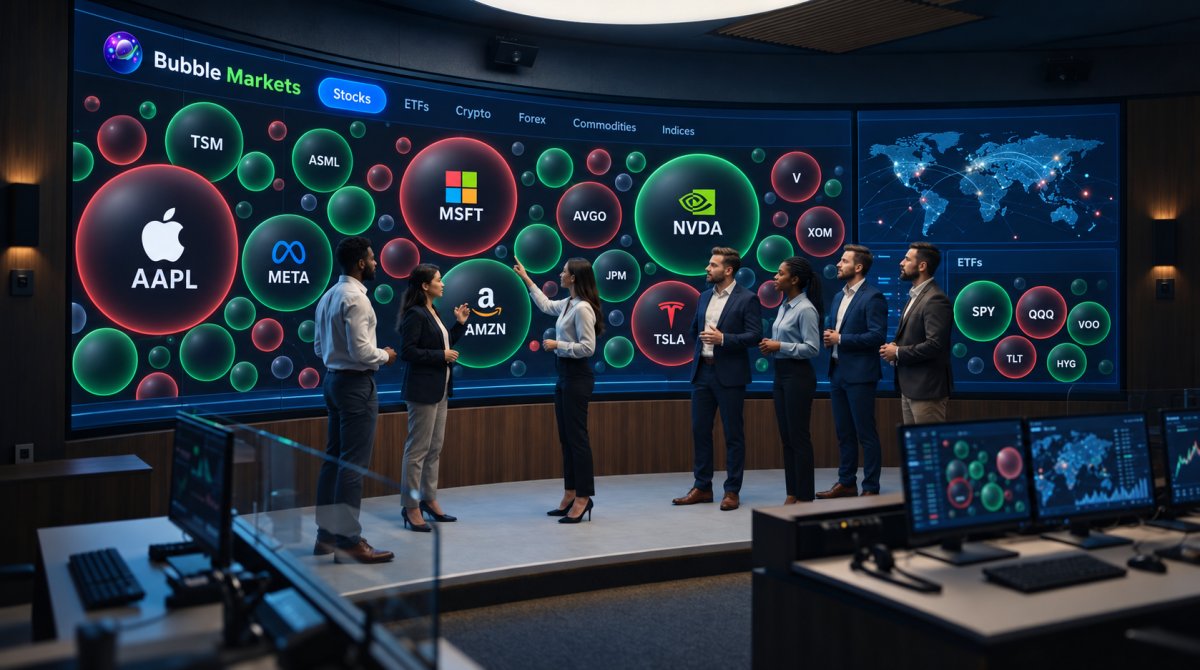
The fastest-looking chart isn’t always the clearest one. A real time crypto bubble screener can make market activity easier to scan, but bubble size, color, asset coverage, and update timing vary by tool. A “live” label alone won’t tell you how fresh the data is or whether the chart shows the signals you need.
If you’ve found it difficult to compare screeners or interpret their visual cues, the practical issue is often knowing what each bubble represents and how often its underlying data changes. Understanding those details makes it easier to judge whether a display fits your routine.
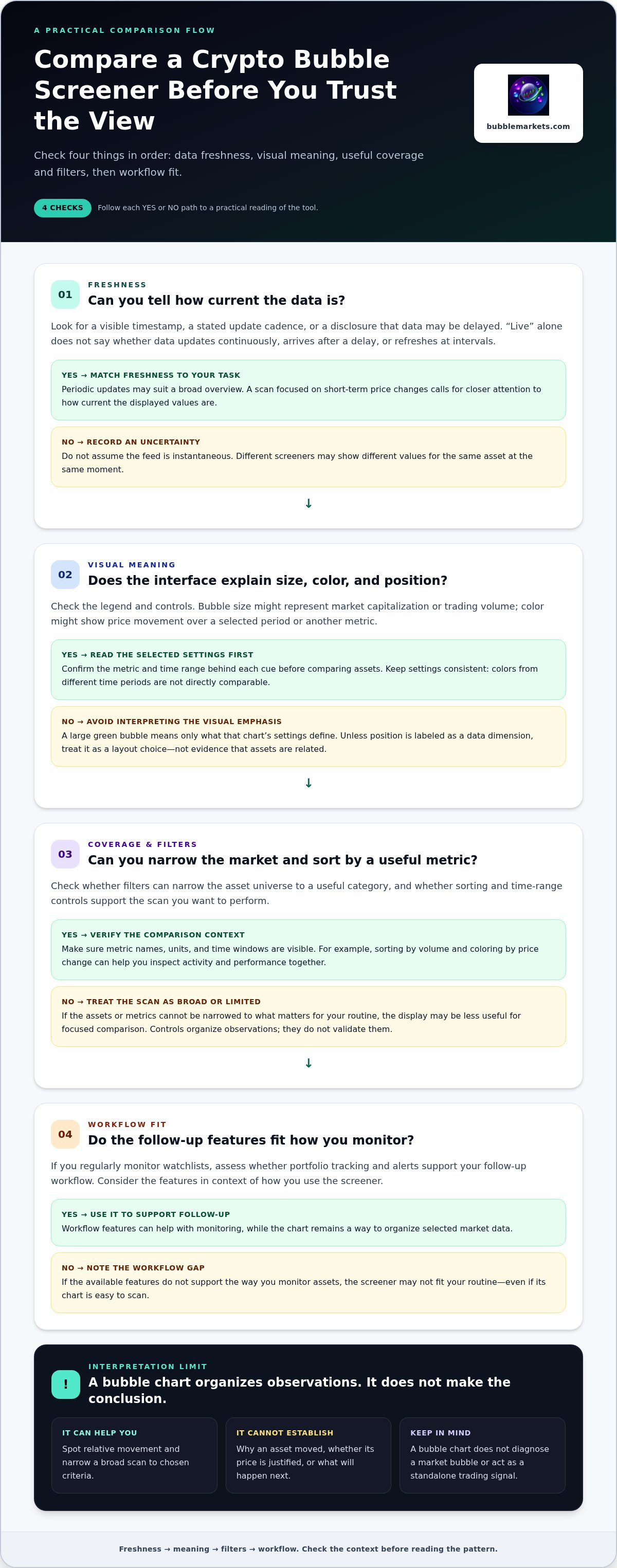
This guide compares crypto bubble screeners using four criteria: data freshness, asset coverage, filtering options, and fit with your monitoring workflow. You’ll learn how to check what size and color mean, assess filters and features such as portfolio tracking and alerts, and recognize the limits of bubble charts. The goal is a visual workflow that helps you scan the market with context, without treating a chart as a forecast or a trade recommendation.
Key Takeaways
- Compare a real time crypto bubble screener by checking how it defines data freshness, not just whether it uses the word “live.”
- Confirm what bubble size, color, and position represent in each interface before interpreting a market view.
- Use asset coverage, sorting, and filters to narrow broad market scans to the assets and metrics relevant to your routine.
- Assess whether alerts and portfolio tools support your follow-up workflow, especially if you monitor watchlists regularly.
- BubbleMarkets offers free live bubble maps and paid subscription tiers with advanced visualization and screening capabilities.
What a Real-Time Crypto Bubble Screener Shows, and What It Cannot Tell You
A crypto bubble screener is a visual interface for scanning selected market data across digital assets. Each asset appears as a bubble, allowing you to compare several values or categories at a glance instead of reading a long table. The display summarizes selected data; it isn’t a complete account of what is happening in the market.
Bubble size and color depend on the metrics and settings used by the screener. For example, one interface might size bubbles by market capitalization and color them by price change over a selected period. Another may let you choose trading volume or a different time range. Check the legend and controls before interpreting a cluster: a large green bubble means only what that chart’s settings define. For more on reading these visual cues, see this crypto bubble map guide.
A real time crypto bubble screener can help you spot relative movement or narrow a broad scan to assets that meet chosen criteria. It cannot establish why an asset moved, whether its price is justified, or what will happen next. Treat the visualization as an analysis aid, not a prediction or standalone trading signal.
What does “real time” mean in a crypto screener?
“Real time” can describe data that updates continuously, data that arrives after a delay, or a view that refreshes at intervals. The label alone doesn’t specify which applies. Freshness also depends on the platform’s data sources and update process, so two screeners may show different values for the same asset at the same moment.
Look for a visible timestamp, a stated update cadence, or a disclosure that data may be delayed. These details help you decide whether the display suits your task. A broad overview may remain useful with periodic updates; a scan focused on short-term price changes calls for closer attention to how current the displayed values are. If timing isn’t clear, record it as an uncertainty rather than assuming the feed is instantaneous.
Can a bubble screener identify a market bubble?
No. A bubble-shaped chart arranges selected metrics visually; it doesn’t diagnose speculative excess. A sharp price rise may stand out, but rapid movement alone isn’t enough to assess valuation or market structure. Those questions require broader context and evidence beyond a chart. For background on the concept, understanding cryptocurrency bubbles means looking beyond short-term price changes to the economic arguments and history around them.
Use the display to form questions, not conclusions. If an asset’s bubble grows or changes color, check which metric and time window drive that change, then investigate the underlying data and relevant context separately. This keeps visual emphasis from being mistaken for proof. The screener can organize observations and guide further analysis, but it can’t predict a reversal or confirm that a market is in a bubble.
How a Real-Time Crypto Bubble Screener Organizes Market Data
A bubble chart turns selected market data into visual encodings. Size, color, and position can each communicate information, but their meanings depend on the screener’s settings. A large circle might represent higher market capitalization in one view, while another may size bubbles by trading volume. Color might show price movement over a chosen period or another selected metric. Don’t assume the visual grammar is universal: check the chart legend and controls before comparing assets.
Position can be just as tool-specific. Bubbles may shift to reduce overlap, form groups, or respond to user settings. Unless the interface labels position as a data dimension, treat it as a layout choice rather than evidence that assets are related. A useful real time crypto bubble screener makes it possible to identify the metric behind each visual cue.
Visual scanning also differs from identifying a market bubble in the economic sense. The Federal Reserve Bank of Chicago’s discussion of the economic definition of a market bubble offers context for why a chart’s selected price or volume metrics alone don’t establish that conclusion. Use the chart to organize observations, not as a substitute for broader analysis.
Which visual controls matter when scanning crypto assets?
Start with filters that narrow the asset universe to a useful category, then sort the remaining assets by the metric relevant to your scan. A time-range control helps you see whether the view reflects a shorter or longer period. These controls organize observations; they don’t validate them. Check that metric names, units, and selected time windows are visible so you know what each bubble’s size or color represents.
For example, sorting by volume and coloring by price change can help you inspect activity and performance together. But if one view uses a short period and another uses a longer one, the colors aren’t directly comparable. Keep the settings consistent when comparing assets.
How do bubbles differ from a crypto heat map?
A bubble layout uses circles of varying sizes arranged in available space; a heat map typically uses a grid of rectangular cells. Both summarize selected market data, often using color to make differences easier to scan. Bubbles emphasize relative size and spatial groupings, while grids make cell-by-cell comparisons more regular. Choose the layout that helps you locate the assets or patterns you want to review.
Filters and metric labels matter in either view. A grid doesn’t make a metric more reliable, and a cluster of bubbles doesn’t prove a relationship. The market bubble map guide explains how bubble maps support visual scanning across markets. You can also inspect live market bubble maps to see how a visual layout works for your scan.
How to Compare Crypto Bubble Screeners Before Choosing One
Compare tools against the same practical criteria, then test them using the kind of scan you actually perform. A polished chart can still be a poor fit if its asset universe is too narrow, its filters don’t match your needs, or its update information is unclear. Separate features you can verify in the interface or documentation from promotional terms such as “instant” or “comprehensive.” Record missing details as “unclear,” rather than treating them as proof that a tool lacks the feature.
Which data and screening criteria should you compare?
Start with data freshness: look for update disclosures, visible timestamps, and source information. The NYSE’s overview of real-time market data provides useful context for why timing and data delivery matter. Then check asset coverage and whether filters, sorting, and saved views support the markets you monitor. Evaluate alerts and portfolio tracking separately; they support follow-up but aren’t the same as the core visualization.
| Criterion | What to record | Useful for |
|---|---|---|
| Freshness | Timestamp, update disclosure, source details, or unclear | Scans where timing matters |
| Coverage | Assets and categories included, plus any stated limits | Broad market scanning |
| Filters and sorting | Available metrics, categories, time ranges, and custom views | Focused comparisons |
| Alerts | Whether alerts exist and what they monitor | Watchlist follow-up |
| Portfolio tools | Whether holdings can be tracked alongside market views | Portfolio review |
Use the same asset category and time range when testing multiple screeners. Note whether a filter is available, whether its label is clear, and whether you can reproduce the resulting view. This keeps the comparison grounded in observable capabilities rather than feature descriptions alone. A visual stock screener buying guide offers a related framework for comparing screening tools outside crypto.
How do free and paid crypto screeners differ?
Compare access by function, not price tier. A free tool may cover the scan you need, while a subscription may add screening depth, customization, or monitoring options. Paid access doesn’t automatically mean fresher or more accurate data. Compare the specific features available and distinguish included capabilities from limits, trials, or promotional claims.
For occasional checks, prioritize clear labels, relevant coverage, and a view that’s easy to understand. If you routinely monitor watchlists or holdings, alerts and portfolio tracking may matter more than extra visual styles. A real time crypto bubble screener should fit the task you’ll repeat, not simply offer the longest feature list. BubbleMarkets provides free live market bubble maps, with paid subscriptions for users seeking advanced visualization and screening capabilities. Its live market visualizer gives you a way to assess how a bubble-based scan fits your process.
Match a Crypto Bubble Screener to Your Monitoring Workflow
A useful screener fits the questions you check repeatedly, not just the first chart you open. Define the task before judging the interface: an occasional overview, a focused watchlist scan, and a portfolio review can call for different controls. Keep your chosen assets and time range consistent across sessions so changes in the display are easier to compare.
Define the scan, test the filters, inspect data freshness, then assess the follow-up tools. This sequence helps you evaluate any real time crypto bubble screener without confusing a busy interface with a useful one.
- Define the scan: Decide which assets or categories you want to observe and what question the view should help you examine.
- Test the filters: Narrow the display, then check whether the selected assets and metrics are easy to identify.
- Inspect freshness: Look for timestamps or update disclosures that help you understand when displayed data was refreshed.
- Assess follow-up tools: Consider whether alerts, portfolio tracking, or saved views support what you do after scanning.
Repeat the same scan with the same time range when comparing views on different days. Otherwise, a change in the selected period may explain a visual difference better than any change in the assets themselves. A repeatable setup makes the screener more useful as a monitoring aid.
What should occasional market scanners prioritize?
If you check the market from time to time, prioritize readable metric labels, a clear overview, and simple ways to narrow the displayed assets. A free live visualizer lets you assess whether its layout and controls suit your observation routine before considering paid capabilities. Focus on whether you can understand and repeat a scan, not on using the display to time trades.
What should frequent portfolio monitors prioritize?
If you routinely review watchlists or holdings, assess whether portfolio tracking and real-time price alerts fit your monitoring process. Saved views or extended screening can reduce repeated navigation by letting you return to relevant settings. Compare those tools separately from the bubble chart itself, and consider whether they support the tasks you actually perform. They organize observations; they don’t provide personalized recommendations.
BubbleMarkets combines live market bubble maps with portfolio tracking and real-time price alerts. The BubbleMarkets live crypto visualizer brings those visualization and monitoring tools together.
Where BubbleMarkets Fits in a Real-Time Crypto Bubble Screener Comparison
BubbleMarkets is a market visualization platform with live bubble maps, screeners, heat maps, and monitoring tools. Its free live bubble maps let you inspect the visual interface, while Pro, Professional, and Enterprise subscriptions provide options for users who need advanced visualization and screening capabilities. The useful comparison is not whether one tool is universally best, but whether its display and supporting features match the scan you want to perform.
When might BubbleMarkets suit a crypto screening workflow?
BubbleMarkets supports visual market scanning alongside tools for ongoing monitoring. Portfolio tracking and real-time price alerts can support a workflow that continues after the initial scan, while AI-generated market summaries offer another way to review market information. Consider these features in relation to your routine: occasional observers may mainly value a clear bubble view, while regular monitors may place more weight on screening and follow-up tools.
Pro, Professional, and Enterprise subscriptions are options for users seeking advanced visualization and screening capabilities. Compare those options with your specific needs rather than assuming a paid plan is necessary or that it changes the meaning of the displayed data. Choose the capabilities that fit the way you review markets.
What to do after selecting a screener
Test the interface with a consistent asset group and time range. Then review the display before making it part of your routine:
- Check timestamps and any data freshness disclosures.
- Confirm the labels for bubble size, color, and selected metrics.
- Test filters and sorting with the assets you intend to monitor.
- Review alert settings and portfolio tools if you plan to use them.
Repeat the same setup across sessions to make changes easier to compare. If a setting, label, or update detail is unclear, treat it as a limitation of the view and avoid drawing conclusions from that point alone. This keeps a real time crypto bubble screener in its proper role: a visual aid for organizing market data, not a forecast.
BubbleMarkets visualizes market data. It doesn’t execute trades or provide financial advice or personalized recommendations. If its combination of bubble maps and monitoring tools fits your criteria, Explore BubbleMarkets’ crypto visualization tools.
Make Your Next Market Scan More Consistent
Choose one recurring market question and use it to test your next real time crypto bubble screener. Keep a brief record of the asset group, selected metric, time range, and visible data timestamp. Revisiting the same setup across sessions can help you distinguish a change in the market view from a change in your settings.
Then assess the routine itself. Can you find the information you need without repeatedly rebuilding the view? Are the labels and filters clear enough to interpret consistently? Do follow-up tools fit naturally into the way you monitor? These checks give you a practical basis for deciding whether the screener supports your process, rather than relying on a long feature list or a “live” label alone.
To try a visual workflow, explore BubbleMarkets’ live crypto visualizer. Start with a simple scan, note what works for your routine, and adjust from there. A consistent process can make market data easier to review with clarity and context.
Frequently Asked Questions
Is a real-time crypto bubble screener actually real time?
Not necessarily in the sense of instant updates. A real time crypto bubble screener may use continuously updating, delayed, or periodically refreshed data, depending on the platform and its data process. For a practical check, note the timestamp, refresh the view, and see whether the displayed value changes. If you compare screeners, check them close together in time and record their update disclosures.
Can a crypto bubble screener tell me whether a coin is in a bubble?
No. A chart can show selected market data, but it can’t determine whether an asset’s price is detached from underlying value. For example, a steep rise in price may prompt further research, but it doesn’t establish why the rise occurred or whether it will continue. Examine additional evidence, such as project fundamentals and broader market conditions, before drawing conclusions from a visual pattern.
Does a crypto bubble screener place trades or provide investment advice?
A bubble screener is a data visualization tool, not a trading or advisory service. BubbleMarkets displays market information and doesn’t execute trades or provide personalized investment recommendations. If you choose to execute trades after completing your research, dedicated non-custodial swap services like n.exchange allow you to exchange digital assets directly. Keep analysis and order placement distinct, and review a platform’s stated functions rather than assuming a chart includes execution tools.
How much does a real-time crypto bubble screener cost?
Cost depends on the platform and the features included. Some tools offer free access, while subscriptions may provide additional screening or visualization capabilities. BubbleMarkets has free live market bubble maps and paid subscription tiers. For a cost comparison, review each platform’s published plan details alongside the features you expect to use, such as custom screening or portfolio monitoring. Avoid comparing plan names alone.
Can I use a crypto bubble screener without connecting an exchange account?
Often, marketwide visual scanning doesn’t require linking a personal exchange account because the chart can display market data separately from an individual’s holdings. Account connections may be relevant to specific portfolio-import or exchange-linked functions, depending on the platform. Before granting access, identify why the connection is requested and what information or permissions it involves. A market overview and a personal portfolio view serve different purposes.
Does every crypto bubble screener cover the same assets?
No. Coverage can differ by platform, including which assets appear and how the tool groups or filters them. A screener that works for a scan of widely followed coins may not include the smaller assets you want to review. Compare its asset list with your intended watchlist, and note whether names or symbols are clear enough to distinguish similar listings. Coverage can affect how useful a scan is for your routine.
Are free crypto bubble screeners useful for regular market monitoring?
They can be, if the free features support the scans you repeat. Try using one for a consistent watchlist review, and note whether you can access the metrics and filters you need without workarounds. If you also want alerts, portfolio tools, or more advanced screening, compare which capabilities are included and which require a subscription. The right fit depends on your monitoring routine, not whether the tool is free.
Frequently asked questions
What does “real time” mean in a crypto screener?
“Real time” can describe data that updates continuously, data that arrives after a delay, or a view that refreshes at intervals. The label alone doesn’t specify which applies. Freshness also depends on the platform’s data sources and update process, so two screeners may show different values for the same asset at the same moment. Look for a visible timestamp, a stated update cadence, or a disclosure that data may be delayed. These details help you decide whether the display suits your task. A broad overview may remain useful with periodic updates; a scan focused on short-term price changes calls for closer attention to how current the displayed values are. If timing isn’t clear, record it as an uncertainty rather than assuming the feed is instantaneous.
Can a bubble screener identify a market bubble?
No. A bubble-shaped chart arranges selected metrics visually; it doesn’t diagnose speculative excess. A sharp price rise may stand out, but rapid movement alone isn’t enough to assess valuation or market structure. Those questions require broader context and evidence beyond a chart. For background on the concept, understanding cryptocurrency bubbles means looking beyond short-term price changes to the economic arguments and history around them. Use the display to form questions, not conclusions. If an asset’s bubble grows or changes color, check which metric and time window drive that change, then investigate the underlying data and relevant context separately. This keeps visual emphasis from being mistaken for proof. The screener can organize observations and guide further analysis, but it can’t predict a reversal or confirm that a market is in a bubble. A bubble chart turns selected market data into visual encodings. Size, color, and position can each communicate information, but their meanings depend on the screener’s settings. A large circle might represent higher market capitalization in one view, while another may size bubbles by trading volume. Color might show price movement over a chosen period or another selected metric. Don’t assume the visual grammar is universal: check the chart legend and controls before comparing assets. Position can be just as tool-specific. Bubbles may shift to reduce overlap, form groups, or respond to user settings. Unless the interface labels position as a data dimension, treat it as a layout choice rather than evidence that assets are related. A useful real time crypto bubble screener makes it possible to identify the metric behind each visual cue. Visual scanning also differs from identifying a market bubble in the economic sense. The Federal Reserve Bank of Chicago’s discussion of the economic definition of a market bubble offers context for why a chart’s selected price or volume metrics alone don’t establish that conclusion. Use the chart to organize observations, not as a substitute for broader analysis.
Which visual controls matter when scanning crypto assets?
Start with filters that narrow the asset universe to a useful category, then sort the remaining assets by the metric relevant to your scan. A time-range control helps you see whether the view reflects a shorter or longer period. These controls organize observations; they don’t validate them. Check that metric names, units, and selected time windows are visible so you know what each bubble’s size or color represents. For example, sorting by volume and coloring by price change can help you inspect activity and performance together. But if one view uses a short period and another uses a longer one, the colors aren’t directly comparable. Keep the settings consistent when comparing assets.
How do bubbles differ from a crypto heat map?
A bubble layout uses circles of varying sizes arranged in available space; a heat map typically uses a grid of rectangular cells. Both summarize selected market data, often using color to make differences easier to scan. Bubbles emphasize relative size and spatial groupings, while grids make cell-by-cell comparisons more regular. Choose the layout that helps you locate the assets or patterns you want to review. Filters and metric labels matter in either view. A grid doesn’t make a metric more reliable, and a cluster of bubbles doesn’t prove a relationship. The market bubble map guide explains how bubble maps support visual scanning across markets. You can also inspect live market bubble maps to see how a visual layout works for your scan. Compare tools against the same practical criteria, then test them using the kind of scan you actually perform. A polished chart can still be a poor fit if its asset universe is too narrow, its filters don’t match your needs, or its update information is unclear. Separate features you can verify in the interface or documentation from promotional terms such as “instant” or “comprehensive.” Record missing details as “unclear,” rather than treating them as proof that a tool lacks the feature.
Which data and screening criteria should you compare?
Start with data freshness: look for update disclosures, visible timestamps, and source information. The NYSE’s overview of real-time market data provides useful context for why timing and data delivery matter. Then check asset coverage and whether filters, sorting, and saved views support the markets you monitor. Evaluate alerts and portfolio tracking separately; they support follow-up but aren’t the same as the core visualization. Use the same asset category and time range when testing multiple screeners. Note whether a filter is available, whether its label is clear, and whether you can reproduce the resulting view. This keeps the comparison grounded in observable capabilities rather than feature descriptions alone. A visual stock screener buying guide offers a related framework for comparing screening tools outside crypto.
How do free and paid crypto screeners differ?
Compare access by function, not price tier. A free tool may cover the scan you need, while a subscription may add screening depth, customization, or monitoring options. Paid access doesn’t automatically mean fresher or more accurate data. Compare the specific features available and distinguish included capabilities from limits, trials, or promotional claims. For occasional checks, prioritize clear labels, relevant coverage, and a view that’s easy to understand. If you routinely monitor watchlists or holdings, alerts and portfolio tracking may matter more than extra visual styles. A real time crypto bubble screener should fit the task you’ll repeat, not simply offer the longest feature list. BubbleMarkets provides free live market bubble maps, with paid subscriptions for users seeking advanced visualization and screening capabilities. Its live market visualizer gives you a way to assess how a bubble-based scan fits your process. A useful screener fits the questions you check repeatedly, not just the first chart you open. Define the task before judging the interface: an occasional overview, a focused watchlist scan, and a portfolio review can call for different controls. Keep your chosen assets and time range consistent across sessions so changes in the display are easier to compare. Define the scan, test the filters, inspect data freshness, then assess the follow-up tools. This sequence helps you evaluate any real time crypto bubble screener without confusing a busy interface with a useful one. Repeat the same scan with the same time range when comparing views on different days. Otherwise, a change in the selected period may explain a visual difference better than any change in the assets themselves. A repeatable setup makes the screener more useful as a monitoring aid.
What should occasional market scanners prioritize?
If you check the market from time to time, prioritize readable metric labels, a clear overview, and simple ways to narrow the displayed assets. A free live visualizer lets you assess whether its layout and controls suit your observation routine before considering paid capabilities. Focus on whether you can understand and repeat a scan, not on using the display to time trades.
What should frequent portfolio monitors prioritize?
If you routinely review watchlists or holdings, assess whether portfolio tracking and real-time price alerts fit your monitoring process. Saved views or extended screening can reduce repeated navigation by letting you return to relevant settings. Compare those tools separately from the bubble chart itself, and consider whether they support the tasks you actually perform. They organize observations; they don’t provide personalized recommendations. BubbleMarkets combines live market bubble maps with portfolio tracking and real-time price alerts. The BubbleMarkets live crypto visualizer brings those visualization and monitoring tools together. BubbleMarkets is a market visualization platform with live bubble maps, screeners, heat maps, and monitoring tools. Its free live bubble maps let you inspect the visual interface, while Pro, Professional, and Enterprise subscriptions provide options for users who need advanced visualization and screening capabilities. The useful comparison is not whether one tool is universally best, but whether its display and supporting features match the scan you want to perform.
When might BubbleMarkets suit a crypto screening workflow?
BubbleMarkets supports visual market scanning alongside tools for ongoing monitoring. Portfolio tracking and real-time price alerts can support a workflow that continues after the initial scan, while AI-generated market summaries offer another way to review market information. Consider these features in relation to your routine: occasional observers may mainly value a clear bubble view, while regular monitors may place more weight on screening and follow-up tools. Pro, Professional, and Enterprise subscriptions are options for users seeking advanced visualization and screening capabilities. Compare those options with your specific needs rather than assuming a paid plan is necessary or that it changes the meaning of the displayed data. Choose the capabilities that fit the way you review markets.
Is a real-time crypto bubble screener actually real time?
Not necessarily in the sense of instant updates. A real time crypto bubble screener may use continuously updating, delayed, or periodically refreshed data, depending on the platform and its data process. For a practical check, note the timestamp, refresh the view, and see whether the displayed value changes. If you compare screeners, check them close together in time and record their update disclosures.
Can a crypto bubble screener tell me whether a coin is in a bubble?
No. A chart can show selected market data, but it can’t determine whether an asset’s price is detached from underlying value. For example, a steep rise in price may prompt further research, but it doesn’t establish why the rise occurred or whether it will continue. Examine additional evidence, such as project fundamentals and broader market conditions, before drawing conclusions from a visual pattern.
Does a crypto bubble screener place trades or provide investment advice?
A bubble screener is a data visualization tool, not a trading or advisory service. BubbleMarkets displays market information and doesn’t execute trades or provide personalized investment recommendations. A chart may help you organize observations, but it doesn’t decide what action to take. Keep analysis and order placement distinct, and review a platform’s stated functions rather than assuming a chart includes execution tools.
How much does a real-time crypto bubble screener cost?
Cost depends on the platform and the features included. Some tools offer free access, while subscriptions may provide additional screening or visualization capabilities. BubbleMarkets has free live market bubble maps and paid subscription tiers. For a cost comparison, review each platform’s published plan details alongside the features you expect to use, such as custom screening or portfolio monitoring. Avoid comparing plan names alone.
Can I use a crypto bubble screener without connecting an exchange account?
Often, marketwide visual scanning doesn’t require linking a personal exchange account because the chart can display market data separately from an individual’s holdings. Account connections may be relevant to specific portfolio-import or exchange-linked functions, depending on the platform. Before granting access, identify why the connection is requested and what information or permissions it involves. A market overview and a personal portfolio view serve different purposes.
Does every crypto bubble screener cover the same assets?
No. Coverage can differ by platform, including which assets appear and how the tool groups or filters them. A screener that works for a scan of widely followed coins may not include the smaller assets you want to review. Compare its asset list with your intended watchlist, and note whether names or symbols are clear enough to distinguish similar listings. Coverage can affect how useful a scan is for your routine.
Are free crypto bubble screeners useful for regular market monitoring?
They can be, if the free features support the scans you repeat. Try using one for a consistent watchlist review, and note whether you can access the metrics and filters you need without workarounds. If you also want alerts, portfolio tools, or more advanced screening, compare which capabilities are included and which require a subscription. The right fit depends on your monitoring routine, not whether the tool is free.
Market information on this page is for education and general information only. It is not investment advice or a recommendation to buy or sell any asset.