 BubbleMarkets
White Label Market Widget: A Buyer’s Guide for 2026
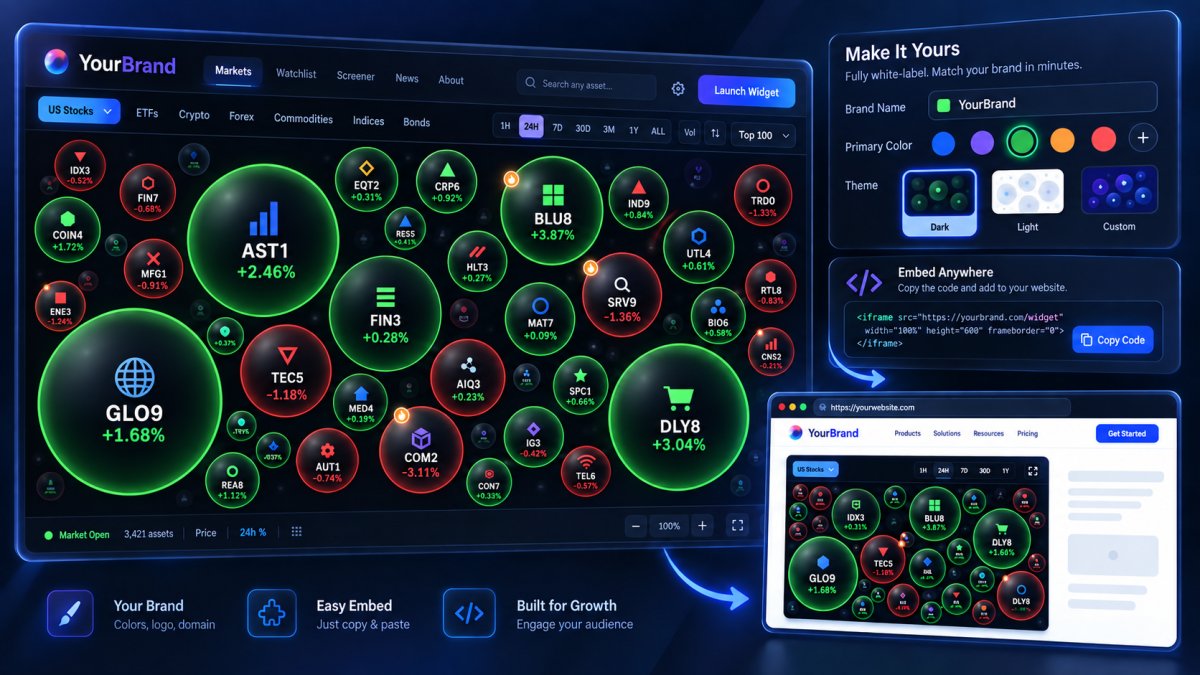
What if the market widget that looks right for your platform can’t be used the way you intend? Choosing a white label market widget takes more than matching colors or embedding a chart. You also need to confirm commercial display and redistribution rights, supported assets, branding controls, and how the data will fit into your product.
That uncertainty is understandable: a market data API subscription doesn’t automatically grant permission to display or redistribute data publicly. Before contacting vendors, define your audience, use case, asset coverage, and technical requirements. Then compare white-label widgets with embedded tools, API-based integrations, and custom development. Each option affects control, implementation, and ongoing data operations differently.
This guide outlines the questions to resolve before selection and launch. You’ll learn how to assess data rights, visual fit, integration needs, and provider suitability, including what to confirm about licensing, update timing, and support commitments. The goal is a clear set of requirements for evaluating providers, not assumptions based on a demo.
Key Takeaways
- Define your audience, intended display, asset coverage, and technical requirements before approaching vendors.
- For each white label market widget, verify commercial use, redistribution, attribution, and geographic terms in writing.
- Compare a widget, market data API, and custom build by design control, engineering effort, launch needs, and ongoing maintenance.
- Bring product, engineering, legal, data, and commercial stakeholders into the evaluation, then test the experience and plan ongoing monitoring.
- Assess providers such as BubbleMarkets for branded visualizations, and confirm licensing, available coverage, customization, and integration details directly.
What Is a White Label Market Widget, and Who Needs One?
A white label market widget is a third-party market visualization presented within another organization’s branded product or website. The provider supplies the visualization, and the organization incorporates it into an experience for its own audience. This follows the broader White-label product model, where one company’s offering is presented under another company’s brand.
Potential buyers include financial publishers adding market context to articles, brokerages displaying visual data alongside their existing services, fintech products showing market movements, and investment-platform teams adding visualizations to their interfaces. For example, a publisher might place a market heat map beside an equities story, while a fintech product could let users scan activity across asset categories within its existing experience.
A licensed visualization is not financial advice, brokerage, or trade execution. It presents market information; it doesn’t, by itself, recommend investments, handle transactions, or manage assets. Make sure the widget’s role is clear to users and distinct from other functions in your product.
What does white labeling change for the end user?
The visualization can appear within a client’s website or product environment, so users can view market data without leaving that experience. The provider’s underlying data and licensing terms still apply, regardless of whose brand appears on the interface.
Don’t assume every branding detail is configurable. Confirm options such as logos, colors, labels, layout, and supported embedding methods directly with the vendor, along with any attribution requirements.
When does a market widget make sense?
A widget may suit a product that already serves an audience and needs market context within an existing workflow. A publisher can place a visualization beside relevant coverage; a platform can make market movements easier to scan where users already access its features.
A standalone market-data destination serves a different purpose: it gives users a separate place to explore data. Choose based on audience needs and product goals. If users need a focused visual view within your experience, an embedded widget may fit. If the goal is a broader, dedicated data destination, another approach may be more appropriate.
BubbleMarkets offers commercial licensing and white-label widgets, with visualizations spanning stocks, crypto, ETFs, commodities, bonds, and forex. Confirm which asset coverage and branding options apply to the widget you’re evaluating.
Which White Label Market Widget Capabilities Should You Evaluate?
Compare a white label market widget against the audience and workflow it needs to serve, not the length of its feature list. A publisher embedding a broad market heat map may need different coverage and display behavior from a fintech product focused on a smaller set of instruments. Start with the requirements that determine whether the widget can be used, understood, and maintained in your product.
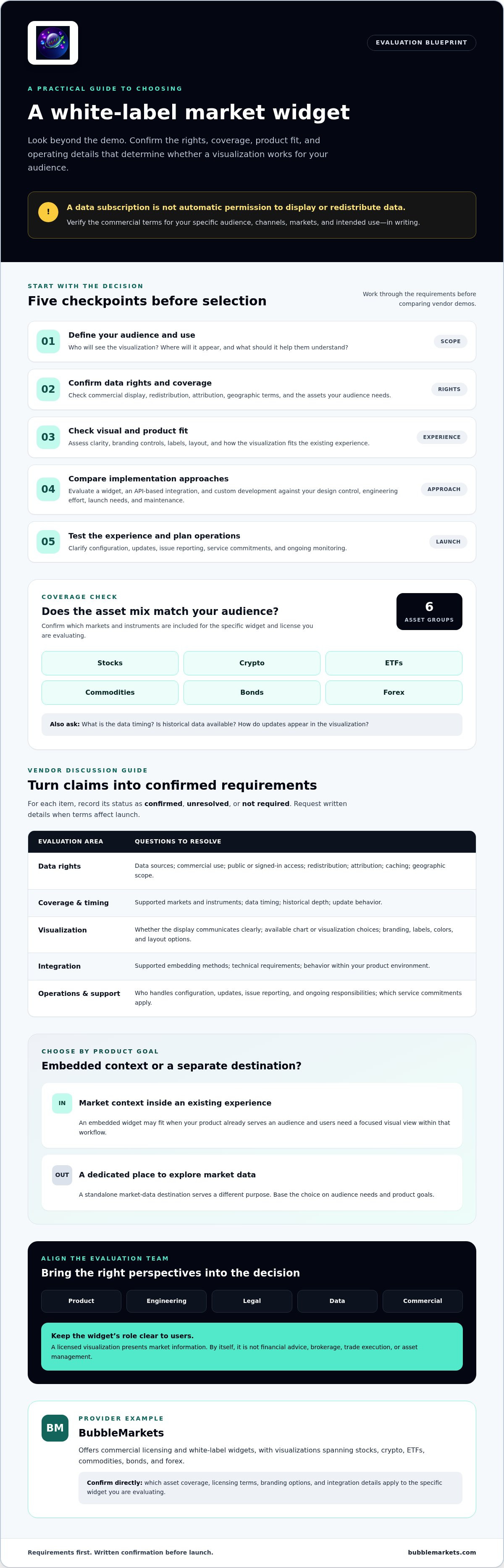
Use this checklist to structure vendor discussions. Mark each item as confirmed, unresolved, or not required, and ask for written details where commercial or technical terms affect launch.
- Data rights: Identify data sources and confirm permitted display, commercial use, redistribution, attribution, caching, and geographic scope for your intended channels.
- Coverage: Match supported instruments and markets to what your audience needs. Check data timing, historical depth, and how updates appear in the visualization.
- Visualization: Assess whether the display communicates information clearly for your users, rather than prioritizing the largest number of chart types or controls.
- Integration: Confirm supported embedding methods, technical requirements, and how the widget behaves within your product environment.
- Operations: Ask who handles configuration, updates, issue reporting, and other ongoing responsibilities. Confirm any service commitments rather than assuming them.
How should you assess market data and licensing?
Ask the provider to document the data sources and rights attached to the specific markets and instruments you plan to show. Clarify whether the license covers your audience, channels, and commercial model, including public-facing pages or access limited to signed-in users.
Get clear answers on attribution, redistribution, caching, data timing, historical availability, and update behavior. An API subscription or widget license alone may not explain every permitted use. Record unresolved terms for review with your legal and data stakeholders before launch.
Which branding and product controls matter?
Check whether the visualization can fit your interface. Ask about control over colors, labels, layout, sizing, and responsive behavior. Review it at the sizes and screen formats your audience uses, and assess readability, contrast, and accessibility needs.
Separate settings your team can change from changes that require provider support. Request a clear description of available branding options and supported embedding methods, then verify how each works in your environment. Don’t infer customization from a demo or a provider’s general description.
BubbleMarkets offers commercial licensing and white-label widgets for market visualizations across multiple asset classes. To assess fit, review BubbleMarkets commercial widget options and confirm the relevant licensing, coverage, branding, and integration details directly with the provider.
White Label Widget, Market Data API, or Custom Build: Which Fits?
These approaches differ in how much visualization work your team takes on. A white label market widget provides a prepared visualization for use within a branded product. An API supplies data for your team to use in its own interface. A custom build puts the visualization itself under your team’s control.
| Approach | Speed to launch | Design control | Engineering effort | Maintenance |
|---|---|---|---|---|
| Licensed widget | May be faster if it meets requirements and integration is supported | Depends on available branding and configuration options | Usually focused on integration and configuration | Confirm which updates and operational tasks the provider handles |
| Market data API | Depends on the team’s ability to build the interface | Greater control over the presentation | Requires data integration, visualization design, and testing | Your team maintains its application and integration |
| Custom build | Depends on scope, resources, and development process | Broadest control over the visualization | Requires building and testing the visualization and supporting systems | Your team plans for ongoing maintenance and updates |
This is a directional comparison, not a delivery promise. In every model, confirm data licensing separately: access to data or software doesn’t by itself establish permission to display or redistribute market data. Also clarify who is responsible for monitoring data behavior, maintaining integrations, and addressing issues.
When is a licensed widget the practical choice?
A licensed widget may suit teams that need a ready-made visualization inside an existing branded product and whose requirements align with the provider’s options. It can reduce the need to develop visualization components from scratch. But if your product needs strict control over layout, user interactions, data handling, or the underlying data source, verify those limits before choosing. For integration context, see this financial market visualizer API integration guide.
When might an API or custom build fit better?
An API can fit when a team wants to shape its own interface and has engineering capacity for programmatic integration and ongoing testing. A custom build can provide more control, with added responsibility for development and maintenance. For a specific example, review embeddable stock heat map integration. Confirm licensing, data responsibilities, and operational needs whichever route you take.
How to Plan a White Label Market Widget Evaluation and Launch
A structured evaluation helps teams catch licensing, product-fit, and operational gaps before users encounter them. Treat selection as a cross-functional review: product defines the use case, engineering assesses integration, legal reviews rights and terms, data teams examine sources and update behavior, and commercial stakeholders confirm the intended arrangement.
What should a vendor evaluation request include?
Give each vendor the same requirements so you can compare responses consistently. Describe the target users, where the widget will appear, branding needs, required asset coverage, and expected audience and usage. Ask for written answers on data provenance, permitted display and redistribution, attribution, update cadence, historical depth, support arrangements, and service terms. Mark anything unconfirmed for follow-up.
Request a demonstration using representative product screens and workflows, not just a generic preview. Show how users will reach the visualization, what they need to understand at a glance, and how it should fit into the surrounding interface. This helps product and engineering teams assess the proposed experience against real requirements.
What should teams verify before launch?
Test the integrated experience across relevant devices, asset categories, and market conditions. Check that the visualization renders at expected sizes, works on mobile, meets accessibility needs, and communicates loading or unavailable states clearly. Review data timestamps and update behavior so users can understand the recency of displayed information. Record issues and assign an owner for each before release.
Have legal and product teams confirm that disclosures and attribution match the agreed license and internal requirements. Then assign responsibility for support escalation, renewals, configuration changes, vendor updates, and periodic usage review. Monitoring shouldn’t end at launch; set a review cadence that fits your product operations and licensing obligations.
Launch gate: Proceed only when rights are clear, the widget fits the user experience, its function has been tested, and ongoing ownership is assigned.
Use those gates to compare vendor responses and document open questions before approval. To assess a potential provider, review BubbleMarkets’ commercial widget options and confirm licensing, configuration, coverage, and operational details for your use case.
Choosing a White Label Market Widget Provider: A Practical Next Step
A provider is worth progressing with when four areas are clear: commercial rights, user experience, required functionality, and ongoing operational responsibilities. If a key term remains uncertain, keep it on the decision list rather than treating a demo or general product description as confirmation.
How does BubbleMarkets fit the evaluation?
BubbleMarkets offers commercial licensing and white-label market visualizations for third-party financial platforms. Its stated coverage categories include stocks, crypto, ETFs, commodities, bonds, and forex. That breadth gives product teams a starting point for assessing whether its visualizations may suit their audience, but it doesn’t establish that every asset class or configuration is included in a particular license.
BubbleMarkets provides visualization tools, not investment advice, brokerage, or trade execution. Evaluate the widget as a way to present market information within your product, and assess any separate financial services in your platform independently.
What should you ask before moving forward?
Share the product context with the provider: who will use the widget, where it will appear, which markets and instruments matter, and how users will interact with the display. Then ask for specific answers on:
- Whether commercial use, redistribution, audience, and geographic rights match your intended deployment.
- Which asset categories, data sources, update cadence, and historical coverage apply to your use case.
- What branding controls and integration methods are supported, and which require provider involvement.
- What ongoing terms, support responsibilities, and service commitments apply.
Request the details in writing and compare them with your product and operational requirements. A strong fit is specific to your use case, not just the provider’s general capabilities. Confirm any outstanding terms before committing or launching.
If you’re assessing a white label market widget for a financial platform, review BubbleMarkets commercial widget options and share your requirements to discuss whether the available licensing and visualization capabilities fit.
Move Forward With Clear Widget Requirements
A successful white label market widget selection starts with a defined use case, not a feature list. Confirm that commercial and redistribution rights match your audience, then assess branding, asset coverage, integration needs, and ongoing responsibilities. Compare a licensed visualization with an API or custom build based on the control your product requires and the work your team can support.
BubbleMarkets offers commercial licensing and white-label market visualizations for third-party platforms, with coverage across stocks, crypto, ETFs, commodities, bonds, and forex. Confirm which assets, configurations, and usage rights apply to your intended deployment before proceeding.
Ready to assess provider fit? Review BubbleMarkets commercial widget options and discuss your product context, audience, and requirements. With the key terms and responsibilities clear, your team can make a considered decision and plan the next steps with confidence.
Frequently Asked Questions
What is a white label market widget?
A white label market widget is a financial visualization supplied by one provider and presented within another company’s product experience. It lets a business show market views without necessarily building the visualization itself. For example, a financial publisher might embed a heat map within an article page. Branding controls, data coverage, display rights, and integration options vary by provider and license, so confirm what’s included before selecting a widget.
Can I use a white label market widget commercially?
Commercial use depends on the provider’s license and your distribution model. Confirm whether the terms cover your intended channels, such as public pages, paid subscriptions, brokerage customers, or media content. Ask for written details about redistribution, attribution, audience limits, and geographic restrictions. An available embed option doesn’t automatically grant every commercial or data-display right. Have the relevant legal or compliance stakeholder review the terms before launch.
How do I choose a white label market widget?
Start with your audience and the task the widget needs to support. Then compare providers against a shared checklist: required instruments and markets, data timing, commercial rights, branding controls, integration requirements, accessibility, and ongoing support. Request written answers on licensing and service terms, and test a representative user workflow before committing. A demo should show how the visualization fits your product, not just what it looks like on its own.
What is the difference between a white label widget and a market data API?
A widget generally provides a visualization component for placement within a product, while an API provides programmatic access to data or visualization-related capabilities. An API can give your team more control over the interface, but it typically requires engineering to build, test, and maintain the integration. Capabilities differ by provider. Compare documentation, licensing terms, supported data, and the work required for your intended use.
Can a white label market widget match my brand?
It may, depending on the provider’s customization options and license. Ask which elements you can adjust, such as colors, labels, sizing, and layout, and whether those settings affect mobile behavior or accessibility. Request a demonstration in a representative product context so your team can assess the fit. Confirm which changes you can make directly and which require provider support before assuming the widget will meet every design requirement.
What market data rights should I check before embedding a widget?
Confirm the data sources, permitted display, redistribution conditions, attribution requirements, audience scope, and any restrictions on caching or downstream use. Ask whether terms differ by asset class, channel, or commercial model. Review the license with the appropriate legal or compliance owner. Data access and permission to display data commercially are separate questions, so don’t assume access to a feed or widget covers every use you have planned.
Is a white label market widget suitable for a brokerage or financial publisher?
It can suit a brokerage or publisher that wants to add market visualizations to an existing audience experience. Fit depends on the use case, license, supported data, interface, and operational requirements. For instance, a publisher may consider a visualization alongside market coverage, while a brokerage may evaluate one within an existing product. A widget itself doesn’t provide brokerage, financial advice, or trade execution. Confirm its role and any required disclosures for your product.
Frequently asked questions
What does white labeling change for the end user?
The visualization can appear within a client’s website or product environment, so users can view market data without leaving that experience. The provider’s underlying data and licensing terms still apply, regardless of whose brand appears on the interface. Don’t assume every branding detail is configurable. Confirm options such as logos, colors, labels, layout, and supported embedding methods directly with the vendor, along with any attribution requirements.
When does a market widget make sense?
A widget may suit a product that already serves an audience and needs market context within an existing workflow. A publisher can place a visualization beside relevant coverage; a platform can make market movements easier to scan where users already access its features. A standalone market-data destination serves a different purpose: it gives users a separate place to explore data. Choose based on audience needs and product goals. If users need a focused visual view within your experience, an embedded widget may fit. If the goal is a broader, dedicated data destination, another approach may be more appropriate. BubbleMarkets offers commercial licensing and white-label widgets, with visualizations spanning stocks, crypto, ETFs, commodities, bonds, and forex. Confirm which asset coverage and branding options apply to the widget you’re evaluating. Compare a white label market widget against the audience and workflow it needs to serve, not the length of its feature list. A publisher embedding a broad market heat map may need different coverage and display behavior from a fintech product focused on a smaller set of instruments. Start with the requirements that determine whether the widget can be used, understood, and maintained in your product. Use this checklist to structure vendor discussions. Mark each item as confirmed, unresolved, or not required, and ask for written details where commercial or technical terms affect launch.
How should you assess market data and licensing?
Ask the provider to document the data sources and rights attached to the specific markets and instruments you plan to show. Clarify whether the license covers your audience, channels, and commercial model, including public-facing pages or access limited to signed-in users. Get clear answers on attribution, redistribution, caching, data timing, historical availability, and update behavior. An API subscription or widget license alone may not explain every permitted use. Record unresolved terms for review with your legal and data stakeholders before launch.
Which branding and product controls matter?
Check whether the visualization can fit your interface. Ask about control over colors, labels, layout, sizing, and responsive behavior. Review it at the sizes and screen formats your audience uses, and assess readability, contrast, and accessibility needs. Separate settings your team can change from changes that require provider support. Request a clear description of available branding options and supported embedding methods, then verify how each works in your environment. Don’t infer customization from a demo or a provider’s general description. BubbleMarkets offers commercial licensing and white-label widgets for market visualizations across multiple asset classes. To assess fit, review BubbleMarkets commercial widget options and confirm the relevant licensing, coverage, branding, and integration details directly with the provider. These approaches differ in how much visualization work your team takes on. A white label market widget provides a prepared visualization for use within a branded product. An API supplies data for your team to use in its own interface. A custom build puts the visualization itself under your team’s control. This is a directional comparison, not a delivery promise. In every model, confirm data licensing separately: access to data or software doesn’t by itself establish permission to display or redistribute market data. Also clarify who is responsible for monitoring data behavior, maintaining integrations, and addressing issues.
When is a licensed widget the practical choice?
A licensed widget may suit teams that need a ready-made visualization inside an existing branded product and whose requirements align with the provider’s options. It can reduce the need to develop visualization components from scratch. But if your product needs strict control over layout, user interactions, data handling, or the underlying data source, verify those limits before choosing. For integration context, see this financial market visualizer API integration guide.
When might an API or custom build fit better?
An API can fit when a team wants to shape its own interface and has engineering capacity for programmatic integration and ongoing testing. A custom build can provide more control, with added responsibility for development and maintenance. For a specific example, review embeddable stock heat map integration. Confirm licensing, data responsibilities, and operational needs whichever route you take. A structured evaluation helps teams catch licensing, product-fit, and operational gaps before users encounter them. Treat selection as a cross-functional review: product defines the use case, engineering assesses integration, legal reviews rights and terms, data teams examine sources and update behavior, and commercial stakeholders confirm the intended arrangement.
What should a vendor evaluation request include?
Give each vendor the same requirements so you can compare responses consistently. Describe the target users, where the widget will appear, branding needs, required asset coverage, and expected audience and usage. Ask for written answers on data provenance, permitted display and redistribution, attribution, update cadence, historical depth, support arrangements, and service terms. Mark anything unconfirmed for follow-up. Request a demonstration using representative product screens and workflows, not just a generic preview. Show how users will reach the visualization, what they need to understand at a glance, and how it should fit into the surrounding interface. This helps product and engineering teams assess the proposed experience against real requirements.
What should teams verify before launch?
Test the integrated experience across relevant devices, asset categories, and market conditions. Check that the visualization renders at expected sizes, works on mobile, meets accessibility needs, and communicates loading or unavailable states clearly. Review data timestamps and update behavior so users can understand the recency of displayed information. Record issues and assign an owner for each before release. Have legal and product teams confirm that disclosures and attribution match the agreed license and internal requirements. Then assign responsibility for support escalation, renewals, configuration changes, vendor updates, and periodic usage review. Monitoring shouldn’t end at launch; set a review cadence that fits your product operations and licensing obligations. Launch gate: Proceed only when rights are clear, the widget fits the user experience, its function has been tested, and ongoing ownership is assigned. Use those gates to compare vendor responses and document open questions before approval. To assess a potential provider, review BubbleMarkets’ commercial widget options and confirm licensing, configuration, coverage, and operational details for your use case. A provider is worth progressing with when four areas are clear: commercial rights, user experience, required functionality, and ongoing operational responsibilities. If a key term remains uncertain, keep it on the decision list rather than treating a demo or general product description as confirmation.
How does BubbleMarkets fit the evaluation?
BubbleMarkets offers commercial licensing and white-label market visualizations for third-party financial platforms. Its stated coverage categories include stocks, crypto, ETFs, commodities, bonds, and forex. That breadth gives product teams a starting point for assessing whether its visualizations may suit their audience, but it doesn’t establish that every asset class or configuration is included in a particular license. BubbleMarkets provides visualization tools, not investment advice, brokerage, or trade execution. Evaluate the widget as a way to present market information within your product, and assess any separate financial services in your platform independently.
What should you ask before moving forward?
Share the product context with the provider: who will use the widget, where it will appear, which markets and instruments matter, and how users will interact with the display. Then ask for specific answers on: Request the details in writing and compare them with your product and operational requirements. A strong fit is specific to your use case, not just the provider’s general capabilities. Confirm any outstanding terms before committing or launching. If you’re assessing a white label market widget for a financial platform, review BubbleMarkets commercial widget options and share your requirements to discuss whether the available licensing and visualization capabilities fit. A successful white label market widget selection starts with a defined use case, not a feature list. Confirm that commercial and redistribution rights match your audience, then assess branding, asset coverage, integration needs, and ongoing responsibilities. Compare a licensed visualization with an API or custom build based on the control your product requires and the work your team can support. BubbleMarkets offers commercial licensing and white-label market visualizations for third-party platforms, with coverage across stocks, crypto, ETFs, commodities, bonds, and forex. Confirm which assets, configurations, and usage rights apply to your intended deployment before proceeding. Ready to assess provider fit? Review BubbleMarkets commercial widget options and discuss your product context, audience, and requirements. With the key terms and responsibilities clear, your team can make a considered decision and plan the next steps with confidence.
What is a white label market widget?
A white label market widget is a financial visualization supplied by one provider and presented within another company’s product experience. It lets a business show market views without necessarily building the visualization itself. For example, a financial publisher might embed a heat map within an article page. Branding controls, data coverage, display rights, and integration options vary by provider and license, so confirm what’s included before selecting a widget.
Can I use a white label market widget commercially?
Commercial use depends on the provider’s license and your distribution model. Confirm whether the terms cover your intended channels, such as public pages, paid subscriptions, brokerage customers, or media content. Ask for written details about redistribution, attribution, audience limits, and geographic restrictions. An available embed option doesn’t automatically grant every commercial or data-display right. Have the relevant legal or compliance stakeholder review the terms before launch.
How do I choose a white label market widget?
Start with your audience and the task the widget needs to support. Then compare providers against a shared checklist: required instruments and markets, data timing, commercial rights, branding controls, integration requirements, accessibility, and ongoing support. Request written answers on licensing and service terms, and test a representative user workflow before committing. A demo should show how the visualization fits your product, not just what it looks like on its own.
What is the difference between a white label widget and a market data API?
A widget generally provides a visualization component for placement within a product, while an API provides programmatic access to data or visualization-related capabilities. An API can give your team more control over the interface, but it typically requires engineering to build, test, and maintain the integration. Capabilities differ by provider. Compare documentation, licensing terms, supported data, and the work required for your intended use.
Can a white label market widget match my brand?
It may, depending on the provider’s customization options and license. Ask which elements you can adjust, such as colors, labels, sizing, and layout, and whether those settings affect mobile behavior or accessibility. Request a demonstration in a representative product context so your team can assess the fit. Confirm which changes you can make directly and which require provider support before assuming the widget will meet every design requirement.
What market data rights should I check before embedding a widget?
Confirm the data sources, permitted display, redistribution conditions, attribution requirements, audience scope, and any restrictions on caching or downstream use. Ask whether terms differ by asset class, channel, or commercial model. Review the license with the appropriate legal or compliance owner. Data access and permission to display data commercially are separate questions, so don’t assume access to a feed or widget covers every use you have planned.
Is a white label market widget suitable for a brokerage or financial publisher?
It can suit a brokerage or publisher that wants to add market visualizations to an existing audience experience. Fit depends on the use case, license, supported data, interface, and operational requirements. For instance, a publisher may consider a visualization alongside market coverage, while a brokerage may evaluate one within an existing product. A widget itself doesn’t provide brokerage, financial advice, or trade execution. Confirm its role and any required disclosures for your product.
Market information on this page is for education and general information only. It is not investment advice or a recommendation to buy or sell any asset.