 BubbleMarkets
World Indices Bubble Map: How to Scan Global Markets in 2026
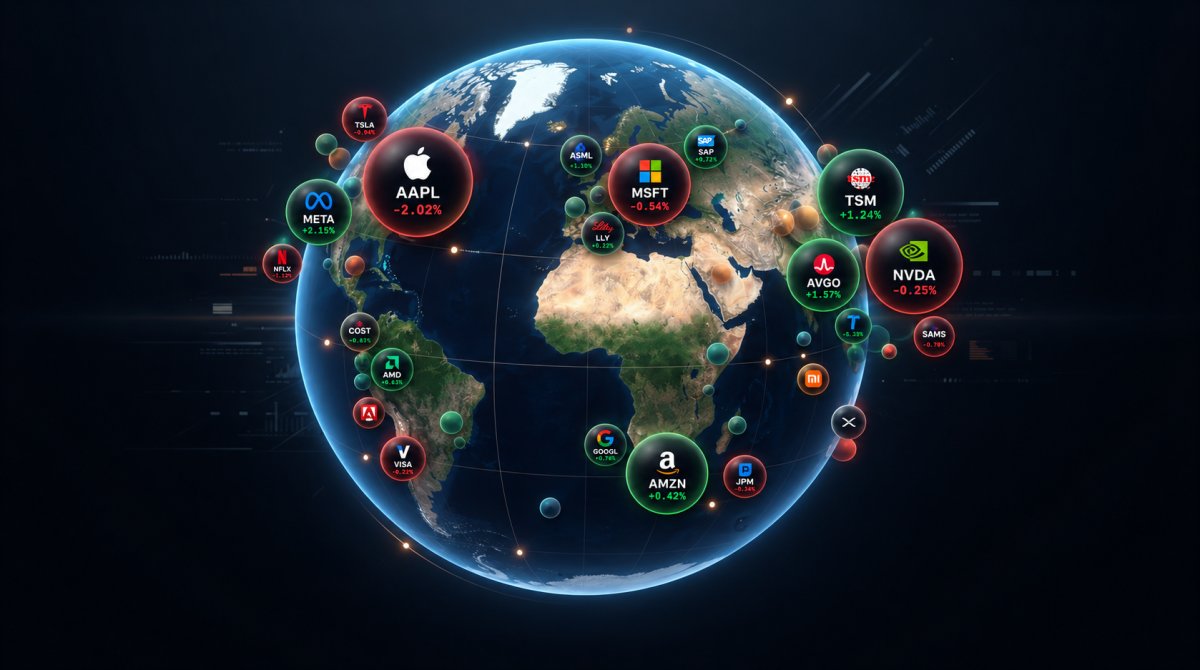
Can one global market snapshot show which regions are leading, or can bubble sizes and colors hide as much as they reveal? A world indices bubble map brings index data from different countries into one view, making regional moves easier to scan. To read it accurately, first check what each mark represents.
A quick comparison is useful when global data is spread across regions and providers. But bubble size and color don’t have universal meanings, and markets don’t share the same opening hours or data timestamps. A map can look like a synchronized snapshot even when its figures were updated at different times.
This guide explains how to read a map’s visual encoding, compare regional index performance without treating it as a forecast, and know when to check an individual index chart or source data. You’ll also learn what to verify in BubbleMarkets’ World Indices Bubble Map, including its legend and timestamps. The aim is a clearer global-market scan, with the limits of the visualization in view.
Key Takeaways
- Use the world indices bubble map to scan geographic markets, but confirm what each circle represents in the selected view.
- Read the legend before interpreting color or size, and check the displayed metric and period before comparing performance.
- Compare indices only after checking their markets, currencies, and timeframes, since their composition and weighting can differ.
- Set a question and timeframe first, then scan regional patterns and inspect notable indices individually.
- Use a chart or source data to verify details the visualization can’t establish, such as index methodology or timestamp differences.
What a world indices bubble map shows at a glance
A world indices bubble map is a visual layout for scanning index data across geographic markets. Unlike a geographic map, which places locations according to their physical coordinates, an index map arranges markers to compare market information. Markers may be grouped by region rather than placed at exact locations. The display can bring several index readings into one view, but its meaning depends on the labels, legend, and selected settings.
An index tracks a defined group of securities using a particular methodology. For a foundational explanation of a stock market index, start by checking what it measures and how its constituents are combined. A bubble representing an index is different from one representing a single company: an index summarizes a basket, while a company is one constituent or a separately listed asset.
What does each bubble represent?
Some maps assign one bubble to each index, but check the current interface rather than assuming that is the case. Read the bubble label or inspect its hover details before comparing it with nearby markers. Confirm the index name and any accompanying market or country information. This avoids a common mistake: treating an index-level move as if it describes every security in that index.
What do bubble size and color mean?
Size represents the metric selected in the visualization, if the map offers a size setting. Color may show performance or a category, depending on the available controls. Neither feature has a universal meaning across tools. Check the legend and selected settings first. Don’t infer that a larger bubble means a larger market or that a particular color always indicates a gain.
For example, if the legend identifies color as percentage change, use that key to distinguish positive from negative readings. If size is tied to another measure, treat it as a separate dimension, not as confirmation of the color. The same color can represent different thresholds or categories in different visualizations, so check each legend before comparing maps.
When reading BubbleMarkets’ World Indices Bubble Map, verify which indices and markets are included, then check what its labels, color key, and size settings represent. BubbleMarkets provides market visualizations, not personalized investment recommendations. The bubbles help organize information for scanning; the selected map settings determine what the visual signals mean.
How to read world indices bubble map signals accurately
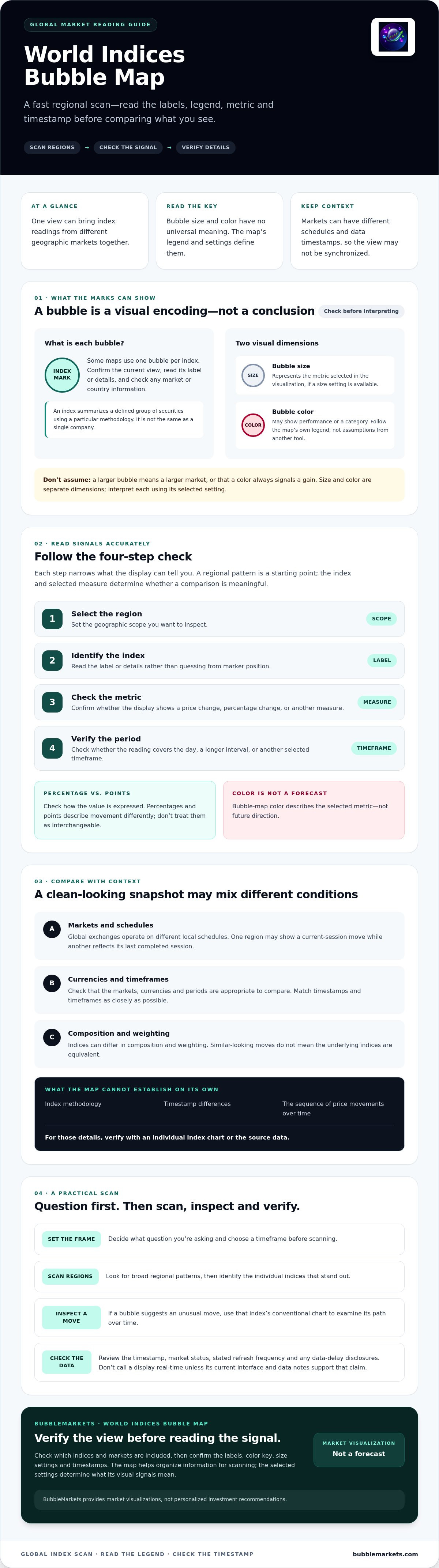
Use a consistent sequence before drawing conclusions from a world indices bubble map: select a region, identify the index, check the metric, then verify the period. Each step narrows what the display can tell you. A regional cluster may reveal a broad pattern, but the index label and selected measure determine whether two bubbles can be compared meaningfully.
- Select the region: Set the geographic scope you want to inspect.
- Identify the index: Read its label or details rather than guessing from its position.
- Check the metric: Confirm whether the displayed value is a price change, percentage change, or another measure.
- Verify the period: Check whether the figure covers the day, a longer interval, or another selected timeframe.
Next, use the legend to interpret performance. If it maps one color to positive change and another to negative change, follow that key rather than relying on conventions from another tool. Also check whether the value is expressed as a percentage or in points. These describe movement differently and shouldn’t be treated as interchangeable.
Bubble-map color describes the selected metric, not future direction.
How should you scan regions and individual indices?
Start with the broad regional pattern, then inspect the labels of individual indices that stand out. Compare like-for-like measures over matching periods where the interface allows it. If a bubble suggests an unusual move, open a conventional chart for that index to examine its path over time. A single map view can’t show the sequence of movements behind the displayed reading.
How do timeframe and data updates affect the view?
Check the timestamp and whether each market is open before treating the map as a synchronized snapshot. Global exchanges operate on different local schedules, so one region may show a current-session move while another reflects its last completed session. That difference can make bubbles appear more or less aligned than they would over a common period.
Look for the map’s stated refresh frequency and any data-delay disclosures. Don’t describe a display as real-time unless its current interface and data notes support that claim. When comparing readings, match their timestamps and timeframes as closely as possible, then consult the index chart or source data if those details aren’t clear. Apply this checking sequence while exploring BubbleMarkets’ World Indices Bubble Map, a visualization tool rather than a source of personalized recommendations.
What to compare, and what a world indices bubble map cannot prove
A regional comparison is useful only after you confirm what each index measures and how its return is expressed. Check the index name, currency, and timeframe before reading two bubbles as comparable. For example, a local-currency percentage change doesn’t describe the same thing as an investor’s return after converting it to another currency.
Indices also differ in composition and weighting. One may track a broad set of companies, while another follows a narrower group; some give larger constituents more influence than others. An index summarizes its defined market segment, but it doesn’t represent every company or investor in that country. Local exchange hours matter, too. Markets can close at different times, leaving readings based on different points in the trading day.
Why can two regional index bubbles be difficult to compare?
Even when two bubbles show the same percentage-change metric, their underlying baskets may differ in sector mix, constituent count, and weighting method. A technology-heavy index and a broad-market index can respond differently to the same event. Check each index’s methodology and the map’s timestamp before interpreting a gap as a direct regional contrast.
Can bubble color or size predict what happens next?
No. A bubble map summarizes selected data for a defined period; it doesn’t forecast returns or establish why an index moved. A large bubble may reflect the selected size metric, while a strong color may mark a value on the chosen scale. Neither is a recommendation. To investigate possible causes, compare the map with index charts and relevant market or company information.
| View | Useful for | Doesn’t establish |
|---|---|---|
| Map overview | Scanning displayed indices for regional patterns or outliers | Why a move occurred or whether it will continue |
| Index chart | Inspecting an index’s movement across a selected period | Whether the index represents every company in its market |
| Source-data checks | Confirming values, timestamps, currency, and methodology | A guaranteed explanation of market behavior |
Use the world indices bubble map to identify what merits a closer look, not to settle a comparison by appearance alone. If two regions seem to diverge, verify their index definitions and align currencies and observation periods where possible. Then use a chart or source data to check whether the apparent difference persists in a like-for-like view.
A practical routine for scanning global indices with a bubble map
A repeatable scan starts with a question, not a search for the most striking bubble. Decide what you want to compare and choose a timeframe before opening the map. For example, ask whether selected regional indices moved in the same direction over a particular session. A defined question keeps the scan focused and makes it easier to check the observation afterward.
What steps make a global market scan repeatable?
- Set the scope. Select the region and timeframe that fit your question. Check the map’s metric and timestamp before recording results.
- Scan the overview. Note apparent regional patterns, then identify indices that stand out as leaders or laggards. Treat these as observations, not explanations.
- Inspect individual indices. Confirm each label and compare readings only when the measure and period align.
- Validate what matters. Check notable moves in an index-specific chart or source data. This can reveal context that the overview doesn’t display.
Keep a short record of the index name, selected measure, timeframe, and timestamp. This makes your notes easier to revisit and helps distinguish a changed market reading from a change in the map’s settings or update time. Don’t infer a cause from a regional cluster alone; investigate relevant data separately.
When should you use a map, heat map, or screener?
Choose the view that matches the task. A bubble map supports spatial comparison when its size, color, and labels represent the measures you need. A heat map is useful for scanning categorized performance across a defined group of securities. For another visual format, a stock-market heat-map guide can explain how that layout organizes performance. Use a screener when the main task is filtering data by explicit criteria rather than comparing by geography.
These views can complement each other, but they aren’t interchangeable. A bubble map may point you toward an index worth examining; a chart can show its movement over time, while source data can help confirm the displayed value and context.
Put this routine into practice with BubbleMarkets’ World Indices Bubble Map. Scan index data visually, then verify the details before drawing conclusions.
Explore world indices with BubbleMarkets, and verify the details
BubbleMarkets is a market-data visualization platform that includes a World Indices Bubble Map. It offers a visual starting point for scanning index information across global markets. Before interpreting a particular view, check the current interface for its available indices and regions, the metrics assigned to bubble size and color, and any displayed timestamps or data-delay notes. Those details determine what the map can show.
What can a world indices visualization help you inspect?
A global overview can help organize an initial scan: look for patterns among the indices shown, then decide which labels or readings need closer inspection. The map’s exact coverage and settings may vary, so confirm what is available rather than assuming every country or benchmark appears. For broader guidance on reading visual market layouts, consult a Market Bubble Map guide. The same general discipline applies, but displayed data and its meaning depend on the specific map.
Use the visualization to identify questions, not settle them. If a reading stands out, note the index name and displayed measure, then check an index chart or reliable source data for further context.
How can you continue research beyond the map?
Move from overview to the evidence that answers your question. Open the individual index’s chart or source data to inspect its movement and confirm the relevant period. If your next task is to filter individual equities by specific criteria, a visual stock screener guide covers a different workflow: screening focuses on chosen conditions, while an index map organizes a broad visual scan.
BubbleMarkets provides tools for visualizing market data. It doesn’t execute trades or provide personalized investment recommendations. Treat the map as an information display, and verify its coverage, metrics, and timing before relying on a comparison.
When interpreting a particular view, check the current interface details and use the map as a starting point for further review.
Make your next global market scan more precise
A world indices bubble map can help you spot regional patterns quickly, but the display is only a starting point. Read the legend and labels, confirm the index, metric, timeframe, and timestamp, then compare like with like. If a bubble raises a question, check an index chart or source data before deciding what the movement means. The visualization shows selected market information; it doesn’t predict future performance.
BubbleMarkets lists a World Indices Bubble Map among its offerings and provides free live market visualizers. Before interpreting this specific map, verify which indices it includes, what its size and color settings represent, and how its data is timed. BubbleMarkets is a visualization platform, not a source of personalized recommendations.
To apply these steps, explore the World Indices Bubble Map, check its current display details, and use it to guide a more careful review. Starting with a clear question and verifying the data can make a global-market scan more precise.
Frequently Asked Questions
What is a world indices bubble map?
A world indices bubble map is a visual market view that uses bubbles to organize index data geographically or by category. The legend and settings determine what each bubble’s size and color represent, so don’t assume those encodings are the same across tools. Before comparing results, check the index label, measurement, timeframe, and timestamp. The visualization summarizes selected data, but it doesn’t explain every cause behind a market move.
How do you read a world indices bubble map?
Start with the legend and timeframe, then confirm what each bubble represents. Check whether size shows a selected value and color indicates performance or another metric. Compare indices only after considering their periods and currency context. If a pattern matters to your research, inspect the individual index view or check another data source. This helps distinguish what the map displays from what requires further verification.
What does bubble size mean on an index map?
Bubble size represents the metric selected for that particular visualization. Depending on the tool and its settings, it may show a measure such as market size or another displayed value. Check the map’s settings, legend, or help text before interpreting the circles. If the metric isn’t stated clearly, don’t use bubble size to rank or compare indices; appearance alone doesn’t identify what the circles measure.
What does color mean on a world indices bubble map?
Color represents a selected category or performance measure, depending on the map. Check its color scale, timeframe, and any stated thresholds before reading a bubble as positive or negative. Don’t assume that green or red has the same meaning across different tools. Color describes the data encoded in the current view; it doesn’t predict direction, recommend an action, or fully explain why an index moved.
Can a world indices bubble map predict market direction?
No. A bubble map visualizes selected market data for a particular period; it doesn’t establish what will happen next. Bubble size, color, and regional clusters can help identify questions for further research, but they aren’t forecasts or trading signals. Check index-level charts, relevant market context, and source data before drawing conclusions. The visualization provides information, not personalized financial advice or a prediction of returns.
Why do world indices show different performance on the same map?
Indices can track different companies, use different weighting methods, and represent markets with different trading hours. Currency denomination and the selected measurement period also affect comparisons. A map may show readings from markets at different stages of their local sessions. Before interpreting a regional difference, check each index’s coverage, currency, timestamp, and timeframe. One index shouldn’t be treated as a complete measure of every company in its market.
Are world indices bubble maps real-time?
Update timing depends on the platform, data source, market, and access level. A map may update frequently, or it may show delayed or end-of-day information. Check the displayed timestamp and data disclosures rather than assuming the view is live. For BubbleMarkets’ World Indices Bubble Map, verify the current interface for available indices, update timing, and other data details before relying on a comparison.
Frequently asked questions
What does each bubble represent?
Some maps assign one bubble to each index, but check the current interface rather than assuming that is the case. Read the bubble label or inspect its hover details before comparing it with nearby markers. Confirm the index name and any accompanying market or country information. This avoids a common mistake: treating an index-level move as if it describes every security in that index.
What do bubble size and color mean?
Size represents the metric selected in the visualization, if the map offers a size setting. Color may show performance or a category, depending on the available controls. Neither feature has a universal meaning across tools. Check the legend and selected settings first. Don’t infer that a larger bubble means a larger market or that a particular color always indicates a gain. For example, if the legend identifies color as percentage change, use that key to distinguish positive from negative readings. If size is tied to another measure, treat it as a separate dimension, not as confirmation of the color. The same color can represent different thresholds or categories in different visualizations, so check each legend before comparing maps. When reading BubbleMarkets’ World Indices Bubble Map, verify which indices and markets are included, then check what its labels, color key, and size settings represent. BubbleMarkets provides market visualizations, not personalized investment recommendations. The bubbles help organize information for scanning; the selected map settings determine what the visual signals mean. Use a consistent sequence before drawing conclusions from a world indices bubble map: select a region, identify the index, check the metric, then verify the period. Each step narrows what the display can tell you. A regional cluster may reveal a broad pattern, but the index label and selected measure determine whether two bubbles can be compared meaningfully. Next, use the legend to interpret performance. If it maps one color to positive change and another to negative change, follow that key rather than relying on conventions from another tool. Also check whether the value is expressed as a percentage or in points. These describe movement differently and shouldn’t be treated as interchangeable. Bubble-map color describes the selected metric, not future direction.
How should you scan regions and individual indices?
Start with the broad regional pattern, then inspect the labels of individual indices that stand out. Compare like-for-like measures over matching periods where the interface allows it. If a bubble suggests an unusual move, open a conventional chart for that index to examine its path over time. A single map view can’t show the sequence of movements behind the displayed reading.
How do timeframe and data updates affect the view?
Check the timestamp and whether each market is open before treating the map as a synchronized snapshot. Global exchanges operate on different local schedules, so one region may show a current-session move while another reflects its last completed session. That difference can make bubbles appear more or less aligned than they would over a common period. Look for the map’s stated refresh frequency and any data-delay disclosures. Don’t describe a display as real-time unless its current interface and data notes support that claim. When comparing readings, match their timestamps and timeframes as closely as possible, then consult the index chart or source data if those details aren’t clear. Apply this checking sequence while exploring BubbleMarkets’ World Indices Bubble Map, a visualization tool rather than a source of personalized recommendations. A regional comparison is useful only after you confirm what each index measures and how its return is expressed. Check the index name, currency, and timeframe before reading two bubbles as comparable. For example, a local-currency percentage change doesn’t describe the same thing as an investor’s return after converting it to another currency. Indices also differ in composition and weighting. One may track a broad set of companies, while another follows a narrower group; some give larger constituents more influence than others. An index summarizes its defined market segment, but it doesn’t represent every company or investor in that country. Local exchange hours matter, too. Markets can close at different times, leaving readings based on different points in the trading day.
Why can two regional index bubbles be difficult to compare?
Even when two bubbles show the same percentage-change metric, their underlying baskets may differ in sector mix, constituent count, and weighting method. A technology-heavy index and a broad-market index can respond differently to the same event. Check each index’s methodology and the map’s timestamp before interpreting a gap as a direct regional contrast.
Can bubble color or size predict what happens next?
No. A bubble map summarizes selected data for a defined period; it doesn’t forecast returns or establish why an index moved. A large bubble may reflect the selected size metric, while a strong color may mark a value on the chosen scale. Neither is a recommendation. To investigate possible causes, compare the map with index charts and relevant market or company information. Use the world indices bubble map to identify what merits a closer look, not to settle a comparison by appearance alone. If two regions seem to diverge, verify their index definitions and align currencies and observation periods where possible. Then use a chart or source data to check whether the apparent difference persists in a like-for-like view. A repeatable scan starts with a question, not a search for the most striking bubble. Decide what you want to compare and choose a timeframe before opening the map. For example, ask whether selected regional indices moved in the same direction over a particular session. A defined question keeps the scan focused and makes it easier to check the observation afterward.
What steps make a global market scan repeatable?
Keep a short record of the index name, selected measure, timeframe, and timestamp. This makes your notes easier to revisit and helps distinguish a changed market reading from a change in the map’s settings or update time. Don’t infer a cause from a regional cluster alone; investigate relevant data separately.
When should you use a map, heat map, or screener?
Choose the view that matches the task. A bubble map supports spatial comparison when its size, color, and labels represent the measures you need. A heat map is useful for scanning categorized performance across a defined group of securities. For another visual format, a stock-market heat-map guide can explain how that layout organizes performance. Use a screener when the main task is filtering data by explicit criteria rather than comparing by geography. These views can complement each other, but they aren’t interchangeable. A bubble map may point you toward an index worth examining; a chart can show its movement over time, while source data can help confirm the displayed value and context. Put this routine into practice with BubbleMarkets’ World Indices Bubble Map. Scan index data visually, then verify the details before drawing conclusions. BubbleMarkets is a market-data visualization platform that includes a World Indices Bubble Map. It offers a visual starting point for scanning index information across global markets. Before interpreting a particular view, check the current interface for its available indices and regions, the metrics assigned to bubble size and color, and any displayed timestamps or data-delay notes. Those details determine what the map can show.
What can a world indices visualization help you inspect?
A global overview can help organize an initial scan: look for patterns among the indices shown, then decide which labels or readings need closer inspection. The map’s exact coverage and settings may vary, so confirm what is available rather than assuming every country or benchmark appears. For broader guidance on reading visual market layouts, consult a Market Bubble Map guide. The same general discipline applies, but displayed data and its meaning depend on the specific map. Use the visualization to identify questions, not settle them. If a reading stands out, note the index name and displayed measure, then check an index chart or reliable source data for further context.
How can you continue research beyond the map?
Move from overview to the evidence that answers your question. Open the individual index’s chart or source data to inspect its movement and confirm the relevant period. If your next task is to filter individual equities by specific criteria, a visual stock screener guide covers a different workflow: screening focuses on chosen conditions, while an index map organizes a broad visual scan. BubbleMarkets provides tools for visualizing market data. It doesn’t execute trades or provide personalized investment recommendations. Treat the map as an information display, and verify its coverage, metrics, and timing before relying on a comparison. When interpreting a particular view, check the current interface details and use the map as a starting point for further review. A world indices bubble map can help you spot regional patterns quickly, but the display is only a starting point. Read the legend and labels, confirm the index, metric, timeframe, and timestamp, then compare like with like. If a bubble raises a question, check an index chart or source data before deciding what the movement means. The visualization shows selected market information; it doesn’t predict future performance. BubbleMarkets lists a World Indices Bubble Map among its offerings and provides free live market visualizers. Before interpreting this specific map, verify which indices it includes, what its size and color settings represent, and how its data is timed. BubbleMarkets is a visualization platform, not a source of personalized recommendations. To apply these steps, explore the World Indices Bubble Map, check its current display details, and use it to guide a more careful review. Starting with a clear question and verifying the data can make a global-market scan more precise.
What is a world indices bubble map?
A world indices bubble map is a visual market view that uses bubbles to organize index data geographically or by category. The legend and settings determine what each bubble’s size and color represent, so don’t assume those encodings are the same across tools. Before comparing results, check the index label, measurement, timeframe, and timestamp. The visualization summarizes selected data, but it doesn’t explain every cause behind a market move.
How do you read a world indices bubble map?
Start with the legend and timeframe, then confirm what each bubble represents. Check whether size shows a selected value and color indicates performance or another metric. Compare indices only after considering their periods and currency context. If a pattern matters to your research, inspect the individual index view or check another data source. This helps distinguish what the map displays from what requires further verification.
What does bubble size mean on an index map?
Bubble size represents the metric selected for that particular visualization. Depending on the tool and its settings, it may show a measure such as market size or another displayed value. Check the map’s settings, legend, or help text before interpreting the circles. If the metric isn’t stated clearly, don’t use bubble size to rank or compare indices; appearance alone doesn’t identify what the circles measure.
What does color mean on a world indices bubble map?
Color represents a selected category or performance measure, depending on the map. Check its color scale, timeframe, and any stated thresholds before reading a bubble as positive or negative. Don’t assume that green or red has the same meaning across different tools. Color describes the data encoded in the current view; it doesn’t predict direction, recommend an action, or fully explain why an index moved.
Can a world indices bubble map predict market direction?
No. A bubble map visualizes selected market data for a particular period; it doesn’t establish what will happen next. Bubble size, color, and regional clusters can help identify questions for further research, but they aren’t forecasts or trading signals. Check index-level charts, relevant market context, and source data before drawing conclusions. The visualization provides information, not personalized financial advice or a prediction of returns.
Why do world indices show different performance on the same map?
Indices can track different companies, use different weighting methods, and represent markets with different trading hours. Currency denomination and the selected measurement period also affect comparisons. A map may show readings from markets at different stages of their local sessions. Before interpreting a regional difference, check each index’s coverage, currency, timestamp, and timeframe. One index shouldn’t be treated as a complete measure of every company in its market.
Are world indices bubble maps real-time?
Update timing depends on the platform, data source, market, and access level. A map may update frequently, or it may show delayed or end-of-day information. Check the displayed timestamp and data disclosures rather than assuming the view is live. For BubbleMarkets’ World Indices Bubble Map, verify the current interface for available indices, update timing, and other data details before relying on a comparison.
Market information on this page is for education and general information only. It is not investment advice or a recommendation to buy or sell any asset.