 BubbleMarkets
Crypto Heat Map Widget Embed: A Practical Integration Guide
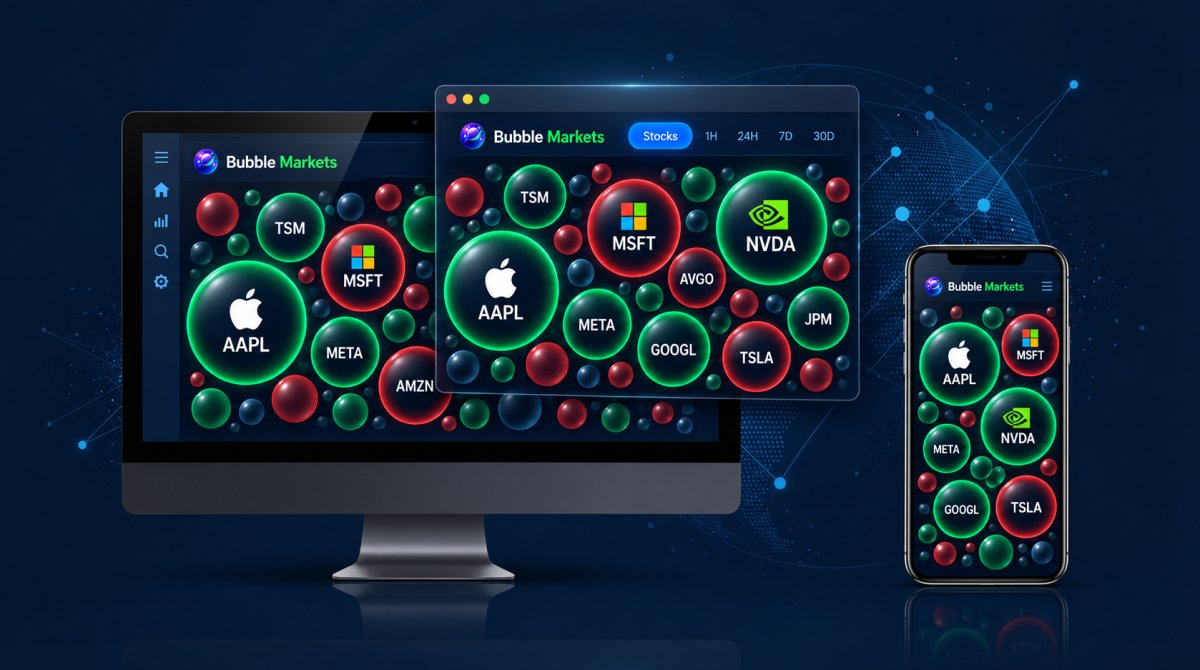
What should a crypto heat map widget embed help visitors do once it’s on your site? A ready-made widget can give a page a quick market overview. A custom API integration may suit a product that needs programmatic data access or a more tailored presentation.
Plan for more than setup. The heat map should fit the page on mobile, make its data easy to interpret, and suit your branding and commercial use. Deciding these requirements early can help you choose an integration that works for your audience.
This guide covers how to choose an embedding method, add the visualization, and test it across screen sizes before publishing. It compares ready-made widgets, white-label options, and API access, with practical checks for layout, interactions, labels, loading, and data context. You’ll also learn when a widget is enough and when a broader integration may better fit your product.
Key Takeaways
- Match the integration to your needs: a ready-made widget, a white-label option, and a developer API involve different levels of control and development effort.
- Plan a crypto heat map widget embed around the page purpose, audience, devices, and market information visitors need.
- Test the visualization on desktop and mobile, including layout, interactions, labels, loading, and color distinction.
- Use labels and other non-color cues to help visitors interpret the display.
- Consider commercial licensing or API access when a basic embed no longer fits your branding or integration requirements.
What a Crypto Heat Map Widget Embed Does for Your Website
A crypto heat map widget embed places a market visualization inside a website or digital product, so visitors can explore grouped crypto market data without leaving the page. Unlike a screenshot, an embedded view can present a changing visualization rather than a static image. Unlike an outbound link, it keeps the view within the host experience. And unlike a custom-built chart, a ready-made widget uses an existing visualization instead of requiring your team to build one from scratch.
The format helps readers scan a broad set of assets. Each tile represents an asset or category, while its color and size can encode different data points. The map is a compact overview, not a complete explanation of every market movement. For a general overview of the visualization method, see What is a Heat Map?
What information can a crypto heat map show?
Color commonly represents change over a selected period, with different shades showing the direction or magnitude of movement. The legend and settings define the scale, so check them rather than assuming every map uses the same colors. Tile size may represent a metric such as market capitalization or trading volume, depending on the visualization.
Grouping can arrange assets by category or another data dimension, helping readers compare related parts of the market. When choosing a widget, review its supported metrics, time periods, filters, and grouping options. These determine what visitors can explore. Tile size, for example, adds useful context only when the page explains what it represents.
When does embedding add value to a page?
An embedded visualization is most useful when it supports the page’s purpose. A market coverage page might use it to show a broad range of assets, while a research article could place it beside analysis of a particular period or category. A product dashboard might use it as one element of a wider set of tools. In each case, the map should help answer a reader’s question, not simply fill space.
Keeping the view on the host page can reduce the need to switch between the publisher’s content and a separate market page. The surrounding content still matters: introduce the visualization, explain what its data represents, and help readers interpret it. For guidance on interpreting crypto market visualizations, the crypto bubble map guide explains how to read relative size and movement.
Use the heat map to support exploration, not to imply what a reader should buy or sell. A color shift or large tile is a visual cue, not investment advice or a trading signal. Clear labels, a visible legend, and a stated time period help readers understand the display without overstating what it can tell them.
Choose an Embed Method That Fits Your Crypto Heat Map Use Case
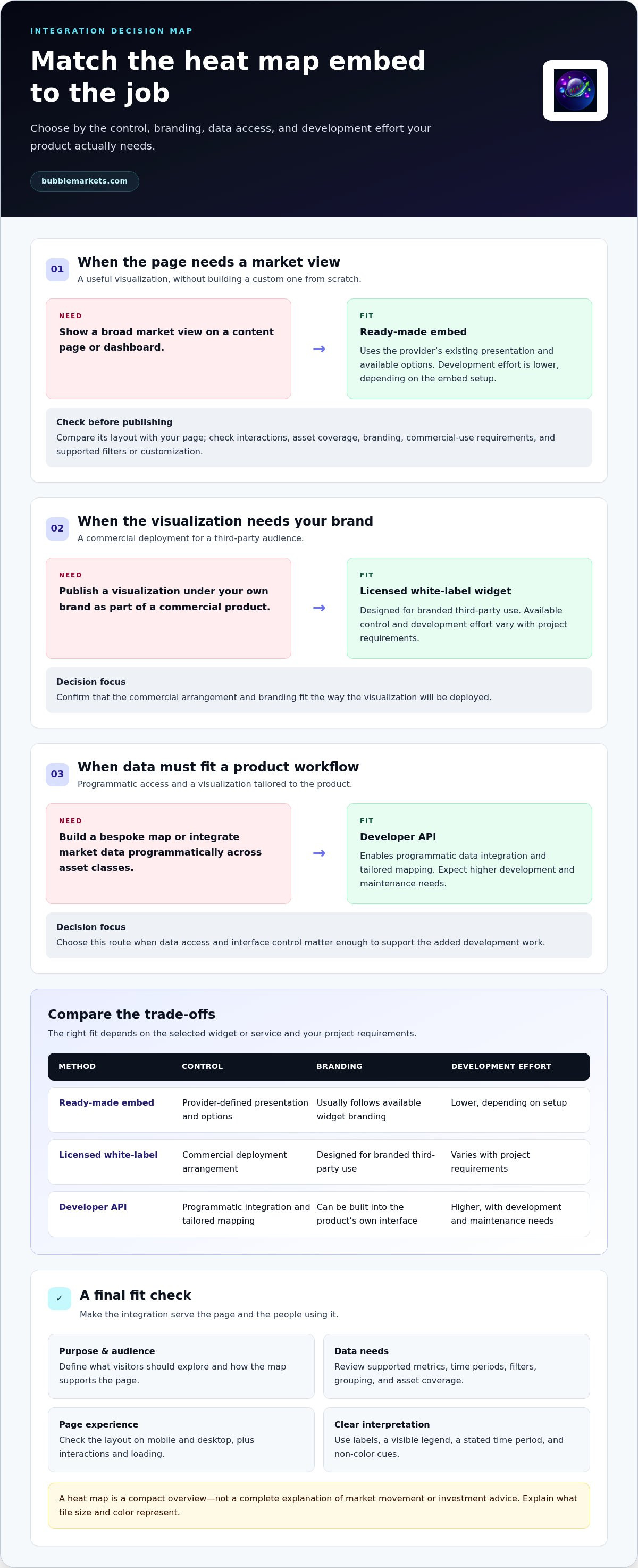
The right method depends on how much control your team needs over the visualization, its branding, and its role in the product. A ready-made widget can suit a page that needs a market view with limited custom development. A white-label widget or API integration is more relevant when the visualization must fit a branded commercial product or a specific data workflow.
Use this comparison to narrow the options. Available controls and implementation requirements depend on the selected widget or service.
When is a ready-made widget the practical route?
Choose a ready-made widget when the page needs a useful visualization and its existing presentation fits the job. Compare its layout with your page, check whether its interactions suit your audience, and confirm that its asset coverage matches the market view you want to show. Review branding and commercial usage requirements before publishing. Check the widget’s documentation for the specific filters and customization options it supports.
When should a team consider white-label or API integration?
Commercial licensing can support organizations that want to deploy branded visualizations for third-party audiences. An API suits developers who need programmatic access to market data or want to build a bespoke map across asset classes. BubbleMarkets offers commercial licensing and white-label widgets, as well as developer API access to live and historical market visualization data. The market visualizer API integration guide provides broader planning context. For background on the technology behind crypto assets, NIST’s Blockchain Technology Overview offers a technical introduction.
For a crypto heat map widget embed, base the decision on the product’s actual requirements: data access, interface control, and commercial deployment. Explore BubbleMarkets visualization solutions for branded widgets and API integration.
How to Embed a Crypto Heat Map Widget: A Step-by-Step Workflow
A reliable crypto heat map widget embed starts with the page, not the code. Define what the visualization should help readers explore, then choose an integration method that fits the site’s design and technical setup. Use the workflow below to plan the work. For exact embed code, API requirements, and configuration steps, follow the selected service’s documentation.
Prepare the host page and integration requirements
Record the target page, its available content width, the front-end environment, and the audience’s likely device mix. Decide where the visualization belongs and what nearby text will explain its purpose, data dimensions, and time context. Set asset coverage, expected update behavior, and branding needs as criteria for comparing options. These requirements give your team a practical basis for choosing an approach before development begins.
Use this sequence to move from planning to publication:
- Set the page purpose. Identify the reader’s task, such as scanning market coverage or exploring a product dashboard. Specify what the visualization should help them understand.
- Define audience and devices. Consider who will use the page and whether visitors are likely to view it on phones, tablets, desktop screens, or a mix.
- List information requirements. Record the asset categories, metrics, and time periods that matter. Treat update expectations as a requirement to evaluate, not an assumed widget feature.
- Select an integration method. Compare a ready-made widget, a licensed white-label visualization, or API access against the desired control, branding, and development effort.
- Review implementation and usage terms. Read the service’s instructions for embed code or API integration. For a commercial deployment, account for applicable licensing and branding requirements before building around the visualization.
- Implement in staging. Add the integration to a test version of the host page using the documented approach. Keep the test environment representative of the site’s layout and front-end setup.
- Validate, then publish. Review how the visualization loads and behaves, fix issues in the host page or integration, and publish after the planned checks pass.
Add the embed and validate it before publishing
Use the selected service’s instructions for the exact code, configuration, and supported environment. Don’t assume implementation steps for one widget apply to another. In staging, test the view at the content width it will occupy, use its available controls, and check for visible errors or layout conflicts. Compare desktop and mobile displays, including how labels and explanatory text sit beside the visualization.
Check that the page still explains what the visualization shows if a reader doesn’t interact with it. Keep the legend, metric context, and any necessary attribution visible. If the embed fails to load or creates an unexpected gap, review the setup instructions and the host page before launch. Record the tested configuration so future page updates can be checked against the same requirements.
After publishing, include the visualization in routine page reviews. Site layout or integration changes can affect how the view appears, so check it in the context of the live page rather than relying only on a development preview.
Test the Crypto Heat Map Embed for Usability, Data Clarity, and Fit
A crypto heat map widget embed can be quick to add, but convenience alone doesn’t show whether it suits your page. Before launch, test how the visualization behaves across screen sizes, whether its data is understandable, and whether its use and branding fit the intended deployment. Review the complete page, not just the widget in isolation.
Check responsive layout and interaction behavior
Start with narrow mobile screens, then review common tablet and desktop widths. Make sure tiles, labels, legends, and nearby text remain readable without creating horizontal scrolling or crowding the page. Test available controls with touch as well as a mouse or keyboard. If details appear on hover, check how users can access equivalent information on devices without hover.
Review loading behavior and page performance with your host platform’s usual testing tools. Note delays, empty spaces, layout shifts, or errors, then investigate whether they come from the embed, its configuration, or the surrounding page. Results vary by implementation and environment, so test in your own staging setup.
Make the data understandable and appropriately framed
Confirm that the legend explains the color scale and that tile size has a clear meaning. Check that colors remain distinguishable and that labels, symbols, or text provide cues beyond color alone. Verify the metric, selected time period, and data freshness against the service’s documentation. If the interface doesn’t make these details clear, add concise explanatory text near the visualization.
- Layout: Check narrow screens and wider browser sizes for clipping, overlap, and unwanted scrolling.
- Interaction: Test controls and available hover, tap, or keyboard interactions on relevant devices.
- Legibility: Confirm the legend, asset labels, and non-color cues remain easy to interpret.
- Data context: State what the metric and time period represent, and compare freshness information with the service’s documentation.
- Loading: Look for errors, blank areas, or layout changes while the visualization loads.
- Rights and branding: Check that commercial usage and attribution or branding arrangements fit the planned deployment.
Interpretation needs the same care as layout. A larger tile or a strong color can draw attention, but neither should be framed as a recommendation. Use neutral descriptions and explain what the display measures. If asset coverage or grouping affects the view, make that scope clear so readers understand what they are comparing.
Embedding doesn’t remove the need to review licensing, presentation, and user experience. Keep a record of test results and repeat key checks after changes to the page or integration. This helps teams catch issues before they confuse visitors. BubbleMarkets offers commercial licensing and white-label widgets for branded market visualization deployments. Explore BubbleMarkets’ commercial visualization options.
Deploy a Crypto Heat Map with a Path from Widget to Integration
The right deployment route depends on the job the visualization needs to do. A crypto heat map widget embed may be enough for a page that needs a market view within its existing content. A branded product or a data workflow with specific requirements may call for commercial licensing or API integration instead. Choose based on the current use case, not on the assumption that the most customized option is always the best fit.
Match the deployment route to organizational needs
Use a standard embed when the main requirement is to place a visualization on a relevant page and its presentation suits the host experience. This can be a practical starting point for a market overview or editorial context. Review the widget’s usage terms and capabilities for the planned deployment, then assess whether it meets the page’s layout and audience needs.
For a third-party platform that needs a branded visualization, commercial licensing and a white-label widget may be a better fit. BubbleMarkets offers commercial licensing and white-label widgets for organizations integrating market visualizations into their products. Match the commercial arrangement to how the visualization will be presented and used. An embed intended for one context may not cover another.
Consider API access when a team needs programmatic access to visualization data or plans a bespoke map across multiple asset classes. BubbleMarkets provides developer API access to live and historical market visualization data. The API lets a product team work with data programmatically, while implementation scope depends on the project and the API documentation. It is not a drop-in widget.
Plan the next integration step
Before choosing a route, write a short deployment brief. Include the target page or product, intended audience, desired branding, asset coverage, and how the data will be used. Note whether the requirement is to display an existing visualization or integrate data into a custom interface. This summary helps product, design, and development teams compare options against the same criteria.
- Page-level need: Use a standard embed when the existing visualization supports the page’s purpose and presentation requirements.
- Branded third-party use: Evaluate commercial licensing and white-label widgets for a visualization deployed as part of an organization’s product.
- Programmatic workflow: Assess API access when the product needs data integration or a bespoke multi-asset map.
As the product changes, revisit the decision. A page-level embed may meet the initial need, while new branding or data workflow requirements can justify a different integration path. Base technical decisions on current documentation and commercial use on the relevant licensing arrangement. Explore BubbleMarkets commercial widgets and API access.
Set Your Next Integration Milestone
Choose one page or product workflow as the next step. Define what readers should be able to explore, how the visualization should fit the experience, and what would show that the implementation is working. This gives your team a clear basis for deciding whether to keep the current setup or plan a deeper integration as requirements change.
If your roadmap includes a branded deployment or programmatic data use, align the project brief with the relevant commercial arrangement and technical documentation. BubbleMarkets offers commercial licensing and white-label market visualization widgets, plus developer API access to live and historical visualization data. Its visualizations also cover crypto and other global asset classes, which may be relevant as a platform’s coverage expands.
A well-planned crypto heat map widget embed serves a defined audience and product need. Explore BubbleMarkets commercial widgets and API access to plan the next step for your platform.
Frequently Asked Questions
How do I embed a crypto heat map widget on my website?
Choose a widget and follow its instructions for adding the visualization to your page or product. Include a brief label explaining the metric and time period shown. For example, a research page might place the map beside commentary on the same asset group. Preview it in a staging environment, then check the published page for rendering or layout changes.
Can I embed a crypto heat map widget without building one from scratch?
Yes. A ready-made widget lets you add an existing visualization without designing and coding the chart yourself. You’ll still need to use the widget’s embed method, fit the view into your page, and follow its usage requirements. With a custom chart, your team controls the display but also takes on the development and maintenance work.
What is the difference between a crypto heat map widget and a crypto bubble map?
The names often describe different visual layouts. A heat map commonly uses adjacent colored tiles, while a bubble map uses circles whose relative sizes and positions organize assets. Both can represent market metrics through color and size, so check each visualization’s legend to understand its encoding. The right format depends on the comparisons your page should help readers make.
Is a crypto heat map widget suitable for mobile websites?
It can be, but usability depends on the widget and the host page. Check whether asset labels and the legend remain readable at phone widths, and whether touch users can access information that may otherwise appear on hover. If the full view feels crowded, give it a dedicated section with enough space and a short explanation of how to read it.
Do I need a developer to embed a crypto heat map?
Not always. A page editor or content platform may let someone add a ready-made embed, depending on its supported features. Developer help is useful if the visualization must fit a custom front end, interact with other product components, or use API-based data. Before implementation, review the widget’s documentation and your platform’s rules for adding external content.
Can a crypto heat map widget be used commercially?
Yes, if the provider’s commercial terms cover how you plan to use and present it. An editorial embed may have different conditions from a visualization built into a third-party product or shown under your brand. BubbleMarkets offers commercial licensing and white-label widgets for branded market visualization deployments. Match the licensing arrangement to your intended audience, branding, and distribution before launch.
Frequently asked questions
What information can a crypto heat map show?
Color commonly represents change over a selected period, with different shades showing the direction or magnitude of movement. The legend and settings define the scale, so check them rather than assuming every map uses the same colors. Tile size may represent a metric such as market capitalization or trading volume, depending on the visualization. Grouping can arrange assets by category or another data dimension, helping readers compare related parts of the market. When choosing a widget, review its supported metrics, time periods, filters, and grouping options. These determine what visitors can explore. Tile size, for example, adds useful context only when the page explains what it represents.
When does embedding add value to a page?
An embedded visualization is most useful when it supports the page’s purpose. A market coverage page might use it to show a broad range of assets, while a research article could place it beside analysis of a particular period or category. A product dashboard might use it as one element of a wider set of tools. In each case, the map should help answer a reader’s question, not simply fill space. Keeping the view on the host page can reduce the need to switch between the publisher’s content and a separate market page. The surrounding content still matters: introduce the visualization, explain what its data represents, and help readers interpret it. For guidance on interpreting crypto market visualizations, the crypto bubble map guide explains how to read relative size and movement. Use the heat map to support exploration, not to imply what a reader should buy or sell. A color shift or large tile is a visual cue, not investment advice or a trading signal. Clear labels, a visible legend, and a stated time period help readers understand the display without overstating what it can tell them. The right method depends on how much control your team needs over the visualization, its branding, and its role in the product. A ready-made widget can suit a page that needs a market view with limited custom development. A white-label widget or API integration is more relevant when the visualization must fit a branded commercial product or a specific data workflow. Use this comparison to narrow the options. Available controls and implementation requirements depend on the selected widget or service.
When is a ready-made widget the practical route?
Choose a ready-made widget when the page needs a useful visualization and its existing presentation fits the job. Compare its layout with your page, check whether its interactions suit your audience, and confirm that its asset coverage matches the market view you want to show. Review branding and commercial usage requirements before publishing. Check the widget’s documentation for the specific filters and customization options it supports.
When should a team consider white-label or API integration?
Commercial licensing can support organizations that want to deploy branded visualizations for third-party audiences. An API suits developers who need programmatic access to market data or want to build a bespoke map across asset classes. BubbleMarkets offers commercial licensing and white-label widgets, as well as developer API access to live and historical market visualization data. The market visualizer API integration guide provides broader planning context. For background on the technology behind crypto assets, NIST’s Blockchain Technology Overview offers a technical introduction. For a crypto heat map widget embed, base the decision on the product’s actual requirements: data access, interface control, and commercial deployment. Explore BubbleMarkets visualization solutions for branded widgets and API integration. A reliable crypto heat map widget embed starts with the page, not the code. Define what the visualization should help readers explore, then choose an integration method that fits the site’s design and technical setup. Use the workflow below to plan the work. For exact embed code, API requirements, and configuration steps, follow the selected service’s documentation.
How do I embed a crypto heat map widget on my website?
Choose a widget and follow its instructions for adding the visualization to your page or product. Include a brief label explaining the metric and time period shown. For example, a research page might place the map beside commentary on the same asset group. Preview it in a staging environment, then check the published page for rendering or layout changes.
Can I embed a crypto heat map widget without building one from scratch?
Yes. A ready-made widget lets you add an existing visualization without designing and coding the chart yourself. You’ll still need to use the widget’s embed method, fit the view into your page, and follow its usage requirements. With a custom chart, your team controls the display but also takes on the development and maintenance work.
What is the difference between a crypto heat map widget and a crypto bubble map?
The names often describe different visual layouts. A heat map commonly uses adjacent colored tiles, while a bubble map uses circles whose relative sizes and positions organize assets. Both can represent market metrics through color and size, so check each visualization’s legend to understand its encoding. The right format depends on the comparisons your page should help readers make.
Is a crypto heat map widget suitable for mobile websites?
It can be, but usability depends on the widget and the host page. Check whether asset labels and the legend remain readable at phone widths, and whether touch users can access information that may otherwise appear on hover. If the full view feels crowded, give it a dedicated section with enough space and a short explanation of how to read it.
Do I need a developer to embed a crypto heat map?
Not always. A page editor or content platform may let someone add a ready-made embed, depending on its supported features. Developer help is useful if the visualization must fit a custom front end, interact with other product components, or use API-based data. Before implementation, review the widget’s documentation and your platform’s rules for adding external content.
Can a crypto heat map widget be used commercially?
Yes, if the provider’s commercial terms cover how you plan to use and present it. An editorial embed may have different conditions from a visualization built into a third-party product or shown under your brand. BubbleMarkets offers commercial licensing and white-label widgets for branded market visualization deployments. Match the licensing arrangement to your intended audience, branding, and distribution before launch.
Market information on this page is for education and general information only. It is not investment advice or a recommendation to buy or sell any asset.