 BubbleMarkets
Crypto market tracking tools compared by price and features

The best tool for tracking crypto markets is not necessarily the one with the longest feature list. It should cover the assets you follow and provide useful tracking features at a price that fits your needs. Compare asset coverage, free access, and paid plan details before choosing.
It’s easy to focus on coin prices alone, but a tracker’s value also depends on how clearly it organizes information and whether it covers the other markets you monitor. While a simple tool like pifiatconvert.com is often enough to convert Pi Coin into fiat currencies for occasional checks, broader tracking features can help when you want a consolidated market view.
This comparison looks at crypto tools through practical criteria: cross-asset support, free features, and paid plan pricing. You’ll see how different options fit, which features distinguish a basic tracker from a broader market view, and how to narrow your choices based on the way you follow crypto.
Key Takeaways
- Compare trackers by the assets they cover, especially if you want to view crypto alongside stocks or other markets.
- Assess free features before paying, then weigh plan costs against the tools you’ll actually use.
- Check how each option handles price updates, charts, alerts, on-chain data, news, and research.
- Use live bubble maps for a visual market overview, and compare the crypto and stock views to see whether they suit your workflow.
Tracking crypto alongside stocks, NFTs, and other assets
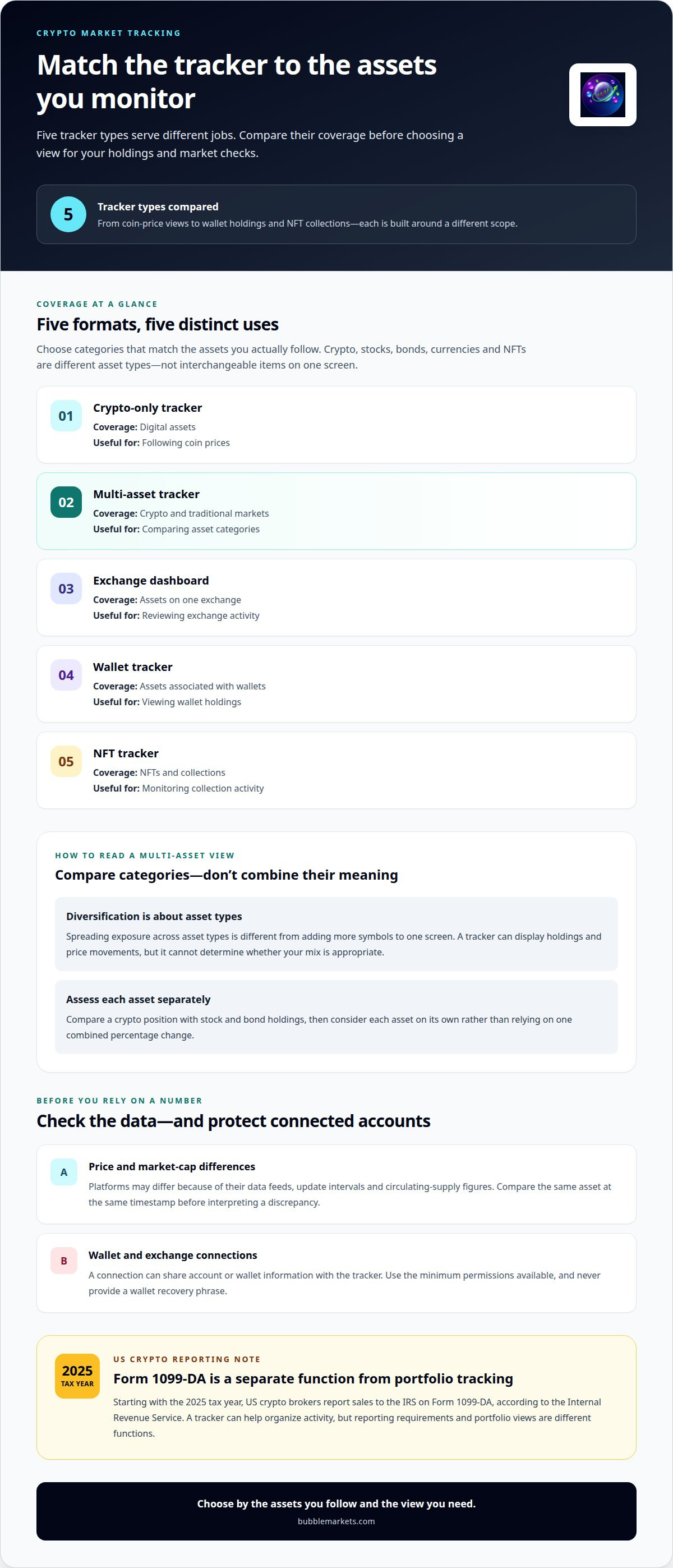
A multi-asset tracker puts crypto prices beside stocks, bonds, currencies, or NFTs. This view helps you compare different holdings without treating them as interchangeable: Bitcoin and a stock index follow different markets, while an NFT may need collection-level data. Choose categories that match the assets you actually monitor.
Diversification means spreading exposure across asset types, not simply adding more symbols to one screen. A tracker can display your holdings and price movements, but it cannot determine whether your mix is appropriate. For example, compare a crypto position with stock and bond holdings, then assess each asset separately rather than relying on one combined percentage change.
Starting with the 2025 tax year, US crypto brokers report sales to the IRS on Form 1099-DA, according to the Internal Revenue Service. A tracker can help organize activity, but reporting requirements and portfolio views are different functions.
How accurate and fast are price and market-cap data on crypto tracking platforms? Prices and market caps can differ because platforms use different data feeds, update intervals, and circulating-supply figures. Compare the same asset at the same timestamp before interpreting a discrepancy.
Which crypto tracking apps are available in the United States? US users can choose between mobile apps and browser-based trackers, with features varying by platform. Compare supported assets and access methods before choosing one.
What security and privacy risks come with connecting an exchange or wallet to a crypto tracker? A connection can share account or wallet information with the tracker. Use the minimum permissions available, and never provide a wallet recovery phrase.
| Tracker type | Asset coverage | Useful for |
|---|---|---|
| Crypto-only tracker | Digital assets | Following coin prices |
| Multi-asset tracker | Crypto and traditional markets | Comparing asset categories |
| Exchange dashboard | Assets on one exchange | Reviewing exchange activity |
| Wallet tracker | Assets associated with wallets | Viewing wallet holdings |
| NFT tracker | NFTs and collections | Monitoring collection activity |
Choose a multi-asset tracker for cross-market comparisons, or a crypto-focused tracker when you need specialized digital-asset views.
Free tiers and paid plans
A free tier lets you test a tracker before committing to a subscription. Start by adding assets such as Bitcoin and Ether, then check whether the free view supports your routine. A plan’s value depends on the features you use, not the length of its feature list.
Compare each free and paid plan using the same tasks. Can you save a watchlist, review historical charts, create alerts, or track a portfolio? Note which features are free and which require an upgrade. This comparison shows whether a paid plan solves a real limitation in your current setup.
- Coverage: Check whether the plan tracks the crypto assets you follow.
- Limits: Look for restrictions on watchlists, tracked portfolios, or saved alerts.
- Research: Compare access to chart history, market summaries, and screening tools.
- Billing: Review the stated billing interval, renewal terms, and cancellation process.
A subscription can be useful when a specific paid feature saves you repeated work. For example, a trader following several assets may value portfolio tracking, while someone checking Bitcoin occasionally may need only basic price views. Match the plan to your workflow, and don’t pay for advanced functions you won’t use.
Before upgrading, test the free tier with a short routine: add your usual assets, review the available chart views, and set an alert if the plan includes one. Then list any features missing from your workflow. If a gap affects a task you perform regularly, compare paid plans against that task and their stated terms.
Plan names alone don’t show what’s included. Compare features and limitations directly. The best tool for tracking crypto markets is the one whose free or paid plan fits your actual needs.
Compare that starting price with the limitation you identified, and confirm the plan includes the feature you need. If the free tier already supports your routine, there may be no reason to upgrade.
Which crypto trackers provide real-time prices, charts, and alerts?
Crypto price aggregators, exchange apps, and portfolio trackers can combine price views with charts or alerts. Their data sources and update speeds differ, so “real-time” doesn’t mean every platform shows the same quote. Compare the same asset, trading pair, and timestamp before relying on a displayed price.
Charts help explain price movement over a chosen period. A Bitcoin chart may show a short-term change, while a longer view can reveal broader direction. Check whether you can switch timeframes, inspect trading volume, and select a quote currency. These controls make comparisons clearer without treating past movement as a forecast.
Alerts are useful when you want a tracker to flag a price threshold without keeping its screen open. Set an example, such as an alert for when Ether reaches a level you choose, then check whether the app offers push notifications, email, or both. Review alert conditions carefully: a price alert reports a trigger, not a recommendation to trade.
Use this feature check before choosing:
- Price feed: Identify whether quotes follow a specific exchange, trading pair, or aggregated market data.
- Chart controls: Test time ranges, volume display, and currency selection using Bitcoin.
- Alert setup: Create a test threshold and note how notifications arrive.
- Portfolio view: Check whether tracked balances and asset prices appear together.
A charting platform suits users who inspect price history and indicators. An exchange app can be convenient for prices tied to that exchange, while a portfolio tracker focuses on combined holdings and alerts. Choose based on the task you repeat, not a feature label alone.
For a visual overview, a crypto bubble map presents market movements through grouped asset bubbles. Pair that view with detailed charts when you need to inspect one asset’s price history or set a specific alert.
Which crypto market trackers offer on-chain data, news, and research?
Trackers differ in whether they combine blockchain activity, news feeds, and analytical commentary. A price dashboard may show Bitcoin’s market movement without explaining network activity. An on-chain analytics platform adds blockchain-derived indicators, while research services organize reports, project updates, and market summaries.
On-chain data records activity visible on a blockchain. Depending on the platform, measures may include transaction volume, active addresses, and transfers to or from exchanges. These indicators describe network activity, not the identity or motives of individual users. For example, a rise in exchange transfers may prompt closer review, but the metric alone doesn’t establish what holders plan to do.
News and research serve different roles. A news feed helps you follow announcements about Ethereum or a protocol; research tools may add context about token design, network usage, or market structure. Check whether a platform links items to their sources, labels analysis separately from reporting, and displays publication dates. These details help distinguish a primary announcement from someone else’s interpretation.
Evaluate a tracker with one focused review:
- Choose an asset: Search for Bitcoin or Ethereum and inspect its available network metrics.
- Check definitions: Confirm what “active addresses” or “exchange flows” measure.
- Trace the source: Open a news item and identify its original announcement or report.
- Separate evidence: Compare observed blockchain activity with the platform’s commentary.
Use specialist on-chain platforms when blockchain metrics are central to your research. Choose a broader market tracker when you want news, summaries, and asset views together. Neither format replaces source material: treat a metric as evidence to investigate, not a standalone conclusion.
For a consolidated view of crypto market signals, compare crypto market data alongside relevant research and news sources.
BubbleMarkets: Free Live Market Bubble Maps
BubbleMarkets offers free live market bubble maps for readers who want to scan crypto activity visually. The Crypto Bubble Map provides an overview of crypto markets, while the Stock Market Bubble Map displays equities separately. Comparing the maps lets you view asset categories side by side without treating them as the same market.
This approach suits readers who prefer a visual snapshot before opening detailed charts or reviewing individual assets. Start with the crypto view to scan market movements, then use the stock map for broader context. Pro, Professional, and Enterprise subscriptions are available for readers who want additional features.
Explore BubbleMarkets’ free maps to see whether bubble-based views fit your tracking routine. Visit bubblemarkets.com to view the maps, with no account required.
Build a tracking routine that fits your decisions
Choose a tracker based on the decisions you need to support. If you review several asset types, prioritize a clear combined view. If you follow specific tokens closely, focus on chart detail, alert controls, or research tools you’ll use regularly. The best tool for tracking crypto markets makes those checks easier without adding unnecessary steps.
Next, test your preferred view as part of your normal routine. Notice which information you use, what you overlook, and where you still need another source. That practical review gives you a better basis for choosing a tool than feature labels alone. BubbleMarkets can be a useful next step if visual market views fit the way you compare assets. Contact BubbleMarkets to discuss your tracking needs, or explore its market maps and choose the approach that works for you.
Frequently Asked Questions
What features should a crypto market tracking tool have?
Choose a tool with views that match your routine: watchlists for selected assets, adjustable charts for price history, and alerts for thresholds you set. If you track several asset types, look for cross-market coverage. For example, someone comparing Bitcoin with an ETF may need a broader dashboard than someone monitoring one token. Check data sources and update timing before relying on displayed values.
What are the best crypto market tracking apps and websites in 2026?
The right option depends on the task. A crypto-focused website suits users reviewing digital assets, while an exchange app can show activity tied to that exchange. For visual market comparisons, BubbleMarkets offers free market bubble maps, including a Crypto Bubble Map. If your research centers on blockchain activity or NFT collections, choose a service focused on those data types rather than assuming every tracker covers them.
Are the leading crypto tracking tools free, and what do paid plans cost?
Some trackers offer free access, while paid subscriptions vary by provider, plan, and included tools. There’s no standard price across the market. Before upgrading, compare the billing period and features you would use, such as saved layouts or expanded analysis. BubbleMarkets offers free live maps and Pro, Professional, and Enterprise subscriptions. Review the plan details to match access to your workflow.
Frequently asked questions
What features should a crypto market tracking tool have?
Choose a tool with views that match your routine: watchlists for selected assets, adjustable charts for price history, and alerts for thresholds you set. If you track several asset types, look for cross-market coverage. For example, someone comparing Bitcoin with an ETF may need a broader dashboard than someone monitoring one token. Check data sources and update timing before relying on displayed values.
What are the best crypto market tracking apps and websites in 2026?
The right option depends on the task. A crypto-focused website suits users reviewing digital assets, while an exchange app can show activity tied to that exchange. For visual market comparisons, BubbleMarkets offers free market bubble maps, including a Crypto Bubble Map. If your research centers on blockchain activity or NFT collections, choose a service focused on those data types rather than assuming every tracker covers them.
Are the leading crypto tracking tools free, and what do paid plans cost?
Some trackers offer free access, while paid subscriptions vary by provider, plan, and included tools. There’s no standard price across the market. Before upgrading, compare the billing period and features you would use, such as saved layouts or expanded analysis. BubbleMarkets offers free live maps and Pro, Professional, and Enterprise subscriptions. Review the plan details to match access to your workflow.
Market information on this page is for education and general information only. It is not investment advice or a recommendation to buy or sell any asset.