 BubbleMarkets
ETF Bubble Map: How to Read Fund Size, Performance, and Exposure in 2026

An ETF bubble map can make dozens of funds easier to scan, but a clear visual pattern doesn’t tell you what each fund owns. The same-sized bubbles may represent different metrics, and strong performance can sit alongside concentrated or overlapping holdings.
That’s why the map is a starting point, not a recommendation. Before comparing funds, check what bubble size, position, and color represent, and note the timeframe behind any performance measure. Visual encodings vary, so use the map’s labels and legend instead of assuming what they mean.
This guide explains how to interpret an ETF bubble map, compare funds and exposures consistently, and spot what a snapshot leaves out. You’ll also learn when to look beyond the chart to fund documents and holdings data. BubbleMarkets’ ETF bubble map offers a practical way to view funds together. Use it to organize your research, then examine each fund’s composition before drawing conclusions.
Key Takeaways
- Read the legend before interpreting bubble size, color, or position. Each visual dimension depends on the map’s defined encoding.
- Use an ETF bubble map to scan fund data, not to assume that a circle represents an individual holding or a complete picture of exposure.
- Compare funds using the same metric, measurement period, and currency where applicable.
- Follow a repeatable process: define the fund universe, check labels and timestamps, scan the map, then verify relevant details in fund documents.
- Use BubbleMarkets’ ETF visualizer as a market-data starting point, then research fund composition before drawing conclusions.
What an ETF bubble map shows, and what it does not
An ETF bubble map arranges funds or fund-related data points as circles so you can scan and compare information visually. An exchange-traded fund holds a collection of assets and trades on an exchange; for foundational background, see this overview of the Exchange-Traded Fund (ETF). A map’s circles don’t automatically represent those underlying assets. Each circle stands for the entity identified by the visualization, while its size, color, and position depend on the data and the map’s configuration.
This distinction sets the map’s limits. It can help you spot patterns across a selected group, but it doesn’t explain every fund’s structure, show every layer of exposure, or provide individualized investment advice. Treat it as a visual aid for research, not as a conclusion about whether a fund is appropriate for you.
ETF-level map or holdings-level view: identify the unit first
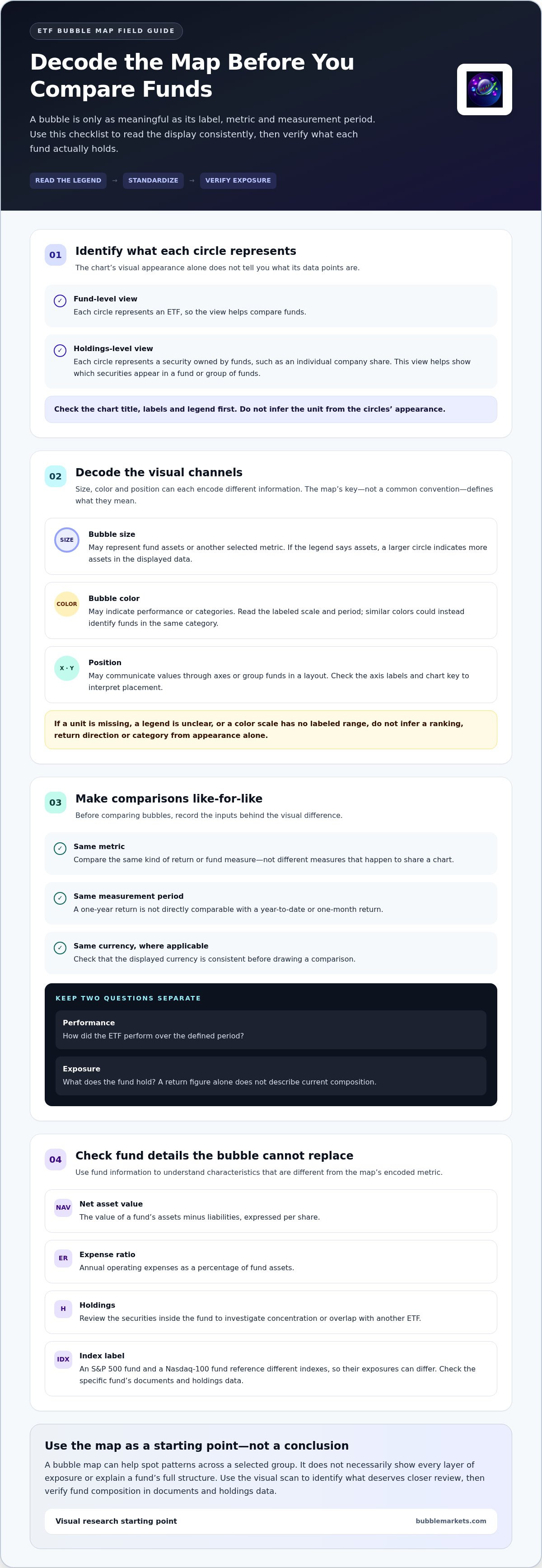
A fund-level view uses each ETF as a data point. A holdings-level view instead plots securities owned by funds, such as individual company shares. The two views answer different questions: one compares funds, while the other helps show which securities appear in a fund or group of funds.
Before interpreting circles, read the title, labels, and data legend. For example, a map might show one circle for each ETF, while a separate holdings view shows one circle for each security. Don’t infer the unit from the chart’s appearance alone.
What a bubble can communicate at a glance
Size can make a selected metric easier to compare, but it only means what the legend says. If the legend defines size as assets, a larger circle represents a fund with more assets in the displayed data. If it defines size differently, use that definition instead. Color may distinguish performance or categories, but only when the map labels that encoding. Position may also communicate values or groupings, depending on the axes and layout.
An ETF bubble map is a visual comparison of labeled fund-related metrics, and its circles carry meaning only through the map’s defined encodings. Check those definitions before drawing conclusions. A striking color or large circle can guide your attention, but it can’t by itself explain a fund’s holdings, concentration, or overlap with another ETF.
How ETF bubble maps encode fund size, returns, and categories
An ETF bubble map can place several kinds of fund information in one view, such as fund size, returns over a selected period, category, or a measure of exposure. These are possible metrics, not fixed conventions. A large circle might represent assets under management in one visualization and a different measure in another. Position may map to horizontal and vertical values, while color could show performance or sort funds into categories.
Start with the legend and labels. Record the metric, its unit, and the period before comparing circles. For example, a return shown as a percentage over a year-to-date period isn’t directly comparable with a one-month return. A performance timeframe describes a specific interval; it doesn’t tell you about longer-term characteristics such as fees, holdings, or the index a fund tracks.
Reading bubble size and color without assuming their meaning
Use the map’s key to decode each visual channel. If size represents fund assets, compare circle sizes as a visual guide to that measure. If colors indicate relative performance, interpret them against the displayed scale and period. Similar colors could instead identify funds in the same category. The map’s configuration, not a common color convention, determines the meaning.
Pause if the legend is unclear, a unit is missing, or a color scale has no labeled range. Those gaps limit what the visualization can support. Don’t infer a return direction, ranking, or category from appearance alone.
Fund characteristics that add context to a visual scan
Other fund details answer different questions. Net asset value (NAV) reflects the value of a fund’s assets minus liabilities, expressed per share. The expense ratio indicates annual operating expenses as a percentage of fund assets. Holdings show the securities inside the fund and help clarify concentration or overlap. These measures shouldn’t be treated as substitutes for the metric encoded in a bubble.
An index label adds another layer of context. An S&P 500 fund and a Nasdaq-100 fund reference different indexes, so their exposures can differ even if both are broad equity funds. Use fund documents and holdings data to investigate what the label means for the specific ETF. Forbes also outlines steps to research and select core ETFs.
A bubble’s apparent prominence is meaningful only alongside its labeled metric and period. Apply that rule before drawing comparisons, then use the visual scan to identify which fund details deserve a closer look. BubbleMarkets’ ETF bubble map provides a visual starting point for that review.
How to compare ETF bubbles without confusing performance and exposure
Separate two questions before comparing funds: how did each ETF perform over a defined period, and what does each fund hold? An ETF bubble map may help you scan performance, but a return figure alone doesn’t describe a fund’s current composition. Keep the comparison consistent by using the same return metric, measurement period, and currency where applicable. Otherwise, differences in the display may reflect mismatched inputs rather than meaningful fund differences.
For example, comparing two funds’ one-year returns is different from comparing one fund’s one-year return with another’s year-to-date return. Even a like-for-like performance comparison says nothing on its own about whether the funds have similar exposures. A recent gap in returns also doesn’t predict what either fund will return in the future.
Fund performance versus underlying holdings
To understand exposure, look beyond the fund’s result. Review its holdings, sector weights, and index methodology. These details can help explain why funds with similar performance figures may represent different parts of the market, or why funds with different names may respond to similar underlying securities.
A fund-level view summarizes the ETF. Individual-stock scanning focuses on the companies themselves, which is a different unit of analysis. For that perspective, see the stock market heat map guide. Use fund and stock views to explore different questions, not as substitutes for each other.
ETF overlap and category comparisons
Category labels can make two funds look distinct even when their holdings overlap. ETFs tracking related benchmarks may own some of the same large companies, though their weights and overall compositions can differ. Compare the holdings lists and benchmark methodologies before assuming that different labels mean separate exposures.
A practical comparison can follow three steps:
- Align performance: Check that the return metric, period, and currency match.
- Inspect composition: Compare holdings and sector weights to identify shared or concentrated exposure.
- Check the benchmark: Read the methodology to understand how the fund selects and weights securities.
That process helps distinguish a performance pattern from an exposure pattern. For broader guidance on reading visual market displays, see the market bubble map guide. Use the map to direct your attention, then verify what the funds contain before drawing conclusions.
A repeatable workflow for reading an ETF bubble map
A consistent process helps turn a visual scan into a focused research question. Before interpreting a pattern, note the map’s data timestamp and any filters applied. This gives you context for what the snapshot includes and helps avoid comparing different fund groups or data periods as if they were the same.
From broad scan to a focused ETF comparison
Work through these steps in order. Don’t treat the map as a ranking until you know what each visual dimension represents.
- Choose the universe. Identify which ETFs or fund-related data points appear in the view. If you narrow the group with filters, note which ones you used.
- Inspect the legend. Confirm what circle size, color, and position encode. Check labels and units; don’t infer meaning from appearance alone.
- Set the comparison period. If you’re assessing returns, use the same measurement period for each fund. Record the period alongside the metric.
- Scan for questions. Look for notably large or differently colored bubbles only after confirming their meaning. Select a small, relevant set of funds for closer comparison rather than treating the full map as one ranking.
- Verify the pattern. Check fund information to see whether holdings, benchmark, fees, or methodology add context to what you noticed.
Validate visual observations with fund information
Use the map to decide what to investigate, then consult fund documents or issuer data. Compare holdings and sector weights to understand composition; review the benchmark and its methodology to see how securities are selected and weighted. Check the expense ratio as a separate fund characteristic, not as an explanation for a visual pattern unless the data supports that connection.
Match the map’s timeframe to the question you’re researching. A short-period return snapshot may be useful for examining recent movement, but it won’t answer a question about longer-term performance or current holdings. If the timestamp, data coverage, or calculation method is unclear, record that limitation rather than treating the displayed comparison as definitive.
For related ideas on screening and narrowing a set of securities, see the visual stock screener buying guide. To apply this workflow to fund data, explore BubbleMarkets’ ETF bubble map and use the encodings defined in its display.
Using BubbleMarkets’ ETF bubble map as a visual research starting point
BubbleMarkets offers ETF bubble maps alongside market visualizers for other asset classes. Use the ETF view to scan the funds shown, then read its labels and legend before interpreting any circles. The map’s displayed metrics, timeframes, and data timing determine what you can compare, so base your interpretation on the information shown.
A practical first pass is simple: open the ETF view, note the visible labels and data timestamp, then identify what each visual dimension represents. Use the displayed filters to narrow the funds to a relevant group, and note your selections. Interpret size, color, or position only when the interface explains its meaning. If a label or scale leaves the metric unclear, treat that as a limit on the comparison rather than filling in the gap with an assumption.
What to inspect in an interactive ETF view
Begin with the question you want the map to help you explore, such as which displayed funds share a visible pattern on a defined metric. Check the available labels, legend, timestamp, and filters before narrowing the view. Keep a note of the selected universe and settings so you can describe what the snapshot actually represents.
The map is a market-data visualization. It doesn’t execute trades or provide personalized investment recommendations. Its role is to organize information for scanning, not to tell you what action to take.
When a visual map is useful, and when to look deeper
A map is useful for spotting relative patterns across the ETF universe it displays. It can help direct attention to funds for further comparison, but a visual cluster doesn’t establish why funds appear similar or whether they hold the same securities.
For questions about concentration, overlapping holdings, or index construction, move from the visualization to fund documents and issuer information. Review holdings, benchmark methodology, and other relevant fund details to test what the visual pattern suggests. The ETF bubble map is a starting point for research, not a buy or sell signal.
Explore BubbleMarkets’ ETF bubble map to scan the fund view and interpret the information its labels define.
Make the Map Your First Step
An ETF bubble map helps you scan funds together, but its visuals only make sense when you know what the size, color, and position represent. Start with the legend, compare matching metrics and time periods, then use the pattern to decide what to investigate next. Performance and exposure are separate questions: fund returns alone don’t reveal holdings, concentration, or overlap with other ETFs.
Before drawing conclusions, check the map’s timestamp and compare relevant fund details, including holdings, benchmark methodology, and expenses. This keeps a quick visual scan in its proper role: a way to organize research, not a prediction or personalized recommendation.
BubbleMarkets offers ETF bubble maps and free live market visualizers, alongside market screeners and portfolio tracking tools. Explore BubbleMarkets’ ETF bubble map to put this reading process into practice. Take your time with the labels, verify what matters, and use each visual pattern as a starting point for deeper research.
Frequently Asked Questions
What is an ETF bubble map, and what does each bubble represent?
An ETF bubble map displays funds or fund-related data points as circles, making it easier to scan a group visually. Each bubble represents the entity named by the map, which could be an ETF or, in a separate holdings-level view, an underlying security. Check the title, labels, and legend first. Don’t assume that a circle represents an individual holding just because the fund owns securities.
How do you read the size and color of bubbles on an ETF map?
Read size and color according to the map’s legend, not by convention. Circle size might encode a fund metric, while color could indicate performance over a stated period or distinguish categories. The interface defines the meaning. Check units, scale, and timeframe, too. If the legend is missing or unclear, you can’t reliably infer a fund’s size, return, or category from its visual appearance alone.
Can an ETF bubble map show a fund’s underlying holdings?
It can show holdings when the visualization identifies individual securities as the plotted entities or provides a clearly labeled holdings view. A fund-level map typically represents ETFs, not every security inside them. To review composition, consult the fund’s holdings information and relevant documents. This helps reveal sector weights, concentration, and securities shared with other funds, details that a fund-level bubble may not show.
Does a larger ETF bubble mean the fund is a better investment?
No. A larger bubble only indicates a larger value for whichever metric the map assigns to size. That could be fund assets or another measure, depending on the visualization. It doesn’t establish quality, suitability, future returns, or risk. Check the legend, then assess fund characteristics such as holdings, benchmark, and expenses in context. A visual comparison is a research aid, not a personalized recommendation.
How can I compare ETF performance on a bubble map fairly?
Compare like with like: use the same return measure, timeframe, and currency where applicable. For example, don’t compare one fund’s year-to-date return with another’s one-year return. Confirm whether the displayed figure represents price performance or another return measure, if specified. Record the period and metric before drawing conclusions. A fair comparison describes past performance over matching inputs; it doesn’t predict future results.
What information should I check after spotting an ETF on a bubble map?
Use the bubble as a prompt for further research. Review the fund’s holdings to understand its composition and possible overlap with other ETFs. Check its benchmark and methodology to see how securities are selected and weighted, and examine the expense ratio as a separate cost measure. Compare these details with the question you’re investigating. The map can guide your attention, but fund information provides essential context.
Are ETF bubble maps real-time, and how can I check the data time frame?
Data timing depends on the visualization and the metric displayed, so don’t assume every ETF field updates in real time. Look for a timestamp, timeframe label, or other data notes in the interface. A live market visualizer may still present metrics calculated over a defined period. Record both the timestamp and comparison period, and note any uncertainty if the display doesn’t make its timing clear.
Frequently asked questions
What is an ETF bubble map, and what does each bubble represent?
An ETF bubble map displays funds or fund-related data points as circles, making it easier to scan a group visually. Each bubble represents the entity named by the map, which could be an ETF or, in a separate holdings-level view, an underlying security. Check the title, labels, and legend first. Don’t assume that a circle represents an individual holding just because the fund owns securities.
How do you read the size and color of bubbles on an ETF map?
Read size and color according to the map’s legend, not by convention. Circle size might encode a fund metric, while color could indicate performance over a stated period or distinguish categories. The interface defines the meaning. Check units, scale, and timeframe, too. If the legend is missing or unclear, you can’t reliably infer a fund’s size, return, or category from its visual appearance alone.
Can an ETF bubble map show a fund’s underlying holdings?
It can show holdings when the visualization identifies individual securities as the plotted entities or provides a clearly labeled holdings view. A fund-level map typically represents ETFs, not every security inside them. To review composition, consult the fund’s holdings information and relevant documents. This helps reveal sector weights, concentration, and securities shared with other funds, details that a fund-level bubble may not show.
Does a larger ETF bubble mean the fund is a better investment?
No. A larger bubble only indicates a larger value for whichever metric the map assigns to size. That could be fund assets or another measure, depending on the visualization. It doesn’t establish quality, suitability, future returns, or risk. Check the legend, then assess fund characteristics such as holdings, benchmark, and expenses in context. A visual comparison is a research aid, not a personalized recommendation.
How can I compare ETF performance on a bubble map fairly?
Compare like with like: use the same return measure, timeframe, and currency where applicable. For example, don’t compare one fund’s year-to-date return with another’s one-year return. Confirm whether the displayed figure represents price performance or another return measure, if specified. Record the period and metric before drawing conclusions. A fair comparison describes past performance over matching inputs; it doesn’t predict future results.
What information should I check after spotting an ETF on a bubble map?
Use the bubble as a prompt for further research. Review the fund’s holdings to understand its composition and possible overlap with other ETFs. Check its benchmark and methodology to see how securities are selected and weighted, and examine the expense ratio as a separate cost measure. Compare these details with the question you’re investigating. The map can guide your attention, but fund information provides essential context.
Are ETF bubble maps real-time, and how can I check the data time frame?
Data timing depends on the visualization and the metric displayed, so don’t assume every ETF field updates in real time. Look for a timestamp, timeframe label, or other data notes in the interface. A live market visualizer may still present metrics calculated over a defined period. Record both the timestamp and comparison period, and note any uncertainty if the display doesn’t make its timing clear.
Market information on this page is for education and general information only. It is not investment advice or a recommendation to buy or sell any asset.