 BubbleMarkets
Financial Data Visualization Software: How to Compare Tools in 2026

The tool with the longest chart list may be the wrong choice for your team. Financial data visualization software ranges from business intelligence dashboards built around reports to market visualizers designed to scan movement across asset classes. Those tools solve different problems, even when their feature lists look similar.
To compare options, look beyond chart types. Identify the data each tool covers, how it fits into your analysis workflow, and whether it can connect to the systems or products you use. This guide offers a practical way to compare those factors and match software to the decisions your team needs to make.
We’ll look at general-purpose BI platforms, charting tools, and market-focused visualizers, then compare their data coverage, analytical workflows, integrations, and everyday use. You’ll also see how BubbleMarkets’ multi-asset visualizers, screeners, portfolio tools, API access, and subscriptions fit into that landscape. The aim is to help you assess fit, not simply count features.
Key Takeaways
- Compare financial data visualization software by the decisions it supports, not by chart variety alone.
- Map required asset classes and visual formats to your analysis workflow before comparing features.
- Use the differences between BI dashboards, charting tools, market visualizers, and APIs to narrow the right category.
- Separate essential data and integration requirements from optional features so comparisons stay consistent.
- Match BubbleMarkets subscriptions, developer APIs, or white-label widgets to individual analysis, programmatic integration, or commercial use.
What financial data visualization software does, and which decisions it supports
Financial data visualization software turns financial information into visual displays that people can inspect, compare, and communicate. Charts, heat maps, and bubble maps can make patterns easier to spot than a table of values. The display helps organize the information, but interpretation remains with the user. It does not make decisions, provide financial advice, or guarantee an outcome.
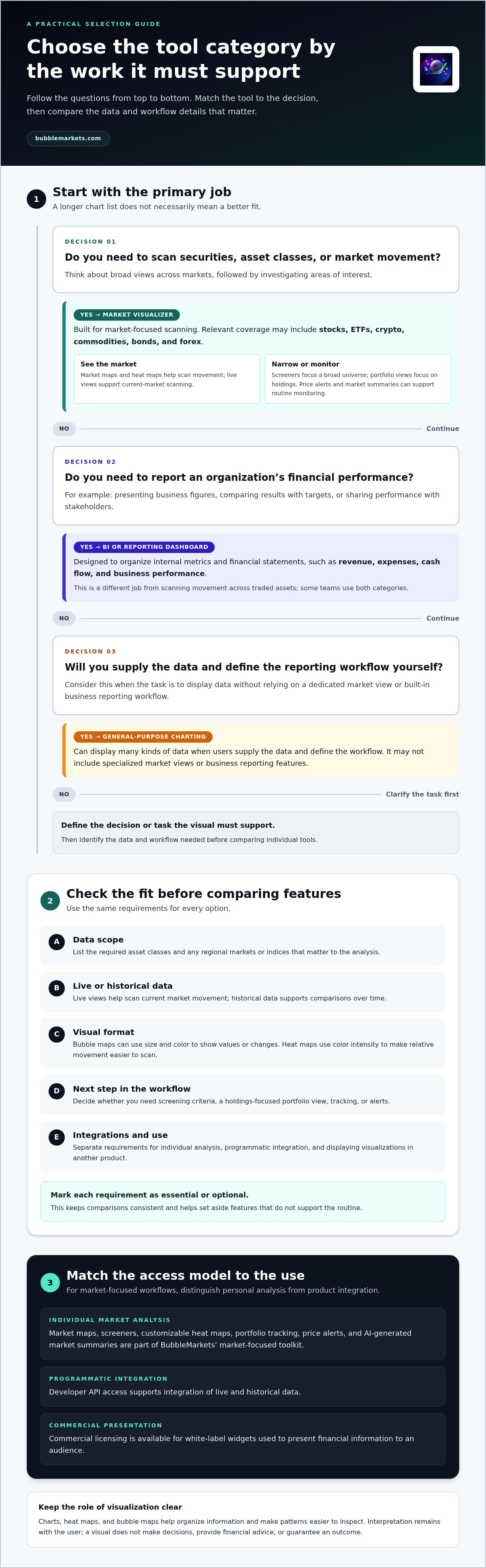
The category includes tools built for different jobs. Market visualizers organize securities and asset classes to show market movement. Financial reporting dashboards present organizational figures such as revenue, expenses, cash flow, and business performance. General-purpose charting software can display many kinds of data, but may not include dedicated market views. Start by identifying the decision or task the visual needs to support.
Market visualization software versus financial reporting dashboards
Market tools focus on securities, asset classes, and changes across markets. A visualizer, for example, can help users scan stocks, ETFs, crypto, commodities, bonds, or forex in one view. BubbleMarkets’ market maps, screeners, and heat maps are designed for this kind of market-focused scanning.
Reporting dashboards answer different questions: How is a business performing? How do current results compare with targets? Which figures need to be shared with stakeholders? These dashboards typically organize internal metrics and financial statements rather than broad movements in traded assets. Some teams need both categories, one to review market activity and another to report business results.
Market visualizers help scan asset movements; accounting and reporting dashboards organize an organization’s financial performance. General charting tools can serve either purpose when users supply the data and define the reporting workflow, but they may not include specialized market views or business reporting features.
Which users benefit from financial data visualization?
The right format depends on who needs to interpret the information and what they need to do with it:
- Investors and traders can scan broad performance across assets or regions, then investigate areas of interest. A visual supports observation; it is not an investment recommendation or trading signal.
- Finance teams can use reporting dashboards to present metrics, statements, and business performance in a shared format. Consistent preparation of the underlying figures helps make comparisons easier to communicate.
- Publishers and product teams can present financial information to an audience through market data visualizations. BubbleMarkets offers developer API access for programmatic integration and commercial licensing for white-label widgets.
For a foundation in how visual forms represent information, see Understanding Data Visualization. The practical distinction is the workflow: scanning markets, reporting organizational performance, or displaying data inside another product. Choose the category that fits the task before comparing individual features.
Which financial data visualization software features should buyers compare?
Compare features against the markets and tasks your team actually handles. A long feature list can hide a basic mismatch: a tool may offer polished dashboards but lack the asset coverage or market-wide view you need. For financial data visualization software, start with data scope, then assess how each visual and workflow feature helps you move from a broad view to a focused review.
Data coverage, freshness, and visual formats
List the asset classes your workflow depends on: stocks, ETFs, crypto, commodities, bonds, and forex. Add regional markets or indices if they matter to your analysis. Then distinguish live visualization from historical data access. Live views help you scan current market movement, while historical data supports comparisons over time. BubbleMarkets provides live market maps and API access for programmatic integration of live and historical data.
Next, consider how each display represents information. Bubble maps can use bubble size and color to show different values or changes. Heat maps use color intensity to make relative movement easier to scan. Screeners narrow a broad universe using selected criteria, while portfolio views focus on holdings. As Comparing Data Visualization Tools suggests, choose a format to suit the task, not just because it is available.
Screening, portfolio workflows, and alerts
A screener helps when a market view is too broad to inspect item by item. Decide which filters would help your team focus, and whether the results fit the next step in its analysis. Portfolio tracking serves a different purpose: it organizes attention around a selected set of holdings instead of the wider market. Price alerts and market summaries can support routine monitoring, but they do not replace the user’s interpretation.
BubbleMarkets brings screeners, customizable heat maps, portfolio tracking, price alerts, and AI-generated market summaries into its market-focused toolkit. To compare a holdings view with a market-wide scan, see the portfolio tracking visualizer guide.
Turn your comparison into a short checklist: required asset classes, live or historical data needs, useful visual formats, screening criteria, and any tracking or alert workflow. Mark each item as essential or optional. This makes it easier to compare tools consistently and set aside features that do not support your routine.
If multi-asset market scanning is central to your use case, compare BubbleMarkets’ visualization tools against that checklist. Then decide whether a free live map or a paid subscription better fits your analysis needs.
How do market visualizers, BI dashboards, and charting tools compare?
These software categories can all display financial information, but they organize it around different tasks. A finance team presenting company performance, an analyst scanning movement across asset classes, and a product team building a custom data view have different workflow needs. Choose the category that fits the job first. There is no universal ranking that makes one type best for every use.
| Category | Primary use | Typical data | Visual workflow | Integration needs |
|---|---|---|---|---|
| BI dashboards | Reporting and sharing business performance | Organizational metrics and consolidated business data | Build or review dashboards and reports | Connect business data sources and share views with stakeholders |
| General charting tools | Visualize data for a defined question | Data supplied or selected by the user | Choose chart types and configure the display | Bring in data through supported sources or files |
| Market visualizers | Scan movements across markets or asset classes | Market data such as stocks, ETFs, crypto, commodities, bonds, or forex | Review market maps, heat maps, screeners, or other focused views | Use a ready-made market interface |
| APIs | Integrate data into a custom workflow or product | Structured data available through the API | Build a visualization or application around integrated data | Programmatic integration and development work |
The table describes common purposes, not fixed limits. A general charting tool may support many data types, and a dashboard can include charts. But overlapping chart formats do not make workflows interchangeable. Assess financial data visualization software by how directly it supports the way your team gathers, reviews, and shares information.
When a business intelligence dashboard is the better fit
Choose a BI dashboard for reporting-led work: consolidating organizational metrics, reviewing business performance, or sharing financial results with stakeholders. The central task is to communicate what is happening inside an organization, often using data from its business systems. Do not assume a BI platform also provides live investment-market coverage; that depends on the tool and its data connections.
When a market visualizer or API fits better
A market visualizer suits users who want a ready-made interface for scanning movement across asset classes. An API meets a different need: developers can integrate available live and historical data into their own application or workflow. BubbleMarkets offers both market visualizers and developer API access. For a closer look at the scanning workflow, see the market bubble map scanning guide.
Use BI dashboards to report organizational performance, general charting tools to visualize selected data, market visualizers to scan asset movements, and APIs to build custom data workflows. Some teams may combine categories, using a market visualizer for analysis and a separate dashboard for business reporting. Let the task determine the fit, then compare the data coverage and integration effort each workflow requires.
How to evaluate financial visualization software for your workflow
Use a consistent evaluation sequence so feature lists do not distract from the work the software needs to support. Treat essential requirements as pass-or-fail criteria, then compare optional features based on their practical value. This makes financial data visualization software easier to assess across different tools and workflows.
Map the decision to data and users
Start with the recurring question your team needs to examine. Identify the relevant data, time horizon, user roles, and where the resulting view will be used. A focused evaluation should establish whether the tool helps users see and explain the comparison they need to make.
- Define the use case. State the question plainly, such as whether users need to scan market movement or review a selected set of holdings.
- Specify the data. List the asset classes and regions involved, and note whether the workflow depends on live views, historical data, or both.
- Name the users. Distinguish individual analysts from internal teams and external audiences. Their needs for sharing, context, and access may differ.
- Describe the workflow. Map how users move from an overview to a focused comparison. Decide whether screeners, portfolio tracking, alerts, or summaries belong in that routine.
- Set integration requirements. Decide whether users will work in a platform interface, embed a widget for an audience, or consume data through an API.
Assess integration, governance, and interpretation
Choose a delivery method that matches your workflow. A platform interface is designed for direct use; an embedded widget presents market visuals within another product; an API supports programmatic integration. For any approach, document who can access the output, how the data is handled, and what review is needed before sharing. Do not assume different tools use the same controls or processes.
Separate requirements into two groups before comparing options:
- Must-haves: required asset coverage, relevant data access, a usable visual workflow, and necessary integration.
- Optional features: additional display choices or analytical aids that are useful but not required to answer the core question.
Then test the intended task with a representative view. Can a user locate the comparison, understand what the visual encodes, and explain what it shows to someone else? If the display looks clear but its dimensions or context are hard to interpret, it may not support the decision well. Teams considering generated summaries should also plan how users will review and interpret them; the AI market summary tool comparison can help frame that workflow.
Price alerts add another requirement. Consider what event users need to monitor and how an alert fits into their existing review routine. The real-time market alerts comparison provides a focused way to assess that use case.
Use your must-have list to compare BubbleMarkets’ visual tools and workflows. Explore BubbleMarkets’ market visualization tools as one option for multi-asset market analysis.
Where BubbleMarkets fits, and how to choose a next step
BubbleMarkets is a market-focused option for people who want to compare activity across global markets and multiple asset classes in visual form. Its live maps and screeners cover stocks, crypto, ETFs, commodities, bonds, and forex. The platform is built for market-scanning workflows, not as a replacement for business reporting dashboards or accounting systems.
Match BubbleMarkets capabilities to the use case
Different workflows call for different ways to use the platform. Individual users can explore the live visualizers and choose among Pro, Professional, or Enterprise subscriptions based on their analysis needs. Available tools include portfolio tracking, price alerts, customizable heat maps, screeners, and AI-generated market summaries. These features support analysis and monitoring; they do not provide personalized advice or guarantee results.
For developers, API access supports programmatic integration of live and historical data. Publishers and product teams with an audience-facing use case can use commercial licensing and white-label widgets to embed visual market data. These options serve different needs: individual analysis, a custom application, or a third-party product.
BubbleMarkets visualizes financial data. It does not execute trades, sell financial assets, or provide investment advice. Keep that distinction in mind when deciding whether a market visualizer fits alongside the other tools your team uses.
Choose a practical evaluation path
Start with the free live visualizers. Choose a relevant map and see whether its market view helps you inspect the assets and comparisons central to your routine. Note what you can identify at a glance and whether you can move from an overview to the information you need to examine next.
If your workflow calls for more, compare the Pro, Professional, and Enterprise subscription options with your requirements. Focus on capabilities your team will use, such as advanced visualization or screening, and use the plan information to choose the appropriate subscription.
- Individual analysis: Begin with a free live map, then assess whether a paid subscription better matches your ongoing visualization and screening needs.
- Developer workflow: Consider API access when data needs to be integrated programmatically into an application or process.
- Audience-facing product: Consider commercial licensing and white-label widgets when you need to embed market visualizations for users.
This approach keeps the evaluation tied to the work rather than the number of available features. Compare relevant asset coverage, the visual workflow, and the delivery method against the checklist you built. If the map helps you scan markets in a way that fits your process, you have a practical basis for deciding what to explore next.
Explore the BubbleMarkets platform to compare its market visualizers, subscriptions, API access, and white-label options against your checklist.
Put your comparison framework to work
Test your shortlist against a real task, not another feature checklist. Choose a recurring market question, identify who needs to inspect the view, and decide how the information should fit into your workflow. A useful tool should make the comparison clear enough to review and explain.
For teams assessing market-focused financial data visualization software, BubbleMarkets offers global visualizers across stocks, crypto, ETFs, commodities, bonds, and forex. Individual users can explore the platform interface, developers can assess API access, and organizations with audience-facing products can use commercial white-label widgets. These are visualization and data tools, not trade execution or financial advice.
Use your checklist to decide what to examine first: a market view, a data integration, or an embedded visualization. Keep the evaluation focused on practical fit, including how the output will be used and understood by its audience.
Explore BubbleMarkets’ financial visualization tools and compare them with your workflow.
Frequently Asked Questions
What is financial data visualization software?
Financial data visualization software converts financial figures into visual displays that help people inspect patterns and communicate results. A finance team might chart monthly expense categories, while a market user might compare asset movements in a bubble map. The software’s purpose depends on its data and workflow. A visual can organize information, but interpretation remains with the user; it is not a decision, investment recommendation, or guarantee of results.
How do I choose financial data visualization software?
Choose financial data visualization software by testing it against a recurring task, not by ranking feature lists. Write down the question, such as which tracked markets changed most over a selected period, then check data coverage and display options. Next, consider who needs access and whether the output stays in the platform or connects to another product. Compare tools using the same task, then choose a subscription tier that suits your requirements.
Is financial data visualization software the same as a BI dashboard?
No. A BI dashboard usually helps an organization review internal figures, such as department budgets or monthly revenue, while market visualization software focuses on market data. A company could use a BI dashboard to prepare a performance review and a separate market visualizer to monitor securities. Overlapping chart types do not make their data sources or workflows the same. Treat them as distinct tools unless a product supports both jobs.
Can financial data visualization software show multiple asset classes?
Some platforms display multiple asset classes, but coverage differs. Check whether the markets, regions, and instruments in your routine are represented rather than assuming a broad category label covers every need. BubbleMarkets provides visualizers for stocks, crypto, ETFs, commodities, bonds, and forex. If you also track a personal set of holdings, assess that separately: a market-wide overview and a portfolio view answer different questions.
What is the difference between a market visualizer and a financial charting tool?
A market visualizer is designed to present a broad set of assets or categories together, while a charting tool is often used to inspect an individual asset or a smaller selection in detail. A user might scan a market map to find an area to investigate, then open a chart to examine one instrument over time. Compare available data, screening options, and time controls to see which workflow the tool supports.
Can financial data visualization software provide investment advice?
Displaying financial information is not the same as providing personalized investment advice. Charts, alerts, and summaries can help organize information, but they do not determine what a user should do or guarantee an outcome. BubbleMarkets is a data visualization platform; it does not provide brokerage, trade execution, asset management, or personalized investment recommendations. Treat visual output as information to interpret, and make decisions independently rather than relying on a display as a recommendation.
Do financial visualization platforms support API or white-label integrations?
Some platforms offer APIs or embeddable widgets, while others focus on direct use through an interface. An API suits a project that needs programmatic data integration; a white-label widget suits a publisher or product team presenting market visuals within its own offering. BubbleMarkets provides developer API access and commercial licensing for white-label widgets. Compare the integration method, data needs, and licensing terms with the project’s requirements.
Frequently asked questions
Which users benefit from financial data visualization?
The right format depends on who needs to interpret the information and what they need to do with it: For a foundation in how visual forms represent information, see Understanding Data Visualization. The practical distinction is the workflow: scanning markets, reporting organizational performance, or displaying data inside another product. Choose the category that fits the task before comparing individual features. Compare features against the markets and tasks your team actually handles. A long feature list can hide a basic mismatch: a tool may offer polished dashboards but lack the asset coverage or market-wide view you need. For financial data visualization software, start with data scope, then assess how each visual and workflow feature helps you move from a broad view to a focused review.
What is financial data visualization software?
Financial data visualization software converts financial figures into visual displays that help people inspect patterns and communicate results. A finance team might chart monthly expense categories, while a market user might compare asset movements in a bubble map. The software’s purpose depends on its data and workflow. A visual can organize information, but interpretation remains with the user; it is not a decision, investment recommendation, or guarantee of results.
How do I choose financial data visualization software?
Choose financial data visualization software by testing it against a recurring task, not by ranking feature lists. Write down the question, such as which tracked markets changed most over a selected period, then check data coverage and display options. Next, consider who needs access and whether the output stays in the platform or connects to another product. Compare tools using the same task, then choose a subscription tier that suits your requirements.
Is financial data visualization software the same as a BI dashboard?
No. A BI dashboard usually helps an organization review internal figures, such as department budgets or monthly revenue, while market visualization software focuses on market data. A company could use a BI dashboard to prepare a performance review and a separate market visualizer to monitor securities. Overlapping chart types do not make their data sources or workflows the same. Treat them as distinct tools unless a product supports both jobs.
Can financial data visualization software show multiple asset classes?
Some platforms display multiple asset classes, but coverage differs. Check whether the markets, regions, and instruments in your routine are represented rather than assuming a broad category label covers every need. BubbleMarkets provides visualizers for stocks, crypto, ETFs, commodities, bonds, and forex. If you also track a personal set of holdings, assess that separately: a market-wide overview and a portfolio view answer different questions.
What is the difference between a market visualizer and a financial charting tool?
A market visualizer is designed to present a broad set of assets or categories together, while a charting tool is often used to inspect an individual asset or a smaller selection in detail. A user might scan a market map to find an area to investigate, then open a chart to examine one instrument over time. Compare available data, screening options, and time controls to see which workflow the tool supports.
Can financial data visualization software provide investment advice?
Displaying financial information is not the same as providing personalized investment advice. Charts, alerts, and summaries can help organize information, but they do not determine what a user should do or guarantee an outcome. BubbleMarkets is a data visualization platform; it does not provide brokerage, trade execution, asset management, or personalized investment recommendations. Treat visual output as information to interpret, and make decisions independently rather than relying on a display as a recommendation.
Do financial visualization platforms support API or white-label integrations?
Some platforms offer APIs or embeddable widgets, while others focus on direct use through an interface. An API suits a project that needs programmatic data integration; a white-label widget suits a publisher or product team presenting market visuals within its own offering. BubbleMarkets provides developer API access and commercial licensing for white-label widgets. Compare the integration method, data needs, and licensing terms with the project’s requirements.
Market information on this page is for education and general information only. It is not investment advice or a recommendation to buy or sell any asset.