 BubbleMarkets
Portfolio Tracking Visualizer: How to See Your Portfolio Clearly
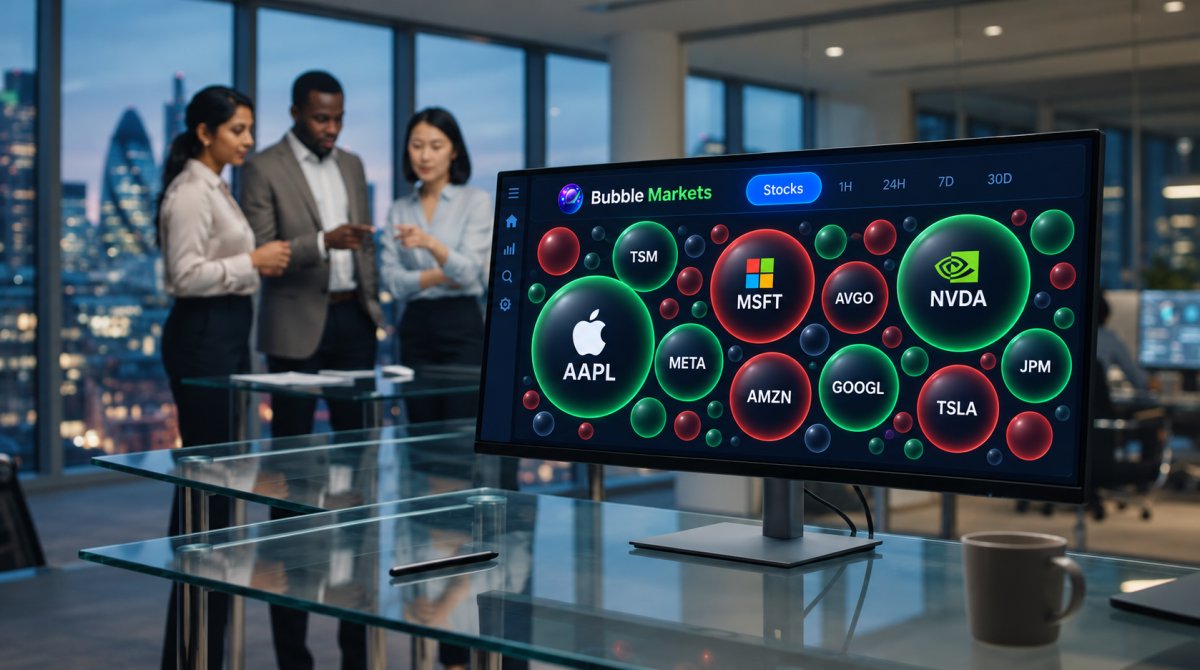
What if the clearest portfolio view isn’t the one that tells you what to buy, but the one that shows what deserves a closer look? When holdings and performance are spread across accounts or screens, it can be hard to see how the pieces fit together. A portfolio tracking visualizer brings allocation, concentration, and changes over time into a view you can scan and review.
A visual snapshot has limits: it reflects the data and time period shown, not what markets will do next. Use it as a starting point for review, not as a forecast or investment recommendation.
In this guide, you’ll learn how to build and read a visual portfolio view, choose useful time periods, and spot patterns that merit further research. We’ll cover what to look for in allocation and performance, and how BubbleMarkets’ custom portfolio tracking and market visualizers can support that review.
Key Takeaways
- Choose a visual format that makes holdings and portfolio-wide patterns easier to scan.
- Set a clear review goal and scope before building your portfolio tracking visualizer.
- Separate allocation, performance, and concentration, because each view answers a different question.
- Check the chart’s date, units, legend, and settings before interpreting what it shows.
- Use BubbleMarkets portfolio tracking and market visualizers to inspect data across stocks, crypto, ETFs, commodities, bonds, and forex.
What Is a Portfolio Tracking Visualizer, and What Can It Show?
A portfolio tracking visualizer is a visual interface for reviewing holdings, allocation, and portfolio changes over a selected period. It organizes portfolio data so you can scan relationships and patterns instead of relying only on separate account screens or rows of figures.
A portfolio tracking visualizer displays portfolio data in a format that helps you review what you hold and how its recorded value or allocation has changed. It describes information available for review, not future performance. Depending on the tool, data may appear as bubbles, charts, tables, or heat maps. A bubble display might use size to represent a stated value and color to encode another measure, while a table can show exact figures. Check the display’s legend and settings before interpreting those visual cues.
These views can support broader Portfolio Analysis, which considers topics such as performance measurement, risk, and attribution. A visual summary can help you identify a pattern to investigate, but it doesn’t explain why that pattern occurred.
Which portfolio details can a visualizer bring together?
Depending on the tool and available data, a view may group holdings by asset, show each position’s weight, organize assets into categories, or compare changes over a selected period. Some displays pair individual holding details with portfolio-level summaries. Others focus on a narrower question, such as category allocation or price movement.
For example, imagine a hypothetical portfolio with holdings across three asset categories. A visualizer could show each holding as a portion of the whole, making it easier to notice that one category occupies more of the display than the others. This illustrates how a chart can reveal relative size, not whether any particular mix is appropriate. What appears on screen depends on how the portfolio is recorded and which fields the tool can display.
How does a visualizer differ from a spreadsheet or brokerage account?
A spreadsheet lays out information in rows and columns. That structure works well for checking individual entries, but portfolio-wide comparisons may require sorting, calculating totals, or moving between tabs. A visualizer emphasizes visual scanning: relative size, category proportions, and changes can stand out quickly. A table may still be better for inspecting precise values.
A brokerage account is where assets may be held and transactions may be executed. A visualizer presents data; it doesn’t, by itself, provide custody, execute trades, or deliver personalized investment advice. Treat it as a review tool, not a decision-maker.
Keep the underlying records in view. Confirm that holdings, dates, units, and displayed values match the source records you rely on, especially before drawing conclusions. A clean visual can make information easier to scan, but its usefulness depends on the data and scope behind it.
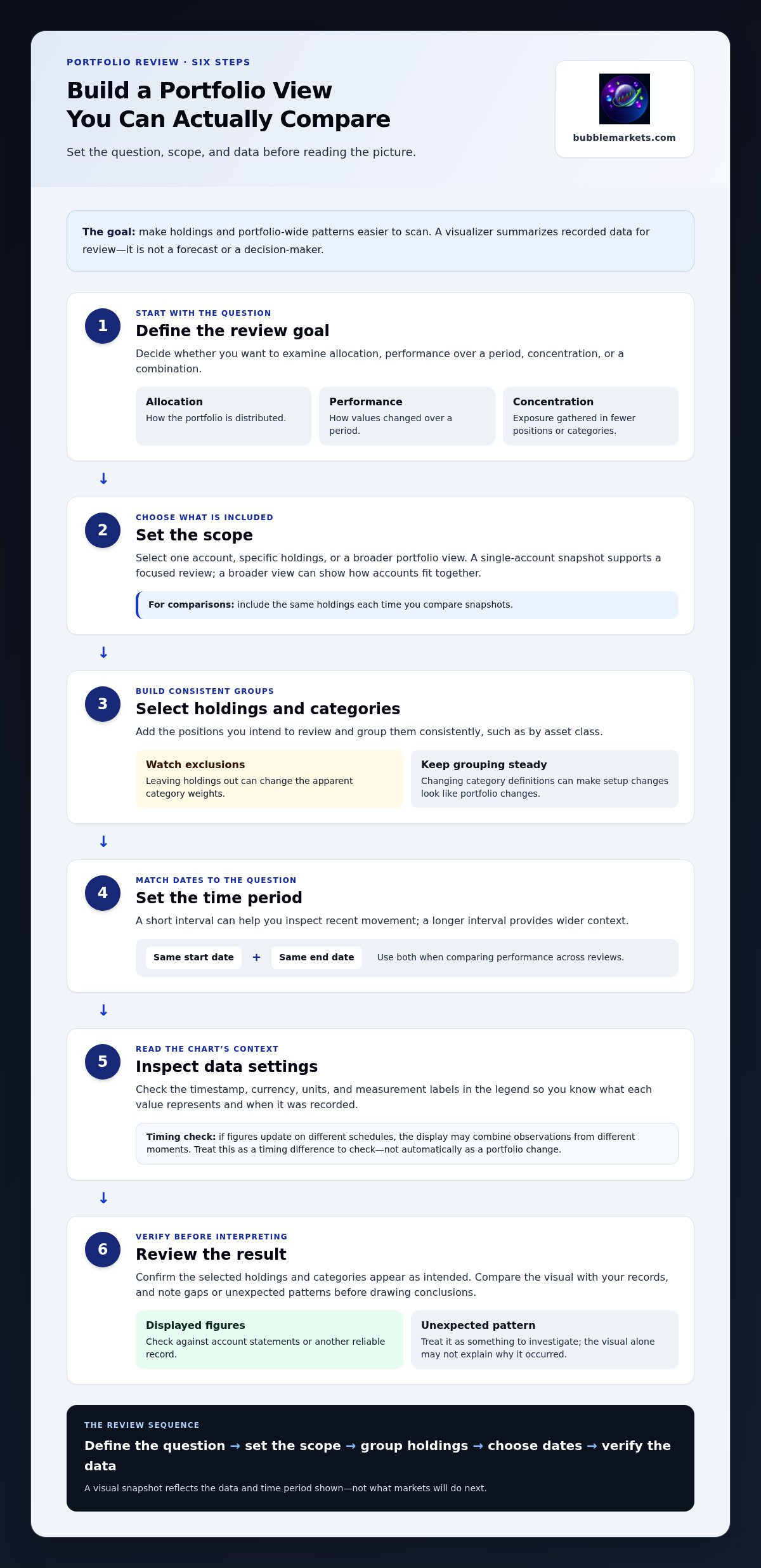
How to Set Up a Portfolio Tracking Visualizer Step by Step
Start with the question you want the view to answer. Choose holdings, categories, and dates that fit that question so the result is easier to interpret and compare in later reviews.
- Define the review goal. Decide whether you’re checking allocation, performance over a period, concentration in a category or holding, or a combination. These views are related but distinct. Allocation shows how the portfolio is distributed; performance shows how values changed over a period; concentration highlights exposure gathered in a smaller set of positions or categories.
- Choose the scope. Select one account, specific holdings, or a broader portfolio view. A single-account snapshot can support a focused review, while a broader view may show how accounts fit together. Include the same holdings each time you compare snapshots.
- Select holdings and categories. Add the positions you intend to review and group them consistently, such as by asset class. Excluding holdings can change the apparent category weights, so note what’s outside the view.
- Set the time period. Match the dates to the question. A short interval can help you inspect recent movement; a longer interval provides wider context. Use the same start and end points when comparing performance across reviews.
- Inspect the data settings. Check the timestamp, currency, units, and measurement labels in the legend. These details clarify what each value represents and when it was recorded.
- Review the result. Confirm that the selected holdings and categories appear as intended. Compare the visual with your records, and note any gaps or unexpected patterns before drawing conclusions.
Choose holdings, categories, and a review objective
Keep the objective specific. To inspect allocation and concentration together, first look at each category’s share, then check whether a small number of positions account for a large part of it. For performance, define the period separately. Consistent grouping makes comparisons more meaningful. Changing category definitions between reviews can create apparent changes that come from the setup rather than the portfolio.
Check data sources, dates, and update frequency
Look for the data’s timestamp and identify the currency and units, such as a value, percentage, or quantity. If some figures update on a different schedule from others, the display may combine observations from different moments. Treat that as a timing difference to check, not automatically as a portfolio change. Compare displayed figures with account statements or another reliable record, especially when dates or values don’t line up.
In short, define the question, set the scope, group holdings, choose a matching period, then verify the display and its data. BubbleMarkets offers custom portfolio tracking and visual market tools for reviewing market data. Explore BubbleMarkets portfolio tracking to put a visual review workflow into practice.
How to Read Portfolio Allocation, Performance, and Concentration
A portfolio tracking visualizer can put three related views side by side, but each answers a different question. Read them separately first, then connect the observations: allocation shows how the portfolio is distributed, performance describes change over a selected period, and concentration highlights exposure gathered in particular holdings or categories.
| View | Question it answers | What to inspect |
|---|---|---|
| Allocation | How is the portfolio divided? | Position weights and category shares |
| Period performance | How did values change over this period? | Start and end dates, units, and reported change |
| Concentration | Where is exposure clustered? | Large positions or categories that account for a notable share |
Visual encoding matters. A bubble’s size might represent portfolio weight, market value, or another measure; color might show a gain or loss, or something else. Read the legend and chart settings before interpreting size or color intensity. A prominent shape indicates only the measure assigned to it, not necessarily greater risk or a likely future move.
Read portfolio weights without mistaking size for risk
A larger visual element represents a larger weight only if the legend says size encodes weight. Weight describes a holding’s share of the displayed portfolio, not its risk by itself. Concentration means exposure is gathered in one holding, sector, or asset category. For example, equities, ETFs, and bonds may appear as separate categories, but a category label alone doesn’t reveal the underlying exposures within it. Inspect category and holding-level views to see where a pattern comes from.
Allocation and concentration are most useful when considered together. A category may occupy a substantial portion of a view, while a closer look shows that exposure is spread across several holdings or concentrated in a few. That distinction can help you decide what to research next, such as what the holdings represent or whether categories overlap. It doesn’t dictate a trade or establish that an allocation is suitable.
Interpret gains and losses across a chosen time period
Absolute change reports a difference in value; percentage change expresses that difference relative to a starting value. If both appear, check the labels and units rather than treating them as interchangeable. Compare matching periods, since a different start date can materially change the result. A short window and a longer window may show different parts of the same history.
Historical performance describes what happened during the period shown; it doesn’t predict future results. Color intensity is a display choice, not a forecast. Treat a striking gain, loss, or category shift as a prompt to investigate the dates, underlying holdings, and available records. The visual summary helps direct attention, but it doesn’t explain every cause or determine what action to take.
How to Review a Visual Portfolio Tracker Without Overreading It
A portfolio tracking visualizer can make a change easy to spot, but the image alone doesn’t establish what caused it or what to do next. Use the same brief review sequence each time, then treat anything unexpected as a question to investigate.
- Confirm the scope: Check which accounts, holdings, or categories are included. Missing positions can make the overall picture misleading.
- Check the date: Note the timestamp and review period. Values recorded at different times may not form a synchronized snapshot.
- Check units and currency: Make sure you’re comparing like with like. Mixed currencies or different measurement units can distort apparent weights and changes.
- Read the legend: Verify what color, size, and position represent. Don’t assume a stronger color means greater risk or importance.
- Compare consistent periods: Use matching date ranges before deciding whether a pattern has changed.
Watch for stale values as well. If one holding’s displayed value hasn’t updated at the same time as others, a difference may reflect update timing rather than a new portfolio-wide pattern. Check the underlying records before drawing a conclusion. A color shift, unexpected concentration, or change in a category’s share is a prompt to inspect the relevant holding, dates, and data source, not a conclusion or an instruction to trade.
Use alerts and summaries as review prompts
Price alerts can notify you about configured price movements. Treat a notification as a cue to review relevant data, not as a trading instruction or prediction. AI-generated market summaries can offer context, but verify their statements against underlying market data and the timeframe they describe. For a broader view of visual scanning, the market bubble map guide explains how market-level patterns can complement, but shouldn’t replace, a personal portfolio review.
Know when another view adds useful context
Keep the question focused on your portfolio. If a holding’s movement prompts a market-wide question, a stock market heat map can help you examine broader performance patterns. If you’re researching securities beyond current holdings, a visual stock screener guide covers screening as a separate task. Neither view, by itself, explains how a portfolio should be changed.
Keep the roles distinct: the portfolio view shows recorded holdings and changes; other market views provide different data for further inspection. To apply this review approach with custom portfolio tracking and visual market tools, explore BubbleMarkets portfolio tracking.
Explore Portfolio Tracking with BubbleMarkets
Once you have a review question and a consistent way to interpret the data, a visual platform can bring portfolio tracking and broader market context into the same analytical workflow. BubbleMarkets offers custom portfolio tracking alongside visual market tools covering stocks, crypto, ETFs, commodities, bonds, and forex. Use these views to inspect recorded information and identify what may deserve further review, not to predict what markets will do.
Where BubbleMarkets fits into a portfolio review
Custom tracking can help you review holdings in relation to market movements across asset classes. For example, if you’re examining how a category’s share has changed, use your portfolio view to review the recorded holdings and consult relevant market visualizations for wider context. Keep those questions distinct: a market-wide view describes the market information displayed, while a personal portfolio view concerns the holdings and data represented in your tracking workflow.
BubbleMarkets also includes price alerts and AI-generated market summaries. An alert can bring a configured price movement to your attention; it isn’t a trade instruction. A summary can provide additional context, but verify its details against the underlying data and relevant dates. Visual patterns and summaries are tools for inspection. They don’t provide personalized investment advice, make decisions for you, or execute trades.
Data quality still matters. Before relying on a display, confirm which holdings and categories it represents, when its values were recorded, and what the labels and units mean. Different sources or update schedules can affect whether figures form a comparable snapshot. Use the visual view to organize your review, then check any consequential or unexpected observation against reliable records.
Take the next step with a visual tracking workflow
Start with one clear question. Are you reviewing allocation, checking recent movement, or looking for exposure concentrated in a particular holding or category? Define the scope, inspect the relevant view, and note what you’d need to verify before interpreting a change. A focused question helps prevent a broad dashboard from becoming a set of disconnected visual signals.
If you want to apply that process with portfolio tracking and market visualizations, explore BubbleMarkets visual tools. Use the views to examine data, confirm important figures against their underlying records, and make investment decisions independently. A visualizer can make information easier to review, but it remains a snapshot of the data shown, not a forecast or recommendation.
Make Your Next Portfolio Review More Focused
Choose one question for your next review, then note what you still need to verify before acting on what you see. A short record of the date, scope, and follow-up questions can make later comparisons more useful. It also helps separate a genuine change in the picture from a difference in how you viewed or recorded it.
A portfolio tracking visualizer is most useful when it supports a steady review habit: inspect the data, identify a pattern, and decide what deserves more research. Keep your priorities and reliable records at the center of that process. A visual tool can organize information, but investment decisions remain yours.
BubbleMarkets brings portfolio tracking and market visualization into a practical workspace, with views spanning stocks, crypto, ETFs, commodities, bonds, and forex. Explore BubbleMarkets portfolio tracking and visual tools to build a view around the questions you want to examine. Start with one clear point of focus, verify what the display shows, and take the next step at your own pace.
Frequently Asked Questions
What is a portfolio tracking visualizer?
A portfolio tracking visualizer presents holdings and related portfolio data in a graphic interface for review. It can help you compare categories or positions, but the display isn’t a complete analysis. Before relying on a view, check whether it includes cash, pending transactions, or only selected investments. Those details affect what the visual represents and whether it matches the question you’re trying to answer.
How do I visualize my investment portfolio?
Start with a reliable record of the holdings you want to examine, then choose a view that suits your question. If you want to see which positions make up a category, group the information so those positions can be compared together. Check that names and values correspond to the same date. A clear scope makes it easier to spot what needs verification without turning a pattern into an instruction.
Can a portfolio visualizer track stocks, ETFs, and crypto together?
It can if the tool supports those asset types and has usable data for the holdings. BubbleMarkets’ market visualizations cover stocks, ETFs, and crypto, along with commodities, bonds, and forex. That describes the platform’s market visualization coverage; the specific assets and details in a personal portfolio view depend on the tool and its available data. Check labels carefully, since similarly named instruments can represent different exposures.
Is a portfolio tracking visualizer the same as a brokerage account?
No. A visualizer displays portfolio or market information, while a brokerage account holds assets and can provide transaction functions. Use brokerage records to confirm ownership and completed transactions, then use a visualizer to inspect information in a different format. BubbleMarkets is a data visualization platform, not a brokerage, and it doesn’t execute trades or provide personalized investment advice.
How often should portfolio tracking data update?
There isn’t one update schedule that fits every review. Choose a cadence that matches your purpose, then check the timestamp to see how current the displayed information is. A long-term allocation review may not require the same timing as an examination of recent price movement. If you see an unexpected change, compare the date and source of the displayed value with your underlying records before interpreting it.
Can a portfolio visualizer show asset allocation and performance?
Yes, if the tool has the relevant holdings and data fields. Allocation can show each position’s or category’s share of the displayed portfolio, while performance can show change over a selected period. Check how the tool defines each metric. For instance, a reported change may not account for deposits, withdrawals, or other cash flows. The label and calculation matter as much as the visual format.
Do portfolio visualizers provide investment advice or predict returns?
A visualizer can organize information, but a chart or summary shouldn’t be treated as personalized advice or a reliable prediction of returns. It doesn’t know your financial circumstances or goals simply because it displays holdings. Use visible patterns to identify questions for further research, and verify important details against source records. BubbleMarkets provides visualization tools, not investment recommendations, trade execution, or guaranteed outcomes.
Frequently asked questions
Which portfolio details can a visualizer bring together?
Depending on the tool and available data, a view may group holdings by asset, show each position’s weight, organize assets into categories, or compare changes over a selected period. Some displays pair individual holding details with portfolio-level summaries. Others focus on a narrower question, such as category allocation or price movement. For example, imagine a hypothetical portfolio with holdings across three asset categories. A visualizer could show each holding as a portion of the whole, making it easier to notice that one category occupies more of the display than the others. This illustrates how a chart can reveal relative size, not whether any particular mix is appropriate. What appears on screen depends on how the portfolio is recorded and which fields the tool can display.
How does a visualizer differ from a spreadsheet or brokerage account?
A spreadsheet lays out information in rows and columns. That structure works well for checking individual entries, but portfolio-wide comparisons may require sorting, calculating totals, or moving between tabs. A visualizer emphasizes visual scanning: relative size, category proportions, and changes can stand out quickly. A table may still be better for inspecting precise values. A brokerage account is where assets may be held and transactions may be executed. A visualizer presents data; it doesn’t, by itself, provide custody, execute trades, or deliver personalized investment advice. Treat it as a review tool, not a decision-maker. Keep the underlying records in view. Confirm that holdings, dates, units, and displayed values match the source records you rely on, especially before drawing conclusions. A clean visual can make information easier to scan, but its usefulness depends on the data and scope behind it. Start with the question you want the view to answer. Choose holdings, categories, and dates that fit that question so the result is easier to interpret and compare in later reviews.
What is a portfolio tracking visualizer?
A portfolio tracking visualizer presents holdings and related portfolio data in a graphic interface for review. It can help you compare categories or positions, but the display isn’t a complete analysis. Before relying on a view, check whether it includes cash, pending transactions, or only selected investments. Those details affect what the visual represents and whether it matches the question you’re trying to answer.
How do I visualize my investment portfolio?
Start with a reliable record of the holdings you want to examine, then choose a view that suits your question. If you want to see which positions make up a category, group the information so those positions can be compared together. Check that names and values correspond to the same date. A clear scope makes it easier to spot what needs verification without turning a pattern into an instruction.
Can a portfolio visualizer track stocks, ETFs, and crypto together?
It can if the tool supports those asset types and has usable data for the holdings. BubbleMarkets’ market visualizations cover stocks, ETFs, and crypto, along with commodities, bonds, and forex. That describes the platform’s market visualization coverage; the specific assets and details in a personal portfolio view depend on the tool and its available data. Check labels carefully, since similarly named instruments can represent different exposures.
Is a portfolio tracking visualizer the same as a brokerage account?
No. A visualizer displays portfolio or market information, while a brokerage account holds assets and can provide transaction functions. Use brokerage records to confirm ownership and completed transactions, then use a visualizer to inspect information in a different format. BubbleMarkets is a data visualization platform, not a brokerage, and it doesn’t execute trades or provide personalized investment advice.
How often should portfolio tracking data update?
There isn’t one update schedule that fits every review. Choose a cadence that matches your purpose, then check the timestamp to see how current the displayed information is. A long-term allocation review may not require the same timing as an examination of recent price movement. If you see an unexpected change, compare the date and source of the displayed value with your underlying records before interpreting it.
Can a portfolio visualizer show asset allocation and performance?
Yes, if the tool has the relevant holdings and data fields. Allocation can show each position’s or category’s share of the displayed portfolio, while performance can show change over a selected period. Check how the tool defines each metric. For instance, a reported change may not account for deposits, withdrawals, or other cash flows. The label and calculation matter as much as the visual format.
Do portfolio visualizers provide investment advice or predict returns?
A visualizer can organize information, but a chart or summary shouldn’t be treated as personalized advice or a reliable prediction of returns. It doesn’t know your financial circumstances or goals simply because it displays holdings. Use visible patterns to identify questions for further research, and verify important details against source records. BubbleMarkets provides visualization tools, not investment recommendations, trade execution, or guaranteed outcomes.
Market information on this page is for education and general information only. It is not investment advice or a recommendation to buy or sell any asset.