 BubbleMarkets
Global Market Sentiment Visualizer: Read Cross-Market Signals

A market can look calm in one index while gains and losses diverge across regions and asset classes. A global market sentiment visualizer brings those movements into one view, but its colors and bubble sizes aren’t sentiment scores or forecasts by themselves. The pattern matters, and so does what the display measures.
Global market data spans stocks, bonds, currencies, commodities, and crypto. A visual comparison can help you see whether markets are moving together or pulling apart, while a single headline or index may miss how broadly a move is shared.
This guide explains how to scan cross-market performance, interpret color, size, and timeframe, and investigate notable changes without treating a snapshot as a prediction. You’ll also learn how BubbleMarkets’ free live visualizers bring multiple asset classes into a shared view. The aim is practical clarity: identify patterns, check what lies behind them, and keep the limits of the data in view.
Key Takeaways
- Use a global market sentiment visualizer to compare performance across asset classes, while treating the display as a snapshot rather than a forecast.
- Check the legend and selected data fields before interpreting color or bubble size; each visual element depends on how the map is configured.
- Compare regional exposure with asset-class behavior to spot divergence without assuming one market explains another.
- Follow a repeatable scan: review global breadth, narrow to regions and asset classes, then investigate notable instruments.
- Use multi-asset maps, such as BubbleMarkets, to organize market observations across stocks, crypto, ETFs, commodities, bonds, and forex.
What Is a Global Market Sentiment Visualizer?
A global market sentiment visualizer organizes market data into a broad snapshot of performance and participation. It can place regions, sectors, asset categories, or individual instruments on one screen, making it easier to compare patterns without switching among separate news pages and charts.
A global market sentiment visualizer summarizes observable market conditions; it doesn’t measure one universal emotion or predict what prices will do next. Its view is built from selected data, such as price changes or other displayed measures. It can help you spot where movements align or differ, but interpretation depends on the fields, time period, and market coverage shown.
That makes it different from a news feed, which presents reported events and commentary, and from a conventional price chart, which usually traces one instrument over time. A visualizer organizes multiple data points for comparison. It is not an investment recommendation: it presents information, while you decide what to investigate. For background on the underlying concept, see Understanding Market Sentiment.
What Does Market Sentiment Mean Across Global Assets?
Market sentiment describes participants’ prevailing response to conditions, reflected imperfectly in observable activity. Price direction offers one clue, but not a complete reading. A market may rise while participation is narrow, or fall amid uneven trading and changing volatility. Breadth, volatility, and the range of instruments moving together add context to an index or asset’s direction.
Sentiment can also differ by asset class. Equities may reflect expectations for company earnings, while bonds respond to interest-rate expectations and currencies to changing demand between economies. Digital assets can move differently again. These markets have distinct drivers, so a broad snapshot is most useful when it shows contrasts rather than compressing them into a single mood label.
What Information Can a Visualizer Put in One View?
Depending on its design, a visualizer can group data by geography, such as regions or countries; by market segment, such as equity sectors; or by asset category, such as bonds, currencies, commodities, and digital assets. It may also arrange individual instruments within those groups. This structure helps you move from a broad comparison to a closer look at specific components.
Coverage and measures vary by visualization and selected market. One view may emphasize price performance, while another may organize instruments around a different data field. Check the labels and legend before drawing conclusions, and note which instruments are included. Bubble maps use spatial arrangement and visual encoding to support this scan; the market bubble map guide explains their basic structure and how to read one.
How to Read Color, Size, and Time in a Global Sentiment Map
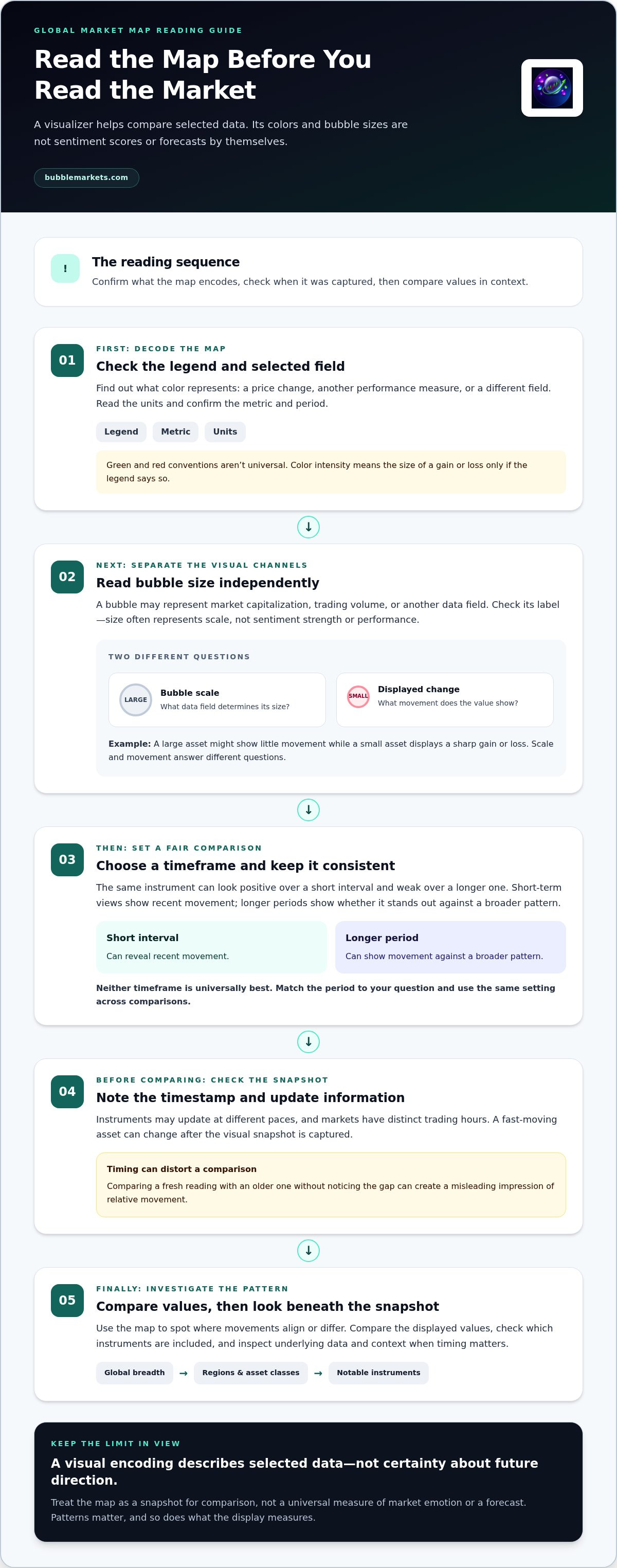
A market map compresses several data points into a small visual space. Before interpreting its pattern, identify what each visual channel represents. Color may show a selected performance measure, but green and red conventions aren’t universal. Read the legend, check the units, and confirm the metric and period. Color intensity might represent the size of a gain or loss, for example, but only if the legend says so. The Financial Market Indicators overview provides background on how indicators represent selected information, rather than a complete account of market conditions.
Visual encoding describes selected data, not certainty about future direction. A global market sentiment visualizer can make comparisons easier, but it can’t turn a color or shape into a forecast. Use the display to decide what to inspect, then look at the underlying values and context.
How Do Color and Bubble Size Change the Reading?
Start with the legend. Check whether color represents a price change, another performance measure, or a different field, and note the units. Then inspect bubble size separately: it may correspond to market capitalization, trading volume, or another data field, but don’t assume which one without a label. Size often represents scale, not sentiment strength or performance.
For example, a large asset might show little movement while a small asset displays a sharp gain or loss. The larger bubble draws the eye because of its scale; the smaller one may show a more pronounced change. These observations answer different questions. Compare the displayed values before deciding which movement deserves closer investigation.
Why Do Timeframes and Data Updates Matter?
The same instrument can look positive over a short interval and weak over a longer one. A short-term view can reveal recent movement, while a longer period can show whether it stands out against a broader pattern. Neither timeframe is universally best. Choose a period that matches your question and keep it consistent when comparing instruments or markets. Otherwise, apparent differences may come from the settings rather than the data.
Check the timestamp and any displayed update information before comparing markets. Instruments may not update at the same pace, and some markets have distinct trading hours. A fast-moving asset can change after the visual snapshot is captured, so note when you viewed it and revisit the underlying data if timing matters. Comparing a fresh reading with an older one without noticing the gap can create a misleading impression of relative movement.
Use a consistent sequence: confirm the metric, read the legend, note the timeframe and timestamp, then compare the displayed values. BubbleMarkets’ live market maps provide a practical way to inspect visual patterns across asset classes. Interpret each map according to its selected fields and data context.
How Global Sentiment Differs Across Regions and Asset Classes
A global market sentiment visualizer can show regional and asset-class patterns side by side, but those categories answer different questions. Region points to geographic exposure; asset class groups instruments with different structures, measures, and drivers. A regional equity index, for example, doesn’t represent every stock or bond in that area. Read each grouping as a useful slice of the market, not a complete summary.
Markets also operate on different schedules. A global snapshot may combine regions that are open, closing, or not yet trading at the same time. Differences in timestamps can make one area’s data more current than another’s, so compare update context as well as displayed movement.
| Asset class | What a visual comparison may show | Context to keep in view |
|---|---|---|
| Equities | Performance across indexes, sectors, or individual stocks | Index composition and regional exposure |
| Bonds | Changes in bond prices or yields, depending on the measure shown | Price and yield move differently, and bond types vary |
| Currencies | Movement in a currency pair | Each quote compares two currencies, not one currency in isolation |
| Commodities | Price changes across selected markets or contracts | Different commodities can respond to different supply and demand conditions |
| Crypto | Movement across selected digital assets | Trading and update patterns may differ from traditional markets |
What Can Regional Comparisons Reveal?
Compare broad regional groups to see whether movement is widespread or concentrated, then inspect what each group contains. The S&P 500, MSCI World Index, and STOXX Europe 600 are examples of indexes used to view different equity universes; none represents every company or asset in its region. Their composition matters when interpreting differences.
Local schedules add another layer. Overlapping trading hours can make regional movements easier to compare in real time, while a market that has closed may show an earlier snapshot. Check timestamps before treating a difference as a current divergence.
Why Can Stocks, Bonds, Forex, and Crypto Show Different Signals?
Asset classes use distinct measures and may react to different conditions. Stocks may be displayed as percentage price changes, bonds as price or yield movements, and forex as changes in currency pairs. Crypto has its own instruments and trading patterns. The stock market heat map guide offers a closer look at interpreting equity maps.
The VIX is a volatility index, not a complete measure of global sentiment across regions and asset classes. Avoid combining unlike percentages, units, or timeframes as if they were directly comparable. First identify what each value measures, then look for relationships or divergences without assuming one market explains another.
A Five-Step Workflow for Scanning Global Market Sentiment
Use a global market sentiment visualizer to organize observations, not to generate trades or predict what comes next. A repeatable scan helps separate a broad pattern from movement concentrated in a region, asset class, or small group of instruments. Follow the same sequence each time, and record what the map shows along with its timeframe, timestamp, and coverage.
From the Global Snapshot to a Focused View
Move from the broadest view to the specific data behind an unusual pattern. At each stage, confirm the selected measure and legend, then note the timestamp and which markets or instruments are included.
- Choose a timeframe. Select a period that fits the question, such as a short-term scan for recent movement or a longer view for context. Keep the period consistent during comparisons.
- Scan global breadth. Look across the full map. Note whether movement appears broadly shared or whether positive and negative readings are mixed. Don’t infer broad participation from a few prominent marks.
- Compare regions. Narrow the view by geography and check which groups contribute to the overall pattern. A regional difference may reflect local schedules or coverage, so compare timestamps and constituents.
- Inspect asset classes. Separate equities, bonds, currencies, commodities, and crypto before comparing their readings. Check that the measure and units are meaningful for each category.
- Investigate outliers. Inspect unusually large moves, then look at the instrument and the components behind its group. For an equity scan, filters can help narrow the field by selected criteria; the visual stock screener buying guide explains how screening can focus that review.
When an unusually broad pattern appears, trace it back one level at a time: from global view to region, from region to asset class, and from category to individual instruments. Record the observation and its context, such as “several regions show declines on the selected daily view.” Avoid labeling it a prediction or assuming the pattern will persist.
How to Check Context Before Drawing a Conclusion
Test an observation before describing it as widespread. If the map supports another relevant measure, compare it with the first. For example, review price movement alongside participation or breadth where those fields are available. Then ask whether the pattern spans many components or is concentrated in a few large ones. A group’s headline reading can conceal that distinction.
Use news or independent sources to investigate possible context, not to confirm that a visual pattern has one clear cause. Headlines may describe an event, while the map shows selected market data; neither alone establishes why every instrument moved. For a consistent record, note the observation, measure, timeframe, timestamp, coverage, and any context you found. Explore BubbleMarkets’ live market maps to apply this scan across multiple asset classes.
Using BubbleMarkets as a Global Market Sentiment Visualizer
Once you have a consistent scan process, a multi-asset platform can help organize the work. BubbleMarkets brings interactive maps for stocks, crypto, ETFs, commodities, bonds, and forex into one platform. Use each map to observe the selected market, then apply the same checks: identify the measure, set a relevant timeframe, and note the data context. The goal is a clearer view of market activity, not a shortcut to a prediction.
Coverage across asset classes makes it easier to move from a broad overview to a focused comparison. It doesn’t make unlike assets directly comparable, though. A percentage change in an equity and a movement in a currency pair may represent different things. Check each map’s labels and fields before relating one view to another.
Explore Multiple Markets Without Losing the Comparison Framework
Move between maps in a deliberate sequence. For example, scan an equity map for broad participation, then inspect bonds or currencies separately for contrasting movement. Keep the selected timeframe in view as you switch, and verify the measure shown on each map. This preserves the comparison framework without treating one market’s reading as an explanation for another’s.
BubbleMarkets also includes market screeners and heat maps to help organize selected markets and instruments. Portfolio tracking provides another view of selected holdings, while price alerts can draw attention to configured price conditions. These tools support observation and review. An alert is a notification, not an instruction to trade, and a screener narrows the display rather than deciding what you should do.
When Do Alerts, Screeners, and Summaries Help?
Use a screener when the broad map contains more instruments than you want to inspect at once. Apply relevant filters to focus the review, then check the remaining results in context. Price alerts can draw attention to a configured condition so you can examine the underlying data. They don’t explain why a price moved or indicate what action to take.
AI-generated market summaries can help condense information for review, but they’re a starting point, not an authoritative forecast. Check the underlying map and relevant independent information before relying on a summary to understand a change. For investors seeking ongoing commentary and stock ideas to complement visual scans, learn more about Phil Stock World. Visualizations, alerts, screeners, and summaries provide data context. They don’t provide personalized investment advice or remove the need for independent analysis.
Try a Visual Market Scan
Apply the workflow by choosing a market, confirming its measure and timeframe, and recording what stands out before drawing conclusions. Explore BubbleMarkets’ free live market visualizers to scan markets across asset classes. Use the displays as information for your own research; you remain responsible for evaluating context and making your own decisions.
Make Your Next Market Scan More Consistent
Turn occasional browsing into a simple observation routine. Choose a regular question to investigate, record the timeframe and data context, and note what you would check next. A consistent record makes it easier to distinguish a recurring pattern from a one-off snapshot without treating either as a forecast.
A global market sentiment visualizer can support that process when you use it as a structured view of data, not a decision-maker. BubbleMarkets brings free live interactive maps across asset classes together with screeners, price alerts, and AI-generated summaries, giving you different ways to examine market information. Apply your own checks and use independent research to assess what a pattern may mean.
Start with one market and one clear question, then expand your scan as you become familiar with the data. Explore BubbleMarkets’ free live market visualizers and put a repeatable approach into practice. A careful scan won’t remove uncertainty, but it can help you ask better questions and investigate market changes with greater clarity.
Frequently Asked Questions
How do you read a global market sentiment map?
Start by identifying the map’s labels and controls, then inspect an individual instrument’s details if the interface provides them. Compare it with similar instruments in the same group rather than assuming neighboring marks share the same cause. Notice missing, unchanged, or delayed data too, since these can affect how complete the pattern appears. A broad visual scan helps locate areas to examine, while the underlying instrument view provides more specific context.
Can a market sentiment visualizer predict stock prices?
No. A visualizer displays selected market information; it can’t establish what a stock’s next price will be. A recent gain, for instance, may be followed by continued gains, a reversal, or little movement. The display alone can’t resolve those possibilities. Use the map to identify an observation, then consider other relevant information and uncertainties. Don’t treat a color pattern, summary, or outlier as a forecast or trading instruction.
What does bubble size mean on a market map?
Bubble size represents the data field assigned by the map, not a universal measure of sentiment. It could indicate market capitalization, trading volume, or another specified value. That choice changes what a large bubble means: size based on capitalization suggests scale, while size based on volume reflects a different characteristic. Check the map’s legend or field labels before comparing bubbles, especially across groups that use different measures.
Why do global markets show different sentiment at the same time?
Markets can respond differently because their participants, trading hours, and exposures differ. For example, a change in interest-rate expectations could affect bond yields and currency pairs while companies in an equity index respond to earnings news. Readings may also come from different points in their trading sessions. Before interpreting divergence, check whether the markets were observed at comparable times and whether their displayed measures describe similar things.
Is a market heat map the same as a sentiment visualizer?
Not always. “Heat map” usually describes a color-coded layout, while “sentiment visualizer” describes a purpose: organizing selected data to help examine broad market conditions. A heat map can serve that purpose if it shows relevant instruments and measures, but the label alone doesn’t reveal its coverage or methodology. Check what the colors encode and which assets appear. A chart’s visual format doesn’t guarantee that it measures sentiment directly.
Are global market visualizers investment advice?
No. Global market visualizers present data for observation; they don’t provide personalized investment advice or decide what action suits an individual. BubbleMarkets operates as a data visualization platform, with maps and related analytical tools rather than brokerage or advisory services. A displayed pattern or AI-generated summary can help organize information, but it isn’t a substitute for independent research. Readers are responsible for evaluating relevant context and making their own decisions.
Frequently asked questions
What Does Market Sentiment Mean Across Global Assets?
Market sentiment describes participants’ prevailing response to conditions, reflected imperfectly in observable activity. Price direction offers one clue, but not a complete reading. A market may rise while participation is narrow, or fall amid uneven trading and changing volatility. Breadth, volatility, and the range of instruments moving together add context to an index or asset’s direction. Sentiment can also differ by asset class. Equities may reflect expectations for company earnings, while bonds respond to interest-rate expectations and currencies to changing demand between economies. Digital assets can move differently again. These markets have distinct drivers, so a broad snapshot is most useful when it shows contrasts rather than compressing them into a single mood label.
What Information Can a Visualizer Put in One View?
Depending on its design, a visualizer can group data by geography, such as regions or countries; by market segment, such as equity sectors; or by asset category, such as bonds, currencies, commodities, and digital assets. It may also arrange individual instruments within those groups. This structure helps you move from a broad comparison to a closer look at specific components. Coverage and measures vary by visualization and selected market. One view may emphasize price performance, while another may organize instruments around a different data field. Check the labels and legend before drawing conclusions, and note which instruments are included. Bubble maps use spatial arrangement and visual encoding to support this scan; the market bubble map guide explains their basic structure and how to read one. A market map compresses several data points into a small visual space. Before interpreting its pattern, identify what each visual channel represents. Color may show a selected performance measure, but green and red conventions aren’t universal. Read the legend, check the units, and confirm the metric and period. Color intensity might represent the size of a gain or loss, for example, but only if the legend says so. The Financial Market Indicators overview provides background on how indicators represent selected information, rather than a complete account of market conditions. Visual encoding describes selected data, not certainty about future direction. A global market sentiment visualizer can make comparisons easier, but it can’t turn a color or shape into a forecast. Use the display to decide what to inspect, then look at the underlying values and context.
How Do Color and Bubble Size Change the Reading?
Start with the legend. Check whether color represents a price change, another performance measure, or a different field, and note the units. Then inspect bubble size separately: it may correspond to market capitalization, trading volume, or another data field, but don’t assume which one without a label. Size often represents scale, not sentiment strength or performance. For example, a large asset might show little movement while a small asset displays a sharp gain or loss. The larger bubble draws the eye because of its scale; the smaller one may show a more pronounced change. These observations answer different questions. Compare the displayed values before deciding which movement deserves closer investigation.
Why Do Timeframes and Data Updates Matter?
The same instrument can look positive over a short interval and weak over a longer one. A short-term view can reveal recent movement, while a longer period can show whether it stands out against a broader pattern. Neither timeframe is universally best. Choose a period that matches your question and keep it consistent when comparing instruments or markets. Otherwise, apparent differences may come from the settings rather than the data. Check the timestamp and any displayed update information before comparing markets. Instruments may not update at the same pace, and some markets have distinct trading hours. A fast-moving asset can change after the visual snapshot is captured, so note when you viewed it and revisit the underlying data if timing matters. Comparing a fresh reading with an older one without noticing the gap can create a misleading impression of relative movement. Use a consistent sequence: confirm the metric, read the legend, note the timeframe and timestamp, then compare the displayed values. BubbleMarkets’ live market maps provide a practical way to inspect visual patterns across asset classes. Interpret each map according to its selected fields and data context. A global market sentiment visualizer can show regional and asset-class patterns side by side, but those categories answer different questions. Region points to geographic exposure; asset class groups instruments with different structures, measures, and drivers. A regional equity index, for example, doesn’t represent every stock or bond in that area. Read each grouping as a useful slice of the market, not a complete summary. Markets also operate on different schedules. A global snapshot may combine regions that are open, closing, or not yet trading at the same time. Differences in timestamps can make one area’s data more current than another’s, so compare update context as well as displayed movement.
What Can Regional Comparisons Reveal?
Compare broad regional groups to see whether movement is widespread or concentrated, then inspect what each group contains. The S&P 500, MSCI World Index, and STOXX Europe 600 are examples of indexes used to view different equity universes; none represents every company or asset in its region. Their composition matters when interpreting differences. Local schedules add another layer. Overlapping trading hours can make regional movements easier to compare in real time, while a market that has closed may show an earlier snapshot. Check timestamps before treating a difference as a current divergence.
Why Can Stocks, Bonds, Forex, and Crypto Show Different Signals?
Asset classes use distinct measures and may react to different conditions. Stocks may be displayed as percentage price changes, bonds as price or yield movements, and forex as changes in currency pairs. Crypto has its own instruments and trading patterns. The stock market heat map guide offers a closer look at interpreting equity maps. The VIX is a volatility index, not a complete measure of global sentiment across regions and asset classes. Avoid combining unlike percentages, units, or timeframes as if they were directly comparable. First identify what each value measures, then look for relationships or divergences without assuming one market explains another. Use a global market sentiment visualizer to organize observations, not to generate trades or predict what comes next. A repeatable scan helps separate a broad pattern from movement concentrated in a region, asset class, or small group of instruments. Follow the same sequence each time, and record what the map shows along with its timeframe, timestamp, and coverage.
When Do Alerts, Screeners, and Summaries Help?
Use a screener when the broad map contains more instruments than you want to inspect at once. Apply relevant filters to focus the review, then check the remaining results in context. Price alerts can draw attention to a configured condition so you can examine the underlying data. They don’t explain why a price moved or indicate what action to take. AI-generated market summaries can help condense information for review, but they’re a starting point, not an authoritative forecast. Check the underlying map and relevant independent information before relying on a summary to understand a change. Visualizations, alerts, screeners, and summaries provide data context. They don’t provide personalized investment advice or remove the need for independent analysis.
How do you read a global market sentiment map?
Start by identifying the map’s labels and controls, then inspect an individual instrument’s details if the interface provides them. Compare it with similar instruments in the same group rather than assuming neighboring marks share the same cause. Notice missing, unchanged, or delayed data too, since these can affect how complete the pattern appears. A broad visual scan helps locate areas to examine, while the underlying instrument view provides more specific context.
Can a market sentiment visualizer predict stock prices?
No. A visualizer displays selected market information; it can’t establish what a stock’s next price will be. A recent gain, for instance, may be followed by continued gains, a reversal, or little movement. The display alone can’t resolve those possibilities. Use the map to identify an observation, then consider other relevant information and uncertainties. Don’t treat a color pattern, summary, or outlier as a forecast or trading instruction.
What does bubble size mean on a market map?
Bubble size represents the data field assigned by the map, not a universal measure of sentiment. It could indicate market capitalization, trading volume, or another specified value. That choice changes what a large bubble means: size based on capitalization suggests scale, while size based on volume reflects a different characteristic. Check the map’s legend or field labels before comparing bubbles, especially across groups that use different measures.
Why do global markets show different sentiment at the same time?
Markets can respond differently because their participants, trading hours, and exposures differ. For example, a change in interest-rate expectations could affect bond yields and currency pairs while companies in an equity index respond to earnings news. Readings may also come from different points in their trading sessions. Before interpreting divergence, check whether the markets were observed at comparable times and whether their displayed measures describe similar things.
Is a market heat map the same as a sentiment visualizer?
Not always. “Heat map” usually describes a color-coded layout, while “sentiment visualizer” describes a purpose: organizing selected data to help examine broad market conditions. A heat map can serve that purpose if it shows relevant instruments and measures, but the label alone doesn’t reveal its coverage or methodology. Check what the colors encode and which assets appear. A chart’s visual format doesn’t guarantee that it measures sentiment directly.
Are global market visualizers investment advice?
No. Global market visualizers present data for observation; they don’t provide personalized investment advice or decide what action suits an individual. BubbleMarkets operates as a data visualization platform, with maps and related analytical tools rather than brokerage or advisory services. A displayed pattern or AI-generated summary can help organize information, but it isn’t a substitute for independent research. Readers are responsible for evaluating relevant context and making their own decisions.
Market information on this page is for education and general information only. It is not investment advice or a recommendation to buy or sell any asset.