 BubbleMarkets
How to Use a Visual Tool to Spot Market Extremes

What if the biggest bubble on a market map is an outlier, not a sign of a turning point? Individual price charts can make it difficult to compare assets, and a sharp move in one ticker doesn’t show whether the wider market is moving with it. A visual tool to spot market extremes helps you scan performance and concentration across many assets. Treat an unusual reading as a reason to investigate, not a prediction of a reversal.
BubbleMarkets’ interactive maps display data across stocks, crypto, ETFs, commodities, bonds, and forex, making it easier to compare moves at a glance. To put a standout bubble in context, check how many assets share the move, compare relevant groups, and review another timeframe before drawing a conclusion.
This guide sets out a repeatable process for finding unusually strong or weak performance, checking whether it’s widespread, and distinguishing a single-asset outlier from a broader market condition. Bubble maps help organize observations; they don’t confirm reversals or recommend trades.
Key Takeaways
- Set the asset group, metric, and timeframe before using a visual tool to spot market extremes, so you know what each comparison means.
- Check the legend and settings to understand how bubble size and color are encoded. Their meanings can vary between visualizations.
- Compare a standout asset with its peers to see whether a move is isolated or shared across a wider group.
- Record what the display shows separately from your explanation of why it may be happening.
- Use BubbleMarkets’ visualizers, screeners, portfolio tracking, price alerts, and AI-generated summaries to organize observations across asset groups.
What Does a Market Extreme Look Like on a Visual Tool?
Markets move across many assets, but not every standout move has the same meaning. One stock may rise while most of its sector falls; an entire asset group may move together. A visual extreme is unusually strong or weak behavior relative to the comparison set on screen, such as selected assets over a defined period. It describes the data in view, not what will happen next.
A large bubble or striking color can attract attention without showing whether a move is isolated, widespread, temporary, or linked to a lasting change in conditions. Use the display to identify where closer review may be useful. Then check the comparison group, metric, and timeframe before interpreting what you see.
An unusually high or low reading describes what has happened; it doesn’t confirm that the market has changed direction.
What Counts as an Unusually Strong or Weak Move?
Start with relative performance. If one asset is up 8% over the selected period while the rest of its displayed group are clustered near 1%, it stands out within that comparison set. These figures are an illustration, not a threshold for calling a move extreme. The same asset might look ordinary in a different group or over a longer period.
Compare the outlier with its peers, then see whether similar readings appear across the group. The assets included, selected metric, and display settings all affect what looks unusual. A visual tool to spot market extremes helps organize these comparisons, but the configuration determines the context for each observation.
Why a Market Extreme Is Not a Reversal Signal
Strong or weak conditions can persist longer than expected. A sharp rise doesn’t, by itself, show that prices have peaked; a steep decline doesn’t establish that they’ve bottomed. Even a pattern that resembles a bubble needs further context. The Economic Bubble overview describes a broader phenomenon, but an unusually high reading on a market display alone cannot diagnose one.
Keep observation separate from prediction. A map can show which assets moved most, how their readings compare, and whether a move appears across a group. It can’t establish the cause or confirm a future reversal. These limits apply whether you’re scanning stocks, crypto, or another asset category.
For a disciplined review, record what the visual shows before writing down why you think it happened. Note the asset group, metric, and period, then describe the reading in neutral terms: “one asset outperformed most peers during this interval” or “weakness appeared across several members of the group.” This makes the observation easier to revisit and compare with other evidence. It also helps prevent a striking display from becoming a forecast, trade instruction, or investment advice. Visual patterns can focus attention, but they don’t remove the need to assess context and other information.
How to Read Bubble Size, Color, and Grouping for Extreme Moves
A bubble map brings several dimensions of market information into one view. Size, color, and position can help you decide where to look, but each mark depends on the display’s settings. A large bubble might represent a larger value for the selected metric, while its color may show positive or negative change. These encodings don’t have one universal meaning across all tools.
Before interpreting a standout bubble, check the legend, selected metric, and timeframe. Then compare the mark with its peers and the wider set. This helps distinguish an unusual reading from an effect of how the view is configured.
Check the Legend and Timeframe Before Interpreting Color
Read the legend first. It explains what each color represents in the current view and how shades relate to the displayed values. Color may show price change over a chosen period, but don’t assume a stronger shade means higher volume, greater risk, or a particular valuation unless the visualization identifies that measure.
Next, compare periods. A group that looks uniformly positive over a short interval may look mixed over a longer one. Changing the timeframe can help you see whether a pattern is brief or persistent, but neither view alone explains why it occurred.
Use Bubble Size and Grouping to Find Concentration
Relative size draws attention to assets with larger values for the selected measure. First compare bubbles within the same group, such as stocks in one sector, where the context is more consistent. Compare across groups more cautiously: different asset classes or metrics may not be directly comparable. Position or proximity helps organize the display; it doesn’t prove that nearby assets are correlated or share a cause.
Read all three visual dimensions together. If a large bubble also has a strong color, check whether size reflects market capitalization, performance, or another metric, and whether color reflects the same period you’re reviewing. A small bubble with an unusually intense color may show a marked percentage move, but size and color still describe different attributes. Use the legend and asset details to confirm what each mark represents.
Grouping can also reveal concentration. If several members of one category share similar colors, the move may be broader within that displayed group than a single standout suggests. That’s a descriptive observation, not proof of a market-wide trend. Bubble maps organize assets according to their settings, so don’t treat visual clusters as evidence of a relationship on their own.
For broader map-reading context, use this market bubble map visual scanning guide. To compare asset groups in a visual workspace, explore BubbleMarkets’ live market visualizers. For context beyond the map, published Consumer Price Index (CPI) data can help you review inflation readings alongside market observations. It doesn’t establish the cause of a particular move.
How to Test Whether a Visual Market Extreme Is Broad or Isolated
A standout move becomes more useful to interpret when you compare it with the assets around it. Check whether peers share its direction, whether the move appears across a wider index, and whether the pattern holds over another timeframe. A visual tool to spot market extremes helps organize that comparison, but price performance alone doesn’t explain what caused a move.
Breadth adds context, but it can’t confirm a market top or bottom. Treat it as a description of how widely a move appears, not proof that a reversal is underway.
| Pattern | What to compare | Evidence and limits |
|---|---|---|
| Isolated asset move | One asset’s direction and displayed change against its peers and a relevant index. | If most peers move differently, the asset stands apart in this view. That doesn’t reveal the cause or establish whether the move will continue. |
| Broad group move | How many assets in a defined group move in the same direction, then how the group compares with a wider index. | Shared direction suggests the move is more widespread in the selected set. It doesn’t prove that the entire market is involved or that conditions have reached an extreme. |
Compare an Outlier with Its Peers and the Wider Index
Start with a consistent comparison set. If one company’s shares fall while most visible peers are higher, record it as an outlier within that set. If many constituents move lower together, compare them with a relevant benchmark, such as the S&P 500 or Nasdaq-100. The Russell 2000 can offer another comparison for smaller U.S. companies. Each index covers a different group, so a mismatch may reflect different constituents rather than a contradiction.
A stock market heat map guide can help structure a group-level scan. Keep the asset universe consistent when comparing breadth, and note whether the display includes all constituents or a narrower selection. A cluster of similar colors shows shared performance in the displayed group, not the whole market.
Add Volatility and Timeframe Context
Before calling a move unusual, compare it with the same asset or group over other relevant periods. A sharp daily decline can occur within a longer-term rise; a modest short-term change can also extend a sustained weakening pattern. Both readings can be accurate because they describe different intervals. Record the selected timeframe alongside the observation.
The CBOE Volatility Index (VIX) can provide separate context about expected volatility in the U.S. stock market. It isn’t a bubble-map reading or a prediction generated by one. For economic background, the Federal Reserve Economic Outlook discusses the outlook, inflation, and monetary policy. This context may inform further research, but a visual display of price performance doesn’t identify those causes. Keep the observation separate from any explanation, and don’t treat breadth or volatility as confirmation of a turning point.
A Repeatable Workflow for Scanning Potential Market Extremes
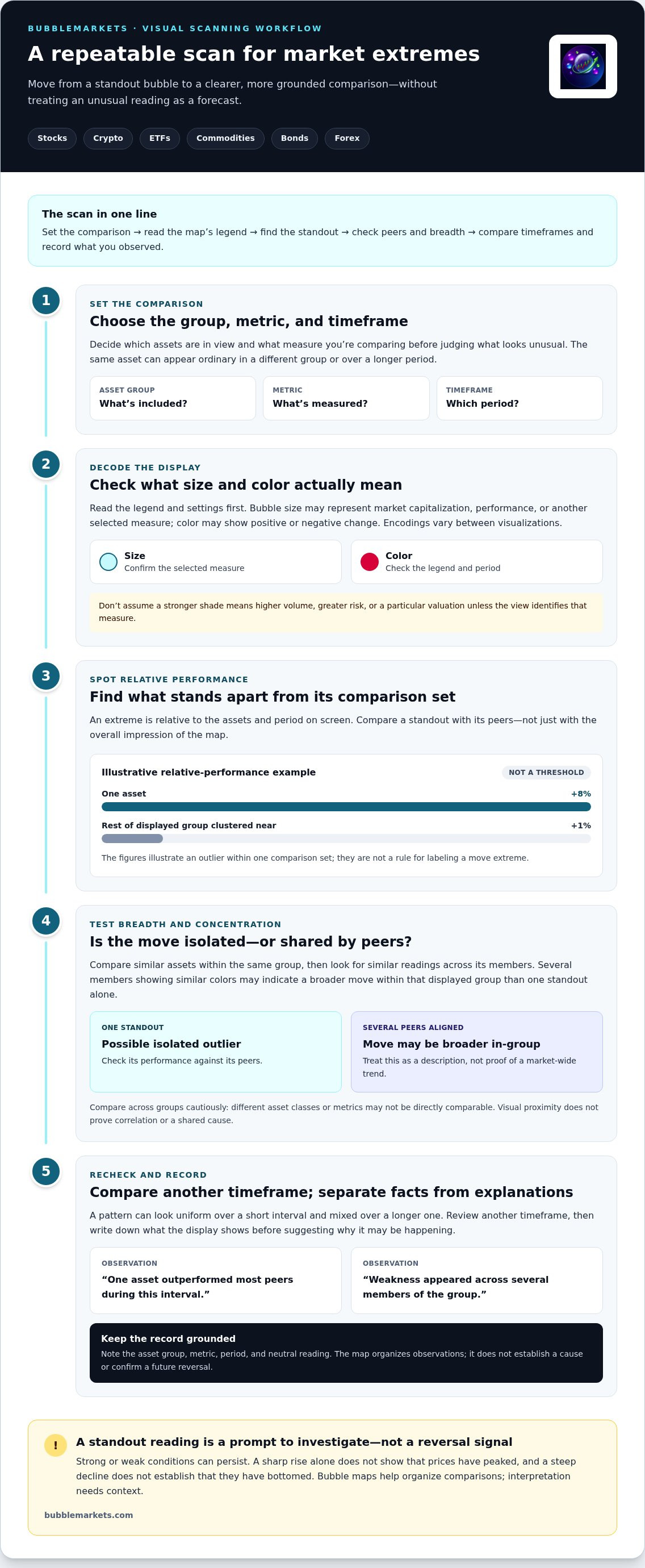
A consistent scan makes it easier to compare observations over time and reduces the chance that a striking display will dictate your conclusion. Follow the same sequence each time: define the view, inspect the data, compare peers, then record what you saw separately from what you think it means.
Set a Clear Scan Before Opening the Map
Choose a market, comparison group, displayed metric, and timeframe before interpreting the map. Keep those settings consistent across the assets you compare. Filters can narrow a broad market to a useful subset, but use them to define the question, not to select only results that support a conclusion.
- Define the comparison. Select a market and group, such as a set of stocks or a category of crypto assets. Note which assets are included so you know what the view represents.
- Choose the metric and period. Decide whether you’re reviewing performance or another displayed measure, then set the timeframe. Check the legend to understand the units and visual encoding.
- Scan for standout readings. Note which assets appear unusually strong or weak within the chosen set. Treat this as a first-pass observation, not a ranking of importance or a forecast.
- Compare the peers. Check whether the move is shared by other assets in the group or concentrated in one name. If useful, compare the group with a relevant index or broader market view, keeping differences in coverage in mind.
- Recheck another period. Change the timeframe to see whether the pattern is limited to the selected interval or also appears in a longer view. Record both readings; they can differ without either being incorrect.
- Write observation and interpretation separately. First describe what the display shows, including the group, metric, timeframe, and peer behavior. In a separate note, list possible explanations as questions to investigate, not facts established by the map.
Record, Recheck, and Keep the Interpretation Bounded
A short scan log makes the process repeatable. For example: “Selected group: technology stocks; metric: displayed price change; period: chosen interval; observation: several assets moved lower, with one standing apart.” Add an interpretation only after reviewing other relevant information. A later scan using the same settings can show whether the pattern persisted, narrowed, or changed.
Filters are useful for focused comparisons, but each one changes the set of assets you’re evaluating. A visual stock screener buying guide can help you think through filtered scans and tool fit. As you use a visual tool to spot market extremes, keep its role clear: it organizes market observations, not personalized recommendations or trade instructions.
Apply this workflow to global asset groups with BubbleMarkets’ live market visualizers, then record your observations using the same settings for future reviews.
Use BubbleMarkets to Scan Extreme Moves Across Markets
BubbleMarkets brings visual market maps and supporting tools together to help you compare asset groups. Instead of switching between individual price charts, start with a broad view, identify assets or groups that stand out, and then narrow the scan. Use the display to organize observations, and check the context before deciding what a market move means.
Match the Market View to the Question
Start with the asset category that fits your scan. Stock, crypto, ETF, commodity, bond, and forex views let you focus on different parts of the market. If you’re reviewing whether strength is concentrated in a stock group or spread across a wider set, for example, begin with the relevant stock view. To compare a defined subset, use a market screener to filter the assets under review.
Keep the question specific. Are you looking for unusually strong or weak performance, or checking how widely a move is shared? Choose the relevant visualizer or screening view, then note its displayed metric and timeframe. A visual tool to spot market extremes is most useful when the scope is clear: changing the asset group or settings changes what counts as a standout reading.
BubbleMarkets also includes portfolio tracking, price alerts, and AI-generated market summaries. Each supports a different part of a review: visual maps help compare assets, screeners narrow the set, tracking and alerts help monitor selected assets, and summaries provide additional context. Pro, Professional, and Enterprise subscriptions unlock advanced visualization tools, extended market screening, customizable heat maps, portfolio tracking, price alerts, AI-generated summaries, and deeper data coverage across global asset classes.
Continue Monitoring Without Treating the Map as Advice
A visual pattern is a starting point, not a conclusion. If an asset or group stands out, return to the same view later and compare results using consistent settings. Portfolio tracking and price alerts can support ongoing observation of selected assets. They don’t establish whether a move is unusual across the full market or signal that its direction will change.
AI-generated summaries can help organize information, but treat them as context to review rather than verified forecasts. Check the underlying display and relevant source information before accepting an explanation. BubbleMarkets presents data patterns; it doesn’t predict market extremes, execute trades, or provide investment advice.
To begin a scan across market categories, explore BubbleMarkets’ live market visualizers.
Make Your Next Market Scan More Consistent
Make visual review a repeatable habit: choose a clear comparison, note what the display shows, and revisit the same view before deciding what the pattern might mean. This keeps the visual tool to spot market extremes in its proper role, helping you organize observations without treating a standout reading as a forecast.
BubbleMarkets offers free live visualizers across global asset classes, along with market screeners, portfolio tracking, and price alerts to support market observation. Use these tools to focus your next scan, then keep your conclusions grounded in the data and its limits. The display can direct your attention, but it doesn’t predict reversals or provide investment advice.
Explore BubbleMarkets’ free live market visualizers to apply a consistent review process to the markets you follow.
Frequently Asked Questions
Can a visual tool identify the exact top or bottom of a market?
No. A visualizer can flag unusually strong or weak readings in the displayed data, but it can’t establish that a market has made its final high or low. An extreme may persist, and a shorter timeframe can look different from a longer one. Use the visual pattern to decide what to examine next, not as a forecast or trade recommendation.
How do bubble maps help spot market extremes?
Bubble maps place assets in a shared view, making relative moves easier to scan than opening charts one at a time. For example, use a stock map to see whether one company differs from its sector, then inspect the underlying data. A visual tool to spot market extremes can highlight what to investigate; it doesn’t explain the cause or validate a hypothesis.
What does a large bubble mean on a market map?
A large bubble represents a larger value for whichever metric the map uses, not a fixed meaning shared by all visualizers. If size is tied to market capitalization, a large company can dominate the display even when its percentage move is modest. If size reflects another measure, the interpretation changes. Confirm the metric in the interface before comparing bubbles of different sizes.
Is a market-wide move more significant than one asset’s extreme move?
Not necessarily. A broad decline can show participation across a selected group, while an individual asset may have a separate company-specific move. Compare a stock’s direction with its sector and the index that includes it; disagreement narrows what the observation describes. Breadth helps characterize scope, but it can’t establish that a move is more consequential or likely to reverse.
Can I use a market visualizer for crypto and stocks?
Yes. BubbleMarkets provides views for stocks and crypto, as well as ETFs, commodities, bonds, and forex. For a cross-market review, compare each category on its own terms first, such as checking stock performance separately from currency-pair changes. Market structures and displayed metrics differ, so matching colors or shapes across categories aren’t necessarily equivalent evidence.
What should I check before calling a move an extreme?
Verify the asset universe and period behind the displayed readings. Then consider whether an event, market closure, or change in data coverage could affect the comparison. Save the settings with your note so a later review uses the same basis. This makes the observation easier to reproduce, though even a consistent visual pattern can’t confirm that the market has reached a turning point.
Frequently asked questions
What Counts as an Unusually Strong or Weak Move?
Start with relative performance. If one asset is up 8% over the selected period while the rest of its displayed group are clustered near 1%, it stands out within that comparison set. These figures are an illustration, not a threshold for calling a move extreme. The same asset might look ordinary in a different group or over a longer period. Compare the outlier with its peers, then see whether similar readings appear across the group. The assets included, selected metric, and display settings all affect what looks unusual. A visual tool to spot market extremes helps organize these comparisons, but the configuration determines the context for each observation.
Can a visual tool identify the exact top or bottom of a market?
No. A visualizer can flag unusually strong or weak readings in the displayed data, but it can’t establish that a market has made its final high or low. An extreme may persist, and a shorter timeframe can look different from a longer one. Use the visual pattern to decide what to examine next, not as a forecast or trade recommendation.
How do bubble maps help spot market extremes?
Bubble maps place assets in a shared view, making relative moves easier to scan than opening charts one at a time. For example, use a stock map to see whether one company differs from its sector, then inspect the underlying data. A visual tool to spot market extremes can highlight what to investigate; it doesn’t explain the cause or validate a hypothesis.
What does a large bubble mean on a market map?
A large bubble represents a larger value for whichever metric the map uses, not a fixed meaning shared by all visualizers. If size is tied to market capitalization, a large company can dominate the display even when its percentage move is modest. If size reflects another measure, the interpretation changes. Confirm the metric in the interface before comparing bubbles of different sizes.
Is a market-wide move more significant than one asset’s extreme move?
Not necessarily. A broad decline can show participation across a selected group, while an individual asset may have a separate company-specific move. Compare a stock’s direction with its sector and the index that includes it; disagreement narrows what the observation describes. Breadth helps characterize scope, but it can’t establish that a move is more consequential or likely to reverse.
Can I use a market visualizer for crypto and stocks?
Yes. BubbleMarkets provides views for stocks and crypto, as well as ETFs, commodities, bonds, and forex. For a cross-market review, compare each category on its own terms first, such as checking stock performance separately from currency-pair changes. Market structures and displayed metrics differ, so matching colors or shapes across categories aren’t necessarily equivalent evidence.
What should I check before calling a move an extreme?
Verify the asset universe and period behind the displayed readings. Then consider whether an event, market closure, or change in data coverage could affect the comparison. Save the settings with your note so a later review uses the same basis. This makes the observation easier to reproduce, though even a consistent visual pattern can’t confirm that the market has reached a turning point.
Market information on this page is for education and general information only. It is not investment advice or a recommendation to buy or sell any asset.