 BubbleMarkets
Market Visualizer API: A Practical Guide to Data, Visuals, and Integration in 2026
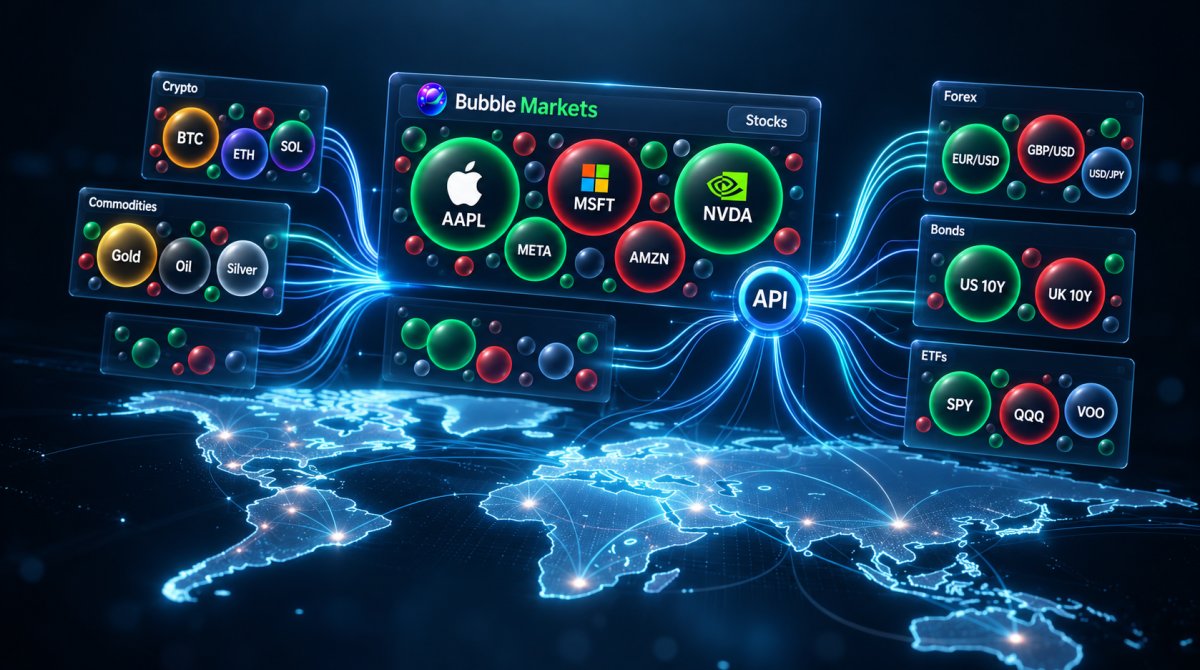
What does a market visualizer API actually provide: market data, visual components, or a connection between the two? The distinction matters. A market visualizer api can connect structured financial data with visual outputs in a product, but the API may cover the data layer, the visual layer, or both. Treating every API as a complete data feed and ready-made chart can lead to an integration that doesn’t fit your needs.
Before building, define which assets your product needs, what users should compare, and how current the displayed data must be. Then assess what the API provides and what your team needs to build. This guide offers a practical framework for evaluating coverage, freshness, visual output, and integration fit.
You’ll learn how data access, visual encoding, and integration fit together; what to examine when reviewing coverage and freshness; and how to move from a use case to an implementation plan. BubbleMarkets provides developer API access to structured live and historical market visualization data across stocks, crypto, ETFs, commodities, bonds, and forex. Use the steps below to decide how an API can support your product workflow.
Key Takeaways
- Separate the data feed, visual layer, and application integration when defining what you need from an API.
- Assess asset coverage, historical depth, freshness, visual output, and integration fit as distinct requirements.
- Match the view to the task: a single-asset detail screen and a multi-asset overview call for different design choices.
- Plan a market visualizer api integration by specifying assets, metrics, time ranges, refresh expectations, and how the interface should handle unavailable data.
- BubbleMarkets’ structured live and historical data supports multi-asset visualization workflows.
What Is a Market Visualizer API, and What Does It Connect?
A financial market visualizer brings together three layers: access to market information, a method for representing selected information visually, and a product interface where people use that view. The term market visualizer API can refer to one layer or a workflow that connects them. This distinction matters when planning an integration: an API that supplies data may not include charts, and a visual component may not supply the underlying market information.
In a financial product, a market visualizer API connects selected market data and metrics to a visual representation within an application. It’s a practical description, not a universal product specification. One implementation may provide data access alone; another may combine data, visualization tools, and integration capabilities.
Think of the relationship as a path: asset data and metrics become visual elements inside a product interface. A selected stock and its price change, for example, might appear as a point in a chart or a bubble in a market map. The data source determines what information is available, the visual layer determines how it is represented, and the application shapes how people use it.
Market data API, API viewer, or visualizer: what is the difference?
A market data API gives software programmatic access to market information. It may supply prices, identifiers, or other available metrics, but the term alone doesn’t specify the format, coverage, or display method. An API viewer is an interface for exploring or testing API data. It helps a person inspect information; it isn’t necessarily the component that appears in a finished financial product.
A visualizer presents selected data spatially. A bubble map can use position, size, or color to distinguish assets or values; a heat map uses color across a set of items. These are examples of data and information visualization, where visual encoding helps people interpret information. Some solutions combine these roles, but don’t assume that every API includes all three.
Who uses a market visualizer API?
Developers use these tools to build financial dashboards, trading terminals, and research interfaces. Product teams can add market context to an existing service, while publishers can embed a view alongside financial news or analysis. The intended task shapes the design: a user comparing several assets needs a different view from someone examining one instrument over time.
For instance, a publisher might use a bubble map to show how a group of stocks is moving at a glance, then place that visual within a broader market page. A market bubble map guide illustrates this kind of visual output. Start by defining what the interface should help users see, then decide whether an API visualizer suits that job.
How Market Visualizer APIs Turn Market Data into Visual Views
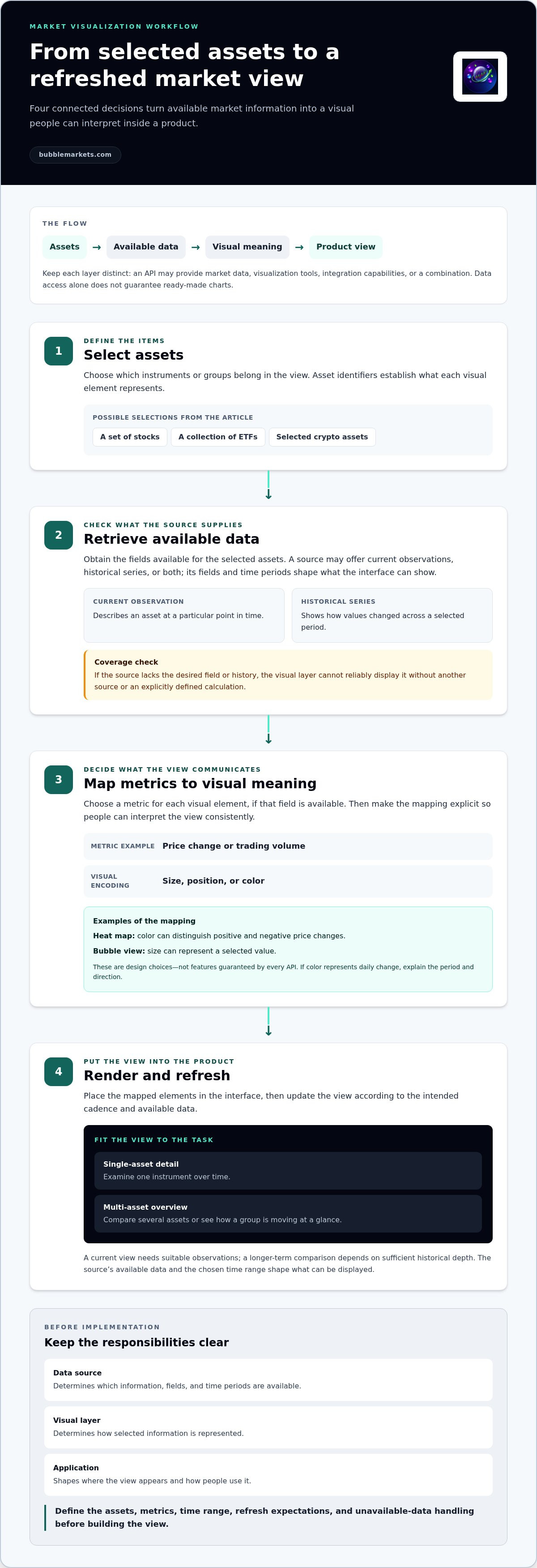
A visual market view is the result of several choices, not just a data feed. A market visualizer api workflow moves from a defined set of assets to retrieved information, then translates selected fields into a display that can be refreshed as new observations become available. Keeping those steps distinct makes it easier to locate a gap: it may be a data limitation, a mapping choice, or a display decision.
- Select assets. Define which instruments or groups belong in the view, such as a set of stocks, a collection of ETFs, or selected crypto assets. Asset identifiers determine what each visual element represents.
- Retrieve data. Obtain the available fields for those assets. A source may provide current observations, historical series, or both. The available fields and periods shape what the application can show.
- Map metrics. Choose the value each visual element should communicate, such as price change or trading volume, if that field is available. The metric determines the visual meaning: a map encoding price change communicates something different from one encoding volume.
- Render and refresh. Place the mapped elements in the product interface, then update the view according to the intended cadence and available data.
From selected assets and metrics to a visual encoding
Asset selection establishes the items in the view; the metric establishes what users compare. A visual may encode that metric through size, position, or color, depending on the design and available fields. For example, a stock heat map could use color to distinguish positive and negative price changes, while a bubble view could use size to represent a selected value. These are design choices, not features guaranteed by every API.
Make the mapping explicit. If color represents daily change, explain the period and direction so users can interpret the view consistently. A visualization can only reflect the fields and time periods available to it. If a source doesn’t provide the desired metric or history, the visual layer can’t reliably display it without another source or an explicitly defined calculation.
Time range, freshness, and historical context
A current observation and a historical series answer different questions. The current value describes an asset at a particular point in time; a historical series shows how values changed across a selected period. A view of recent movement needs a clear time range and suitable observations, while a longer-term comparison depends on sufficient historical depth.
Inspect timestamps and the stated update cadence before deciding how a view should behave. A timestamp indicates when an observation applies; cadence describes how often updates are expected. Don’t present data as current without making its timing clear. The CME Group Market Data APIs page offers an example of how market data access is described by a market operator. For a visual example of grouped stock movements, explore this stock market heat map guide.
BubbleMarkets provides structured live and historical data for multi-asset views. Explore BubbleMarkets developer API access.
How to Evaluate a Market Visualizer API Before Choosing an Approach
Assess the data and display as distinct parts of the decision. A compact comparison helps expose gaps before they become design constraints. Evaluate the data contract and visual output separately. The data contract describes the information available and its context; the visual output determines how users see and interact with that information.
| Evaluation area | Questions to answer |
|---|---|
| Data coverage | Does it include the asset classes and instruments your view needs? |
| Historical depth | Are the available time ranges sufficient for the comparisons users will make? |
| Freshness | Are timestamps and update cadence clear enough for the intended display? |
| Visual output | Does it supply a view, a visual component, or data that your product must render? |
| Integration fit | Can the approach support your workflow, design requirements, and handling of incomplete data? |
Match asset coverage and data depth to the use case
Start with the products your users need to compare. An equities dashboard may require stock coverage, while a multi-asset overview could also need crypto, ETFs, commodities, bonds, and forex. Check that coverage matches the instruments and groupings in the product, not just broad asset-class labels.
Then define the time context. A snapshot may suit a current market overview; a research view may need historical context as well. Check how data provenance is described, whether records include timestamps, and how missing values are represented. These are evaluation questions, not features to assume. A crypto bubble map guide offers an example of a cross-asset visual format to consider when defining the intended view.
Compare single-asset and multi-asset views
A single-asset screen can focus on one instrument’s metric across a chosen period. Check whether the required field and time range are available and whether their timing is clear. A multi-asset overview adds comparison needs: identifiers must distinguish the items, fields should be comparable across them, and missing observations shouldn’t be silently presented as equivalent values.
Write down what a user should be able to compare before reviewing implementations. That makes mismatched coverage or ambiguous timestamps easier to spot.
Compare a visualizer API with a data-only API
A data-only API gives the product team more control over calculations, visual logic, and interface design, but the team must build and maintain that presentation layer. An approach with a visual component can reduce display work when its view fits the product, though it may offer less control over layout or behavior. Neither is universally better. Choose based on the balance of customization, development effort, and the experience your product requires.
A Practical Workflow for Planning a Market Visualizer API Integration
Plan the user experience before settling implementation details. A market visualizer api integration works best when product decisions are clear: what users need to see, compare, or monitor. Then use current provider documentation to shape the technical plan. This keeps interface requirements grounded in the data and capabilities available.
- Define the user task. State what someone should be able to do in the view, such as compare a group of assets or inspect one asset over time. Keep the task specific enough to guide design and testing.
- Select assets. List the required instruments or groups, including how users select or change them. Note whether the view covers one asset class or several.
- Choose metrics. Identify the fields that support the task and define how each should be interpreted. Avoid mixing metrics with different meanings in one visual without clear labels.
- Design the view. Choose a chart, heat map, bubble map, or other representation because it suits the task, not simply because it is available. Specify labels, groupings, and how the view communicates time context.
- Test outputs. Compare what appears in the interface with the selected assets, metrics, periods, and stated update expectations. Check for clear labels and consistent behavior across asset classes.
Translate a product question into a visual requirement
Begin with the user’s question: are they comparing assets, monitoring one instrument, or identifying items that meet a condition? That answer informs whether a visual adds useful context or whether a simpler presentation is clearer. Before development, document the assets, metric, time period, and grouping. For example, a view comparing ETFs by a selected measure needs a defined group and a consistent basis for comparison.
Keep product choices separate from technical choices. The product brief sets the intended task and appearance; implementation decisions depend on the provider’s current documentation. Don’t assume a particular endpoint, data format, or refresh capability from the term “API” alone.
Plan testing, updates, and fallback behavior
Write down the required time ranges, expected refresh behavior, and what the interface should show when observations are missing or unavailable. Use the provider’s stated cadence and terminology rather than inventing an update interval. Test timestamps for clarity, confirm that changing the selected asset universe updates the intended items, and check that comparable metrics remain understandable across stocks, crypto, ETFs, or other supported classes.
Define fallback behavior in product terms: should the view show an unavailable-data message, omit an item, or retain its last displayed observation with its timestamp visible? The appropriate choice depends on the user task. Validate these cases against documentation and observed outputs; avoid claims about latency, error handling, or performance unless implementation evidence supports them.
Once you’ve scoped your requirements, explore BubbleMarkets developer API access for structured live and historical market visualization data.
Where BubbleMarkets Fits in a Market Visualizer API Workflow
Once the product task, required data, and intended view are clear, assess how a specific platform fits. BubbleMarkets provides developer API access to structured live and historical market visualization data. That places it in the data and integration layer of a market visualizer API workflow: product teams can use the market information to support their own interface and use case.
Use the API when a product needs multi-asset market context
BubbleMarkets covers stocks, crypto, ETFs, commodities, bonds, and forex. This breadth suits applications that need to present market context across asset classes, rather than a view limited to one category. For example, a research interface could bring selected asset groups into a broader market overview, while a trading terminal or enterprise application could use market data as part of its own workflow.
Supported use cases include custom algorithmic feeds, bespoke multi-asset mapping, and integration into trading terminals or enterprise applications. These describe ways the data can fit into a product, not a set of predefined visual components. The product team determines how to organize information for its users and how a view should communicate metrics and time context.
Base implementation planning on the technical details required for your integration, including endpoints, formats, authentication methods, and update timing. Don’t infer these specifics from the phrase “developer API.” Keeping product requirements separate from technical decisions helps ground the build in documented information.
Explore the market visualization platform
BubbleMarkets is a market visualization platform with developer API access. It provides market data and visualization context for products, not brokerage, financial advice, or investment recommendations. Teams can assess its fit by comparing their planned asset coverage and workflow with the platform’s multi-asset scope, then using the relevant technical information to shape implementation.
For a related perspective on choosing visual market tools, the visual stock screener buying guide looks at product selection through the needs of a particular use case. It can help frame the difference between selecting a visual tool for direct use and planning market data for integration into an existing application.
Explore BubbleMarkets to review its market visualization platform and developer API access.
Turn Your Integration Plan Into a Testable Product View
Turn your requirements into a small, testable product brief. Choose one user task and describe what the interface should help someone compare, monitor, or understand. Then use that brief to assess whether a market visualizer api supports the experience you intend to build. A focused first use case makes gaps easier to identify before they spread across a larger product.
Use a prototype or sample view to check whether the selected data reads clearly in context. Test the labels, time framing, and behavior when an observation is missing. Record what works and what needs adjustment, then use those findings to guide the broader integration plan. Keep the work grounded in user needs, not visual features added without a clear purpose.
Explore BubbleMarkets to see how its market visualization platform and developer API access can support your integration plan.
Frequently Asked Questions
Is a market visualizer API the same as a market data API?
Not exactly. The terms can overlap, but they describe different roles: a market data API gives software access to information, while a visualizer concerns how selected information appears in an interface. For example, a data feed might supply values that your application then turns into a chart. Some products combine data access and presentation; others leave rendering to your team. Compare documented data scope and visual capabilities separately.
Can a market visualizer API work with stocks and cryptocurrency?
Yes, if the provider covers both asset classes and the integration supports the fields your view requires. But don’t assume a stock price change and a crypto price change use identical periods or update schedules. For a combined dashboard, define a comparison such as percentage movement over a chosen interval, then check that both markets provide suitable observations. Review sample outputs before deciding how to label or group the assets.
How can I tell whether market data is real-time?
Check the provider’s documentation and the timestamps attached to the observations you plan to display. “Live” may refer to a stated update pattern, not continuous updates, and a changing visual alone doesn’t prove that its data is current. Record the cadence, covered markets, and timing conditions that apply to your selected data. In a prototype, compare the displayed timestamp with the source observation so users can see when the value applies.
Do I need coding skills to use a market visualizer API?
For a production integration, someone generally needs to connect the data, map it to the interface, and maintain the resulting view. An API viewer may let a non-developer inspect sample information or test requests, but that doesn’t automatically embed a visual in another product. The skill requirement depends on your goal: exploring data, creating a prototype, or building and maintaining a user-facing feature.
Can a market visualizer API provide investment advice?
A visualization displays information; it doesn’t, by itself, provide personalized financial advice. A heat map can show how selected values compare, but it can’t determine whether an asset suits an individual or guarantee a result. Keep labels factual and explain the metric and period shown. BubbleMarkets operates as a market data visualization platform, not as a provider of personalized investment recommendations or trade execution.
How much does a market visualizer API cost?
There isn’t one standard price for every market visualizer API. Costs depend on the provider’s published terms and the scope of the data and use. Before comparing options, define the assets, historical data, expected usage, and whether the integration is for commercial use. Then compare applicable plans and licensing terms on the same basis. This avoids treating different coverage or usage conditions as equivalent.
Frequently asked questions
Market data API, API viewer, or visualizer: what is the difference?
A market data API gives software programmatic access to market information. It may supply prices, identifiers, or other available metrics, but the term alone doesn’t specify the format, coverage, or display method. An API viewer is an interface for exploring or testing API data. It helps a person inspect information; it isn’t necessarily the component that appears in a finished financial product. A visualizer presents selected data spatially. A bubble map can use position, size, or color to distinguish assets or values; a heat map uses color across a set of items. These are examples of data and information visualization, where visual encoding helps people interpret information. Some solutions combine these roles, but don’t assume that every API includes all three.
Who uses a market visualizer API?
Developers use these tools to build financial dashboards, trading terminals, and research interfaces. Product teams can add market context to an existing service, while publishers can embed a view alongside financial news or analysis. The intended task shapes the design: a user comparing several assets needs a different view from someone examining one instrument over time. For instance, a publisher might use a bubble map to show how a group of stocks is moving at a glance, then place that visual within a broader market page. A market bubble map guide illustrates this kind of visual output. Start by defining what the interface should help users see, then decide whether an API visualizer suits that job. A visual market view is the result of several choices, not just a data feed. A market visualizer api workflow moves from a defined set of assets to retrieved information, then translates selected fields into a display that can be refreshed as new observations become available. Keeping those steps distinct makes it easier to locate a gap: it may be a data limitation, a mapping choice, or a display decision.
Is a market visualizer API the same as a market data API?
Not exactly. The terms can overlap, but they describe different roles: a market data API gives software access to information, while a visualizer concerns how selected information appears in an interface. For example, a data feed might supply values that your application then turns into a chart. Some products combine data access and presentation; others leave rendering to your team. Compare documented data scope and visual capabilities separately.
Can a market visualizer API work with stocks and cryptocurrency?
Yes, if the provider covers both asset classes and the integration supports the fields your view requires. But don’t assume a stock price change and a crypto price change use identical periods or update schedules. For a combined dashboard, define a comparison such as percentage movement over a chosen interval, then check that both markets provide suitable observations. Review sample outputs before deciding how to label or group the assets.
How can I tell whether market data is real-time?
Check the provider’s documentation and the timestamps attached to the observations you plan to display. “Live” may refer to a stated update pattern, not continuous updates, and a changing visual alone doesn’t prove that its data is current. Record the cadence, covered markets, and timing conditions that apply to your selected data. In a prototype, compare the displayed timestamp with the source observation so users can see when the value applies.
Do I need coding skills to use a market visualizer API?
For a production integration, someone generally needs to connect the data, map it to the interface, and maintain the resulting view. An API viewer may let a non-developer inspect sample information or test requests, but that doesn’t automatically embed a visual in another product. The skill requirement depends on your goal: exploring data, creating a prototype, or building and maintaining a user-facing feature.
Can a market visualizer API provide investment advice?
A visualization displays information; it doesn’t, by itself, provide personalized financial advice. A heat map can show how selected values compare, but it can’t determine whether an asset suits an individual or guarantee a result. Keep labels factual and explain the metric and period shown. BubbleMarkets operates as a market data visualization platform, not as a provider of personalized investment recommendations or trade execution.
How much does a market visualizer API cost?
There isn’t one standard price for every market visualizer API. Costs depend on the provider’s published terms and the scope of the data and use. Before comparing options, define the assets, historical data, expected usage, and whether the integration is for commercial use. Then compare applicable plans and licensing terms on the same basis. This avoids treating different coverage or usage conditions as equivalent.
Market information on this page is for education and general information only. It is not investment advice or a recommendation to buy or sell any asset.