 BubbleMarkets
Multi-Asset Market Visualizer: See Global Markets in One View

Can one screen make markets easier to scan without making stocks, currencies, bonds, and commodities seem interchangeable? A multi asset market visualizer brings market views together, but the patterns only make sense when you understand what each visual encoding represents and which data it covers.
If you’ve had to switch between separate charts and pages, a unified view can help you spot where markets are moving and where a closer look may be useful. Use it to decide what to investigate next, not as a shortcut to comparing unlike assets or making investment decisions.
This article explains how multi-asset visualizers combine market data, how bubble size and color can guide a scan, and why timing and coverage matter. You’ll also get a repeatable way to review asset classes, then move from the broad view to focused analysis. BubbleMarkets offers free live visualizers and heat maps for stocks, crypto, ETFs, commodities, bonds, forex, and world indices. Check each view’s context before drawing conclusions: a broad snapshot can’t replace asset-specific research or serve as investment advice.
Key Takeaways
- Separate the asset universe from the metric on display. The same market map can show different information depending on what you select.
- Read the visual encoding and grouping before comparing patterns across instruments or asset classes.
- Use a multi asset market visualizer for broad orientation, then turn to asset-specific charts when you need instrument-level context.
- Scan systematically: set the scope, choose a metric, review clusters and outliers, then validate the timing and data context.
- BubbleMarkets’ bubble maps and heat maps bring several asset classes into one workspace for an initial scan, not investment advice.
What Is a Multi-Asset Market Visualizer, and What Does It Show?
A multi asset market visualizer is one visual interface for scanning multiple asset classes. It places selected market instruments in a shared view so you can orient yourself across categories without opening a separate chart for each one. The display may use bubbles, a heat map, or another visual format to organize the data.
Keep two choices separate: the asset universe is what’s included, while the metric is what the display measures. A view might include stocks and currencies but show price change, market value, or another available field. The graphic’s purpose is to communicate information clearly, the basic idea behind data and information visualization. The visual form doesn’t make different assets equivalent.
Which asset classes can one visualizer bring together?
A multi-asset view may include stocks, exchange-traded funds (ETFs), crypto, commodities, bonds, forex, and indices. These are distinct categories, and the instruments and data fields available can vary by category and platform. For example, the S&P 500 is an index, while Bitcoin is a cryptocurrency. They can appear in a broad market scan, but they represent different things and shouldn’t be treated as directly comparable just because they share a screen.
What do bubble size and color mean?
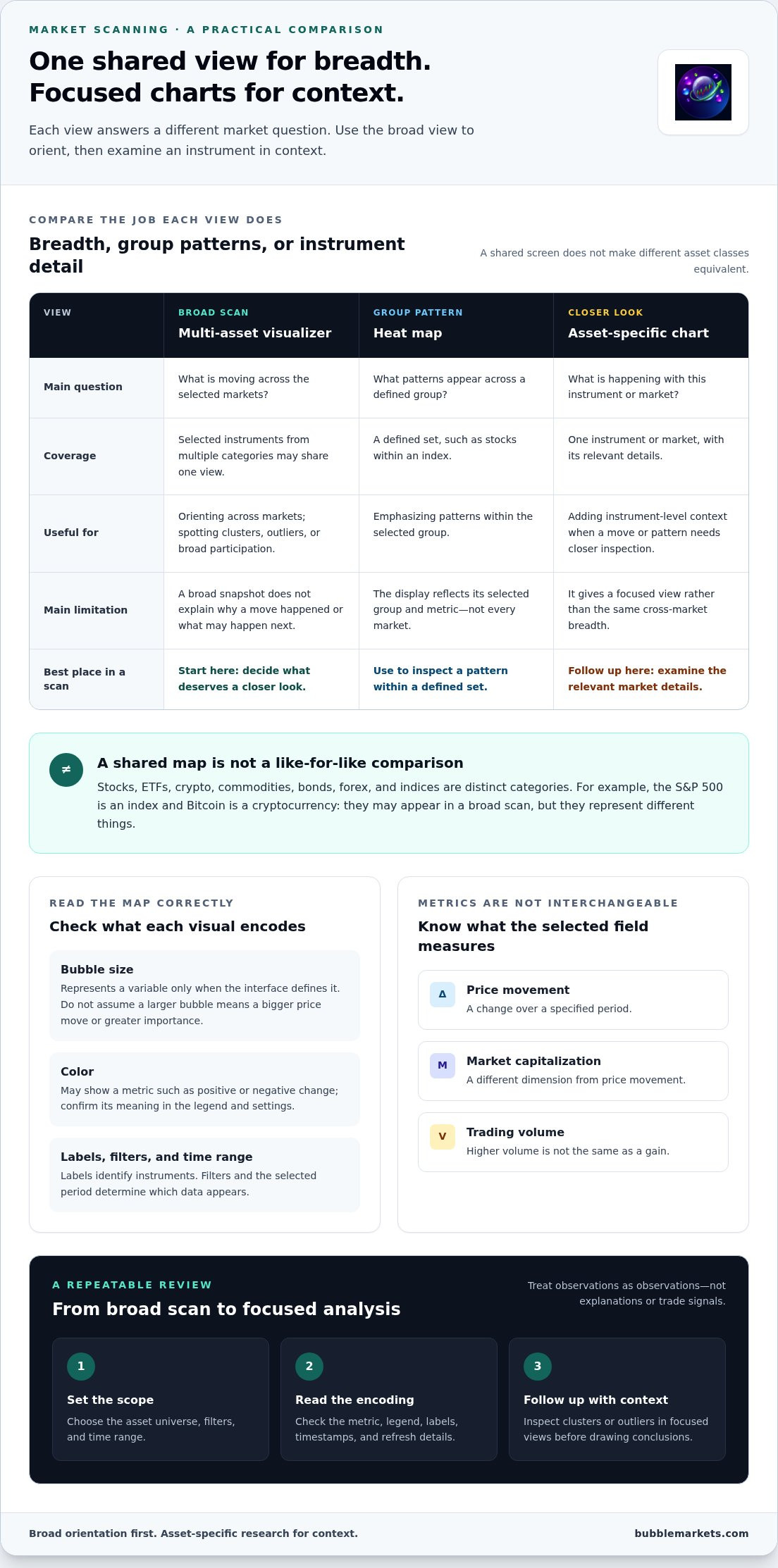
Visual encodings translate selected data into visible differences. Bubble size represents a variable only when the interface defines what that variable is. Don’t assume a larger bubble means a larger price move or greater importance. Color may encode a metric such as positive or negative change, but its meaning depends on the map’s legend and settings. Labels identify instruments, while filters and time ranges determine which data appears.
Before interpreting a pattern, check the legend, labels, active filters, selected metric, and time range. Then consider whether the displayed field is available and meaningful in the same way for each category. A broad map can help you explore clusters or spot an outlier worth examining, but it doesn’t explain the cause of a move or establish what may happen next.
Use the overview as a starting point, not a recommendation or trade signal. When an instrument or pattern needs context, move to a focused view with the relevant market details. That preserves the convenience of a shared visual workspace without flattening differences between asset classes.
How Multi-Asset Market Visualizers Turn Data into a Cross-Market View
A multi asset market visualizer turns data into a map through a sequence of choices: which instruments to include, which metric to display, what time window to measure, and how to encode the results visually. Change any one of these, and the picture can change. A map grouped by sector may reveal clusters within equities; grouping by region may instead highlight geographic patterns. Instrument type or index membership offers another lens, but each grouping answers a different question.
A shared interface makes markets easier to scan, not asset classes interchangeable. A stock index, currency pair, bond, and commodity can all have data points on one screen, yet their pricing conventions and market behavior differ. Financial visualization can help organize complex information, as discussed in this overview of the power of data visualization in finance, but the display still needs context.
Read the selected metric carefully. Price movement describes a change over a specified period; market capitalization and trading volume describe different dimensions. A larger market-cap value doesn’t mean a larger price move, and higher volume isn’t the same as a gain. Interpret bubble size or another visual dimension according to the metric the interface assigns to it.
How filters and time ranges shape the view
Filters make a crowded map easier to inspect. Narrow the instruments, category, or region, or use a performance filter to focus on a subset of the displayed data. Then check the selected time window. A short period can show a sharp move that looks less pronounced over a longer one. The underlying instruments may be identical, but the pattern is not. Note the selected period whenever you describe what the map shows.
Why data context matters across markets
Markets don’t all follow the same schedule. Exchange-traded instruments have market hours, while some markets, including crypto markets, trade continuously. Time zones, reporting conventions, timestamps, and data refresh cadence can also differ. Don’t assume all points on a cross-market view reflect the same moment. Check the platform’s timestamps and refresh details before interpreting them.
For a cleaner comparison, use like-for-like metrics and periods wherever possible, and separate observations from conclusions. For example, you might observe that several regional equity groups show positive changes over the selected session while a currency view moves in the opposite direction. That describes the display; it doesn’t explain the cause or imply a trade. Use BubbleMarkets’ market visualizer to scan categories in one workspace, then inspect focused views for more context.
Multi-Asset Visualizer vs. Separate Charts: What Can You Compare?
Each view answers a different kind of market question. A multi asset market visualizer provides breadth: it can help you scan selected markets for clusters, outliers, or broad participation. A heat map emphasizes patterns across a defined group, such as stocks in an index. An asset-specific chart focuses on one instrument or market, preserving details such as its price path and selected indicators.
None is universally better. Choose based on the question: use a unified map to decide where to look next, a heat map to inspect distribution within a category, and a focused chart to examine an instrument’s movement over time. For more on how bubble maps arrange market information, see the market bubble map guide.
When does a unified market map help most?
A broad map is useful for spotting whether movement appears concentrated in one group or spread across the selected markets. A cluster of similar readings or a standout outlier can prompt a follow-up question: is the pattern limited to one region, category, or index? Treat that as a lead for investigation, not proof that one market caused another to move. The map shows an arrangement of selected data; it doesn’t establish causation.
When should you switch to a focused asset view?
Switch when the question needs detail the broad map compresses. A stock heat map can help examine equity breadth or sector distribution; a focused chart can then show how an individual stock behaved. Use a crypto-specific map to compare digital assets within their own market context rather than assuming their patterns match those of equities or currencies. Explore the stock market heat map guide and crypto bubble map guide for category-specific scanning techniques.
A practical workflow moves from wide to narrow: scan the unified view, identify a pattern worth checking, then open the relevant category or instrument view. Keep the metric and time period consistent as you move between displays where possible. If the focused chart uses a different measure or period, the apparent pattern may change. Treat that as a reason to refine the question, not to assume the broad view was wrong.
Use the interface that fits the task. A cross-market view supports orientation; focused maps and charts provide context for closer analysis. Together, they help organize observations without turning visual comparison into a recommendation or trade signal. For active market participants seeking dedicated multi-asset brokerage infrastructure, learn more about TradingPRO.
How to Scan Multiple Asset Classes Without Misreading the Map
A repeatable process keeps a broad market scan descriptive rather than speculative. Before interpreting a multi asset market visualizer, set its scope and metric, then look for patterns and verify them in a focused view. Filters can reduce visual noise, but a narrow selection may hide how the filtered instruments fit into the wider market.
A practical five-step cross-market scan
- Set the scope. Select the asset classes, region, and instruments you want to review. Choose a time window before reading colors or bubble sizes.
- Choose the metric. Confirm whether the map shows a price change, volume, market value, or another measure. Don’t treat different measures as interchangeable.
- Scan clusters. Look first for groups sharing a visible pattern. Filters can help you focus, but briefly restore a broader view to see what your selection leaves out.
- Inspect outliers. Note individual instruments that appear different from nearby points. Check their labels and the map’s scale rather than assuming size or color has the same meaning in every view.
- Validate the context. Open a focused chart or market view for instruments that raise a question. Confirm the displayed period and data context before describing the observation.
For example, suppose an illustrative map shows several regional equity groups with positive changes over a selected session, while one group is mixed and a currency instrument stands apart. The careful takeaway is that the display shows different patterns across those selected categories for that period. A focused view can help examine the instruments more closely; the broad map alone doesn’t explain why the differences appeared.
A visual pattern is an observation to investigate, not a forecast. Simultaneous movement across asset classes doesn’t establish that one caused another to move. Nor should you compare bubble sizes across separate views unless the same metric and scale apply. Before repeating a visual claim, recheck labels, timestamps, filters, and metric definitions.
Common interpretation errors to avoid
- Don’t compare bubble size across maps when the measures or scales differ.
- Don’t infer causation from movements that appear at the same time in different markets.
- Don’t describe a pattern without stating the selected period and confirming what the colors represent.
Use BubbleMarkets’ market visualizers to practise this sequence: narrow the scan, identify a question, then inspect the relevant market context.
How BubbleMarkets Fits a Multi-Asset Market Scanning Workflow
BubbleMarkets brings market visualizations for stocks, crypto, ETFs, commodities, bonds, forex, and world indices into one workspace. Its bubble maps and heat maps support an initial scan: review the selected market view, note patterns that may warrant a closer look, then switch to a focused asset-class view for more detail. The broad display helps orient the scan; it doesn’t replace analysis of individual instruments or their market context.
From broad scan to focused market view
Start with the asset class or market you want to review. A multi asset market visualizer can help you orient across categories, while a focused view can narrow the field when a particular group or instrument raises a question. If screening is your next step, the visual stock screener guide explains how screening fits into a research workflow. Treat displayed patterns as observations to examine, not instructions to trade.
BubbleMarkets also offers tools for different stages of market research. Market screeners help filter data; portfolio tracking and real-time price alerts support monitoring; AI-generated market summaries provide another way to review information. Pro, Professional, and Enterprise subscriptions add advanced visualization tools, extended screening, customizable heat maps, and deeper data coverage. These tools organize and present data, but they don’t promise a particular result or determine what action is right for you.
Who may benefit from a unified visual workspace?
Individual investors and analysts may use a shared visual workspace to orient their research across asset classes. Publishers and teams can use visual summaries to review or communicate market patterns. Developer API access supports programmatic access to live and historical visualization data, while commercial licensing and white-label widgets let third parties integrate branded visualizers and heat maps into their platforms.
Whatever the use case, a map or summary is a starting point. Check the displayed metric, time period, and data context, then use independent research to assess the instruments or markets that matter to your question. Visualization and summaries don’t replace financial advice.
To begin a broad scan, explore BubbleMarkets visualizers and start with a market or asset class that fits your research question.
Make Your Next Market Scan More Deliberate
A multi asset market visualizer gives you a shared view for spotting patterns across selected markets, but useful comparisons depend on reading the metric, time window, and data context. Treat the broad view as orientation, then move to focused charts or asset-class maps when a pattern needs closer examination. Visual patterns are observations, not forecasts or investment advice.
BubbleMarkets brings interactive visualizers for global markets across multiple asset classes into one workspace. Related tools include screeners, portfolio tracking, real-time price alerts, and AI-generated market summaries to support different stages of market research.
Start a cross-market scan with BubbleMarkets visualizers, then use the map to identify what you want to investigate more closely.
Frequently Asked Questions
What is a multi-asset market visualizer?
A multi asset market visualizer displays data from more than one asset class in a shared interface. Depending on the platform, it may include stocks, ETFs, crypto, commodities, bonds, forex, or indices. Bubbles, colors, labels, and filters organize selected market data. Before interpreting the display, check its legend, metric definition, and time period. Those settings determine what the visual patterns represent and which comparisons the view supports.
How does a multi-asset market visualizer work?
It arranges selected instruments according to chosen market data, such as price change or another available metric. Filters can narrow the view by asset class or category, while time controls define the period shown. The available fields and data-refresh timing vary by platform. Read the interface labels and check its timestamps before comparing markets. This helps distinguish what the visualizer actually displays from what you might infer from a pattern.
Can you compare stocks, crypto, forex, and commodities on one map?
Some visualizers let you scan several asset classes in one interface, but a shared map doesn’t make every measure directly comparable. Market hours, units, structures, and available data fields can differ. Compare clearly defined metrics over suitable, matching periods where possible. Use the map to orient your research, then open a focused view when an instrument needs more context. A shared visual pattern alone doesn’t establish a relationship between markets.
What do bubble size and color mean on a market visualizer?
Their meaning depends on the selected view and its legend. Bubble size may represent a metric such as market value, while color may indicate the direction or magnitude of change, but these conventions aren’t universal. Check the labels, scale, filters, and time range before interpreting the map. If the visual encoding isn’t clear, describe only what is visible rather than inferring a signal or comparing bubbles across differently configured views.
Is a multi-asset market visualizer the same as a stock market heat map?
No. A stock market heat map focuses on equities and may group stocks by sector or index. A multi-asset visualizer can bring several asset classes into one scanning experience. Formats and available data fields vary by platform. Use the broader view to orient your scan, then switch to a stock-specific map or chart when you need equity or instrument-level detail. Keep the selected metric and time period in view as you move between displays.
Can a market visualizer predict which asset will rise?
No. A visualizer shows selected data for a chosen period; it can’t establish future performance from a displayed pattern alone. A map also doesn’t prove why prices moved. Use visual observations to form research questions, then examine relevant data and context. BubbleMarkets provides market visualization tools, not personalized investment recommendations, guaranteed returns, or trading signals. Treat a map as an orientation and research aid, not a prediction or investment decision.
How do I choose a multi-asset market visualizer?
Start with the markets and metrics you want to scan. Then examine how the platform groups assets, defines visual encodings, and handles filters and time ranges. Look for focused views that let you investigate a pattern more closely. For integration needs, consider whether developer API access or white-label widgets fit your workflow. A visualizer can organize market information, but it doesn’t replace independent research or financial advice.
Frequently asked questions
Which asset classes can one visualizer bring together?
A multi-asset view may include stocks, exchange-traded funds (ETFs), crypto, commodities, bonds, forex, and indices. These are distinct categories, and the instruments and data fields available can vary by category and platform. For example, the S&P 500 is an index, while Bitcoin is a cryptocurrency. They can appear in a broad market scan, but they represent different things and shouldn’t be treated as directly comparable just because they share a screen.
What do bubble size and color mean?
Visual encodings translate selected data into visible differences. Bubble size represents a variable only when the interface defines what that variable is. Don’t assume a larger bubble means a larger price move or greater importance. Color may encode a metric such as positive or negative change, but its meaning depends on the map’s legend and settings. Labels identify instruments, while filters and time ranges determine which data appears. Before interpreting a pattern, check the legend, labels, active filters, selected metric, and time range. Then consider whether the displayed field is available and meaningful in the same way for each category. A broad map can help you explore clusters or spot an outlier worth examining, but it doesn’t explain the cause of a move or establish what may happen next. Use the overview as a starting point, not a recommendation or trade signal. When an instrument or pattern needs context, move to a focused view with the relevant market details. That preserves the convenience of a shared visual workspace without flattening differences between asset classes. A multi asset market visualizer turns data into a map through a sequence of choices: which instruments to include, which metric to display, what time window to measure, and how to encode the results visually. Change any one of these, and the picture can change. A map grouped by sector may reveal clusters within equities; grouping by region may instead highlight geographic patterns. Instrument type or index membership offers another lens, but each grouping answers a different question. A shared interface makes markets easier to scan, not asset classes interchangeable. A stock index, currency pair, bond, and commodity can all have data points on one screen, yet their pricing conventions and market behavior differ. Financial visualization can help organize complex information, as discussed in this overview of the power of data visualization in finance, but the display still needs context. Read the selected metric carefully. Price movement describes a change over a specified period; market capitalization and trading volume describe different dimensions. A larger market-cap value doesn’t mean a larger price move, and higher volume isn’t the same as a gain. Interpret bubble size or another visual dimension according to the metric the interface assigns to it.
When does a unified market map help most?
A broad map is useful for spotting whether movement appears concentrated in one group or spread across the selected markets. A cluster of similar readings or a standout outlier can prompt a follow-up question: is the pattern limited to one region, category, or index? Treat that as a lead for investigation, not proof that one market caused another to move. The map shows an arrangement of selected data; it doesn’t establish causation.
When should you switch to a focused asset view?
Switch when the question needs detail the broad map compresses. A stock heat map can help examine equity breadth or sector distribution; a focused chart can then show how an individual stock behaved. Use a crypto-specific map to compare digital assets within their own market context rather than assuming their patterns match those of equities or currencies. Explore the stock market heat map guide and crypto bubble map guide for category-specific scanning techniques. A practical workflow moves from wide to narrow: scan the unified view, identify a pattern worth checking, then open the relevant category or instrument view. Keep the metric and time period consistent as you move between displays where possible. If the focused chart uses a different measure or period, the apparent pattern may change. Treat that as a reason to refine the question, not to assume the broad view was wrong. Use the interface that fits the task. A cross-market view supports orientation; focused maps and charts provide context for closer analysis. Together, they help organize observations without turning visual comparison into a recommendation or trade signal. A repeatable process keeps a broad market scan descriptive rather than speculative. Before interpreting a multi asset market visualizer, set its scope and metric, then look for patterns and verify them in a focused view. Filters can reduce visual noise, but a narrow selection may hide how the filtered instruments fit into the wider market.
Who may benefit from a unified visual workspace?
Individual investors and analysts may use a shared visual workspace to orient their research across asset classes. Publishers and teams can use visual summaries to review or communicate market patterns. Developer API access supports programmatic access to live and historical visualization data, while commercial licensing and white-label widgets let third parties integrate branded visualizers and heat maps into their platforms. Whatever the use case, a map or summary is a starting point. Check the displayed metric, time period, and data context, then use independent research to assess the instruments or markets that matter to your question. Visualization and summaries don’t replace financial advice. To begin a broad scan, explore BubbleMarkets visualizers and start with a market or asset class that fits your research question. A multi asset market visualizer gives you a shared view for spotting patterns across selected markets, but useful comparisons depend on reading the metric, time window, and data context. Treat the broad view as orientation, then move to focused charts or asset-class maps when a pattern needs closer examination. Visual patterns are observations, not forecasts or investment advice. BubbleMarkets brings interactive visualizers for global markets across multiple asset classes into one workspace. Related tools include screeners, portfolio tracking, real-time price alerts, and AI-generated market summaries to support different stages of market research. Start a cross-market scan with BubbleMarkets visualizers, then use the map to identify what you want to investigate more closely.
What is a multi-asset market visualizer?
A multi asset market visualizer displays data from more than one asset class in a shared interface. Depending on the platform, it may include stocks, ETFs, crypto, commodities, bonds, forex, or indices. Bubbles, colors, labels, and filters organize selected market data. Before interpreting the display, check its legend, metric definition, and time period. Those settings determine what the visual patterns represent and which comparisons the view supports.
How does a multi-asset market visualizer work?
It arranges selected instruments according to chosen market data, such as price change or another available metric. Filters can narrow the view by asset class or category, while time controls define the period shown. The available fields and data-refresh timing vary by platform. Read the interface labels and check its timestamps before comparing markets. This helps distinguish what the visualizer actually displays from what you might infer from a pattern.
Can you compare stocks, crypto, forex, and commodities on one map?
Some visualizers let you scan several asset classes in one interface, but a shared map doesn’t make every measure directly comparable. Market hours, units, structures, and available data fields can differ. Compare clearly defined metrics over suitable, matching periods where possible. Use the map to orient your research, then open a focused view when an instrument needs more context. A shared visual pattern alone doesn’t establish a relationship between markets.
What do bubble size and color mean on a market visualizer?
Their meaning depends on the selected view and its legend. Bubble size may represent a metric such as market value, while color may indicate the direction or magnitude of change, but these conventions aren’t universal. Check the labels, scale, filters, and time range before interpreting the map. If the visual encoding isn’t clear, describe only what is visible rather than inferring a signal or comparing bubbles across differently configured views.
Is a multi-asset market visualizer the same as a stock market heat map?
No. A stock market heat map focuses on equities and may group stocks by sector or index. A multi-asset visualizer can bring several asset classes into one scanning experience. Formats and available data fields vary by platform. Use the broader view to orient your scan, then switch to a stock-specific map or chart when you need equity or instrument-level detail. Keep the selected metric and time period in view as you move between displays.
Can a market visualizer predict which asset will rise?
No. A visualizer shows selected data for a chosen period; it can’t establish future performance from a displayed pattern alone. A map also doesn’t prove why prices moved. Use visual observations to form research questions, then examine relevant data and context. BubbleMarkets provides market visualization tools, not personalized investment recommendations, guaranteed returns, or trading signals. Treat a map as an orientation and research aid, not a prediction or investment decision.
How do I choose a multi-asset market visualizer?
Start with the markets and metrics you want to scan. Then examine how the platform groups assets, defines visual encodings, and handles filters and time ranges. Look for focused views that let you investigate a pattern more closely. For integration needs, consider whether developer API access or white-label widgets fit your workflow. A visualizer can organize market information, but it doesn’t replace independent research or financial advice.
Market information on this page is for education and general information only. It is not investment advice or a recommendation to buy or sell any asset.