 BubbleMarkets
Portfolio tracker with alerts for live portfolio updates

Separate brokerage accounts don’t have to mean separate views. Investment tracking tools can bring holdings from multiple brokers into one place, while a portfolio tracker with alerts helps you monitor performance as prices change.
Combining accounts is useful, but seeing your holdings is only part of the job. You also need to understand what is changing, where your portfolio may be concentrated, and which updates deserve your attention.
This guide explains how to bring brokerage accounts together and follow portfolio performance with live updates. You’ll learn how to organize holdings, choose useful alert conditions for concentration, trading signals, and dividends, and understand what affects the quality and timeliness of updates. It also outlines how portfolio tracking and price alerts fit into a visual market-monitoring workflow, so you can decide which information to review and when.
Key Takeaways
- Choose a tracker by checking how it brings account data together and presents holdings across brokers.
- Read performance updates alongside their timing and data source to understand what each view shows.
- Review how linked-account access, data handling, and account permissions affect privacy and security.
- Set alerts around specific conditions, then treat them as prompts to review information rather than automatic decisions.
How do I track multiple brokerage accounts in one place?
Investment tracking tools can bring holdings from multiple brokers into one view. Choose a tracker that organizes your accounts clearly and shows each holding’s contribution to your overall portfolio.
Choosing a Multi-Account Tracker
Start by listing the accounts and asset types you want to monitor, such as brokerage or retirement accounts and crypto holdings. Then review how each tracker handles portfolio information. Available methods, such as connected accounts, manual entry, or file imports, affect how much setup is involved.
Check whether the combined view separates accounts or groups holdings by asset, sector, or currency. For example, you should be able to recognize the same technology stock across two accounts as one overall exposure while still seeing each account’s details. Review portfolio analysis tools too: they should help you examine allocation, not make decisions for you.
Holdings and Performance Tracking
Look for a view that pairs each holding with its value and share of the overall portfolio. Use it to spot duplicate positions across accounts and compare how different assets, such as stocks and crypto, contribute to your holdings.
Review performance both by account and across the portfolio. A clear history can help you distinguish a change in one holding from a broader movement across your investments. Check how the tracker presents cash, transfers, and other activity so you can interpret the performance view in context.
To examine your allocation, group holdings by asset class or sector and review the result. Comparing stock and crypto exposure, for example, can show whether your current mix matches your intended approach. Use these tools to analyze your choices, not as personalized investment recommendations.
Benchmark comparisons can put performance in context, but compare like with like. A stock-focused account and a diversified portfolio may not be meaningfully assessed against the same benchmark. Check which holdings and dates the comparison covers.
Some trackers also show investment impact or sustainability scores. Check what the score covers and how it is categorized: a company-level rating may not describe every holding equally. Treat it as one perspective alongside performance and allocation, not a complete measure of impact.
Live price updates and performance tracking
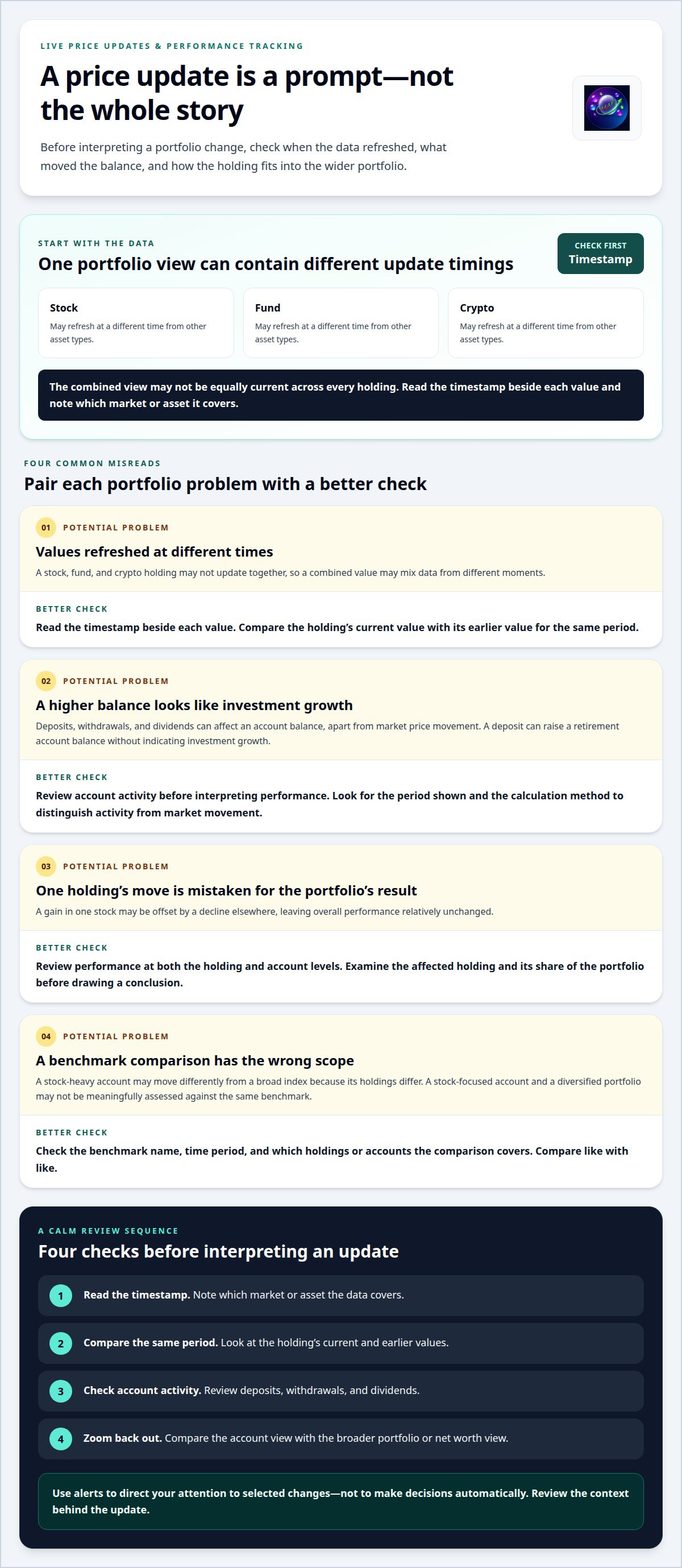
Price updates show how holdings change as market data moves, but update timing varies by asset and data feed. A stock, fund, and crypto holding may not refresh at the same time. Check the timestamp beside each value before treating the combined view as current. A portfolio tracker with alerts can draw your attention to selected changes.
To interpret performance, distinguish price movement from deposits, withdrawals, and dividends. A deposit into a retirement account can raise its balance without indicating investment growth. Look for a visible period and calculation method so you can separate account activity from market movement. Review these details before using an update to assess wealth or net worth.
Review your portfolio at both the holding and account levels. A gain in one stock may be offset by a decline elsewhere, leaving overall performance relatively unchanged. A portfolio tracker with alerts is most useful when a notification prompts you to examine the affected holding and its share of the portfolio.
Use this sequence when reviewing updates:
- Read the data timestamp and note which market or asset it covers.
- Compare the holding’s current value with its earlier value for the same period.
- Review deposits, withdrawals, and dividend activity before interpreting the result.
- Compare the account view with your broader portfolio or net worth view.
Benchmarks add context only when the comparison has a suitable scope. A stock-heavy account may move differently from a broad index because its holdings differ. Check the benchmark name, time period, and whether the comparison covers your retirement account or all connected investments.
Connect updates to a review routine instead of watching every price change. For example, after a notable portfolio move, inspect the affected holding, its weight, and the reason for the change. Use a portfolio tracker with alerts as a monitoring aid, not a substitute for assessing context.
A visual market view can help place individual prices in wider context. Explore live market updates alongside your portfolio review.
How do portfolio trackers handle privacy and security of linked financial accounts?
Portfolio trackers can connect to financial accounts using different data-sharing methods, often integrating dedicated financial aggregation providers such as Wealthreader to retrieve balances and holdings securely. A connection may provide account and holding information, but the permitted access depends on its method and settings. Before linking an account, review what information the tracker requests and what permissions it receives.
Read the platform’s privacy and security information before connecting a brokerage account. Look for details about collected data, its stated uses, retention, and deletion. Check, for example, whether the tracker collects balances and holdings or also requests transaction history. This helps you assess whether the connection suits your needs.
Use this review sequence for each account:
- Open the connection screen and read the requested permissions.
- Confirm that the account name and institution are correct.
- Check whether access is limited to viewing data or includes other actions.
- Review the tracker’s settings for connected accounts and data controls.
- Remove a connection you no longer use through the account or tracker settings.
Protect your brokerage login separately from your tracking account. Use a unique password for each account and enable multifactor authentication where available. Before entering brokerage credentials, make sure the sign-in page belongs to the intended service. A password manager can help you recognize saved, legitimate sign-in pages.
Shared devices can create another exposure point. Sign out after checking a portfolio on a public or household computer, and use a device lock on phones that display account balances. Avoid showing sensitive account screens while screen sharing. These steps help limit casual access to balances and transaction details.
Review connected-account permissions after changing passwords or closing an account. If a connection is no longer needed, revoke it in the relevant settings and confirm that current account data no longer appears in the tracker. Keep alerts focused on useful events, such as a dividend posting, rather than exposing account details in lock-screen notifications. Privacy depends on both the platform’s practices and the access you grant.
What are the limitations and risks of relying on portfolio tracker alerts?
An alert reports a defined event, but it doesn’t explain why the event happened. A price threshold may trigger after a brief move, while a concentration alert may reflect a holding’s increased value rather than a new purchase. Treat each notification as a prompt to check the portfolio context, not as a complete analysis or trading instruction.
Timing and coverage affect what an alert can tell you. If a data feed updates after the market moves, a notification may arrive late. Assets, exchanges, and account connections can use different data sources and refresh schedules. Check the displayed timestamp and compare it with the latest available information for the holding before acting.
Alert settings can create noise or leave gaps in your monitoring. Review each notification’s conditions and consider whether they match the event you want to follow:
- A narrow price threshold may generate repeated notifications during normal movement.
- A broad threshold may miss a change you intended to review sooner.
- A dividend alert may depend on the tracker’s coverage of dividend events.
- A trading signal can identify a condition without explaining its risks or suitability.
Changes to linked accounts can also affect the combined view. A transfer, cash balance, or holding that hasn’t updated may skew a concentration alert. If a notification conflicts with an account statement or another view, inspect the holding and transaction details before drawing conclusions. Alerts don’t replace account records or a review of your financial circumstances.
Keep the process deliberate: set alerts for specific conditions, remove notifications that no longer help, and review the relevant holding before making a decision. A portfolio tracking and price alerts workflow can help organize market notifications for review, while leaving interpretation and trading decisions with you.
BubbleMarkets: Portfolio Tracking and Price Alerts
BubbleMarkets offers portfolio tracking and price alerts in one workflow. Use these tools to follow holdings and review price changes, treating alerts as prompts for your own assessment rather than trading instructions.
Free Live Market Bubble Maps and the Stock Market Bubble Map provide a visual view of market movement, helping you compare an individual holding’s price change with broader stock activity. Pro, Professional, and Enterprise subscriptions offer different levels of platform functionality.
Bring portfolio monitoring and visual market context into your routine with BubbleMarkets’ portfolio tracking, price alerts, and interactive market maps. Explore the tools and choose the subscription that fits your monitoring needs.
Make Your Monitoring Routine Work for You
Choose a portfolio tracker with alerts to support a consistent review process, not replace one. Decide which changes deserve your attention, then give each notification a clear next step: inspect the holding, check the wider context, or record the event. A repeatable routine makes alerts easier to interpret without turning every market move into a decision.
Revisit your routine as your accounts or priorities change. Remove conditions that generate noise and add relevant ones as your monitoring needs shift. The goal is a useful portfolio view that supports deliberate decisions while leaving control with you.
Ready to discuss how market-monitoring tools could fit your workflow? Start a conversation with BubbleMarkets about your portfolio needs. Take the next step at your own pace and build a monitoring approach that works for you.
Frequently Asked Questions
What is the best investment tracking app?
The right investment tracking app depends on your accounts, assets, and review habits. If you hold stocks and funds across institutions, prioritize a consolidated view and clear holding-level records. If you also follow crypto, check that the tracker covers it. Compare how each option handles cash, dividends, and transfers, as these details affect how you interpret changes in your portfolio.
Why not just a spreadsheet?
A spreadsheet can work well for a small portfolio that you update manually. It gives you control over categories and calculations, but prices, dividends, and transactions all need accurate entry. A missed transfer, for instance, can make the balance differ from your account records. A tracking platform can reduce repetitive data entry, while a spreadsheet remains useful for custom notes or a one-off allocation review.
What are the best portfolio tracker apps with price alerts in the United States?
There’s no single best choice for every US investor. Start with the assets and accounts you want to monitor, then compare coverage, clarity of price data, and alert options. Someone following both domestic stocks and crypto, for example, should assess both categories. Test the workflow against your actual review needs, not just the feature list.
What types of alerts do portfolio trackers offer, such as price, percentage-change, and news alerts?
Common alert types include reaching a chosen price, moving by a set percentage, or receiving news about a company or asset. Availability and trigger definitions vary by platform. A price alert concerns a specific value; a percentage-change alert tracks movement over a selected period. News alerts surface events for review, but don’t show whether an event matters to your portfolio.
Which portfolio trackers support custom alert thresholds and multiple notification channels?
Alert options vary, so review the settings before relying on a particular workflow. Look for controls to set trigger conditions and choose where notifications appear, such as inside the platform or through another channel. If possible, test a sample threshold to see how the alert is worded and delivered. Don’t assume every tracker offers the same channels or customization.
Frequently asked questions
What is the best investment tracking app?
The right investment tracking app depends on your accounts, assets, and review habits. If you hold stocks and funds across institutions, prioritize a consolidated view and clear holding-level records. If you also follow crypto, check that the tracker covers it. Compare how each option handles cash, dividends, and transfers, as these details affect how you interpret changes in your portfolio.
Why not just a spreadsheet?
A spreadsheet can work well for a small portfolio that you update manually. It gives you control over categories and calculations, but prices, dividends, and transactions all need accurate entry. A missed transfer, for instance, can make the balance differ from your account records. A tracking platform can reduce repetitive data entry, while a spreadsheet remains useful for custom notes or a one-off allocation review.
What are the best portfolio tracker apps with price alerts in the United States?
There’s no single best choice for every US investor. Start with the assets and accounts you want to monitor, then compare coverage, clarity of price data, and alert options. Someone following both domestic stocks and crypto, for example, should assess both categories. Test the workflow against your actual review needs, not just the feature list.
What types of alerts do portfolio trackers offer, such as price, percentage-change, and news alerts?
Common alert types include reaching a chosen price, moving by a set percentage, or receiving news about a company or asset. Availability and trigger definitions vary by platform. A price alert concerns a specific value; a percentage-change alert tracks movement over a selected period. News alerts surface events for review, but don’t show whether an event matters to your portfolio.
Which portfolio trackers support custom alert thresholds and multiple notification channels?
Alert options vary, so review the settings before relying on a particular workflow. Look for controls to set trigger conditions and choose where notifications appear, such as inside the platform or through another channel. If possible, test a sample threshold to see how the alert is worded and delivered. Don’t assume every tracker offers the same channels or customization.
Market information on this page is for education and general information only. It is not investment advice or a recommendation to buy or sell any asset.