 BubbleMarkets
Real-Time Market Alerts Software: How to Compare Tools in 2026

What makes a market alert useful is not just how quickly it arrives, but how easily you can judge what it means. A sharp price move can be easy to miss across markets and watchlists, while frequent low-value alerts can interrupt analysis. When comparing real time market alerts software, look beyond feature lists to data freshness, trigger options, and the context available after a notification.
The right fit depends on what you monitor and how you review market changes. A price alert can flag a move that is already underway. News and event alerts may add context about potential catalysts, but can also increase notification volume. Either way, treat an alert as a prompt to investigate, not as a prediction or trading signal.
This guide explains how to compare alert tools, from asset coverage and data timing to filtering and workflow. It also looks at how visual maps, screeners, and portfolio tracking can help you assess a notification instead of viewing it in isolation. BubbleMarkets combines real-time price alerts and portfolio tracking with visual market maps and heat maps. Use the criteria below to identify a setup that fits the assets you follow and the way you work.
Key Takeaways
- Compare alert tools by asset coverage, data freshness, trigger options, and control over notification volume.
- List the assets, watchlists, and portfolio views you need before comparing software.
- Judge real time market alerts software by the context around each notification, not by alert counts alone.
- Understand the different roles of alerts, charts, screeners, summaries, and trade execution.
- BubbleMarkets pairs price alerts and portfolio tracking with market maps, heat maps, and screeners for visual review.
What Real-Time Market Alerts Software Does, and Where It Fits
Real time market alerts software monitors selected instruments or portfolio data and notifies you when a specified condition occurs. It brings a change to your attention without requiring you to watch every market screen continuously. A notification tells you that a condition has been met. It is not an investment recommendation, a forecast, or an instruction to trade.
Alerts complement other market tools, but serve a different purpose. A chart shows price history and movement. A screener filters instruments using selected criteria, while a market summary offers a broader overview. Trade execution places orders and is separate from monitoring. Use an alert as a prompt to inspect the underlying data, not as an explanation of what caused a move.
Which market events can an alert help you monitor?
Price changes and portfolio monitoring are common alert use cases. For example, you might set a price threshold for an instrument and receive a notification if it reaches that level. A portfolio alert can draw attention to a change in tracked holdings, depending on the tool’s features. Trigger options and asset coverage differ, so compare them with the instruments and conditions you actually follow.
The data behind an alert matters, too. Market Data includes information such as prices and trading activity, collected and distributed through different sources. A notification tells you that a configured condition has been met, but not why the market moved. To investigate, look at relevant context such as a chart, market summary, or news.
Who benefits from real-time market alerts?
Individual investors can use alerts to keep watchlists and tracked portfolios visible without repeatedly checking each instrument. This can be useful when holdings span companies, funds, or asset classes. An alert can focus attention on a change worth reviewing, while the investor remains responsible for interpreting it.
Active traders may use alerts to monitor changing conditions across selected markets. Notifications can reduce the need to keep every chart open, but their usefulness depends on how well the conditions fit the task. Poorly chosen triggers can create noise, and a notification on its own does not show the full price pattern or wider market environment.
Analysts and teams tracking multiple market segments can use alerts to flag changes for review. A visual monitoring workspace can help relate a signal to broader movement. BubbleMarkets brings together real-time price alerts and portfolio tracking with market maps, heat maps, screeners, and AI-generated market summaries. These tools help users examine context without treating an alert as a conclusion.
How Real-Time Market Alerts Work: Data, Triggers, and Context
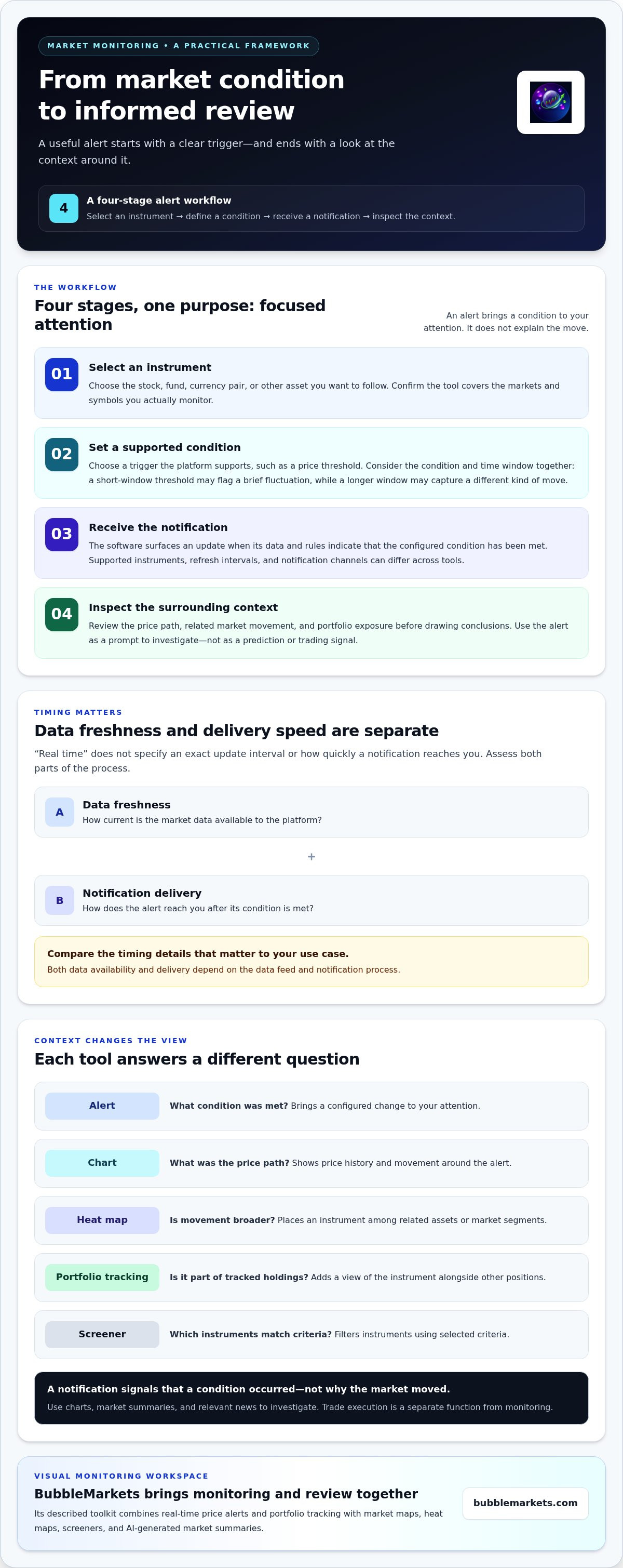
An alert workflow moves from observation to review: choose an instrument, define a supported condition, receive a notification when that condition is met, then inspect the surrounding data. Each step affects whether an alert is useful. A condition that suits one instrument or time window may be less relevant for another.
- Select an instrument: Choose the stock, fund, currency pair, or other asset you want to follow.
- Set a condition: Choose a trigger supported by the platform, such as a price threshold.
- Receive a notification: The software surfaces an update when its data and rules indicate that the condition has been met.
- Inspect the context: Review the instrument’s chart, related market movement, and portfolio exposure before drawing conclusions.
From market data to a notification
Alert software generally evaluates incoming market data against configured or platform-supported conditions. When the data meets a condition, the tool generates a notification through its available workflow. Supported instruments, trigger settings, refresh intervals, and notification channels can differ across tools. Compare the details that matter to your use case rather than assuming every platform works the same way.
Data freshness and notification delivery speed are separate: fresh data can be available to a platform before a notification reaches you. Both depend on the data feed and delivery process. The label “real time” does not specify an exact update interval or delivery speed. Look for timing details and consider whether they suit the way you plan to use the tool.
Trigger logic also shapes what a notification tells you. A threshold evaluated over a short window may flag a brief fluctuation, while a condition applied over a longer window may capture a different kind of move. Coverage matters as well: an alert is useful only if the tool monitors the markets and symbols you follow. Assess the condition, time window, and asset coverage together instead of judging a tool by the number of trigger types it lists.
Why visual context matters after an alert
A notification isolates a condition. A chart shows the price path around it, while a heat map places the instrument among related assets or market segments. This can help you see whether a move appears isolated or occurs alongside broader movement. It does not explain the cause, but it gives you more information to examine.
Portfolio tracking adds another perspective by showing whether a notified instrument is part of your tracked holdings and how it sits alongside other positions. For a practical look at organizing that information, explore this portfolio tracking visualizer guide. BubbleMarkets combines price alerts and portfolio tracking with visual market maps, heat maps, and screeners. You can explore its visual market-monitoring tools to see how these views can connect an alert with broader context.
How to Compare Market Alert Tools Beyond Notification Counts
A long list of alerts does not prove that a tool fits your monitoring routine. Compare the markets it covers, its data freshness, and how easily you can investigate a notification. Focus on whether the signal is relevant to your review, not simply on how many conditions the platform advertises.
Start with the assets you follow: stocks, ETFs, cryptocurrencies, commodities, bonds, and forex. Then consider whether alerts connect to watchlists, portfolio views, screeners, charts, heat maps, or market summaries. Alert organization and delivery options matter too. Use documented settings to compare what you can configure. The table below provides a practical framework for evaluating real time market alerts software.
| Criteria | Why it matters | Questions to evaluate |
|---|---|---|
| Asset and instrument coverage | An alert tool is useful only for markets and symbols you need to monitor. | Does it cover your asset classes, exchanges, and specific instruments? |
| Data freshness | Delayed or historical data may not suit a workflow that depends on current changes. | Is each feed real-time, delayed, or historical, and what does the provider specify? |
| Visual and portfolio context | Context helps you examine an alert alongside related assets or tracked holdings. | Can you move from an alert to a chart, heat map, screener, or portfolio view? |
| Configuration and organization | Clear conditions and manageable alert lists can make monitoring easier to review. | Which settings, labels, grouping methods, and delivery options are documented? |
Evaluate data coverage and freshness
Match coverage to your watchlist, not just to a broad asset-class label. A tool may cover stocks, for example, but the more useful question is whether it includes the instruments and venues you follow. Distinguish live, delayed, and historical data in product descriptions. Availability can depend on market hours, trading venue, and data source, so compare information for the specific markets on your list.
“Real time” is not a complete specification. Look for a stated refresh frequency or a clear description of the feed. If timing is not specified, do not assume an alert reflects every market change immediately. Consider whether the tool’s update behavior fits your review needs.
Measure signal relevance and interface context
Consider what you can do after a notification: inspect a chart, compare movement on a heat map, or view the instrument in a portfolio. The interface should make it clear which information is the alert and which is broader market context. A real-time stock heat map guide can help you understand how visual comparisons support market scanning.
Then assess the tool using a realistic monitoring task. Choose a market segment you follow and trace how its data, alert, and supporting views fit together. This can reveal workflow friction that feature counts hide, without assuming every platform offers identical controls or connections.
A Practical Checklist for Choosing Real-Time Market Alerts Software
Choose a tool around the monitoring work you actually do. Before comparing subscription levels, list the instruments you follow, the alert conditions that matter, and the update timing your routine can accommodate. Then assess whether the interface helps you review notifications in context. This keeps feature lists from becoming a substitute for fit.
- Map your coverage: Separate instruments you need to monitor regularly from markets you check occasionally. Include relevant asset classes, watchlists, and portfolio views.
- Rank your alert needs: Note which conditions would prompt a closer look, then separate essential triggers from optional ones.
- Set timing expectations: Decide what data freshness your workflow requires, then compare it with the documented feed and update details.
- Define useful context: Decide whether you need a chart, heat map, screener, portfolio view, or summary to assess a notification.
Keep the list specific. “Monitor global markets” is difficult to evaluate. Naming the instruments and market segments you need gives you a clearer basis for comparison. For a visual approach to screening stocks, the visual stock screener buying guide can help you consider how screening tools fit into your routine.
Match alert coverage to your monitoring routine
Sort assets into two groups: instruments that need regular attention and those you review as needed. This helps you assess whether a tool covers your core watchlist or mainly adds breadth you may not use. If you follow several asset classes, consider whether one multi-asset view makes cross-market scanning easier than switching between separate screens.
Compare coverage and data timing for the actual instruments and markets on your list. A broad category label does not guarantee coverage of every symbol, venue, or feed you need.
Check alert quality without overloading your workflow
Start with a small, representative watchlist rather than adding every instrument at once. Include the assets and conditions you expect to monitor, then see whether each notification leads to a clear next step. Can you inspect the relevant data, compare related market movement, or review portfolio exposure? If an alert leaves you without a useful way to investigate, it may not fit your process.
Assess notification volume and relevance together. If too many alerts compete for attention, refine your watchlist or prioritize the conditions that matter most. Don’t compare plans on alert counts alone. First establish the coverage, context, and workflow you need, then assess usability and subscription options.
Once you have set those criteria, explore BubbleMarkets’ visual monitoring workflow to see how market maps, screeners, portfolio tracking, and price alerts support a connected review process.
How BubbleMarkets Combines Market Alerts With Visual Monitoring
BubbleMarkets combines market visualization with real-time price alerts and portfolio tracking. Rather than treating an alert as a complete explanation, you can review it alongside visual views of market activity. Maps, heat maps, and screeners help organize information across assets and segments. AI-generated market summaries offer another way to review market context. These tools support analysis; they do not predict outcomes.
This can suit people comparing real time market alerts software with a broader monitoring workspace. An alert draws attention to a price change, while visual tools provide other ways to examine the instrument and its surrounding market. Portfolio tracking adds a view of holdings you choose to follow. The value lies in having monitoring and context together, not in assuming a notification tells you what to do.
When a visual workspace fits your alert workflow
A price move can be easier to assess when you can also scan related assets or a wider market segment. BubbleMarkets’ visualizers cover stocks, ETFs, cryptocurrencies, commodities, forex, bonds, and world indices. A market map or heat map can help you compare movement across a selected segment, while a screener lets you filter and inspect instruments.
Portfolio tracking connects market monitoring to holdings you choose to follow. If an alert concerns an instrument in your portfolio, you can include the portfolio view in your review. This provides context, not personalized investment guidance, and does not remove the need to interpret the data yourself.
Choose a BubbleMarkets access path
Start with free live market bubble maps or choose a Pro, Professional, or Enterprise subscription for advanced visualization tools, extended market screening, and customizable heat maps. Subscribers also have access to portfolio tracking, real-time price alerts, AI-generated market summaries, and deeper data coverage across global asset classes.
Developers can use API access to work with market visualization data programmatically. Commercial platforms can use commercial licensing and white-label widgets to integrate branded visualizers and heat maps into their products. These options serve different workflows from individual market monitoring, so consider whether you need a tool for personal analysis or an integration for a product or platform.
BubbleMarkets is a market visualization and monitoring platform. It does not execute trades or provide personalized investment recommendations. Treat alerts as prompts to review market information, not as guaranteed trading signals or instructions. Explore BubbleMarkets market tools to see how visualizers, price alerts, portfolio tracking, screeners, and summaries can support your workflow.
Build a Monitoring Workflow You Can Refine
Choosing real time market alerts software is a starting point, not a one-time decision. As your watchlists or analysis habits change, revisit which notifications deserve attention and what information you need alongside them. A practical workflow makes it straightforward to review a signal, decide whether it merits further analysis, and return to your work without unnecessary friction.
Start with one focused monitoring routine. Identify the markets you follow most closely, set clear criteria for what warrants review, and choose a tool that supports the way you prefer to examine data. For individual analysis, that may mean connecting alerts to portfolio context. For a commercial product, it may mean integrating market data and visualizations into an existing platform.
BubbleMarkets offers market visualizers and heat maps across asset classes, price alerts and portfolio tracking, as well as developer API access and commercial white-label widgets. Explore BubbleMarkets’ market visualization and alert tools to assess how these options fit your monitoring needs. Start with a focused setup and refine it as your workflow develops.
Frequently Asked Questions
What is real-time market alerts software?
Real-time market alerts software flags a monitored market condition so you can decide whether it needs closer review. For example, someone following several funds might set an alert for a chosen price level, then review the fund’s chart and relevant market information if it is reached. The software surfaces data based on supported conditions; it does not explain the cause of a change or tell you what action to take.
How do real-time market alerts work?
Alert tools compare incoming market information with conditions their systems support, then notify you when a match occurs. Consider how an alert behaves in your use case. For example, note whether it flags a brief threshold crossing or a change you want to review over a longer period. After receiving an alert, examine the instrument’s history and related information before deciding whether it matters to your analysis.
Are real-time market alerts actually instantaneous?
No. The label does not guarantee that data updates and notifications happen at the exact moment of a market event. Timing can vary by instrument, market, data source, and delivery setup. When comparing tools, look for stated update timing and coverage for the markets you follow. You can compare displayed data with another time-stamped reference, keeping in mind that different sources may update on different schedules.
Can market alerts cover stocks, ETFs, and cryptocurrency?
Some services cover stocks, ETFs, and cryptocurrency, while others focus on selected markets or instruments. Look at the symbols you actually follow and how each is represented. For example, an ETF alert may be useful alongside movement in the underlying market, while a crypto watchlist may require coverage of particular assets. Broader coverage helps only when it matches your review habits.
What is the difference between a market alert and a trading signal?
A market alert reports a condition; a trading signal suggests an interpretation or action. A notification that an instrument crossed a price level is different from a claim that the change means you should buy or sell. Treat the alert as one piece of information to examine, not as a forecast. Market-monitoring software does not replace your own analysis or provide personalized investment recommendations.
How can I reduce too many market alert notifications?
Start by removing alerts that do not lead to a useful review. Keep a focused list of instruments and conditions tied to questions you want to investigate, then assess the notifications during a typical monitoring session. If several alerts prompt the same check, consider whether a broader market view would be more useful. Use grouping, prioritization, or customization when those options are available.
Do I need market alerts if I already use a portfolio tracker?
Not necessarily. It depends on how you review your holdings. A portfolio tracker may be enough if you prefer scheduled check-ins and do not need separate prompts. Alerts can complement it when a change in a tracked holding should bring your attention to that position between reviews. Consider whether notifications fit your routine rather than adding them simply because they are available.
Frequently asked questions
Which market events can an alert help you monitor?
Price changes and portfolio monitoring are common alert use cases. For example, you might set a price threshold for an instrument and receive a notification if it reaches that level. A portfolio alert can draw attention to a change in tracked holdings, depending on the tool’s features. Trigger options and asset coverage differ, so compare them with the instruments and conditions you actually follow. The data behind an alert matters, too. Market Data includes information such as prices and trading activity, collected and distributed through different sources. A notification tells you that a configured condition has been met, but not why the market moved. To investigate, look at relevant context such as a chart, market summary, or news.
Who benefits from real-time market alerts?
Individual investors can use alerts to keep watchlists and tracked portfolios visible without repeatedly checking each instrument. This can be useful when holdings span companies, funds, or asset classes. An alert can focus attention on a change worth reviewing, while the investor remains responsible for interpreting it. Active traders may use alerts to monitor changing conditions across selected markets. Notifications can reduce the need to keep every chart open, but their usefulness depends on how well the conditions fit the task. Poorly chosen triggers can create noise, and a notification on its own does not show the full price pattern or wider market environment. Analysts and teams tracking multiple market segments can use alerts to flag changes for review. A visual monitoring workspace can help relate a signal to broader movement. BubbleMarkets brings together real-time price alerts and portfolio tracking with market maps, heat maps, screeners, and AI-generated market summaries. These tools help users examine context without treating an alert as a conclusion. An alert workflow moves from observation to review: choose an instrument, define a supported condition, receive a notification when that condition is met, then inspect the surrounding data. Each step affects whether an alert is useful. A condition that suits one instrument or time window may be less relevant for another.
What is real-time market alerts software?
Real-time market alerts software flags a monitored market condition so you can decide whether it needs closer review. For example, someone following several funds might set an alert for a chosen price level, then review the fund’s chart and relevant market information if it is reached. The software surfaces data based on supported conditions; it does not explain the cause of a change or tell you what action to take.
How do real-time market alerts work?
Alert tools compare incoming market information with conditions their systems support, then notify you when a match occurs. Consider how an alert behaves in your use case. For example, note whether it flags a brief threshold crossing or a change you want to review over a longer period. After receiving an alert, examine the instrument’s history and related information before deciding whether it matters to your analysis.
Are real-time market alerts actually instantaneous?
No. The label does not guarantee that data updates and notifications happen at the exact moment of a market event. Timing can vary by instrument, market, data source, and delivery setup. When comparing tools, look for stated update timing and coverage for the markets you follow. You can compare displayed data with another time-stamped reference, keeping in mind that different sources may update on different schedules.
Can market alerts cover stocks, ETFs, and cryptocurrency?
Some services cover stocks, ETFs, and cryptocurrency, while others focus on selected markets or instruments. Look at the symbols you actually follow and how each is represented. For example, an ETF alert may be useful alongside movement in the underlying market, while a crypto watchlist may require coverage of particular assets. Broader coverage helps only when it matches your review habits.
What is the difference between a market alert and a trading signal?
A market alert reports a condition; a trading signal suggests an interpretation or action. A notification that an instrument crossed a price level is different from a claim that the change means you should buy or sell. Treat the alert as one piece of information to examine, not as a forecast. Market-monitoring software does not replace your own analysis or provide personalized investment recommendations.
How can I reduce too many market alert notifications?
Start by removing alerts that do not lead to a useful review. Keep a focused list of instruments and conditions tied to questions you want to investigate, then assess the notifications during a typical monitoring session. If several alerts prompt the same check, consider whether a broader market view would be more useful. Use grouping, prioritization, or customization when those options are available.
Do I need market alerts if I already use a portfolio tracker?
Not necessarily. It depends on how you review your holdings. A portfolio tracker may be enough if you prefer scheduled check-ins and do not need separate prompts. Alerts can complement it when a change in a tracked holding should bring your attention to that position between reviews. Consider whether notifications fit your routine rather than adding them simply because they are available.
Market information on this page is for education and general information only. It is not investment advice or a recommendation to buy or sell any asset.