 BubbleMarkets
Stock price alerts for your investments

A stock price alert is most useful when its trigger and update frequency match what you want to monitor. A price alert tool for stocks helps you follow selected price movements without keeping every chart open. Set alerts for the conditions you care about, then choose a refresh schedule that suits your monitoring.
You’ll learn how to customize an alert, select an update frequency, and create it from an instrument page or the Alert Center. The guide also explains how to organize alerts around the stocks you follow and use market views to add context to price changes. Alerts provide a way to track specified conditions; they don’t decide what action to take. The aim is a clear setup that keeps relevant price information accessible while leaving investment decisions in your hands.
Key Takeaways
- Choose an alert trigger that reflects the price movement you want to monitor, then tailor it to each instrument.
- Set an update frequency that gives you useful information without creating unnecessary notifications.
- Compare free tools by how they handle alert setup, delivery preferences, and access to market context.
- Use instrument pages or the Alert Center to create alerts, and explore portfolio tracking alongside market maps for a broader view.
Alert delivery by push notification, email, or phone call
A price alert tool for stocks can send notifications through push alerts, email, or phone calls when those options are available. Choose a channel you can review: push notifications appear on a device, while email keeps a message in your inbox. A phone call is more direct, but may interrupt other activity.
For desktop and smartphone notifications, check device settings as well as alert settings. A browser or app may need permission before a push notification can appear. For example, if your desktop browser blocks notifications, an active price alert may not show a pop-up. Keep email enabled as an alternative if the service offers it.
Choose delivery based on the alert’s purpose. A threshold you want to review during the day may suit a push notification. An alert you want to keep for later may suit email. If phone calls are available, reserve them for conditions where an audible interruption is useful. Before saving, confirm the selected stock, trigger level, and delivery channel.
Trade activity notifications serve a different purpose from price alerts. A price alert reports that a selected price condition has been met. A trade activity notification may concern an order or account event, depending on the platform. Treat them as separate settings, and don’t assume a price alert confirms that an order was placed or completed.
What are the limitations of free stock alert services? Free plans can limit alert counts, trigger choices, or delivery channels; the specific restrictions vary by service. Compare those limits with the number of stocks and notification methods you need.
Use this setup sequence:
- Select the stock and define the price condition.
- Choose push, email, or phone delivery where available.
- Allow device notifications if using a desktop browser or smartphone app.
- Review the saved alert and any separate trade activity settings.
Customized price alerts for financial instruments
Customize each alert around the instrument and condition you want to monitor. Select the stock, choose a trigger, then review the settings before saving.
Free Stock Price Alert Tools in the US
Free stock alert tools available to US users differ in supported instruments, trigger types, and alert limits. Compare the settings that matter for your watchlist, such as whether you can set a separate price threshold for each stock.
Do stock price alert tools offer percentage-change and technical-indicator alerts? Some support percentage-change triggers or technical indicators, while others focus on price levels. Check the available trigger types in the alert setup rather than assuming every free service includes them.
For a useful comparison, create a sample alert for one stock and inspect its available conditions. If you follow several stocks, check whether each can have a distinct trigger and whether the tool clearly identifies the selected symbol.
Percentage-Change and Indicator Alerts
A percentage-change alert triggers when an instrument moves by a chosen proportion rather than reaching a particular price. For example, you might set an alert for a specified percentage rise or fall. The reference period matters, so identify whether the tool measures the move over a day, a session, or another interval.
Technical-indicator alerts use a calculated measure, such as a moving average or relative strength index, as the trigger. Availability and configuration vary by tool. If an indicator is available, check its period and crossing condition: “crosses above” and “crosses below” describe different events.
Are stock price alert apps safe and private to use? Privacy and security depend on the app’s data practices, permissions, and account protections. Review requested device permissions, use a unique password, and avoid sharing account credentials through an alert message.
Before saving, confirm the ticker, trigger type, measurement period, and direction. A percentage move and an indicator crossing can signal different conditions, so give each alert a clear label. This makes a list easier to interpret when you’re monitoring several stocks.
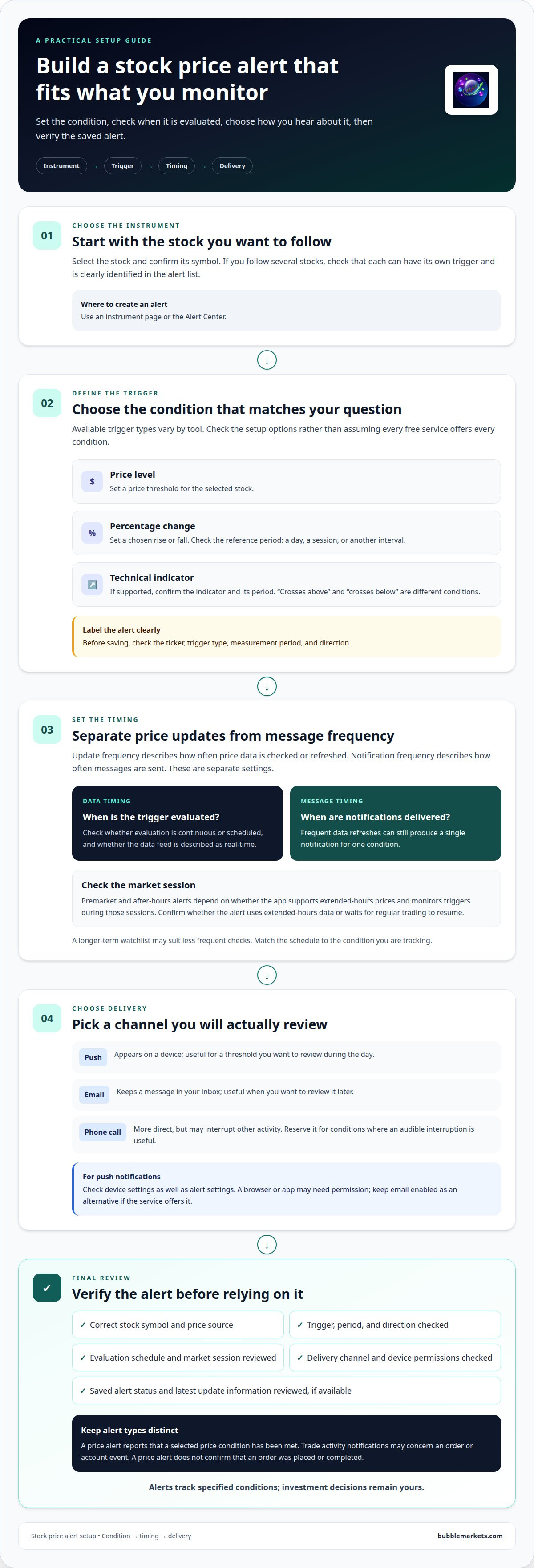
Alert update frequency
Update frequency describes how often an alert system checks or refreshes price data. A trigger may depend on incoming price updates, scheduled checks, or the service’s data feed. These are different from how often you receive messages. Review both settings: frequent data refreshes can still produce a single notification for one condition.
Which stock alert apps offer real-time price notifications? Look for apps that explicitly describe their stock prices and alerts as real-time. Check whether that timing applies to the data feed, trigger evaluation, and notification itself, since each step can have a different schedule.
Premarket and after-hours alerts depend on whether the app supports extended-hours prices and monitors triggers during those sessions. A regular-session alert may behave differently outside standard trading hours. Review the session setting for each stock, then confirm whether the trigger uses extended-hours data or waits for regular trading to resume.
Match the update schedule to the condition you’re tracking. For a price threshold, decide whether you need alerts as prices update or only at set intervals. Less frequent checks may be sufficient for a longer-term watchlist. Read the settings carefully: “price refresh” and “notification frequency” can refer to separate controls.
Use this quick review before saving an alert:
- Confirm the stock symbol and the price source shown in its details.
- Check whether the trigger is evaluated continuously or at scheduled intervals.
- Review which market sessions the alert monitors, including premarket and after-hours.
- Separate data update timing from notification delivery timing.
After setup, check the alert status and its latest update information, if available. If an alert seems delayed, review the selected session and update settings before changing the trigger. A clearly defined schedule helps you understand what a notification reflects, especially when a stock moves outside regular trading hours.
What are the best free stock price alert tools in the US?
There isn’t one best free tool for every US stock watchlist. The right choice depends on the stocks you follow, the conditions you need to track, and how you want to review alerts. Compare tools using the same stock and trigger to assess their settings consistently.
Start with alert setup. Can you choose a specific price, percentage move, or other condition? If you monitor two stocks, for example, check whether each can have its own trigger. A tool that supports your actual monitoring needs is more useful than one with extra features you won’t use.
Next, examine how the service handles market sessions and price updates. If you want to follow a US stock outside regular trading hours, look for a clear setting for premarket or after-hours activity. Distinguish the timing of price updates from alert delivery, since both affect how you interpret a notification.
Review a free plan’s limits before building a long watchlist. Check whether it restricts the number of saved alerts, available conditions, or delivery methods. Consider how easily you can edit or remove alerts when your priorities change. These practical checks help you decide whether the free option fits your routine.
Use a simple comparison process:
- Select a stock you already follow and create a test alert.
- Record the available trigger types and market-session settings.
- Review delivery choices and free-plan limits.
- Check how clearly the alert identifies its symbol and condition.
Choose based on the settings you’ll use, not a generic ranking. A tool suited to one price threshold may not fit someone monitoring percentage changes across several stocks. Apply the same checklist to each option, then choose the one whose alert controls match your watchlist and review habits.
There is no single best free stock price alert tool for every US investor. The best fit is the one whose trigger types, market-session settings, delivery options, and free-plan limits match the stocks you follow and how you review alerts.
BubbleMarkets: Portfolio Tracking and Price Alerts
BubbleMarkets offers portfolio tracking and price alerts for monitoring selected instruments alongside a tracked portfolio. Use these tools when separate watchlists and price alerts are becoming harder to manage together.
Free Live Market Bubble Maps and the Stock Market Bubble Map add a visual view of market movements. Use them to examine stock activity alongside your tracking, while keeping alerts focused on the price conditions you choose.
To explore how these tools fit your monitoring routine, contact BubbleMarkets.
Make your alert setup part of a steady routine
A useful alert system starts with a clear purpose: decide what deserves your attention and how you’ll use that information. Treat a price alert tool for stocks as a monitoring aid, not a substitute for reviewing the context around a price move. A notification can prompt a closer look; your own process determines what follows.
As your watchlist changes, revisit the alerts that still serve a purpose. Remove conditions you no longer need and adjust your monitoring approach when your priorities shift. This keeps your setup focused instead of letting old alerts accumulate.
If you want to explore how BubbleMarkets’ available subscriptions and market tools may fit your workflow, contact BubbleMarkets about price alerts. You can discuss what you’re trying to monitor and identify a practical next step. Start with a clear objective, then build a routine that works for you.
Frequently Asked Questions
Which tools support alerts for stocks, ETFs, and options?
Support depends on the tool and asset type: check its supported instruments before setting alerts. BubbleMarkets provides market data for stocks and ETFs, but its listed asset coverage does not include options. For an options watchlist, confirm that the specific service supports option contracts and the alert conditions you need. A stock alert tied to a company’s shares may not track an options contract’s price.
Can stock price alerts be sent by SMS, email, or push notification?
Delivery methods vary by platform, so review its settings for SMS, email, or push notifications. SMS and phone calls are different channels. For push delivery, device or browser permissions can affect whether a notification appears. If you monitor alerts on a phone and desktop, review which channels are available on each device.
How accurate and timely are stock price alerts during market hours?
Timeliness depends on the price-data update schedule, trigger processing, and notification delivery. BubbleMarkets’ Free plan refreshes prices every 1-2 minutes; Professional and Enterprise plans provide second-to-second live streaming for US stocks. A displayed price and a delivered alert can therefore have different timing. Check the data cadence for your plan and interpret an alert as a prompt to review the instrument, not an execution confirmation.
Frequently asked questions
Which tools support alerts for stocks, ETFs, and options?
Support depends on the tool and asset type: check its supported instruments before setting alerts. BubbleMarkets provides market data for stocks and ETFs, but its listed asset coverage does not include options. For an options watchlist, confirm that the specific service supports option contracts and the alert conditions you need. A stock alert tied to a company’s shares may not track an options contract’s price.
Can stock price alerts be sent by SMS, email, or push notification?
Delivery methods vary by platform, so review its settings for SMS, email, or push notifications. SMS and phone calls are different channels. For push delivery, device or browser permissions can affect whether a notification appears. If you monitor alerts on a phone and desktop, review which channels are available on each device.
How accurate and timely are stock price alerts during market hours?
Timeliness depends on the price-data update schedule, trigger processing, and notification delivery. BubbleMarkets’ Free plan refreshes prices every 1–2 minutes; Professional and Enterprise plans provide second-to-second live streaming for US stocks. A displayed price and a delivered alert can therefore have different timing. Check the data cadence for your plan and interpret an alert as a prompt to review the instrument, not an execution confirmation.
Market information on this page is for education and general information only. It is not investment advice or a recommendation to buy or sell any asset.