 BubbleMarkets
Visual Market Screener vs FINVIZ: Which Tool Fits Your Research Workflow?
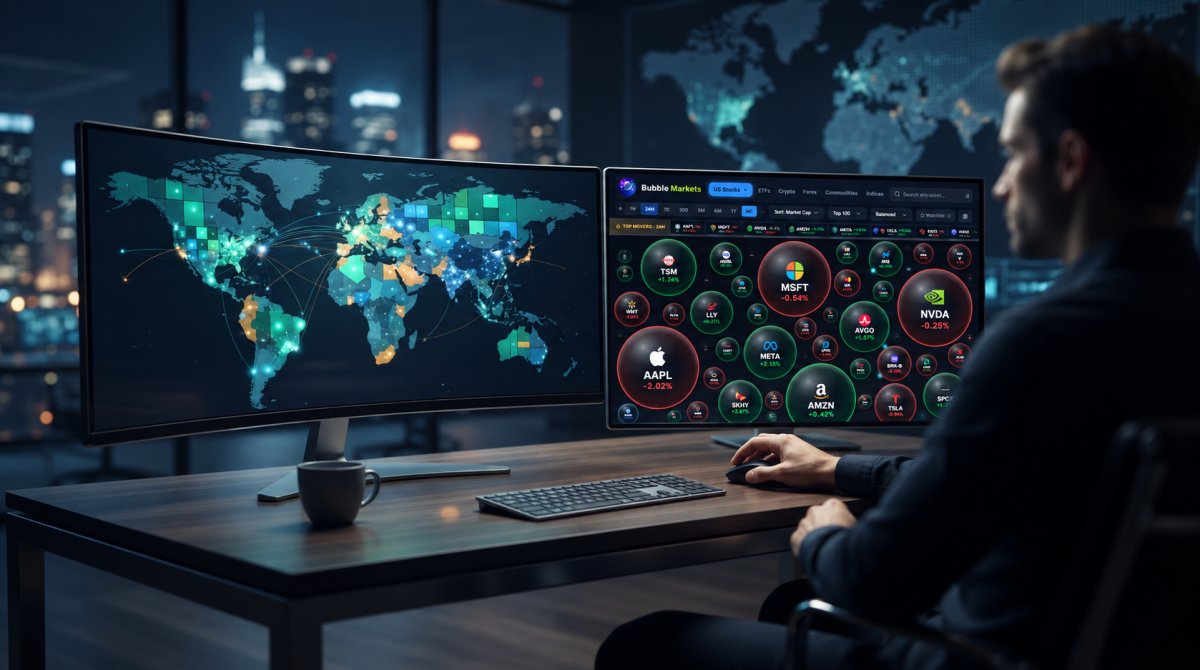
What if the best tool isn’t the one with the most filters? The visual market screener vs finviz choice depends on whether you want to spot broad market patterns first or narrow stocks using specific criteria. FINVIZ is known for filter-based stock discovery and heat maps. Visual market maps arrange market data so you can scan for patterns at a glance. Neither workflow answers every research question.
To choose between them, compare the details that affect your task: asset coverage, data timing, available metrics, and how easily you can repeat a scan. FINVIZ’s free data is delayed 15 minutes for Nasdaq and 20 minutes for NYSE and Amex, so check whether that timing suits your research. This comparison explains when to start with a broad view, when to apply precise criteria, and how BubbleMarkets’ multi-asset maps and screening tools may fit alongside a stock screener.
Key Takeaways
- The visual market screener vs finviz comparison comes down to workflow: maps help reveal broad patterns, while filters narrow securities using chosen criteria.
- Match the tool to the research step, from scanning a market universe to finding candidates for closer review.
- Check asset coverage, available metrics, timeframes, sorting, and customization against the market you want to examine.
- Use a four-step selection process: define the task, choose the market, test the interface, and review limitations.
- BubbleMarkets’ multi-asset maps, screening, alerts, and portfolio tracking may complement FINVIZ, rather than replace every screening workflow.
Visual Market Screener vs FINVIZ: Two Different Ways to Scan Stocks
The key difference in the visual market screener vs finviz comparison is how each interface presents market information. A visual screener arranges securities in a spatial map, using elements such as bubble size, color, and position to represent selected data. Alternative research platforms often rely on filter-based screeners and traditional market visualizations, including standard heat maps. A map makes relative patterns easier to scan; filters help isolate stocks that meet selected conditions.
What does a visual market screener show at a glance?
A bubble map can make groups and outliers easier to spot than a long results table. Depending on the map, bubble size, color, and placement may each represent a different value. Before interpreting the display, check its legend, active metric, and timeframe. For example, a hypothetical scan might show several stocks in the same sector with similar colors, while one larger bubble stands apart. That pattern can point you toward a closer look, but it does not explain what caused a move. For more help comparing map-based tools, see this visual stock screener buying guide.
What do traditional stock screening platforms help users screen or inspect?
Standard screening software often includes robust filter libraries with dozens of parameters, heat maps, basic static charts, news aggregation, and insider transaction data. Free market data on many platforms is typically delayed by 15 to 20 minutes across major exchanges. Premium tiers generally add real-time data refreshed every few seconds, extended-hours coverage, and advanced, interactive charts. Always confirm current features and plan limits directly with the platform provider before relying on a particular control or display.
Filters are useful for questions you can express as conditions. Narrow the stock universe using available criteria, then review the resulting candidates. Maps start from a different point: they provide market context, helping you compare groups before choosing securities to inspect. Charts may support technical analysis, which studies past market data, especially price and volume. Chart access and interactivity vary by plan.
Neither interface determines whether an investment is suitable or guarantees an outcome. A map can surface a pattern, and a filter can return stocks that match its rules, but both require verification and further research. This comparison evaluates research workflows, not investment performance.
How Visual Market Maps and FINVIZ Filters Support Different Research Steps
Think of the visual market screener vs FINVIZ as a choice of starting point, not a contest between tools that answer every question. A map gives broad context: where activity appears concentrated and which securities stand out. A filter-based screener starts with selected conditions, narrowing a defined universe to candidates for closer inspection.
When is a visual scan more useful than starting with filters?
Start with a map when you want to scan broad market direction, sector clusters, or outliers before deciding on screening rules. For example, you might look for groups of stocks moving in similar directions, then investigate an unusual cluster. The result depends on the selected metric, market universe, and timeframe. Check all three before drawing conclusions. This market bubble map scanning guide explains how to read a visual overview.
When do FINVIZ-style filters make the search more specific?
Filters are useful when you can describe what you’re looking for in measurable terms. FINVIZ’s free stock screener has more than 60 filters, according to current plan information, but don’t assume every metric or market is supported. Check which criteria are available for your intended universe, then verify candidates against underlying data and your own research process. A filter result is a shortlist, not a conclusion.
The approaches can also work in sequence: scan broadly, use a filter to define candidates, inspect relevant data in more detail, then decide what to monitor. A map can hide detail in its visual encoding, and a crowded display can make individual values difficult to compare. Filters have the opposite risk: strict conditions can narrow your attention before you notice patterns outside those criteria. Both are forms of financial analytics, but each emphasizes a different way to organize information.
Starting point: A visual map gives broad market context. FINVIZ starts with selected screening rules.
Scan style: A map supports spatial comparison and pattern recognition. FINVIZ supports filter-led candidate discovery.
Asset scope: Confirm that the map covers your intended market. Verify FINVIZ’s current supported universe rather than assuming its stock screener covers other assets.
Verification needs: Check the map’s metric, universe, and timeframe. For FINVIZ, confirm the criteria, data timing, and plan limits.
For a quick visual scan across market categories, you can explore live market bubble maps as one layer in a broader workflow. Use the interface that fits your question, then verify what its display leaves out.
Visual Market Screener vs FINVIZ: Compare the Criteria That Affect Fit
The visual market screener vs finviz decision involves more than whether you prefer maps or filter menus. Check whether each tool covers your intended market, offers the metrics you use, and presents data at a timing that suits your research. A clear interface can make information easier to scan, but it does not confirm that the underlying data is complete or independently verified.
Which tool offers the market coverage you actually need?
Start with stocks, then consider whether you need to scan other asset classes. BubbleMarkets offers visual maps for stocks, ETFs, crypto, commodities, bonds, forex, and world indices, alongside regional stock maps. FINVIZ is best known for stock research; verify its current asset-class and geographic coverage before assuming it supports the full universe you want. A stock market heat map guide can help you assess what a map reveals during an equity scan.
Coverage affects the questions you can explore. A broad multi-asset map can put different markets in view, while a stock-focused screener may suit a search confined to equities. A stock screener uses criteria to identify securities, but available fields and markets vary by platform. Confirm that your target region and instrument type are supported before building a workflow around them.
How should you judge filters, visual controls, and data freshness?
Test each interface with the same research task. Can you select the metrics you need, combine criteria, sort results, and save or reuse a view? FINVIZ’s free plan includes more than 60 screener filters; registered users can save up to 50 screener presets and portfolios. BubbleMarkets offers market maps and screening, with additional screening and customization features in paid tiers. Check current plan details to see which functions are available to you.
Data timing matters as well. FINVIZ’s free data is delayed 15 minutes for Nasdaq and 20 minutes for NYSE and Amex; its Elite plan provides real-time data refreshed every few seconds. Check current disclosures and plan terms directly, and compare like with like. BubbleMarkets offers free live market visualizers, but verify timing and relevant market-specific details in its current product information.
- Readability: Can you identify the active metric, timeframe, and filters without guesswork?
- Workflow: Can you repeat a scan or monitor a portfolio using features confirmed in the current interface?
- Data: Are freshness, market coverage, and limitations clear enough for your use?
BubbleMarkets also offers portfolio tracking and price alerts. Treat these as workflow features, not evidence that a display is comprehensive. Review current plan details before relying on a feature, and verify important figures against underlying market data.
How to Choose Between a Visual Screener and FINVIZ for Your Workflow
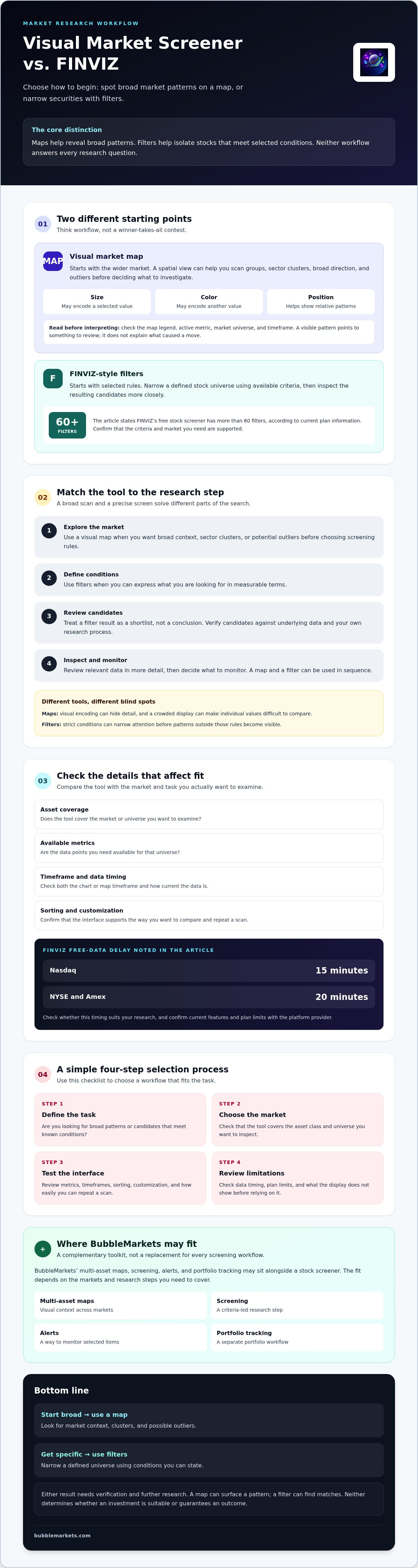
Choose based on the question you need to answer, not the number of controls on the screen. A visual market screener can help you explore market-wide patterns; FINVIZ can help apply defined stock-screening criteria. If your process needs both context and a shortlist, use the tools in sequence and verify each step.
Which tool fits a broad market scan or a focused stock search?
Start with a visual scan if you want to compare sectors or groups, or identify outliers before setting rules. Start with FINVIZ-style filters if you already know the conditions you want to apply, such as selected price, valuation, or performance measures available in the screener. A combined workflow can help you consider context before narrowing candidates, but it does not establish suitability or promise better returns.
Use this four-step process to make the choice practical:
- Define the task: Are you exploring for patterns, building a shortlist, or monitoring securities?
- Select the market: Confirm that the tool covers the assets and geography you intend to examine.
- Test the interface: Run your task and note how easily you can set the view, interpret results, and repeat the scan.
- Review limitations: Check metric definitions, data timing, plan access, and coverage gaps before relying on the output.
What should you test before relying on either screener?
Try the same research question in both interfaces. For example, if you’re looking for stocks with a particular market characteristic, first scan the relevant universe visually, then apply corresponding filters where available. Compare the steps required and whether the results answer the same question. If the universe or metric differs, the outputs may not be directly comparable.
Keep a short checklist beside you: Is the market universe correct? What does each metric measure? Is the timeframe clear? When was the data updated? Are filters, saved views, alerts, or other controls limited by plan? Confirm details in each product’s current documentation, since features and access can change.
A screen is a research aid, not a recommendation. Treat its output as a starting point for checking source data and applying your own process. To try a visual-first view of market data, explore BubbleMarkets’ market maps and assess whether their layout fits your scan.
Where BubbleMarkets Fits Alongside FINVIZ
In the visual market screener vs finviz comparison, BubbleMarkets can serve as a visual layer for broad market scanning, while FINVIZ remains part of a filter-led stock research process. You don’t have to replace one with the other. Keep the tools that support your workflow, and use each for tasks it handles clearly.
What does BubbleMarkets add to a visual-first workflow?
BubbleMarkets offers interactive bubble maps and heat maps that arrange market data visually, helping you explore relative movements across markets. Its maps cover stocks, ETFs, crypto, commodities, bonds, forex, and world indices. It also offers market screening, portfolio tracking, price alerts, and AI-generated market summaries. Check current product and plan details to confirm feature availability before relying on a specific function.
These tools can support a workflow that starts with visual context: scan a market map, note an area or security to investigate, then use filters or other research tools to examine it further. BubbleMarkets is not a broker or a substitute for every screening task. Its visualizations and related tools support research; they are not individualized financial advice, trading signals, or a guarantee of an outcome.
How can you compare the tools in practice?
Choose one market question, such as which parts of a stock universe show a similar move. Set the same universe and timeframe in both tools where possible, then compare what each helps you see and how much effort it takes to investigate an observation. If the markets or metrics don’t match, note that limitation rather than treating the results as equivalent.
- Navigation: How quickly can you reach the market, metric, or filter you need?
- Context: Does the map make relative patterns easy to scan, or do filters provide the specific shortlist you’re seeking?
- Clarity: Are metric definitions, timeframes, and data timestamps visible?
- Follow-up: Can you move from an observation to the next research step without losing track of the criteria?
Use FINVIZ for filter-led tasks if its current coverage and controls meet your needs. Add a visual tool when a spatial overview helps you explore the market. To compare that workflow firsthand, explore BubbleMarkets visual market tools.
Build a Research Workflow That Fits Your Questions
The visual market screener vs finviz choice comes down to how you want to explore. Visual maps help you scan relative market patterns and spot areas to investigate; FINVIZ’s filters help narrow stocks using defined criteria. In many research workflows, these approaches can work together: use a broad view for context, then apply filters and verify the details.
BubbleMarkets adds interactive maps and heat maps across multiple asset classes, along with market screening, portfolio tracking, and price alerts. Check current coverage, data timing, and feature access before relying on any tool. Neither a map nor a screener determines whether an investment is right for you, but each can organize the information you review.
To see whether a visual-first scan fits your process, explore BubbleMarkets visual market tools and compare the workflow with your current research routine. A clear process starts with the right view, then leaves room to inspect the data and make your own decisions.
Frequently Asked Questions
What is the difference between a visual market screener and FINVIZ?
A visual market screener presents market data spatially, often using bubble size, position, or color to show relative changes. FINVIZ is a stock research platform with screening and visualization features. The practical difference in the visual market screener vs finviz choice is where you start: with a broad visual overview or filters based on chosen criteria. Check current features and data limits, and treat either tool as a research aid, not a replacement for independent research.
Is FINVIZ a visual stock screener?
FINVIZ includes visual market presentations, such as heat maps, alongside its stock research tools. However, its core screening workflow applies filters to stocks, while a visual market screener typically makes spatial relationships central to the scan. Compare the current interfaces directly: see whether the visual display helps you identify broad patterns, then check whether available filters support your research criteria. Feature access can vary by plan, so verify current details.
Can a visual market screener replace FINVIZ?
A visual market screener can replace some steps in a research workflow, but it may not provide every filter or control you need. Maps help reveal relative patterns; filter-based tools narrow a universe using selected criteria. Before switching, compare asset coverage, available metrics, and the steps needed to investigate candidates. You might use a visual map for market context and FINVIZ for a focused stock search, if its current filters fit your needs.
Which is better for finding stocks, a visual screener or FINVIZ?
The better fit depends on the question you’re trying to answer. Use a visual scan to explore broad market or sector patterns; use FINVIZ filters when you have specific criteria and want to narrow stocks accordingly. Check metric definitions, data timing, and current filter availability in both tools. A result identifies information for further research; it is not a prediction or a personalized recommendation about whether to buy a security.
Does FINVIZ provide real-time market data?
FINVIZ’s free plan provides delayed data: 15 minutes for Nasdaq and 20 minutes for NYSE and Amex. FINVIZ Elite includes real-time data refreshed every few seconds, according to current plan information. Confirm the latest disclosures and plan terms before relying on a particular screen or instrument. Don’t assume a visual display is real time just because it appears live; check its stated update timing and data source.
Can BubbleMarkets screen more than stocks?
Yes. BubbleMarkets offers visual market maps across stocks, crypto, ETFs, commodities, bonds, and forex, along with market screening tools. The assets and features available may depend on the visualizer or subscription, so check current product details before relying on a particular function. BubbleMarkets is a data visualization platform, not a broker or financial adviser; it doesn’t provide trade execution or individualized investment advice.
Should I use a visual market map and a stock screener together?
Yes, if each tool supports a different step in your research. Start with a map to explore market context, then use a stock screener to narrow the search if its filters match your criteria. Compare the same market and timeframe where possible, and verify what each tool displays. This approach can help organize discovery, but screen results don’t establish whether a security is suitable for you or predict its performance.
Frequently asked questions
What does a visual market screener show at a glance?
A bubble map can make groups and outliers easier to spot than a long results table. Depending on the map, bubble size, color, and placement may each represent a different value. Before interpreting the display, check its legend, active metric, and timeframe. For example, a hypothetical scan might show several stocks in the same sector with similar colors, while one larger bubble stands apart. That pattern can point you toward a closer look, but it does not explain what caused a move. For more help comparing map-based tools, see this visual stock screener buying guide.
What does FINVIZ help users screen or inspect?
FINVIZ’s free plan includes a stock screener with more than 60 filters, heat maps, basic static charts, news aggregation, and insider transaction data. Its free market data is delayed: 15 minutes for Nasdaq and 20 minutes for NYSE and Amex. FINVIZ Elite adds real-time data refreshed every few seconds, pre-market and after-hours data, and advanced, interactive charts. Confirm current features and plan limits with FINVIZ before relying on a particular control or display. Filters are useful for questions you can express as conditions. Narrow the stock universe using available criteria, then review the resulting candidates. Maps start from a different point: they provide market context, helping you compare groups before choosing securities to inspect. Charts may support technical analysis, which studies past market data, especially price and volume. Chart access and interactivity vary by plan. Neither interface determines whether an investment is suitable or guarantees an outcome. A map can surface a pattern, and a filter can return stocks that match its rules, but both require verification and further research. This comparison evaluates research workflows, not investment performance. Think of the visual market screener vs FINVIZ as a choice of starting point, not a contest between tools that answer every question. A map gives broad context: where activity appears concentrated and which securities stand out. A filter-based screener starts with selected conditions, narrowing a defined universe to candidates for closer inspection.
When is a visual scan more useful than starting with filters?
Start with a map when you want to scan broad market direction, sector clusters, or outliers before deciding on screening rules. For example, you might look for groups of stocks moving in similar directions, then investigate an unusual cluster. The result depends on the selected metric, market universe, and timeframe. Check all three before drawing conclusions. This market bubble map scanning guide explains how to read a visual overview.
When do FINVIZ-style filters make the search more specific?
Filters are useful when you can describe what you’re looking for in measurable terms. FINVIZ’s free stock screener has more than 60 filters, according to current plan information, but don’t assume every metric or market is supported. Check which criteria are available for your intended universe, then verify candidates against underlying data and your own research process. A filter result is a shortlist, not a conclusion. The approaches can also work in sequence: scan broadly, use a filter to define candidates, inspect relevant data in more detail, then decide what to monitor. A map can hide detail in its visual encoding, and a crowded display can make individual values difficult to compare. Filters have the opposite risk: strict conditions can narrow your attention before you notice patterns outside those criteria. Both are forms of financial analytics, but each emphasizes a different way to organize information. Starting point: A visual map gives broad market context. FINVIZ starts with selected screening rules. Scan style: A map supports spatial comparison and pattern recognition. FINVIZ supports filter-led candidate discovery. Asset scope: Confirm that the map covers your intended market. Verify FINVIZ’s current supported universe rather than assuming its stock screener covers other assets. Verification needs: Check the map’s metric, universe, and timeframe. For FINVIZ, confirm the criteria, data timing, and plan limits. For a quick visual scan across market categories, you can explore live market bubble maps as one layer in a broader workflow. Use the interface that fits your question, then verify what its display leaves out. The visual market screener vs finviz decision involves more than whether you prefer maps or filter menus. Check whether each tool covers your intended market, offers the metrics you use, and presents data at a timing that suits your research. A clear interface can make information easier to scan, but it does not confirm that the underlying data is complete or independently verified.
Which tool offers the market coverage you actually need?
Start with stocks, then consider whether you need to scan other asset classes. BubbleMarkets offers visual maps for stocks, ETFs, crypto, commodities, bonds, forex, and world indices, alongside regional stock maps. FINVIZ is best known for stock research; verify its current asset-class and geographic coverage before assuming it supports the full universe you want. A stock market heat map guide can help you assess what a map reveals during an equity scan. Coverage affects the questions you can explore. A broad multi-asset map can put different markets in view, while a stock-focused screener may suit a search confined to equities. A stock screener uses criteria to identify securities, but available fields and markets vary by platform. Confirm that your target region and instrument type are supported before building a workflow around them.
How should you judge filters, visual controls, and data freshness?
Test each interface with the same research task. Can you select the metrics you need, combine criteria, sort results, and save or reuse a view? FINVIZ’s free plan includes more than 60 screener filters; registered users can save up to 50 screener presets and portfolios. BubbleMarkets offers market maps and screening, with additional screening and customization features in paid tiers. Check current plan details to see which functions are available to you. Data timing matters as well. FINVIZ’s free data is delayed 15 minutes for Nasdaq and 20 minutes for NYSE and Amex; its Elite plan provides real-time data refreshed every few seconds. Check current disclosures and plan terms directly, and compare like with like. BubbleMarkets offers free live market visualizers, but verify timing and relevant market-specific details in its current product information. BubbleMarkets also offers portfolio tracking and price alerts. Treat these as workflow features, not evidence that a display is comprehensive. Review current plan details before relying on a feature, and verify important figures against underlying market data. Choose based on the question you need to answer, not the number of controls on the screen. A visual market screener can help you explore market-wide patterns; FINVIZ can help apply defined stock-screening criteria. If your process needs both context and a shortlist, use the tools in sequence and verify each step.
Which tool fits a broad market scan or a focused stock search?
Start with a visual scan if you want to compare sectors or groups, or identify outliers before setting rules. Start with FINVIZ-style filters if you already know the conditions you want to apply, such as selected price, valuation, or performance measures available in the screener. A combined workflow can help you consider context before narrowing candidates, but it does not establish suitability or promise better returns. Use this four-step process to make the choice practical:
What should you test before relying on either screener?
Try the same research question in both interfaces. For example, if you’re looking for stocks with a particular market characteristic, first scan the relevant universe visually, then apply corresponding filters where available. Compare the steps required and whether the results answer the same question. If the universe or metric differs, the outputs may not be directly comparable. Keep a short checklist beside you: Is the market universe correct? What does each metric measure? Is the timeframe clear? When was the data updated? Are filters, saved views, alerts, or other controls limited by plan? Confirm details in each product’s current documentation, since features and access can change. A screen is a research aid, not a recommendation. Treat its output as a starting point for checking source data and applying your own process. To try a visual-first view of market data, explore BubbleMarkets’ market maps and assess whether their layout fits your scan. In the visual market screener vs finviz comparison, BubbleMarkets can serve as a visual layer for broad market scanning, while FINVIZ remains part of a filter-led stock research process. You don’t have to replace one with the other. Keep the tools that support your workflow, and use each for tasks it handles clearly.
What does BubbleMarkets add to a visual-first workflow?
BubbleMarkets offers interactive bubble maps and heat maps that arrange market data visually, helping you explore relative movements across markets. Its maps cover stocks, ETFs, crypto, commodities, bonds, forex, and world indices. It also offers market screening, portfolio tracking, price alerts, and AI-generated market summaries. Check current product and plan details to confirm feature availability before relying on a specific function. These tools can support a workflow that starts with visual context: scan a market map, note an area or security to investigate, then use filters or other research tools to examine it further. BubbleMarkets is not a broker or a substitute for every screening task. Its visualizations and related tools support research; they are not individualized financial advice, trading signals, or a guarantee of an outcome.
How can you compare the tools in practice?
Choose one market question, such as which parts of a stock universe show a similar move. Set the same universe and timeframe in both tools where possible, then compare what each helps you see and how much effort it takes to investigate an observation. If the markets or metrics don’t match, note that limitation rather than treating the results as equivalent. Use FINVIZ for filter-led tasks if its current coverage and controls meet your needs. Add a visual tool when a spatial overview helps you explore the market. To compare that workflow firsthand, explore BubbleMarkets visual market tools. The visual market screener vs finviz choice comes down to how you want to explore. Visual maps help you scan relative market patterns and spot areas to investigate; FINVIZ’s filters help narrow stocks using defined criteria. In many research workflows, these approaches can work together: use a broad view for context, then apply filters and verify the details. BubbleMarkets adds interactive maps and heat maps across multiple asset classes, along with market screening, portfolio tracking, and price alerts. Check current coverage, data timing, and feature access before relying on any tool. Neither a map nor a screener determines whether an investment is right for you, but each can organize the information you review. To see whether a visual-first scan fits your process, explore BubbleMarkets visual market tools and compare the workflow with your current research routine. A clear process starts with the right view, then leaves room to inspect the data and make your own decisions.
What is the difference between a visual market screener and FINVIZ?
A visual market screener presents market data spatially, often using bubble size, position, or color to show relative changes. FINVIZ is a stock research platform with screening and visualization features. The practical difference in the visual market screener vs finviz choice is where you start: with a broad visual overview or filters based on chosen criteria. Check current features and data limits, and treat either tool as a research aid, not a replacement for independent research.
Is FINVIZ a visual stock screener?
FINVIZ includes visual market presentations, such as heat maps, alongside its stock research tools. However, its core screening workflow applies filters to stocks, while a visual market screener typically makes spatial relationships central to the scan. Compare the current interfaces directly: see whether the visual display helps you identify broad patterns, then check whether available filters support your research criteria. Feature access can vary by plan, so verify current details.
Can a visual market screener replace FINVIZ?
A visual market screener can replace some steps in a research workflow, but it may not provide every filter or control you need. Maps help reveal relative patterns; filter-based tools narrow a universe using selected criteria. Before switching, compare asset coverage, available metrics, and the steps needed to investigate candidates. You might use a visual map for market context and FINVIZ for a focused stock search, if its current filters fit your needs.
Which is better for finding stocks, a visual screener or FINVIZ?
The better fit depends on the question you’re trying to answer. Use a visual scan to explore broad market or sector patterns; use FINVIZ filters when you have specific criteria and want to narrow stocks accordingly. Check metric definitions, data timing, and current filter availability in both tools. A result identifies information for further research; it is not a prediction or a personalized recommendation about whether to buy a security.
Does FINVIZ provide real-time market data?
FINVIZ’s free plan provides delayed data: 15 minutes for Nasdaq and 20 minutes for NYSE and Amex. FINVIZ Elite includes real-time data refreshed every few seconds, according to current plan information. Confirm the latest disclosures and plan terms before relying on a particular screen or instrument. Don’t assume a visual display is real time just because it appears live; check its stated update timing and data source.
Can BubbleMarkets screen more than stocks?
Yes. BubbleMarkets offers visual market maps across stocks, crypto, ETFs, commodities, bonds, and forex, along with market screening tools. The assets and features available may depend on the visualizer or subscription, so check current product details before relying on a particular function. BubbleMarkets is a data visualization platform, not a broker or financial adviser; it doesn’t provide trade execution or individualized investment advice.
Should I use a visual market map and a stock screener together?
Yes, if each tool supports a different step in your research. Start with a map to explore market context, then use a stock screener to narrow the search if its filters match your criteria. Compare the same market and timeframe where possible, and verify what each tool displays. This approach can help organize discovery, but screen results don’t establish whether a security is suitable for you or predict its performance.
Market information on this page is for education and general information only. It is not investment advice or a recommendation to buy or sell any asset.