 BubbleMarkets
Visual Stock Screener Buying Guide: Compare Tools and Choose the Right Fit

The most eye-catching visual stock screener may not be the right tool for your research. A bubble map can make market patterns easier to scan, but a clear display alone won’t tell you whether a platform has the filters, stock coverage, or data fields your workflow requires. Comparing those details can take more effort than comparing screenshots.
If conventional lists make broad patterns hard to spot, that frustration is understandable. The right screener should help you move from a market-wide view to a focused shortlist, then continue your research with other tools. This guide explains how visual screeners organize market data and what to compare before choosing one.
You’ll assess screening filters, market coverage, data freshness, usability, and how each platform fits into your research process. You’ll also see how BubbleMarkets, with stock bubble maps, market screeners, heat maps, portfolio tracking, alerts, and views across other asset classes, may fit among the options. A visual screener can help organize information, but it doesn’t replace further research or provide personalized investment advice.
Key Takeaways
- Read bubble size, position, and color as configured data cues, not universal signals.
- Compare a visual stock screener by its universe, filters, visual controls, and intended use.
- Choose between bubble maps, heat maps, and tables based on the task you need to complete.
- Test a representative research task to see whether the screener supports your actual process.
- Assess BubbleMarkets using the same criteria, and confirm current coverage and features before relying on them.
What a Visual Stock Screener Shows, and What It Does Not
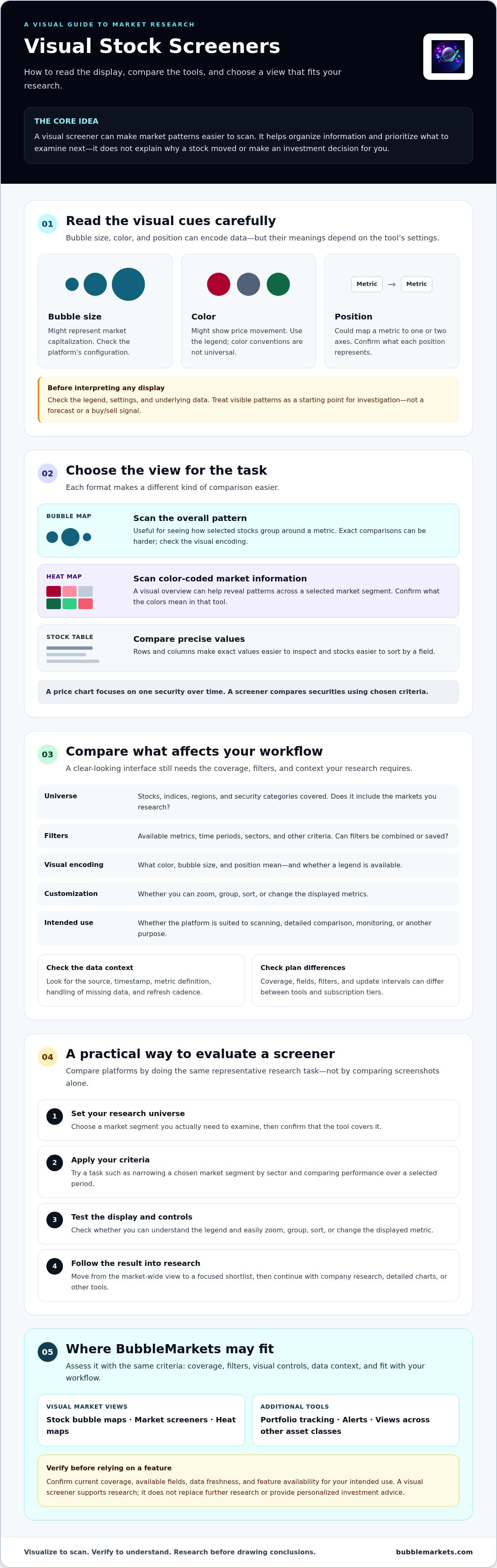
A visual stock screener filters equities and presents the results with spatial or color-based cues. Rather than reading every row, you can scan how selected stocks are grouped or compare a chosen metric across a market segment. Bubble size might represent market capitalization, while color might show price movement; position could map a metric to one or two axes. These are examples, not universal rules. Check the legend and settings before interpreting any visual.
Visual displays build on a longer history of market data visualization, from ticker tapes to screen-based systems. The purpose remains practical: organize market information so people can inspect it. A visual stock screener can help you prioritize what to examine next, but a pattern alone doesn’t explain why a stock moved or establish a buy or sell decision.
How visual stock screening differs from lists and charts
A sortable table presents precise rows and columns, making it easier to compare exact values or sort stocks by a field. A map emphasizes the overall pattern, such as whether a selected group clusters around a metric. That overview can be faster to scan, but exact comparisons may be harder.
A conventional price chart focuses on one security over time. Screening, by contrast, compares securities using chosen criteria. Interfaces differ, so check each tool’s legend, configuration, and underlying data before drawing conclusions.
Which questions a visual screener can help investigate
Use the view to scan how selected stocks are performing across an index or market segment, then identify groups that may warrant closer research. For example, grouping a screen by sector can help you notice whether movement appears concentrated in one area or spread across several. That observation is a starting point for investigation, not a forecast.
A screener is also distinct from portfolio monitoring, which follows holdings, and brokerage, which provides access to trading. It doesn’t replace company research, a detailed chart, or investment advice. The display helps organize information; it doesn’t assess whether an investment suits your circumstances. For a focused explanation of interpreting color-coded market displays, see the stock market heat map guide.
Compare Visual Stock Screener Features That Affect Your Workflow
Compare tools by running the same research task, not just by reviewing their screenshots. A visual stock screener may look clear but still lack the coverage, filters, or data context your work requires. Investor education resources such as the AAII’s guide to tools that allow individual investors offer broader context; use the criteria below to assess how each platform works in practice.
| Criteria | What to compare | Why it matters |
|---|---|---|
| Universe | Stocks, indices, regions, and security categories covered | Confirms the tool includes the markets you research |
| Filters | Performance metrics, time periods, sectors, and other criteria; whether filters combine or save | Shows whether you can narrow the market to a useful set |
| Visual encoding | Meaning of color, bubble size, and position; availability of a legend | Prevents misreading how values are represented |
| Customization | Options to zoom, group, sort, or change displayed metrics | Determines whether the view adapts to your task |
| Intended use | Scanning, detailed comparison, monitoring, or another purpose | Helps distinguish a quick overview from deeper research support |
Market coverage, filters, and data context
Start with your research universe. Check whether the platform covers the stocks, indices, regions, and security types you need, then confirm which filters are available. A sector filter alone may not be enough if you also need to narrow results by performance period or another metric. Test whether filters can be combined and saved, and whether those functions vary by subscription tier.
Inspect the data context before comparing values. Look for the source, timestamp, and definition of each metric. Check how missing data is handled, and verify the refresh cadence rather than assuming it. Coverage, fields, and update intervals can differ between tools and plans.
Visual controls and complementary research features
Run the same task in each interface, such as narrowing a chosen market segment by sector and comparing performance over a selected period. Check how easily you can zoom, group, sort, and change the display. Also consider whether watchlists, portfolio tracking, or alerts would fit your workflow alongside screening; verify current availability and functionality directly.
For broader context on scanning markets through visual displays, explore the market bubble map guide. You can also compare these criteria with BubbleMarkets’ visual market maps and screening tools, checking current coverage and features against your needs.
Bubble Map, Heat Map, or Stock Table: Which View Fits?
Each view makes a different kind of comparison easier. A bubble map lays out relationships spatially, a heat map uses color to compare values across groups, and a sortable table keeps exact records in rows. No format is best for every task. To choose a visual stock screener, test the same research question in each view and note which one helps you find and verify relevant information.
| View | Useful for | Check before interpreting |
|---|---|---|
| Bubble map | Scanning relative patterns across a selected market universe | What size, color, and position encode |
| Heat map | Comparing color-coded performance across stocks, sectors, or groups | Metric, time period, color scale, and legend |
| Sortable table | Checking exact values and sorting or comparing fields | Metric definitions, units, and data timestamps |
When a bubble map is useful for scanning equities
Use a bubble map to see how securities relate across a selected universe without reviewing every row first. Bubble size and color can represent separate dimensions, but their meanings depend on the configuration. Read the legend before treating a large bubble or a particular color as meaningful. A map supports pattern recognition; follow up with the underlying figures to confirm what you see. For a fuller introduction, see the market bubble map overview.
When a heat map or table is the better fit
A heat map can help compare color-coded performance across sectors or other groups at a glance. It’s useful for spotting where displayed values appear concentrated, provided you check the time period and color scale. A table is a better fit when you need precise numbers, want to sort by a field, or need to check values side by side. Use the stock market heat map guide for more on heat-map use cases.
Try one question in all three formats, such as comparing a chosen set of stocks over the same period. Does the map reveal a useful grouping? Does the heat map make relative performance clearer? Can the table confirm the exact values? A strong workflow may use more than one view: scan visually, then verify in a sortable record.
A Practical Checklist for Choosing a Visual Stock Screener
Choose by workflow fit, not by the length of a feature list. A repeatable test makes it easier to compare platforms and identify gaps before relying on a display in your research process.
- Define the task. Decide whether you need broad market scanning, a sector review, or monitoring of selected stocks.
- Select the universe and time horizon. Specify the stocks or market segment you want to review and the period relevant to your question.
- Test the filters. Apply the metrics and criteria you need, and check whether they can be combined or saved.
- Inspect visual controls. Try grouping, sorting, zooming, or changing displayed values where available.
- Verify the context. Check the data timestamp, metric definition, legend, missing-data treatment, and any relevant plan limitations or terms.
Score each tool against your own requirements. For example, rate coverage, essential filters, clarity of visual encoding, and ease of follow-up research as meets, partly meets, or does not meet. This keeps a polished interface from outweighing a missing control you actually need.
Match the screener to your research task
Be specific about the question before comparing results. “Review technology stocks” is a starting point; defining the universe, time horizon, and performance metric makes the task testable. Decide what information you’ll need to investigate a pattern, such as an underlying value or a way to narrow the group further. A tool is a better fit when it helps you move from an initial scan to that next research step.
Test usability and validate what the display means
Use a free or trial interface when available, and repeat the same scan in each candidate. Note how long setup takes, whether the result is easy to interpret, and which controls or context are missing. Before drawing conclusions, confirm the selected metric and period, read the visual legend, and check the displayed data’s timestamp and definitions. Review limitations and terms, too.
A screener helps organize market information; its output isn’t personalized investment advice. Treat the result as a prompt for further research, not as a decision in itself.
Use this checklist to evaluate BubbleMarkets’ visual screening tools against your research task, and verify current coverage and features before relying on them.
How BubbleMarkets Fits a Visual Stock-Screening Workflow
BubbleMarkets is one platform to assess against the criteria in this guide. Its stock market bubble maps, market screeners, and customizable heat maps provide visual ways to inspect market data. Whether those views suit your workflow depends on details to verify, including the stock universe, available filters, displayed metrics, and data timestamps. Don’t assume that every exchange, filter, or control is available across all views or subscription tiers.
Assess the platform against your screening requirements
Start with a representative task, such as reviewing a stock group you follow over a chosen period. Open the relevant stock view, check the available filters, and see whether the display helps you identify a pattern and follow up with the context you need. Confirm current feature availability, market coverage, data fields, and refresh details for the subscription tier you’re evaluating.
Then consider how other tools might fit around screening. BubbleMarkets also offers portfolio tracking, price alerts, and AI-generated market summaries. These may complement a research workflow, but check what’s currently available and whether each feature serves a practical need. A longer feature list isn’t useful if it doesn’t support the task you defined.
Choose a next step without overcommitting
Free live visualizers provide a way to assess layout and scanning fit before comparing paid subscription tiers. Use the same research task to test the available view: can you understand the visual encoding, find the relevant market information, and identify what you’d need to verify elsewhere? If a filter or data detail is essential, confirm it directly rather than inferring its availability from a product description.
Compare Pro, Professional, and Enterprise subscriptions only against functionality you expect to use. BubbleMarkets presents market data; it doesn’t execute trades or provide personalized financial advice. Treat the visual output as a research aid, not a recommendation or a decision on its own.
Explore BubbleMarkets’ visual market tools and assess their fit for your workflow.
Choose a Screener That Fits Your Research Process
The right visual stock screener is the one that supports the work you need to do, not simply the one with the clearest display. Compare market coverage, filters, visual controls, and data context, then test a representative research task before deciding. Bubble maps and heat maps can help you scan patterns; tables and further research help you check the details.
BubbleMarkets offers interactive visual market maps, heat maps, and screeners, with coverage across global assets, including stocks. Free live visualizers provide a way to assess the interface, while paid subscription tiers offer additional capabilities to compare against your requirements. Check current feature availability and data details for the tier you’re considering.
Ready to evaluate a visual workflow against your needs? Explore BubbleMarkets’ visual market tools and see how they fit your research process. Take the time to test, compare, and choose with confidence.
Frequently Asked Questions
What is a visual stock screener?
A visual stock screener filters equities and displays results using visual elements such as color, position, or bubble size. These cues can help you scan a selected market universe for patterns before examining individual stocks more closely. Their meanings depend on the tool’s settings, so check the legend and selected metrics. A visual stock screener supports research, but it doesn’t determine whether a stock is right for you.
How does a visual stock screener differ from a stock heat map?
A visual stock screener is a broader tool for filtering and displaying stocks; a heat map is one possible way to present selected data. A heat map typically uses color to compare values across stocks or groups, while a screener may offer other views, such as bubble maps or tables. Check what the colors represent, which filters are active, and whether the map shows the full universe or only filtered results.
Can a visual stock screener help me find stocks to research?
Yes. It can help narrow a market or sector to stocks that meet criteria you select, or make a group pattern easier to notice. Treat the results as a research shortlist, not as predictions or buy and sell recommendations. Follow up by checking the underlying data and investigating relevant company information. A visual pattern alone doesn’t explain its cause or establish whether a security suits your goals.
What features should I look for in a visual stock screener?
Start with coverage that matches your research universe, then check filters for metrics, time periods, sectors, or other criteria you use. Review whether filters can be combined, and whether visual controls let you change or sort the display. Confirm the legend, metric definitions, data timestamps, refresh details, and how missing data appears. Prioritize the functions you need over a long feature list.
Are visual stock screeners suitable for beginners?
They can be useful for beginners because a visual layout may make broad market patterns easier to scan than a long list. Start with a small, clear question, such as comparing a selected group over a defined period. Read the legend before interpreting color or size, and verify displayed values in context. Screeners organize information; they don’t replace learning, independent research, or personalized financial advice.
Do visual stock screeners provide real-time stock data?
Not necessarily. Data availability and refresh cadence vary by platform, market, data field, and subscription tier. BubbleMarkets offers free live market visualizers, but check the relevant stock view for its current coverage, timestamp, and refresh details before relying on displayed information. “Live” in a product description isn’t a substitute for verifying what data is shown and when it was updated.
Can I trade stocks directly through BubbleMarkets?
No. BubbleMarkets is a market data visualization platform, not a brokerage or trade execution service. Its tools include stock market bubble maps, screeners, and heat maps, alongside features such as portfolio tracking and price alerts. These tools present information for research; they don’t place trades or provide personalized investment recommendations. If you decide to trade, use a separate service designed to handle transactions.
Frequently asked questions
What is a visual stock screener?
A visual stock screener filters equities and displays results using visual elements such as color, position, or bubble size. These cues can help you scan a selected market universe for patterns before examining individual stocks more closely. Their meanings depend on the tool’s settings, so check the legend and selected metrics. A visual stock screener supports research, but it doesn’t determine whether a stock is right for you.
How does a visual stock screener differ from a stock heat map?
A visual stock screener is a broader tool for filtering and displaying stocks; a heat map is one possible way to present selected data. A heat map typically uses color to compare values across stocks or groups, while a screener may offer other views, such as bubble maps or tables. Check what the colors represent, which filters are active, and whether the map shows the full universe or only filtered results.
Can a visual stock screener help me find stocks to research?
Yes. It can help narrow a market or sector to stocks that meet criteria you select, or make a group pattern easier to notice. Treat the results as a research shortlist, not as predictions or buy and sell recommendations. Follow up by checking the underlying data and investigating relevant company information. A visual pattern alone doesn’t explain its cause or establish whether a security suits your goals.
What features should I look for in a visual stock screener?
Start with coverage that matches your research universe, then check filters for metrics, time periods, sectors, or other criteria you use. Review whether filters can be combined, and whether visual controls let you change or sort the display. Confirm the legend, metric definitions, data timestamps, refresh details, and how missing data appears. Prioritize the functions you need over a long feature list.
Are visual stock screeners suitable for beginners?
They can be useful for beginners because a visual layout may make broad market patterns easier to scan than a long list. Start with a small, clear question, such as comparing a selected group over a defined period. Read the legend before interpreting color or size, and verify displayed values in context. Screeners organize information; they don’t replace learning, independent research, or personalized financial advice.
Do visual stock screeners provide real-time stock data?
Not necessarily. Data availability and refresh cadence vary by platform, market, data field, and subscription tier. BubbleMarkets offers free live market visualizers, but check the relevant stock view for its current coverage, timestamp, and refresh details before relying on displayed information. “Live” in a product description isn’t a substitute for verifying what data is shown and when it was updated.
Can I trade stocks directly through BubbleMarkets?
No. BubbleMarkets is a market data visualization platform, not a brokerage or trade execution service. Its tools include stock market bubble maps, screeners, and heat maps, alongside features such as portfolio tracking and price alerts. These tools present information for research; they don’t place trades or provide personalized investment recommendations. If you decide to trade, use a separate service designed to handle transactions.
Market information on this page is for education and general information only. It is not investment advice or a recommendation to buy or sell any asset.