 BubbleMarkets
Commercial Financial Widget Licensing: A B2B Buying Guide

Permission to embed a financial widget isn’t necessarily permission to use it across every product, audience, or brand. That distinction is why commercial financial widget licensing deserves more than a quick review of an embed code. A widget in an employee dashboard has a different audience from a white-label feature offered to customers. And permission to display a visualization doesn’t automatically settle rights to the underlying market data.
A ready-made chart can add market context to your platform without requiring your team to build a visualization from scratch. First define the deployment: who will see the widget, where it will appear, how it will be branded, and what data rights apply. This guide explains how to assess license scope, attribution and redistribution boundaries, branding, integration requirements, and operational fit. It also compares a white-label widget with API-based development, so you can choose the approach that matches your audience, brand, and technical workflow. BubbleMarkets provides commercial white-label visualizations and developer API access for these distinct integration needs.
Key Takeaways
- Define your audience, deployment surfaces, and commercial purpose before assessing commercial financial widget licensing.
- Separate permission to display a visualization from rights to use or redistribute its underlying financial data.
- Compare a ready-made white-label widget with an API by weighing branding control, engineering effort, and ongoing ownership.
- Build a licensing brief that records expected traffic, geographic reach, business model, and distribution partners.
- Explore how BubbleMarkets’ commercial widgets cover stocks, crypto, ETFs, commodities, bonds, and forex.
Commercial financial widget licensing: define the use before choosing a license
Commercial financial widget licensing sets the terms for using and displaying a visualization. The scope depends on the deployment described in those terms, not simply on whether a chart can be embedded. A team evaluating a widget privately, a company displaying it on a public website, and a platform giving customers access are making different uses. Distribution through partners or client products adds another use to define.
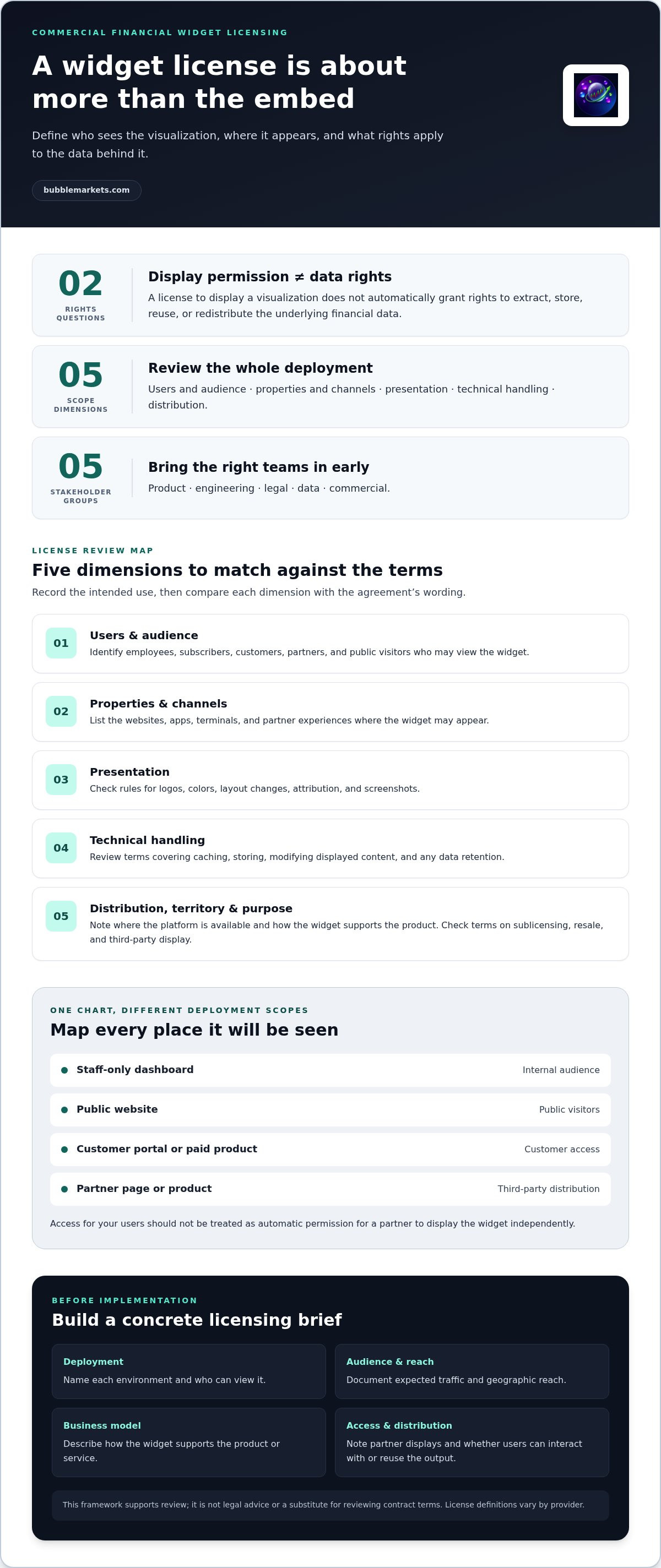
Widget permission and underlying data rights are separate questions. A license to display an interface should not be assumed to grant rights to extract, store, reuse, or redistribute the financial data shown within it. The visualization may be licensed while data rights remain subject to separate terms. List what users can see and do, and whether the product exposes data beyond the visual display.
This distinction matters for products ranging from market dashboards to tools used alongside financial modeling. A chart embedded in a company’s research portal, for example, may serve internal staff only. The same chart placed in a customer portal or republished by a media partner reaches a different audience through a different distribution path. Describe each path before comparing license options.
What counts as commercial use of a financial widget?
Commercial use can include displaying a widget on a company website, inside a paid product, in a customer portal, or on a media property. Monetization matters, but it isn’t the only consideration: customer access and organizational use can also affect the permitted scope. If your team plans to begin with internal evaluation and later add public display or customer access, document those as separate stages. Definitions vary by provider, so use the governing terms to establish what a particular license permits.
Who needs to participate in the licensing decision?
Bring product, engineering, legal, data, and commercial stakeholders into the decision before implementation. Product owners should document the intended audience, display surfaces, and user actions. Engineering can map where the widget will run and how it will connect to the platform. Data teams can identify which information is displayed or passed through. Commercial stakeholders should describe monetization and distribution partners, while legal reviewers assess the contract language and applicable data obligations.
Make the initial brief concrete: name each environment, such as a public webpage, logged-in customer portal, or staff-only dashboard, and state who can view it. Note whether a partner will display the widget and whether users can interact with or reuse its output. This buying guide offers a practical framework, not legal advice or a substitute for reviewing contract terms. Compare the documented deployment with the license scope before choosing a solution.
Which license terms matter for a financial visualization widget?
Review the license against the actual deployment, not just the act of embedding a chart. A useful comparison records who may access the widget, where it may appear, and what the platform may do with its display and data. Terms differ across providers, so don’t assume a restriction or permission in one agreement applies to another.
Map the license dimensions that match your intended deployment: permitted users, properties, audience, territories, display environments, business purposes, branding, modification, attribution, caching, screenshots, and redistribution. Use that list as a review framework, then compare each item with the agreement’s wording. Note whether a permission applies only to your organization or also covers customers, partners, and other third parties.
- Users and audience: Identify employees, subscribers, customers, partners, and public visitors who may view the widget.
- Properties and channels: List the relevant websites, apps, terminals, and partner experiences.
- Presentation: Review rules for logos, colors, layout changes, attribution, and screenshots.
- Technical handling: Check whether caching, storing, or modifying displayed content is addressed.
- Distribution: Record any limits on sublicensing, resale, or display through third parties.
How do audience, channels, and redistribution affect scope?
A widget used by employees on an internal dashboard has a different reach from one displayed to subscribers in a mobile app. Map every audience and surface, including partner pages or products that incorporate your platform. Then look for terms that address those uses. Sublicensing and third-party distribution are explicit contract questions. Don’t treat access for your users as automatic permission for a partner to display the widget independently.
Territory and business purpose also matter. Record where the platform is available and how the widget supports the product, such as a market overview within a paid subscription or content on a public media site. If the use changes after launch, the original scope may no longer describe the deployment. Keep the review tied to the actual distribution plan.
What should buyers review about data and attribution?
Read provisions for the visualization and its source data as separate parts of the agreement. Check how attribution must appear, whether data retention or caching is covered, and whether the terms address transformed or derived displays. Permission to embed a widget doesn’t, by itself, establish rights to access, store, transform, or redistribute the underlying market data.
Don’t infer exchange, regulatory, or data-vendor permissions from a display right. Flag any planned reuse of data, such as exporting values or supplying them to another service, for review against applicable terms and obligations. This framework can help teams assess commercial financial widget licensing without treating this section as legal advice or a substitute for reviewing the contract. For a practical point of comparison, explore commercial market visualization widgets alongside your documented deployment requirements.
White-label widget or financial data API: compare the deployment options
A white-label widget and a financial data API solve different integration problems. A widget packages market information in a ready-made visual format that can be embedded in a platform. An API provides programmatic access to data that a development team can use to build and maintain its own interface. Compare the work each approach leaves with your team, not just how quickly it can appear on screen.
The choice depends on how much control you need and how much implementation responsibility your team can own. A widget may suit a product that needs a consistent visual display with publisher branding. An API may suit a product that needs a custom workflow, data presentation, or interaction model. Neither option removes the need to understand applicable data rights and license terms.
Comparison point
White-label widget
API-based visualization
Time to deployment
Can reduce interface development when the available visualization fits the product.
Requires development work to build the visualization and connect it to the application.
Branding and control
Branding and display changes depend on the configuration and presentation rights permitted by the license.
Offers greater control over the interface, within the API and data terms.
Engineering effort
Engineering focuses on embedding and fitting the widget into the product environment.
Engineering owns more of the data integration, interface, and ongoing technical work.
Product ownership
The provider supplies the visualization; the license defines how it may be used.
The product team maintains its custom visualization and the workflow built around the API.
When does a white-label financial widget fit?
Consider a widget when your product needs an embedded market visualization and its existing format suits the audience. For example, a financial platform may want a market overview inside a customer portal without designing a chart interface from the ground up. Review how the widget appears in context, then map required branding, layout, and configuration to the permissions in the license. A white-label description alone doesn’t define which changes are allowed.
For a focused example of an embedded display, see this crypto heat map widget embedding guide. Use it to consider how a specific visual format might fit a product surface, then assess your own requirements and license scope.
When does API-based integration fit better?
An API can be a better fit when developers need programmatic access to data for a proprietary interface or workflow. That flexibility shifts more responsibility to the product team: engineers must build and maintain the visualization, while the organization must account for data handling and the API’s applicable terms. BubbleMarkets provides developer API access to live and historical visualization data. Its market visualizer API integration guide offers further context for assessing that approach.
For commercial financial widget licensing, compare the usable interface, brand control, engineering capacity, and ongoing ownership together. Choose the route that fits the product’s actual workflow, not simply the one that appears easiest to embed or build.
Build a commercial widget licensing brief before implementation
A short requirements brief helps teams compare the proposed deployment with both the license and the product architecture. Make it specific enough that product, design, engineering, legal, data, and commercial reviewers are assessing the same use case. Include expected traffic, geographic reach, monetization model, and distribution partners, even if some details are estimates.
- Define the purpose. State what the visualization adds to the product and what users should be able to see or do with it.
- Map the audiences. Identify employees, customers, subscribers, partners, or public visitors who may access the display.
- Document the surfaces. List every planned location, such as a public website, logged-in portal, mobile app, or partner platform. Note whether the widget is embedded directly or distributed through another service.
- Assess technical fit. Describe the desired asset classes, visualization types, branding, interactions, and how the widget or API would fit the application architecture and user journey.
- Review the terms. Compare the intended use with the agreement’s permissions and restrictions. Record data rights, display limitations, attribution, and any questions that need qualified review.
What information belongs in a licensing requirements brief?
Describe the product, target users, monetization model, display locations, expected traffic, geographic reach, and distribution partners. Specify the asset classes and visualization formats the product needs, along with branding and interaction requirements. For example, note whether users only view a market map or whether the experience calls for additional actions. The brief should make clear where the visualization appears and who controls each surface.
Also document what information the display communicates, where its market data comes from, and any known display limitations. Treat data provenance and user disclosures as project-specific review items, not assumptions that can be settled by the visual format alone. This gives data and product reviewers concrete questions to examine alongside the license scope.
How should teams prepare for technical and legal review?
Engineering should map the proposed widget or API into the existing application and identify dependencies, data flows, and maintenance responsibilities. Product and design can check that the visual format serves the user journey and fits the intended surfaces. Legal reviewers should assess the actual license language, data rights, restrictions, and applicable obligations. Record assumptions and unresolved requirements so they remain visible before production approval.
Bring the reviews together before launch. A design choice may affect attribution; a distribution partner may change the audience; an engineering decision may involve storing or transforming data. Make each team’s approval relate to the documented deployment, and revisit the brief if the use changes. To evaluate a market visualization against your implementation needs, explore BubbleMarkets commercial widget options.
How BubbleMarkets supports commercial financial widget licensing
BubbleMarkets licenses commercial market visualization widgets, including white-label options for third-party financial platforms, media outlets, and brokerages. Its visualizations cover stocks, crypto, ETFs, commodities, bonds, and forex. This breadth lets a platform choose market context that fits its users, while the implementation depends on the product’s interface needs, technical workflow, and intended distribution.
There are two distinct routes to consider. A licensed widget can add an existing bubble map or heat map to a product; developer API access supports programmatic integration using live and historical visualization data. The widget route centers on displaying a visualization. The API route gives a development team data access for its own integration. Neither route should be treated as a grant to redistribute underlying market data unless the applicable terms establish that right.
What can a white-label market visualization add?
An embedded bubble map or heat map can give users a visual overview of markets within a product they already use. A publisher might place a market visualization alongside financial coverage; a financial platform or brokerage might include it in a customer-facing information area. Stocks, ETFs, bonds, commodities, crypto, and forex support different market contexts. Choose the relevant coverage based on your audience and the product’s purpose.
Keep the use focused on display and analysis workflows. A visualization can organize market information for users to inspect; it isn’t itself a brokerage service, trade execution tool, investment recommendation, or trading signal. For a white-label deployment, align the desired brand presentation with the specific configuration and display rights set out in the applicable license. Avoid assuming that “white-label” grants unrestricted modification or distribution.
How should a buyer move from evaluation to implementation?
Start with the project requirements brief. Match the audience, display locations, asset classes, branding needs, and technical architecture to either an embeddable widget or a programmatic API integration. If the required visualization fits an existing widget, evaluate that deployment path. If the product needs a custom data-driven interface, account for the engineering and maintenance work associated with API-based development.
Before production, review applicable licensing and data terms against the actual integration. Confirm that the intended users, product surfaces, and distribution model align with the permissions granted, and keep data display or reuse within the rights established by the relevant terms. BubbleMarkets provides visualization tools, not brokerage, trade execution, or investment advice.
Use your brief to identify the commercial visualization approach that best fits your platform and workflow. Explore BubbleMarkets commercial visualization options.
Move from licensing review to a clear deployment plan
Use your requirements brief as a working document, not a one-time approval step. Assign owners for license review, technical integration, and product presentation, then revisit the plan if your audience, distribution partners, or platform surfaces change. This keeps implementation aligned with the intended use and gives teams a clear reference point for later decisions.
For commercial financial widget licensing, match those requirements to an implementation path. BubbleMarkets offers commercial white-label market bubble visualizers and heat map widgets, alongside developer API access for programmatic integration. Its visualizations span stocks, crypto, ETFs, commodities, bonds, and forex, giving teams options to assess against their platform’s needs.
Review BubbleMarkets’ commercial visualization options alongside your brief, then identify the approach that fits your product and workflow. Explore BubbleMarkets commercial visualization options and take the next step toward a well-scoped deployment.
Frequently Asked Questions
What is commercial financial widget licensing?
Commercial financial widget licensing is permission to use and display a financial visualization under agreed terms. The scope may cover who can access it, where it appears, how it is branded, and the business purposes it supports. It’s separate from rights to the underlying financial data, which may have distinct conditions. The signed agreement controls the actual permissions. Have qualified counsel review its language against your planned deployment before relying on it.
How do I know whether my financial widget use is commercial?
Organizational, public-facing, monetized, or customer-facing use may be treated differently from personal use, but there’s no universal definition across providers. Start with a concrete example: a widget shown in a paid subscriber portal has a different context from one used privately to assess a product. Map who will access it, where it will appear, and how the product operates, then compare those details with the applicable provider terms.
Can I use a financial widget on multiple websites or apps?
That depends on the license’s stated properties, products, and deployment scope. Permission for one company website doesn’t necessarily cover a mobile app, affiliate site, or partner platform. Before launch, list each intended domain, app, and distribution channel, including environments managed by another organization. Review the agreement for channel, domain, and redistribution language, and document any difference between your planned deployment and the scope the contract describes.
Does a widget license include the rights to redistribute financial data?
No, permission to display a visualization doesn’t automatically establish rights to store, transform, or redistribute its underlying data. Those rights may be addressed separately by the widget provider or data source. Trace each data flow in your product: what users can view, what your systems retain, and what another service receives. Have the relevant terms reviewed before enabling exports, feeds, or downstream access for customers or partners.
How much does commercial financial widget licensing cost?
Licensing costs depend on the provider’s offer and the deployment scope, so there’s no reliable general figure to apply. Define your audience, channels, branding needs, asset coverage, and integration approach before comparing proposals. In your business case, separate the license fee from engineering work, data-related expenses, and ongoing operational costs. This makes it easier to compare options on the same assumptions and see which costs relate to the license itself.
What happens if our use exceeds the widget license?
Consequences depend on the agreement and applicable law, so don’t assume a specific penalty or remedy. The organization may need to change the deployment or obtain different permissions. If you discover a mismatch, document how the widget is actually being used and pause planned expansion while the scope is reviewed. Involve qualified legal counsel for guidance on the contract and appropriate next steps for your particular situation.
Should we license a widget or build with a financial data API?
A widget may suit a team that needs an embeddable visualization, while an API may fit a team building a more customized interface or workflow. Compare engineering effort, design control, data handling, and who will maintain the experience after launch. For example, a standard market overview may fit an existing widget format, while a product-specific screen may require custom development. Choose based on product requirements, license scope, and technical capacity.
Frequently asked questions
What counts as commercial use of a financial widget?
Commercial use can include displaying a widget on a company website, inside a paid product, in a customer portal, or on a media property. Monetization matters, but it isn’t the only consideration: customer access and organizational use can also affect the permitted scope. If your team plans to begin with internal evaluation and later add public display or customer access, document those as separate stages. Definitions vary by provider, so use the governing terms to establish what a particular license permits.
Who needs to participate in the licensing decision?
Bring product, engineering, legal, data, and commercial stakeholders into the decision before implementation. Product owners should document the intended audience, display surfaces, and user actions. Engineering can map where the widget will run and how it will connect to the platform. Data teams can identify which information is displayed or passed through. Commercial stakeholders should describe monetization and distribution partners, while legal reviewers assess the contract language and applicable data obligations. Make the initial brief concrete: name each environment, such as a public webpage, logged-in customer portal, or staff-only dashboard, and state who can view it. Note whether a partner will display the widget and whether users can interact with or reuse its output. This buying guide offers a practical framework, not legal advice or a substitute for reviewing contract terms. Compare the documented deployment with the license scope before choosing a solution. Review the license against the actual deployment, not just the act of embedding a chart. A useful comparison records who may access the widget, where it may appear, and what the platform may do with its display and data. Terms differ across providers, so don’t assume a restriction or permission in one agreement applies to another. Map the license dimensions that match your intended deployment: permitted users, properties, audience, territories, display environments, business purposes, branding, modification, attribution, caching, screenshots, and redistribution. Use that list as a review framework, then compare each item with the agreement’s wording. Note whether a permission applies only to your organization or also covers customers, partners, and other third parties.
How do audience, channels, and redistribution affect scope?
A widget used by employees on an internal dashboard has a different reach from one displayed to subscribers in a mobile app. Map every audience and surface, including partner pages or products that incorporate your platform. Then look for terms that address those uses. Sublicensing and third-party distribution are explicit contract questions. Don’t treat access for your users as automatic permission for a partner to display the widget independently. Territory and business purpose also matter. Record where the platform is available and how the widget supports the product, such as a market overview within a paid subscription or content on a public media site. If the use changes after launch, the original scope may no longer describe the deployment. Keep the review tied to the actual distribution plan.
What should buyers review about data and attribution?
Read provisions for the visualization and its source data as separate parts of the agreement. Check how attribution must appear, whether data retention or caching is covered, and whether the terms address transformed or derived displays. Permission to embed a widget doesn’t, by itself, establish rights to access, store, transform, or redistribute the underlying market data. Don’t infer exchange, regulatory, or data-vendor permissions from a display right. Flag any planned reuse of data, such as exporting values or supplying them to another service, for review against applicable terms and obligations. This framework can help teams assess commercial financial widget licensing without treating this section as legal advice or a substitute for reviewing the contract. For a practical point of comparison, explore commercial market visualization widgets alongside your documented deployment requirements. A white-label widget and a financial data API solve different integration problems. A widget packages market information in a ready-made visual format that can be embedded in a platform. An API provides programmatic access to data that a development team can use to build and maintain its own interface. Compare the work each approach leaves with your team, not just how quickly it can appear on screen. The choice depends on how much control you need and how much implementation responsibility your team can own. A widget may suit a product that needs a consistent visual display with publisher branding. An API may suit a product that needs a custom workflow, data presentation, or interaction model. Neither option removes the need to understand applicable data rights and license terms. Comparison point White-label widget API-based visualization Time to deployment Can reduce interface development when the available visualization fits the product. Requires development work to build the visualization and connect it to the application. Branding and control Branding and display changes depend on the configuration and presentation rights permitted by the license. Offers greater control over the interface, within the API and data terms. Engineering effort Engineering focuses on embedding and fitting the widget into the product environment. Engineering owns more of the data integration, interface, and ongoing technical work. Product ownership The provider supplies the visualization; the license defines how it may be used. The product team maintains its custom visualization and the workflow built around the API.
When does a white-label financial widget fit?
Consider a widget when your product needs an embedded market visualization and its existing format suits the audience. For example, a financial platform may want a market overview inside a customer portal without designing a chart interface from the ground up. Review how the widget appears in context, then map required branding, layout, and configuration to the permissions in the license. A white-label description alone doesn’t define which changes are allowed. For a focused example of an embedded display, see this crypto heat map widget embedding guide. Use it to consider how a specific visual format might fit a product surface, then assess your own requirements and license scope.
When does API-based integration fit better?
An API can be a better fit when developers need programmatic access to data for a proprietary interface or workflow. That flexibility shifts more responsibility to the product team: engineers must build and maintain the visualization, while the organization must account for data handling and the API’s applicable terms. BubbleMarkets provides developer API access to live and historical visualization data. Its market visualizer API integration guide offers further context for assessing that approach. For commercial financial widget licensing, compare the usable interface, brand control, engineering capacity, and ongoing ownership together. Choose the route that fits the product’s actual workflow, not simply the one that appears easiest to embed or build. A short requirements brief helps teams compare the proposed deployment with both the license and the product architecture. Make it specific enough that product, design, engineering, legal, data, and commercial reviewers are assessing the same use case. Include expected traffic, geographic reach, monetization model, and distribution partners, even if some details are estimates.
What information belongs in a licensing requirements brief?
Describe the product, target users, monetization model, display locations, expected traffic, geographic reach, and distribution partners. Specify the asset classes and visualization formats the product needs, along with branding and interaction requirements. For example, note whether users only view a market map or whether the experience calls for additional actions. The brief should make clear where the visualization appears and who controls each surface. Also document what information the display communicates, where its market data comes from, and any known display limitations. Treat data provenance and user disclosures as project-specific review items, not assumptions that can be settled by the visual format alone. This gives data and product reviewers concrete questions to examine alongside the license scope.
How should teams prepare for technical and legal review?
Engineering should map the proposed widget or API into the existing application and identify dependencies, data flows, and maintenance responsibilities. Product and design can check that the visual format serves the user journey and fits the intended surfaces. Legal reviewers should assess the actual license language, data rights, restrictions, and applicable obligations. Record assumptions and unresolved requirements so they remain visible before production approval. Bring the reviews together before launch. A design choice may affect attribution; a distribution partner may change the audience; an engineering decision may involve storing or transforming data. Make each team’s approval relate to the documented deployment, and revisit the brief if the use changes. To evaluate a market visualization against your implementation needs, explore BubbleMarkets commercial widget options. BubbleMarkets licenses commercial market visualization widgets, including white-label options for third-party financial platforms, media outlets, and brokerages. Its visualizations cover stocks, crypto, ETFs, commodities, bonds, and forex. This breadth lets a platform choose market context that fits its users, while the implementation depends on the product’s interface needs, technical workflow, and intended distribution. There are two distinct routes to consider. A licensed widget can add an existing bubble map or heat map to a product; developer API access supports programmatic integration using live and historical visualization data. The widget route centers on displaying a visualization. The API route gives a development team data access for its own integration. Neither route should be treated as a grant to redistribute underlying market data unless the applicable terms establish that right.
What can a white-label market visualization add?
An embedded bubble map or heat map can give users a visual overview of markets within a product they already use. A publisher might place a market visualization alongside financial coverage; a financial platform or brokerage might include it in a customer-facing information area. Stocks, ETFs, bonds, commodities, crypto, and forex support different market contexts. Choose the relevant coverage based on your audience and the product’s purpose. Keep the use focused on display and analysis workflows. A visualization can organize market information for users to inspect; it isn’t itself a brokerage service, trade execution tool, investment recommendation, or trading signal. For a white-label deployment, align the desired brand presentation with the specific configuration and display rights set out in the applicable license. Avoid assuming that “white-label” grants unrestricted modification or distribution.
How should a buyer move from evaluation to implementation?
Start with the project requirements brief. Match the audience, display locations, asset classes, branding needs, and technical architecture to either an embeddable widget or a programmatic API integration. If the required visualization fits an existing widget, evaluate that deployment path. If the product needs a custom data-driven interface, account for the engineering and maintenance work associated with API-based development. Before production, review applicable licensing and data terms against the actual integration. Confirm that the intended users, product surfaces, and distribution model align with the permissions granted, and keep data display or reuse within the rights established by the relevant terms. BubbleMarkets provides visualization tools, not brokerage, trade execution, or investment advice. Use your brief to identify the commercial visualization approach that best fits your platform and workflow. Explore BubbleMarkets commercial visualization options. Use your requirements brief as a working document, not a one-time approval step. Assign owners for license review, technical integration, and product presentation, then revisit the plan if your audience, distribution partners, or platform surfaces change. This keeps implementation aligned with the intended use and gives teams a clear reference point for later decisions. For commercial financial widget licensing, match those requirements to an implementation path. BubbleMarkets offers commercial white-label market bubble visualizers and heat map widgets, alongside developer API access for programmatic integration. Its visualizations span stocks, crypto, ETFs, commodities, bonds, and forex, giving teams options to assess against their platform’s needs. Review BubbleMarkets’ commercial visualization options alongside your brief, then identify the approach that fits your product and workflow. Explore BubbleMarkets commercial visualization options and take the next step toward a well-scoped deployment.
What is commercial financial widget licensing?
Commercial financial widget licensing is permission to use and display a financial visualization under agreed terms. The scope may cover who can access it, where it appears, how it is branded, and the business purposes it supports. It’s separate from rights to the underlying financial data, which may have distinct conditions. The signed agreement controls the actual permissions. Have qualified counsel review its language against your planned deployment before relying on it.
How do I know whether my financial widget use is commercial?
Organizational, public-facing, monetized, or customer-facing use may be treated differently from personal use, but there’s no universal definition across providers. Start with a concrete example: a widget shown in a paid subscriber portal has a different context from one used privately to assess a product. Map who will access it, where it will appear, and how the product operates, then compare those details with the applicable provider terms.
Can I use a financial widget on multiple websites or apps?
That depends on the license’s stated properties, products, and deployment scope. Permission for one company website doesn’t necessarily cover a mobile app, affiliate site, or partner platform. Before launch, list each intended domain, app, and distribution channel, including environments managed by another organization. Review the agreement for channel, domain, and redistribution language, and document any difference between your planned deployment and the scope the contract describes.
Does a widget license include the rights to redistribute financial data?
No, permission to display a visualization doesn’t automatically establish rights to store, transform, or redistribute its underlying data. Those rights may be addressed separately by the widget provider or data source. Trace each data flow in your product: what users can view, what your systems retain, and what another service receives. Have the relevant terms reviewed before enabling exports, feeds, or downstream access for customers or partners.
How much does commercial financial widget licensing cost?
Licensing costs depend on the provider’s offer and the deployment scope, so there’s no reliable general figure to apply. Define your audience, channels, branding needs, asset coverage, and integration approach before comparing proposals. In your business case, separate the license fee from engineering work, data-related expenses, and ongoing operational costs. This makes it easier to compare options on the same assumptions and see which costs relate to the license itself.
What happens if our use exceeds the widget license?
Consequences depend on the agreement and applicable law, so don’t assume a specific penalty or remedy. The organization may need to change the deployment or obtain different permissions. If you discover a mismatch, document how the widget is actually being used and pause planned expansion while the scope is reviewed. Involve qualified legal counsel for guidance on the contract and appropriate next steps for your particular situation.
Should we license a widget or build with a financial data API?
A widget may suit a team that needs an embeddable visualization, while an API may fit a team building a more customized interface or workflow. Compare engineering effort, design control, data handling, and who will maintain the experience after launch. For example, a standard market overview may fit an existing widget format, while a product-specific screen may require custom development. Choose based on product requirements, license scope, and technical capacity.
Market information on this page is for education and general information only. It is not investment advice or a recommendation to buy or sell any asset.