 BubbleMarkets
Embeddable Stock Market Widget: JavaScript Libraries and Options
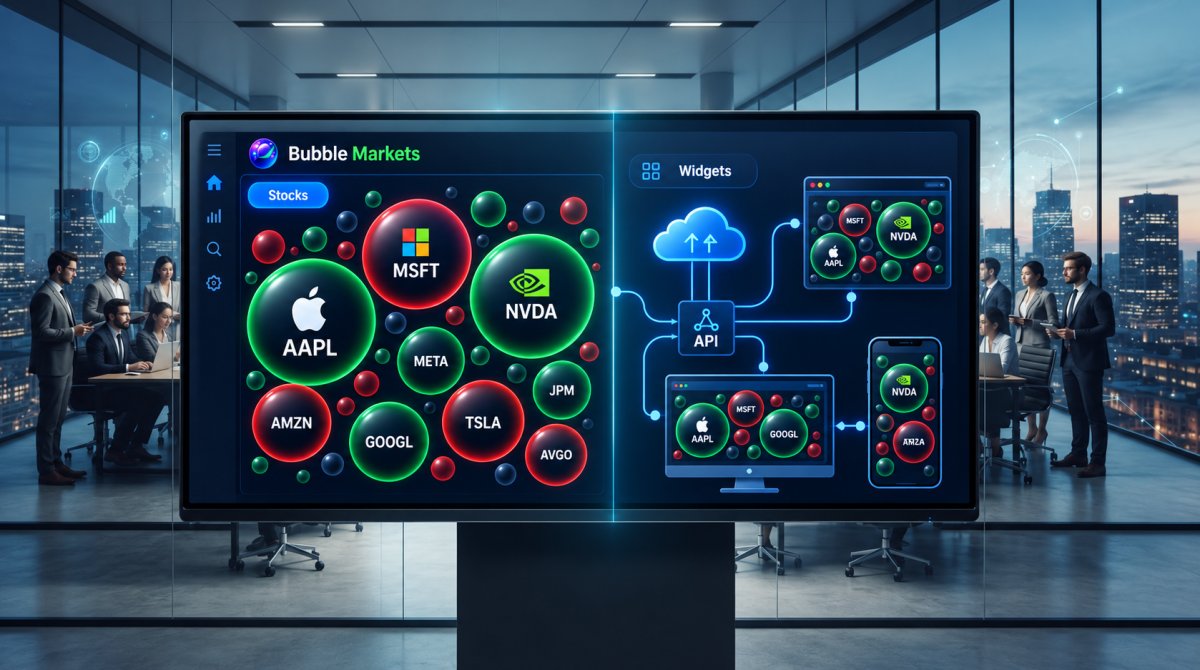
The most customizable chart isn’t always the best fit. A ready-made embeddable stock market widget can add market data to a page with less development work, while a JavaScript library offers more control over the display but requires developers to build and maintain more of the experience. In either case, the visual is only part of the decision: data coverage, update timing, display rights, and commercial licensing can all affect what you publish.
If you’re weighing a hosted widget against a charting library or a custom API integration, compare them by setup effort, control over the display, and responsibility for data. This guide explains how hosted widgets differ from libraries such as Chart.js and Recharts, and when an API-led build makes sense. For teams seeking branded market visualizations, BubbleMarkets offers commercial licensing, white-label widgets, and developer API access. Use the comparison to choose an approach that fits your site or application without adding unnecessary complexity.
Key Takeaways
- Choose an embeddable stock market widget based on display needs, data timing, and audience, not chart count alone.
- Separate the display layer from the data source: hosted widgets, JavaScript libraries, and APIs serve different roles.
- Compare setup effort, branding control, and data responsibilities before choosing a hosted or custom approach.
- Review usage rights, attribution, and commercial licensing alongside data freshness when planning a market-data display.
- Decide whether a licensed branded visualizer or an API-led integration better fits your product and development needs.
What an embeddable stock market widget does, and what it does not
An embeddable stock market widget places a market-data visual inside another digital product, such as a company website, news page, or financial application. Visitors can see market context where they’re already reading or working, without leaving for a separate destination. The display might focus on one company, a selected group of symbols, or a wider market view.
“Widget” describes the visible component, not necessarily the technology behind it. A hosted widget is a ready-made display. A JavaScript chart library gives developers components for building an interface. A data API supplies information that an application can request and process. These pieces can work together, but they aren’t interchangeable. For background on how market information is collected and distributed, see Stock market data systems.
How a hosted market widget differs from a JavaScript chart library
A hosted widget packages the visual and its display behavior for placement within a page. Depending on its configuration, a publisher may be able to select symbols or display types, while the provider determines the available interface and controls. This approach is useful when a supplied visual meets the page’s needs and the team wants to avoid building the chart interface from scratch.
A JavaScript chart library works at a different layer. Developers use its components to create charts and connect them to an application’s data flow. The library usually doesn’t supply market data, so a custom build may also require a data source, integration work, and decisions about how information is refreshed, formatted, and presented.
What a stock widget can show, and what it cannot establish
A market visual organizes information so visitors can scan it more easily. Depending on the tool and data source, it might show a ticker quote, historical price chart, market summary, or stock heatmap grouped by a selected measure. These formats help visitors inspect displayed information, but the visual alone doesn’t tell them what action to take.
A widget reports or visualizes data; it doesn’t establish what a stock will do next or whether an investment is suitable for a particular person. Keep that distinction clear in the interface and surrounding text. Displayed prices and changes are information, not a forecast or personalized recommendation.
- Display: The visual arrangement, such as a chart, quote, or heatmap.
- Data: The market information and symbols made available by the chosen source.
- Interpretation: Analysis or advice, which is separate from displaying data.
Coverage, update timing, and permitted display use depend on the data source and applicable terms. A visual labeled as a stock chart doesn’t automatically cover every exchange or show real-time prices. Treat the widget and its data rights as related but distinct parts of the implementation.
How embeddable stock widgets and JavaScript chart integrations work
Adding an embeddable stock market widget can be a short workflow, but the work isn’t always limited to copying code into a page. A hosted visual may bundle its display and data connection, while a chart-library integration usually requires developers to connect the visual layer to a separate source. Start with the audience and page purpose, then decide how much control the implementation needs.
A practical workflow from market-data requirement to embedded display
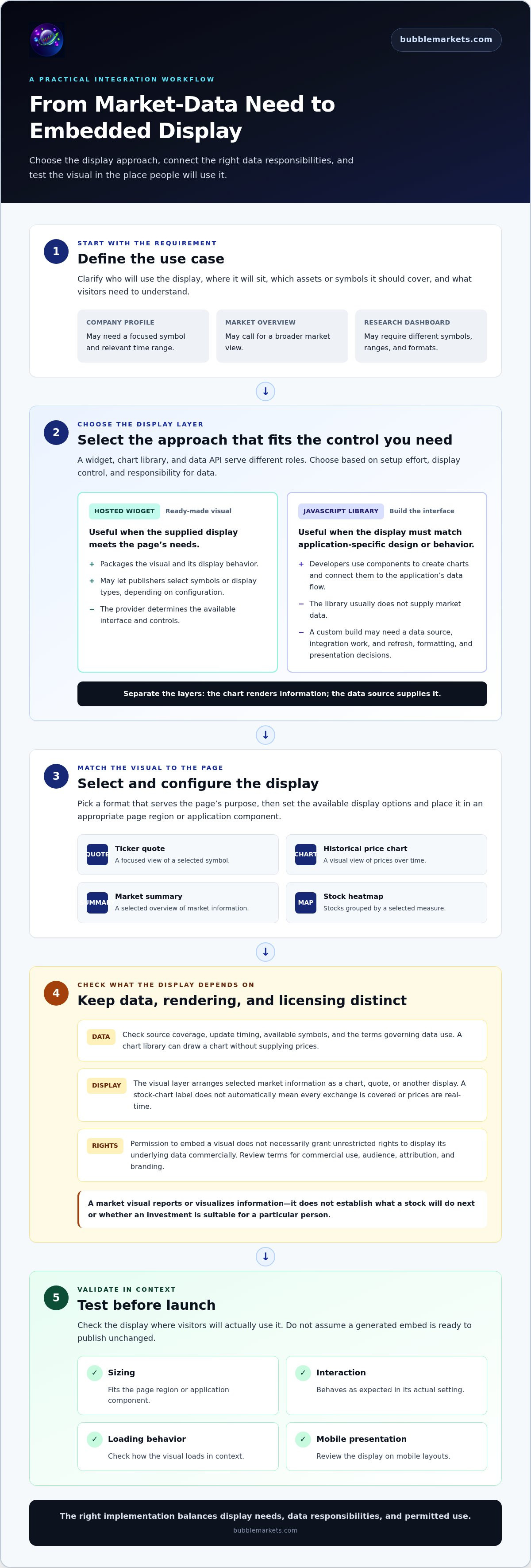
Plan the integration in sequence. Define who will use the display, where it will sit, which assets or symbols it should cover, and what visitors need to understand from it. Then choose a hosted widget for a supplied visual or a library-based approach when the interface needs to match application-specific design and behavior.
- Define the use case. A company profile, market overview, and research dashboard may call for different symbols, time ranges, and visual formats.
- Select the display. Choose a widget type or charting approach that serves the page’s purpose and required level of control.
- Configure and place it. Set the available display options, then add the visual to an appropriate page region or application component.
- Test before launch. Check sizing, interaction, loading behavior, and mobile presentation in the context where visitors will use it.
The exact steps depend on the provider, website platform, application stack, and widget type. One hosted option may require only a code snippet; another setup may involve configuration or developer work. Test the display in its actual setting rather than assuming the generated embed is ready to publish unchanged.
Where data, rendering, and licensing fit
Rendering is the visual layer: it arranges selected market information as a chart, quote, or other display. Data access is separate. A library can draw a chart without supplying prices, so a custom integration may need a data API and application code to request, prepare, and pass information to the display.
Licensing is a separate consideration. Permission to embed a visual doesn’t necessarily grant unrestricted rights to display its underlying market data in every commercial context. Review the applicable terms for data use, audience, attribution, and branding before publishing. Keep those checks distinct from visual configuration.
For a programmatic route, the market visualizer API integration guide can help frame the data and development questions. BubbleMarkets offers developer API access and commercial licensing for branded, white-label visualizers. Teams comparing a licensed visualizer with a custom API-led build can explore BubbleMarkets market visualizers.
Hosted stock widgets vs JavaScript libraries: compare the trade-offs
The right implementation depends on how much control your product needs and what your team can build and maintain. A hosted embeddable stock market widget can provide a direct route to a prebuilt display. A JavaScript library gives developers more control over the interface, while an API-led build adds responsibility for connecting data and application logic.
| Criterion | Hosted widget | JavaScript library | API-led custom build |
|---|---|---|---|
| Setup effort | Often lower; configure and place the provider’s visual. | Requires coding and connection to a data source. | Requires data integration, rendering, and application development. |
| Interface control | Bounded by the provider’s configuration options. | Greater control over chart behavior and presentation. | Broad control, with more components to develop. |
| Branding | Depends on available styling and licensing options. | Can be styled within the application. | Can be designed around the product’s interface. |
| Data responsibilities | Provider defines the available data and display. | Usually requires a separate data source. | Team handles API integration and data flow. |
| Licensing | Check widget, data, and commercial-use terms. | Review library license and data rights separately. | Review API terms and data-use permissions. |
A free widget listing doesn’t establish commercial rights or data entitlements by itself. The display software and market data may have separate terms. Check what applies to your intended audience and use, including attribution or branding conditions, rather than treating “free” as permission for every deployment.
When a hosted stock market widget is a practical fit
A hosted option can suit teams that need a provider-supplied visualization and don’t require extensive control over its structure. The provider’s presentation reduces the work of building the chart interface, leaving the publisher to focus on placement and page fit. Before choosing one, compare its configuration options, branding, symbol and asset coverage, data timing, and usage terms against your requirements.
When a JavaScript library or custom build makes more sense
Choose a library-based approach when developers need close control over how charts fit the application. That flexibility also means connecting a data source, implementing the interface, testing its behavior, and maintaining the integration as the product changes. An API is a separate programmatic route for accessing data, not a chart library; the financial market visualizer API guide outlines that distinction.
Implementation choice depends on control, development capacity, and intended use. A prebuilt visual may fit a focused publishing need. A library or API-led build may suit a display that must work as part of a broader product experience.
A selection checklist for embedding stock-market visuals
Start with the job the visual needs to do. An embeddable stock market widget for a company profile may focus on one symbol, while a market overview could call for a broader scan. Define the audience and page context first, then compare options against specific requirements rather than appearance alone.
Separate the decision into three areas: what the display needs to show, how it needs to fit your product, and what terms govern its use. This makes gaps easier to spot before implementation, especially when a page serves a commercial audience or combines several asset types.
Questions to answer before choosing an embed
Write down requirements your team can use to assess a provider or build approach. A financial news page, for example, may need a compact quote, while a research dashboard may need chart controls or a cross-market view. Consider:
- Markets and instruments: Which regions, exchanges, asset classes, and symbols does the page need to cover?
- Display purpose: Do visitors need a quick overview, a focused price chart, or a broader market scan?
- Audience and context: Is the visual for readers, customers, or internal users, and what information will help them understand it?
- Brand and control: Must the display match your product’s visual system, or are provider-defined styling and configuration sufficient?
- Product fit: Does the approach work with your website platform or application stack, and can it fit the intended page layout?
Test the display in its actual context. Check whether it resizes cleanly on narrow screens, whether labels and values remain readable, and whether interactive elements are understandable and usable. Consider accessibility, including keyboard use and sufficient contrast. Assess page performance too: a visual that loads slowly or shifts the surrounding layout can interrupt the experience.
Commercial, product, and maintenance checks
Read the applicable product and usage terms before publishing. Look for permitted commercial display, attribution requirements, branding conditions, and limits on redistribution. A free listing or easy-to-use embed doesn’t establish rights to use the visual or underlying data for every purpose. Describe the terms precisely, and don’t imply a universal latency or licensing standard.
Check how the provider describes asset coverage and data timing, then make sure the page communicates those details accurately. Avoid labels such as “live” unless they match the product’s stated data timing. Keep the scope clear to visitors, particularly if the display covers selected symbols or markets rather than a complete universe.
Assign ownership after launch. Someone should be responsible for testing the visual on the live page, reviewing changes to the application or provider configuration, and addressing updates to data access or usage terms. This helps prevent a once-correct display from becoming misaligned, unclear, or unsuitable as the product evolves.
For teams weighing branded market displays against a custom integration, explore BubbleMarkets’ licensed, white-label visualizers.
Where BubbleMarkets fits: licensed visualizers and integration options
BubbleMarkets provides interactive market visualizers across stocks, crypto, ETFs, commodities, bonds, and forex, alongside commercial licensing and developer API access. For a team assessing an embeddable stock market widget, these offerings provide two routes: incorporate a licensed branded visualizer or build a programmatic integration using API access. The right fit depends on how much control the product needs and how the team wants to handle integration.
Both routes support market-data visualization, not brokerage, trade execution, or investment advice. The difference is how the visual enters your product. A licensed visualizer provides a branded display; API access gives developers a way to integrate programmatically within an application. They aren’t interchangeable: one centers on the visualization, while the other supports an integration built by the application team.
A branded visualization route for financial platforms
White-label licensing can suit financial platforms, media outlets, and brokerages that want market visuals associated with their own brand. Instead of building a visualization interface from the ground up, a team can use a licensed visualizer as a branded display. This can fit a product that needs to present market context while keeping the visual experience aligned with its existing platform.
Before choosing this route, define which markets the display should cover and where it needs to appear. Consider the intended brand presentation and how the visual fits the surrounding product. The licensing scope, data entitlements, supported embedding methods, and applicable terms govern a particular deployment, so align the implementation with those requirements.
An API route for programmatic market-data visualization
Developer API access is the programmatic option for teams integrating market visualization into an application. Developers can use this route when a product calls for a bespoke multi-asset map or when visualization needs to form part of an application workflow. It lets the team treat integration as a development task rather than relying only on a ready-made visual.
This path calls for technical planning: define the markets and application context, then align the integration with the product’s needs and applicable API terms. BubbleMarkets covers stocks, crypto, ETFs, commodities, bonds, and forex, giving teams a range of asset categories for multi-market experiences. Implementation and data use follow the applicable API access and terms.
Use the licensed visualizer route when a branded market display is the central requirement. Consider API access when programmatic integration is central to the product. Both support market visualization, with different implications for how the display is incorporated.
Explore BubbleMarkets market visualizers to see how its visualizer and integration options relate to your product needs.
Turn your requirements into a clear next step
Before choosing an embeddable stock market widget, write a short implementation brief: who will use the display, what it needs to show, how closely it should match your brand, and who will maintain it. This gives your team a practical basis for comparing a ready-to-use visualizer with a custom integration.
If a branded market display is the priority, consider how commercial licensing and white-label widgets fit your product. If you need a programmatic route, developer API access supports integration work. BubbleMarkets’ market visualizers cover multiple global asset classes, providing a starting point for market-focused experiences.
Match your brief to the available visualizer options. Explore BubbleMarkets market visualizers and identify an approach that fits your product and development needs. A focused first decision can make the rest of the implementation clearer.
Frequently Asked Questions
What is an embeddable stock market widget?
An embeddable stock market widget is a compact market display added to a website or application, such as a quote panel beside a company profile or a heat map on a market overview page. It lets visitors view selected market information in context. It doesn’t place trades or determine whether an investment suits someone. The provider and data source shape which symbols, markets, and details appear.
How do I embed a stock market widget on my website?
Choose a display that fits the page, then follow the selected provider’s setup instructions. A hosted widget may supply code to add through your site’s editor or content management system; a custom integration may need developer support. Preview the page at desktop and mobile widths, confirm the visual doesn’t obscure nearby content, and check that its labels and data timing are clear before publishing.
Can I use a stock market widget commercially?
Commercial use depends on the terms for both the visualization and underlying market data. A provider may distinguish personal, editorial, internal, and public commercial display, so review applicable permissions, attribution rules, branding conditions, and redistribution limits. Don’t treat a free widget or working embed as proof of commercial rights. For branded deployments, commercial licensing is one route to consider.
What is the difference between a stock widget and a JavaScript chart library?
A stock widget is a prepared market display, while a JavaScript chart library is a developer component for drawing charts inside an application. A publisher adding a quote panel may prefer a supplied widget; a product team building charts that match its own interface may use a library. The library itself doesn’t necessarily provide stock data, so its data connection is a separate part of the build.
Are embeddable stock market widgets free?
Some providers offer free widgets or free access to selected market visualizations, while other functionality or use cases may require a paid plan or commercial license. “Free” can refer to access to the display, not unrestricted data use or permission for every commercial setting. BubbleMarkets offers free live market bubble maps, alongside subscription, commercial licensing, and API options. Review the terms relevant to your use.
Can a stock market widget display real-time data?
Yes, some widgets can display real-time data, but availability depends on the provider, data source, selected market, and applicable access terms. Other displays may use delayed or historical information. Review the stated timing for the instruments you plan to show, and label the display accurately. If a page depends on current prices, test that the displayed update status matches its description before launch.
Frequently asked questions
What is an embeddable stock market widget?
An embeddable stock market widget is a compact market display added to a website or application, such as a quote panel beside a company profile or a heat map on a market overview page. It lets visitors view selected market information in context. It doesn’t place trades or determine whether an investment suits someone. The provider and data source shape which symbols, markets, and details appear.
How do I embed a stock market widget on my website?
Choose a display that fits the page, then follow the selected provider’s setup instructions. A hosted widget may supply code to add through your site’s editor or content management system; a custom integration may need developer support. Preview the page at desktop and mobile widths, confirm the visual doesn’t obscure nearby content, and check that its labels and data timing are clear before publishing.
Can I use a stock market widget commercially?
Commercial use depends on the terms for both the visualization and underlying market data. A provider may distinguish personal, editorial, internal, and public commercial display, so review applicable permissions, attribution rules, branding conditions, and redistribution limits. Don’t treat a free widget or working embed as proof of commercial rights. For branded deployments, commercial licensing is one route to consider.
What is the difference between a stock widget and a JavaScript chart library?
A stock widget is a prepared market display, while a JavaScript chart library is a developer component for drawing charts inside an application. A publisher adding a quote panel may prefer a supplied widget; a product team building charts that match its own interface may use a library. The library itself doesn’t necessarily provide stock data, so its data connection is a separate part of the build.
Are embeddable stock market widgets free?
Some providers offer free widgets or free access to selected market visualizations, while other functionality or use cases may require a paid plan or commercial license. “Free” can refer to access to the display, not unrestricted data use or permission for every commercial setting. BubbleMarkets offers free live market bubble maps, alongside subscription, commercial licensing, and API options. Review the terms relevant to your use.
Can a stock market widget display real-time data?
Yes, some widgets can display real-time data, but availability depends on the provider, data source, selected market, and applicable access terms. Other displays may use delayed or historical information. Review the stated timing for the instruments you plan to show, and label the display accurately. If a page depends on current prices, test that the displayed update status matches its description before launch.
Market information on this page is for education and general information only. It is not investment advice or a recommendation to buy or sell any asset.