 BubbleMarkets
Stock Market Screener: How to Filter and Read Stocks More Clearly

Roughly 59,000 companies make up the global investable stock universe, according to World Federation of Exchanges data for 2025. A stock market screener can narrow that field, but a list of matching names isn’t a verdict on which stocks deserve your money. It’s a starting point for research.
If you’ve ever struggled to compare filters or wondered what a shortlist means without market context, the challenge isn’t just finding stocks. It’s asking a clear question, choosing relevant criteria, and reading the results consistently. Screeners sort companies by selected data, but they can’t assess every factor behind a business or make an investment decision for you.
This guide explains how screeners work, how to build a repeatable process around a research question, and how to interpret a shortlist without treating it as a signal. You’ll also see how visual tools, including market maps and heat maps, place individual stocks alongside sector and broader market movements. The goal is a clearer workflow: filter first, then examine what the results show in context.
Key Takeaways
- Start with a specific research question, then choose criteria that meaningfully narrow the stocks you review.
- Group stock market screener filters by price, trading activity, company size, and fundamentals to compare criteria consistently.
- Read each result as evidence that a stock matches selected conditions, not as proof of business quality or a reason to invest.
- Use a repeatable workflow to test whether your filters produce a manageable, interpretable shortlist, and document what you find.
- Use market maps and heat maps to examine shortlisted stocks alongside sector and broader market movements.
What Is a Stock Market Screener, and What Can It Help You Find?
A stock market screener filters listed companies using conditions you select, such as share price, company size, trading activity, or financial measures. It applies those conditions to a defined stock universe and returns the companies that match. The result is a shortlist for further research, not an evaluation of each company or a buy or sell recommendation.
That distinction matters. Screening answers, “Which stocks meet these conditions?” Company research asks, “What do the company’s results, disclosures, business model, and risks tell me?” A filter can sort available data, but it can’t establish whether a company is suitable for a particular person or predict what its shares will do.
How a stock screener narrows a large universe
Start with a broad group of listed stocks, then translate your research question into conditions the tool can apply. Each added “and” condition generally removes stocks that don’t meet it. Changing a threshold or selecting a different condition can reshape the results.
For example, suppose you want to find companies within a particular size range that also meet a minimum level of trading activity. Applying both conditions returns stocks that meet those requirements. Adding a financial measure may narrow the list further. These are search rules, not evidence that the resulting companies are better investments or suitable for your goals.
The question behind the screen determines what to include. If it’s too broad, the results may remain difficult to review. If you stack conditions without a clear reason, you may filter out companies that would otherwise merit research. Treat the first result as a draft: check whether the list is useful and whether every condition has a clear purpose.
Stock screening versus stock research
Screening helps you discover candidates. Research begins once you have candidates to examine. Review company fundamentals, read public disclosures, and consider details that aren’t represented by the filters you selected.
A match has a narrow meaning: based on the data available to the tool, the stock met the conditions at the time of screening. It doesn’t explain why a metric has a particular value, whether that value is sustainable, or what risks may affect the company. A screener also can’t fully assess management quality, competitive position, or potential regulatory issues.
Use the output as a route into research, not as a conclusion. Keep the original question in view as you inspect the results, and note what the screen doesn’t address. This prevents a clean-looking list from carrying more meaning than its criteria support.
- Screening: filters a selected stock universe against defined conditions.
- Research: investigates the businesses behind matching results using broader evidence.
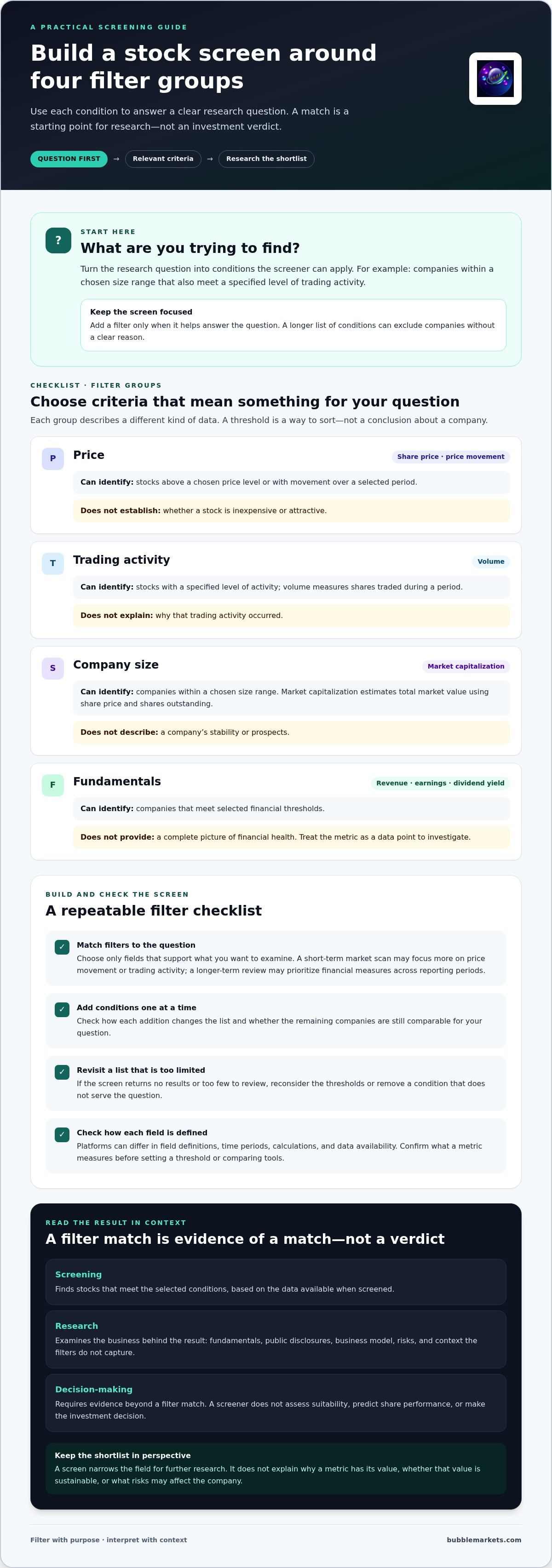
- Decision-making: requires context beyond a filter match; the screen itself doesn’t make the decision.
How Stock Market Screener Filters Turn a Research Question into Criteria
A useful screen starts with a question, not a long list of available fields. Filter choice determines which stocks appear in the results, so each condition should represent something you want to examine. The Uses of a Stock Screener overview from Corporate Finance Institute describes common screening criteria and how screeners support market research.
Most criteria fit into four groups:
- Price: Share price or price movement over a selected period. A condition such as “price above a chosen level” describes a threshold, not whether the stock is inexpensive or attractive.
- Trading activity: Volume measures how many shares changed hands during a period. A volume condition can identify stocks with a specified level of activity, but it doesn’t explain why that activity occurred.
- Company size: Market capitalization estimates a company’s total market value by multiplying its share price by its shares outstanding. A size range groups companies by scale; it doesn’t describe their stability or prospects.
- Fundamentals: Measures such as revenue, earnings, or dividend yield relate to company financials. Meeting a selected threshold gives you a data point to investigate, not a full picture of the company’s financial health.
In each case, the filter is a condition. To interpret the result, look beyond that condition and consider the company and its context.
Choose filters that match the question
Suppose your research question is, “Which companies in a chosen size range also show a specified level of trading activity?” Start with market capitalization and volume. Don’t add dividend yield or earnings filters unless they help answer that question. A longer-term review may prioritize financial measures across reporting periods, while a short-term market scan may focus more on price movement or trading activity. Choose fields that fit the purpose of the screen.
Field names, definitions, time periods, and data availability can vary between platforms. Check what a metric measures before setting a threshold, especially if you plan to compare results across tools. A familiar label may use a different calculation or time window.
Combine criteria without over-filtering
Add conditions one at a time. After each addition, check how the list changes and whether the remaining companies are still comparable for your question. If the results drop to zero or become too limited to review, revisit the thresholds or remove a condition that isn’t essential. A narrow screen can serve a precise purpose, but an empty result caused by arbitrary limits won’t provide a useful comparison.
Keep the first version simple, then refine it. That makes it easier to see which condition changes the results and to explain why each filter is there. To inspect stocks alongside broader market activity, explore BubbleMarkets’ market screener and heat maps.
How to Interpret Stock Screener Results Without Overreading the Signals
A screener result describes how a stock matched your selected conditions using the data available to the platform. It doesn’t explain why the stock met those conditions or what may happen next. A stock market screener identifies candidates for research; it doesn’t forecast performance or establish that a stock is worth buying or selling.
Read each result as a limited observation. Ask what the filter indicates, what it leaves unanswered, and whether the information is current enough for your purpose.
| Filter result | What it indicates | What it cannot establish |
|---|---|---|
| Price rose over a selected period | The share price increased during that time frame. | Whether the movement will continue, or what caused it. |
| Trading volume met a threshold | A specified number of shares changed hands over the measured period. | Whether activity reflects lasting interest or a temporary event. |
| A financial metric met a condition | The available data matched a chosen threshold or range. | Whether the company is strong overall or the metric is sustainable. |
Read a metric in its market context
A number needs a time frame. A price increase over one session describes a different interval from a move over several months. Volume also depends on the period measured. Before interpreting a result, check the date range and compare like with like. Otherwise, a short-lived change may look like a broader pattern.
Sector movement matters, too. If several companies in one sector are rising or falling together, an individual stock’s result may reflect a wider shift rather than a company-specific development. Compare the stock with its sector and the broader market, then investigate what may explain any difference. A standout metric is one clue, not a complete account of the business.
Check what the screen leaves out
After screening, review company disclosures and other primary information for details the selected fields can’t show. Look for context around reported results, business changes, and risks. A matching value alone doesn’t tell you how the company arrived there or whether the underlying conditions are changing.
Data coverage and update timing can differ across platforms, so note the source and period behind a result before comparing it with another screen or external information. A missing or differently timed data point can affect the list without changing the company itself.
Visual context can make comparison easier. This stock market heat map guide explains how to view stocks alongside sector and broader market movement. Use that view to frame follow-up questions, not to replace company research. The screen narrows the field; the next step is to examine what the data does and doesn’t show.
How to Use a Stock Market Screener in a Repeatable Research Workflow
A repeatable process makes it easier to see why a stock appeared in your results and whether the screen answered your question. Use the stock market screener to organize a research pass, then record what you checked and what remains unresolved.
Build and refine a screen
Begin with one research objective and choose only criteria that relate to it. Add filters incrementally, noting how each one changes the results. Check whether the remaining stocks form a useful, interpretable shortlist, not merely a smaller one. If your platform supports saved screens, keep the criteria consistent so you can review changes later.
- Define the question. Write down what you want to explore, such as companies that meet a particular size condition and show a specified level of trading activity. Keep the question focused enough to guide your filter choices.
- Set the initial criteria. Choose conditions that directly address the question. Note the selected values, measurement periods, and relevant data definitions.
- Apply filters one at a time. Review how the results change after each condition. If the screen returns no stocks or too few to compare, check whether a threshold is too restrictive or a field doesn’t match your objective.
- Review the shortlist in context. Compare the companies with their sectors and the wider market before beginning deeper research. A shortlist is easier to interpret when you can see whether a move is isolated or part of broader market activity.
- Document the outcome. Record the question, criteria, review date, and observations. Note why you kept or changed a filter, and what information you still need to examine.
Review results with visual market context
Interactive market views can add another perspective to a shortlist. Inspect where each stock sits relative to its sector and the broader market. Bubble size and color may help direct attention, but their meaning depends on the visualization’s legend and selected data. Treat them as visual cues, then consult the underlying figures before drawing conclusions. The market bubble map guide covers this style of visual scanning.
Keep the stages distinct: filtering creates a shortlist, visual review adds context, and company research examines the underlying information. Record uncertainties instead of forcing a conclusion from the screen. If you’re comparing platforms for this workflow, the visual stock screener buying guide covers tool selection separately.
Use BubbleMarkets’ live market bubble maps to view stocks in broader market context.
Use BubbleMarkets for Visual Stock Market Screening
A filtered list shows which stocks meet chosen conditions. A visual market view adds another perspective by showing how those stocks sit alongside sector peers and the wider market. BubbleMarkets provides stock market screening, interactive market views, and heat maps. These tools help organize market information for inspection, while the meaning of any pattern still depends on the underlying data and your research question.
When a visual market view complements a screener
Maps make relative patterns easier to scan. Grouping can show which stocks belong to a sector, while bubble size and color provide visual cues about the data displayed. For example, you can view a shortlist against the broader market to see whether its members appear alongside a wider sector pattern or stand apart from it. Check the map’s labels and underlying figures before interpreting what a visual difference means.
This view complements a screener; it doesn’t replace detailed company research or explain why a stock has a particular result. Use it to identify comparisons or questions to investigate next. A related portfolio tracking visualizer guide explores how visual organization can also help when reviewing portfolio information.
Explore BubbleMarkets’ stock market tools
BubbleMarkets brings stock screening together with interactive visualizations and customizable heat maps. Use screening to narrow a stock universe, then view the shortlist in broader context. Free live market bubble maps offer a way to explore market views, while Pro, Professional, and Enterprise subscriptions include extended screening and deeper data coverage.
The platform is for financial data visualization. It doesn’t provide brokerage services, execute trades, or offer financial advice or personalized investment recommendations. A screen or visual pattern is information to examine, not a signal or a promised outcome. Continue your review with company disclosures and other relevant primary information.
For a practical review, begin with a clear research question, create a focused shortlist, then compare its members with sector and market patterns in a visual view. Treat anything that stands out as a prompt for further investigation, and keep your criteria and observations consistent across reviews. This makes it easier to understand what the screen shows and where additional research is needed.
Explore BubbleMarkets’ market visualizations to view stocks through interactive market maps and heat maps.
Make Your Next Market Review More Deliberate
Choose one question for your next review and note what you want to learn. As your focus changes, revisit the criteria rather than adding filters by habit. A stock market screener is most useful when it supports a clear process and leaves room to investigate what the results can’t tell you.
Visual context can help you decide what to examine next. BubbleMarkets brings stock screening together with customizable heat maps and visualizations spanning global asset classes. Start with the free live market bubble maps, then explore the views that fit your research workflow. Use them to inspect data, not to replace your own analysis.
Explore BubbleMarkets’ market visualizations and choose a view for your next market review. A clear question and a consistent process are practical places to begin.
Frequently Asked Questions
Can I use a stock market screener to search international stocks?
Yes, if the screener includes the exchanges and listings you want to examine. International coverage varies by platform, so review its market list and confirm whether it includes the relevant primary listings, not just a related instrument. Comparisons may also need adjustment: prices can be quoted in different currencies, financial reporting conventions can differ, and local trading hours may not align. These details affect how you interpret results across markets.
How often does stock screener data update?
There isn’t one universal refresh schedule. Timing depends on the platform, its data feed, and the market being viewed. Price information may be live or delayed, while company fundamentals generally follow separate update cycles tied to reporting and data processing. Before using a result, check its timestamp, any stated delay, and the metric definition. This helps distinguish a market change from a data update.
Can a stock market screener filter by both technical and fundamental criteria?
Yes, some screeners allow both, but the available fields depend on the platform. Technical criteria use price or trading-activity data, such as a selected price change or volume level. Fundamental criteria describe company or financial measures, such as revenue or earnings. You might combine them to narrow a search, then inspect what each field measures. Confirm its definition and period in the tool before comparing results.
Is a stock market screener useful for beginners?
Yes. A stock market screener can help beginners turn a broad search into a structured list, provided the first screen starts with a clear question and a few familiar criteria. For example, begin by exploring one company-size range rather than adding several unfamiliar financial measures at once. Look up any metric you don’t recognize before interpreting a match. Treat the resulting names as topics for further reading, not recommendations or a shortcut around understanding risk.
Can a stock screener find stocks before they move?
No. A screener can show securities that meet conditions now or matched historical data, but that doesn’t reveal what will happen next. For instance, a filter for recent price strength describes a past or current observation; it can’t establish whether the trend will continue. Use the result to organize questions and research. Conditions can change, so a filter match isn’t a forecast, recommendation, or trading signal.
Why does a stock market screener return no results?
An empty result usually means the current combination didn’t match the screener’s available data, not that relevant stocks don’t exist. Thresholds may be too tight, conditions may conflict, or a field may not apply to the selected market. Remove one condition at a time and rerun the search, while confirming the market or security universe. Also consider data coverage, since unavailable values can exclude otherwise matching listings.
Can I use a stock screener to monitor stocks I already own?
A screener can help locate stocks you already own if they meet your selected conditions, but it may not be designed to track holdings over time. Portfolio tools are typically organized around monitoring existing positions, while screeners support discovery; some platforms combine both, with different capabilities. Keep these tasks distinct: use a screen to find matching securities and a portfolio view to follow holdings, exposure, and changes relevant to your review.
Frequently asked questions
Can I use a stock market screener to search international stocks?
Yes, if the screener includes the exchanges and listings you want to examine. International coverage varies by platform, so review its market list and confirm whether it includes the relevant primary listings, not just a related instrument. Comparisons may also need adjustment: prices can be quoted in different currencies, financial reporting conventions can differ, and local trading hours may not align. These details affect how you interpret results across markets.
How often does stock screener data update?
There isn’t one universal refresh schedule. Timing depends on the platform, its data feed, and the market being viewed. Price information may be live or delayed, while company fundamentals generally follow separate update cycles tied to reporting and data processing. Before using a result, check its timestamp, any stated delay, and the metric definition. This helps distinguish a market change from a data update.
Can a stock market screener filter by both technical and fundamental criteria?
Yes, some screeners allow both, but the available fields depend on the platform. Technical criteria use price or trading-activity data, such as a selected price change or volume level. Fundamental criteria describe company or financial measures, such as revenue or earnings. You might combine them to narrow a search, then inspect what each field measures. Confirm its definition and period in the tool before comparing results.
Is a stock market screener useful for beginners?
Yes. A stock market screener can help beginners turn a broad search into a structured list, provided the first screen starts with a clear question and a few familiar criteria. For example, begin by exploring one company-size range rather than adding several unfamiliar financial measures at once. Look up any metric you don’t recognize before interpreting a match. Treat the resulting names as topics for further reading, not recommendations or a shortcut around understanding risk.
Can a stock screener find stocks before they move?
No. A screener can show securities that meet conditions now or matched historical data, but that doesn’t reveal what will happen next. For instance, a filter for recent price strength describes a past or current observation; it can’t establish whether the trend will continue. Use the result to organize questions and research. Conditions can change, so a filter match isn’t a forecast, recommendation, or trading signal.
Why does a stock market screener return no results?
An empty result usually means the current combination didn’t match the screener’s available data, not that relevant stocks don’t exist. Thresholds may be too tight, conditions may conflict, or a field may not apply to the selected market. Remove one condition at a time and rerun the search, while confirming the market or security universe. Also consider data coverage, since unavailable values can exclude otherwise matching listings.
Can I use a stock screener to monitor stocks I already own?
A screener can help locate stocks you already own if they meet your selected conditions, but it may not be designed to track holdings over time. Portfolio tools are typically organized around monitoring existing positions, while screeners support discovery; some platforms combine both, with different capabilities. Keep these tasks distinct: use a screen to find matching securities and a portfolio view to follow holdings, exposure, and changes relevant to your review.
Market information on this page is for education and general information only. It is not investment advice or a recommendation to buy or sell any asset.